---
title: Configure User Accounts for Use in Data Privacy
description: "Configure User Accounts for Use in Data PrivacyConfigure User Accounts for Use in Data Privacy\nThis topic provides the procedures for configuring use"
---
[Skip to content](https://mydev.netwitness.com/knowledge-base/configureuseraccountsforuseindataprivacy#main-content)

- [Home](https://mydev.netwitness.com/home)
- Integrations
Show submenu for Integrations
- [Netwitness Platform Integrations](https://mydev.netwitness.com/netwitnessplatformintegrations)
- [Third Party Integrations](https://mydev.netwitness.com/thirdpartyintegrations)
- [Knowledge Center](https://mydev.netwitness.com/knowledge-base)
- Community
Show submenu for Community
- [Blogs](https://mydev.netwitness.com/netwitness-security-llc-blog)
- Discussions
- Customers
Show submenu for Customers
- [Manage Products and Licenses](https://mydev.netwitness.com/nwportal)
- Downloads
- Partners
Show submenu for Partners
- [Partner Program](https://mydev.netwitness.com/partner)
- [Partner Resources](https://mydev.netwitness.com/partnerresources)
- [Submit a New Deal Registration](https://mydev.netwitness.com/dealregistration)
- [Become a Partner](https://mydev.netwitness.com/becomeapartner)
- [Update Your Partner Locator Profile](https://www.netwitness.com/partner-locator/?utm_source=pardotnewsletter&utm_medium=email&utm_campaign=partner_march)
- [NetWitness LinkedIn Partner Hub](https://linkedin.com/showcase/netwitnesspartners/)
- Education
Show submenu for Education
- [Instructor Led Training Schedule](https://mydev.netwitness.com/instructorledtrainingschedule)
- [NetWitness Training Catalog](https://mydev.netwitness.com/netwitnesstrainingcatalog)
- [Security Awareness Training](https://mydev.netwitness.com/securityawarenesstraining)
- [New Product Readiness](https://mydev.netwitness.com/newproductreadiness)
- [On-Demand Virtual Labs](https://mydev.netwitness.com/ondemandvirtuallabs)
- [Additional Training Information](https://mydev.netwitness.com/additionaltraininginformation)
- [Frequently Asked Questions](https://mydev.netwitness.com/educationfaq)
- [Contact NetWitness Education Team](https://mydev.netwitness.com/contact-netwitness-education-team)
- Support
Show submenu for Support
- [Contact Support](https://mydev.netwitness.com/contact-support)
- [Create a New Case](https://mydev.netwitness.com/create-support-case)
- [View My Cases](https://mydev.netwitness.com/viewmycase)
- [Product Version Life Cycle](https://mydev.netwitness.com/product-version-life-cycle)
- [Warranty & Replacement Parts](https://mydev.netwitness.com/warranty-and-replacement-parts)
- [Community Support Forum](https://mydev.netwitness.com/community-support-forum)
- [Technical Support Guide](https://mydev.netwitness.com/technical-support-guide)
Open main navigation
Close main navigation
- [Home](https://mydev.netwitness.com/home)
- Integrations
Show submenu for Integrations
- [Netwitness Platform Integrations](https://mydev.netwitness.com/netwitnessplatformintegrations)
- [Third Party Integrations](https://mydev.netwitness.com/thirdpartyintegrations)
- [Knowledge Center](https://mydev.netwitness.com/knowledge-base)
- Community
Show submenu for Community
- [Blogs](https://mydev.netwitness.com/netwitness-security-llc-blog)
- Discussions
- Customers
Show submenu for Customers
- [Manage Products and Licenses](https://mydev.netwitness.com/nwportal)
- Downloads
- Partners
Show submenu for Partners
- [Partner Program](https://mydev.netwitness.com/partner)
- [Partner Resources](https://mydev.netwitness.com/partnerresources)
- [Submit a New Deal Registration](https://mydev.netwitness.com/dealregistration)
- [Become a Partner](https://mydev.netwitness.com/becomeapartner)
- [Update Your Partner Locator Profile](https://www.netwitness.com/partner-locator/?utm_source=pardotnewsletter&utm_medium=email&utm_campaign=partner_march)
- [NetWitness LinkedIn Partner Hub](https://linkedin.com/showcase/netwitnesspartners/)
- Education
Show submenu for Education
- [Instructor Led Training Schedule](https://mydev.netwitness.com/instructorledtrainingschedule)
- [NetWitness Training Catalog](https://mydev.netwitness.com/netwitnesstrainingcatalog)
- [Security Awareness Training](https://mydev.netwitness.com/securityawarenesstraining)
- [New Product Readiness](https://mydev.netwitness.com/newproductreadiness)
- [On-Demand Virtual Labs](https://mydev.netwitness.com/ondemandvirtuallabs)
- [Additional Training Information](https://mydev.netwitness.com/additionaltraininginformation)
- [Frequently Asked Questions](https://mydev.netwitness.com/educationfaq)
- [Contact NetWitness Education Team](https://mydev.netwitness.com/contact-netwitness-education-team)
- Support
Show submenu for Support
- [Contact Support](https://mydev.netwitness.com/contact-support)
- [Create a New Case](https://mydev.netwitness.com/create-support-case)
- [View My Cases](https://mydev.netwitness.com/viewmycase)
- [Product Version Life Cycle](https://mydev.netwitness.com/product-version-life-cycle)
- [Warranty & Replacement Parts](https://mydev.netwitness.com/warranty-and-replacement-parts)
- [Community Support Forum](https://mydev.netwitness.com/community-support-forum)
- [Technical Support Guide](https://mydev.netwitness.com/technical-support-guide)
How can we help you?
- There are no suggestions because the search field is empty.
1. [NetWitness Knowledge Base](https://mydev.netwitness.com/knowledge-base?hsLang=en)
2. [Documentation](https://mydev.netwitness.com/knowledge-base/documentation?hsLang=en)
April 28, 2026
# Configure User Accounts for Use in Data Privacy
## Configure User Accounts for Use in Data PrivacyConfigure User Accounts for Use in Data Privacy
This topic provides the procedures for configuring user accounts that work with data obfuscation in NetWitness. In order for data obfuscation to work, accounts and permissions for several types of users must be configured.
- Customize the default Administrators system role in NetWitness to remove permissions that should be available only to the Data Privacy Officer.
- Add two new user accounts at the system level to depict a data privacy officer and a typical analyst.
- Add a user account at the service level with the aggregation role so that Decoders and Log Decoders can aggregate data to a Concentrator or Broker.
- On the Reporting Engine, configure two separate service accounts. One service account for general purpose reporting that does not include any sensitive data and the other account for privileged users with access to all data including sensitive data. This procedure is described in "Configure Data Source Permissions" in the *Reporting Engine Configuration Guide*.
## Customize the Default Administrators User Role at the Service LevelCustomize the Default Administrators User Role at the Service Level
To separate the data privacy officer and administrator functions on each Decoder and Log Decoder, you need to remove the dpo.manage permission from a clone of the Administrators role.
1. Go to ** (Admin)** \> **Services**, select a Decoder or Log Decoder, then select  **\> View \> Security**.
2. In the **Services Security** view, click the **Roles** tab, select **Administrators** and click .
In the **Enter Role Name** dialog, enter a new role name such as Non\_DPO\_Administrators and click **Save**.
3. Select the new role.
The Role Information is displayed for editing.
4. Clear the box next to **dpo.manage** so that it is no longer checked and click **Apply**.
The permission to manage data privacy configuration is removed for the new role.
5. In the **Users** tab, select each user who has the **Administrators** role, and change their role to the cloned role.
6. Validate that the users with the modified Administrators role can login as with admin privileges.
7. Validate that the users with the modified Administrators role cannot configure metadata and content restrictions in the Settings tab.
## Add a User Account with the Aggregation User Role at the Service LevelAdd a User Account with the Aggregation User Role at the Service Level
To ensure that Decoders and Log Decoders can aggregate data to a Concentrator or Broker:
1. Go to  (Admin) \> **Services**, select a Decoder or Log Decoder, then select  **\> View \> Security**.
2. In the **Users** tab, add a user with the `Aggregation` role and click **Apply**.
**Note:** "Aggregation Role" in the *Hosts and Services Getting Started Guide* provides details about the application of this user role.
## Add Data Privacy Officer and Analyst Accounts on the NetWitness ServerAdd Data Privacy Officer and Analyst Accounts on the NetWitness Server
You need to add two new user accounts in NetWitness at the system level to depict a privileged data privacy officer and a typical analyst. If the environment is configured using the default trusted connections, you do not need to create the new user accounts on the Core services (Brokers, Concentrators, and Decoders). When a user is created in the NetWitness Server, that user can log on to the services.
**Note:** The role name is required to exist on both the server and the services, and the role name for all places must be identical. If you create a new custom role on the NetWitness Server, make sure to add it to all Core services as well.
1. Create a new user account for the data privacy officer:
1. Go to ** (Admin)** \> **Security**, select the **Users** tab and click .
The Add User dialog is displayed.
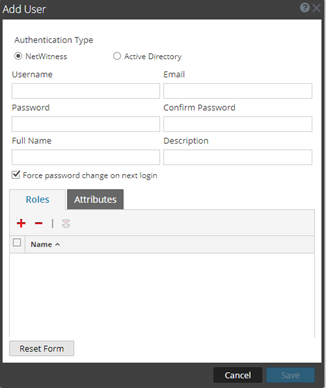
2. Create the new account with the following credentials.
Username =
Email =
Password =
Full Name =
3. Click the **Roles** tab, , and select the Data\_Privacy\_Officers role for the new user.
4. Select **Save**.
2. Create a new user account for the analyst with limited privileges:
1. In the ** (Admin) \> Security** view, click the **Users** tab. In the **Users** tab toolbar, click .
The Add User dialog is displayed.
2. Create the new account with the following credentials:
Username =
Email =
Password =
Full Name =
3. Click the **Roles** tab, , and select the Analysts role for the new user.
4. Select **Save**.
[](https://mydev.netwitness.com/?hsLang=en)
Copyright © 2026, NetWitness LLC. All rights reserved.
[NetWitness Platform](https://www.netwitness.com/)
[Acceptable Use Policy](https://www.netwitness.com/wp-content/uploads/Acceptable-Use-Policy-092022.pdf) [Privacy Statement](https://www.netwitness.com/wp-content/uploads/NetWitness-Privacy-Statement-07292024.pdf)

[](https://www.linkedin.com/company/netwitness-platform/) [](https://www.youtube.com/@netwitness)
© 2026 NetWitness LLC. All rights reserved.