---
title: Configure the Recommended Data Privacy Solution
description: "Configure the Recommended Data Privacy Solution\nThis topic tells administrators and data privacy officers how to configure the recommended data priva"
---
[Skip to content](https://mydev.netwitness.com/knowledge-base/configuretherecommendeddataprivacysolution#main-content)

- [Home](https://mydev.netwitness.com/home)
- Integrations
Show submenu for Integrations
- [Netwitness Platform Integrations](https://mydev.netwitness.com/netwitnessplatformintegrations)
- [Third Party Integrations](https://mydev.netwitness.com/thirdpartyintegrations)
- [Knowledge Center](https://mydev.netwitness.com/knowledge-base)
- Community
Show submenu for Community
- [Blogs](https://mydev.netwitness.com/netwitness-security-llc-blog)
- Discussions
- Customers
Show submenu for Customers
- [Manage Products and Licenses](https://mydev.netwitness.com/nwportal)
- Downloads
- Partners
Show submenu for Partners
- [Partner Program](https://mydev.netwitness.com/partner)
- [Partner Resources](https://mydev.netwitness.com/partnerresources)
- [Submit a New Deal Registration](https://mydev.netwitness.com/dealregistration)
- [Become a Partner](https://mydev.netwitness.com/becomeapartner)
- [Update Your Partner Locator Profile](https://www.netwitness.com/partner-locator/?utm_source=pardotnewsletter&utm_medium=email&utm_campaign=partner_march)
- [NetWitness LinkedIn Partner Hub](https://linkedin.com/showcase/netwitnesspartners/)
- Education
Show submenu for Education
- [Instructor Led Training Schedule](https://mydev.netwitness.com/instructorledtrainingschedule)
- [NetWitness Training Catalog](https://mydev.netwitness.com/netwitnesstrainingcatalog)
- [Security Awareness Training](https://mydev.netwitness.com/securityawarenesstraining)
- [New Product Readiness](https://mydev.netwitness.com/newproductreadiness)
- [On-Demand Virtual Labs](https://mydev.netwitness.com/ondemandvirtuallabs)
- [Additional Training Information](https://mydev.netwitness.com/additionaltraininginformation)
- [Frequently Asked Questions](https://mydev.netwitness.com/educationfaq)
- [Contact NetWitness Education Team](https://mydev.netwitness.com/contact-netwitness-education-team)
- Support
Show submenu for Support
- [Contact Support](https://mydev.netwitness.com/contact-support)
- [Create a New Case](https://mydev.netwitness.com/create-support-case)
- [View My Cases](https://mydev.netwitness.com/viewmycase)
- [Product Version Life Cycle](https://mydev.netwitness.com/product-version-life-cycle)
- [Warranty & Replacement Parts](https://mydev.netwitness.com/warranty-and-replacement-parts)
- [Community Support Forum](https://mydev.netwitness.com/community-support-forum)
- [Technical Support Guide](https://mydev.netwitness.com/technical-support-guide)
Open main navigation
Close main navigation
- [Home](https://mydev.netwitness.com/home)
- Integrations
Show submenu for Integrations
- [Netwitness Platform Integrations](https://mydev.netwitness.com/netwitnessplatformintegrations)
- [Third Party Integrations](https://mydev.netwitness.com/thirdpartyintegrations)
- [Knowledge Center](https://mydev.netwitness.com/knowledge-base)
- Community
Show submenu for Community
- [Blogs](https://mydev.netwitness.com/netwitness-security-llc-blog)
- Discussions
- Customers
Show submenu for Customers
- [Manage Products and Licenses](https://mydev.netwitness.com/nwportal)
- Downloads
- Partners
Show submenu for Partners
- [Partner Program](https://mydev.netwitness.com/partner)
- [Partner Resources](https://mydev.netwitness.com/partnerresources)
- [Submit a New Deal Registration](https://mydev.netwitness.com/dealregistration)
- [Become a Partner](https://mydev.netwitness.com/becomeapartner)
- [Update Your Partner Locator Profile](https://www.netwitness.com/partner-locator/?utm_source=pardotnewsletter&utm_medium=email&utm_campaign=partner_march)
- [NetWitness LinkedIn Partner Hub](https://linkedin.com/showcase/netwitnesspartners/)
- Education
Show submenu for Education
- [Instructor Led Training Schedule](https://mydev.netwitness.com/instructorledtrainingschedule)
- [NetWitness Training Catalog](https://mydev.netwitness.com/netwitnesstrainingcatalog)
- [Security Awareness Training](https://mydev.netwitness.com/securityawarenesstraining)
- [New Product Readiness](https://mydev.netwitness.com/newproductreadiness)
- [On-Demand Virtual Labs](https://mydev.netwitness.com/ondemandvirtuallabs)
- [Additional Training Information](https://mydev.netwitness.com/additionaltraininginformation)
- [Frequently Asked Questions](https://mydev.netwitness.com/educationfaq)
- [Contact NetWitness Education Team](https://mydev.netwitness.com/contact-netwitness-education-team)
- Support
Show submenu for Support
- [Contact Support](https://mydev.netwitness.com/contact-support)
- [Create a New Case](https://mydev.netwitness.com/create-support-case)
- [View My Cases](https://mydev.netwitness.com/viewmycase)
- [Product Version Life Cycle](https://mydev.netwitness.com/product-version-life-cycle)
- [Warranty & Replacement Parts](https://mydev.netwitness.com/warranty-and-replacement-parts)
- [Community Support Forum](https://mydev.netwitness.com/community-support-forum)
- [Technical Support Guide](https://mydev.netwitness.com/technical-support-guide)
How can we help you?
- There are no suggestions because the search field is empty.
1. [NetWitness Knowledge Base](https://mydev.netwitness.com/knowledge-base?hsLang=en)
2. [Documentation](https://mydev.netwitness.com/knowledge-base/documentation?hsLang=en)
April 28, 2026
# Configure the Recommended Data Privacy Solution
## Configure the Recommended Data Privacy Solution
This topic tells administrators and data privacy officers how to configure the recommended data privacy solution in a NetWitness network. These are the basic steps to follow to configure the NetWitness system to identify sensitive data and determine who can see the sensitive data. The recommended configuration generates obfuscated values of certain original meta keys and then persists both the original and obfuscated data so that it is available to users assigned privileged role access.
This configuration has several parts:
1. Create two users with different levels of permissions. One user (the data privacy officer) can view all metadata and another user (an analyst) is restricted from seeing certain metadata and content with associated metadata.
2. Set up two transforms using a salt and hash to create an obfuscated version of original `username` and `ip.src` meta keys.
3. Configure data retention on the Decoder and Concentrator services.
**Note:** The following conditions are required in order to complete this procedure:
-The Concentrator and Decoder must be added to the NetWitness Server using trusted connections.
-The NW Server version must be 11.x or later.
-The Core services must be 11.x or later.
-Aggregation must use Aggregators accounts on all Core services.
## Configure Metadata and Content Restrictions on Brokers, Concentrators, and Decoders
**Note:** In version 11.6, if these 12 metas namely 'sessionid','nwe.callback\_id', 'medium','session.split','ip.dst','ip.src','ipv6.src','ipv6.dst','tcp.dstport','tcp.srcport','udp.dstport', and 'udp.srcport' are restricted then the group events option will be disabled.
To restrict the metadata and raw content that users can view, you must enable SDK system roles to allow more granular controls by configuring metadata and content restrictions on each service in the Services Security view.
1. Go to ** (Admin)** \> **Services**, select a service and then select **\> View \> Security**.
2. Click the **Settings** tab.
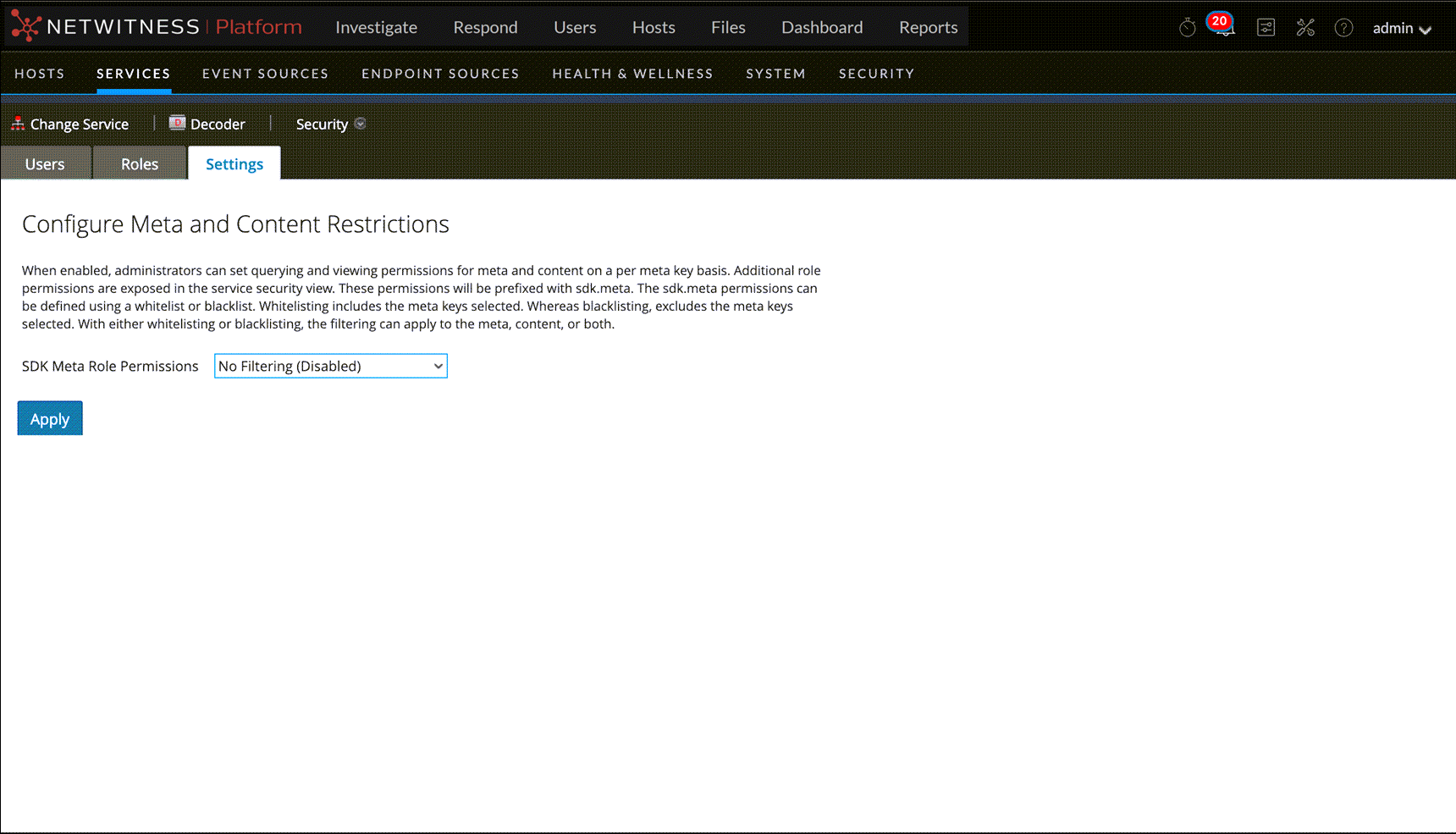
3. In the **SDK Meta Role Permissions** field, select **Blacklist meta and content**. Click **Apply**.
This allows the administrator to blacklist individual meta keys so that only the data privacy officer can see the meta keys and content. New roles per meta key are added to the Roles tab.
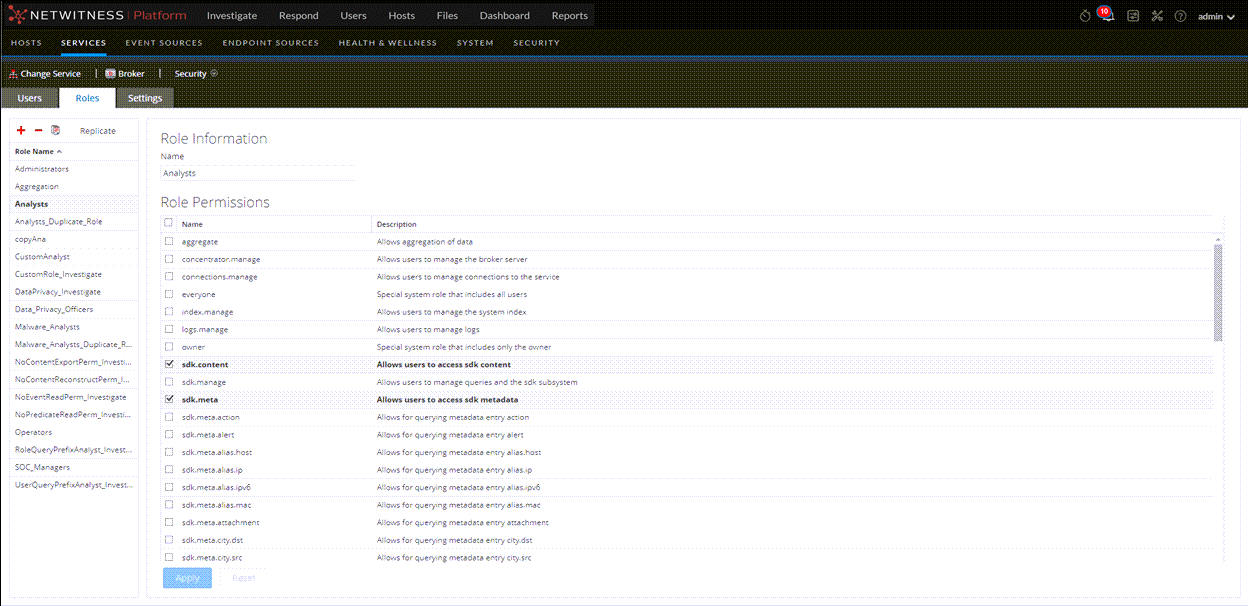
4. Click the **Roles** tab and select a role, for example **Analysts**.
5. In the **Roles** tab,
1. Select the meta keys that you do not want analysts to see, for example, select sdk.meta.username and sdk.meta.ip.src.
This restricts the analyst from seeing the privacy-sensitive meta keys username and ip.src as well as any content for any session that contains that metadata within it.
2. Ensure that sdk.packets is selected.
If it is de-selected, analysts lose the ability to bulk export raw packets and logs. In NetWitness Platform 11.0 and later, RBAC just works for packets. Sessions that are restricted are just skipped during pcap generation in Investigate. Sessions that are allowed have packets returned. For more information on RBAC, see the *System Security and User Management Guide*.
3. Click **Apply**.
6. In the Roles tab, ensure that the `Data_Privacy_Officers` role has no sdk.meta.values selected. Click **Apply**.
A DPO can view any metadata and any session.
In the Roles tab, ensure that the `Aggregation` role has the following permissions: select `aggregate`, `sdk.content`,`sdk.meta`, and `sdk.packets.`
## Add Data Privacy Officer and Analyst Accounts on the NetWitness Server
You must add two new user accounts in NetWitness at the system level to depict a privileged data privacy officer and a typical analyst. If the environment is configured using the default trusted connections, you do not need to create the new user accounts on the Core services (Brokers, Concentrators, and Decoders). When a user is created in the NetWitness Server, that user can log on to the services.
**Note:** The role name is required to exist on both the server and the services, and the role name for all must be identical. If you create a new custom role on the NetWitness Server, make sure to add it to all Core services as well.
1. Create a new user account for the data privacy officer:
1. Go to ** (Admin)** \> **Security**, select the **Users** tab. In the **Users** tab toolbar, click .
The Add User dialog is displayed.
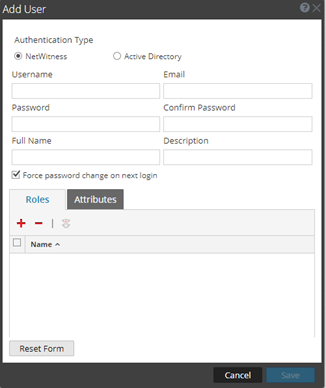
2. Create the new account with the following credentials.
Username =
Email =
Password =
Full Name =
3. Click the Roles tab, , and select the `Data_Privacy_Officers` role for the new user.
4. Select **Save**.
2. Create a new user account for the analyst with limited privileges:
1. In the **Services Security** view, select the **Users** tab. In the **Users** tab toolbar, click .
The Add User dialog is displayed.
2. Create the new account with the following credentials:
Username =
Email =
Password =
Full Name =
3. Click the Roles tab, , and select the `Analysts` role for the new user.
4. Select **Save**.
## Configure Obfuscated Data on Decoders and Concentrators
This procedure creates the obfuscated values to provide to users who do not have access to the original values.
1. Configure a salt so that the obfuscated value becomes unique. Different companies may have analysts of the same first name and potentially the same login username, and using a salt limits the possibility of someone outside your organization determining your obfuscation mechanism. In this example, you use a simple salt and SHA-256, but the salt is configurable and the hash algorithm can be changed. For additional information, see [Configure Data Obfuscation](https://50269063.hs-sites.com/knowledge-base/ConfigureDataObfuscation?hsLang=en).
1. To define the salt and hash algorithm, go to ** (Admin) \> Services**.
2. Select a Decoder in the **Admin Services** view and select  \> **View \> Config**.
3. Click the **Data Privacy** tab, and select hash algorithm (SHA-256). In the Salt field, type a hash, for example, **rsasecurity**, and click **Apply**.
2. Define the transforms, including the hash format, between the original meta key and obfuscated meta key on the Decoder. The default hash format is binary, but the recommended configuration calls for using the text/string format.
1. While still in the Services Config view, click the **Files** tab, and in the drop-down menu select **index-decoder-custom.xml.** (You can apply this same configuration to the Log Decoder in the index-logdecoder-custom.xml file.)
2. Enter the following lines in the available input area:
``
3. To restart the Decoder service, go to ** (Admin)** \> **Services**, find the Decoder service you want to restart, and select  \> **Restart**.
The service should automatically restart.
3. Define the meta keys on the Concentrator in the index-concentrator-custom.xml file:
1. Go to ** (Admin)** \> **Services**, select a Concentrator in the **Admin Services** view, and select  \> **View \> Config**.
2. Click the **Files** tab, and in the drop-down menu select **index-concentrator-custom.xml**
3. Enter the following lines in the available input area:
``
4. To restart the Concentrator service, go to ** (Admin)** \> **Services**, find the concentrator service you want to restart, and select  \> **Restart**.
The service should automatically restart.
## Configure Data Retention on Concentrators and Decoders
Data retention configuration ensures that the data residing in the NetWitness Core components is deleted after a certain time. Configuring data retention on Concentrators and Decoders is not required for all environments, but it may be necessary to be in compliance with applicable laws and regulations. It is important to evaluate an appropriate retention period for your environment. The Data Retention Scheduler settings that you set apply to ALL data on a Concentrator or Decoder.
In the following example, NetWitness is configured to execute a check every 15 minutes to determine if the duration threshold has been met. If the threshold is met, NetWitness deletes data older than 90 days in the relevant databases.
**Caution:** The 90 day retention period is just an example. Adjust your rollover criteria depending on the location of the data and the applicable laws. In a strict data privacy environment, such as in Europe where laws require that Personally Identifiable Information (PII) not be saved or removed frequently, you may need to adjust the time.
This procedure is optional. If you do not set a time retention limit, the system automatically deletes the oldest data when the hard drive space is full.
(Optional) For each Concentrator and Decoder:
1. Navigate to the **Services Config** view **\> Data Retention Scheduler** tab.
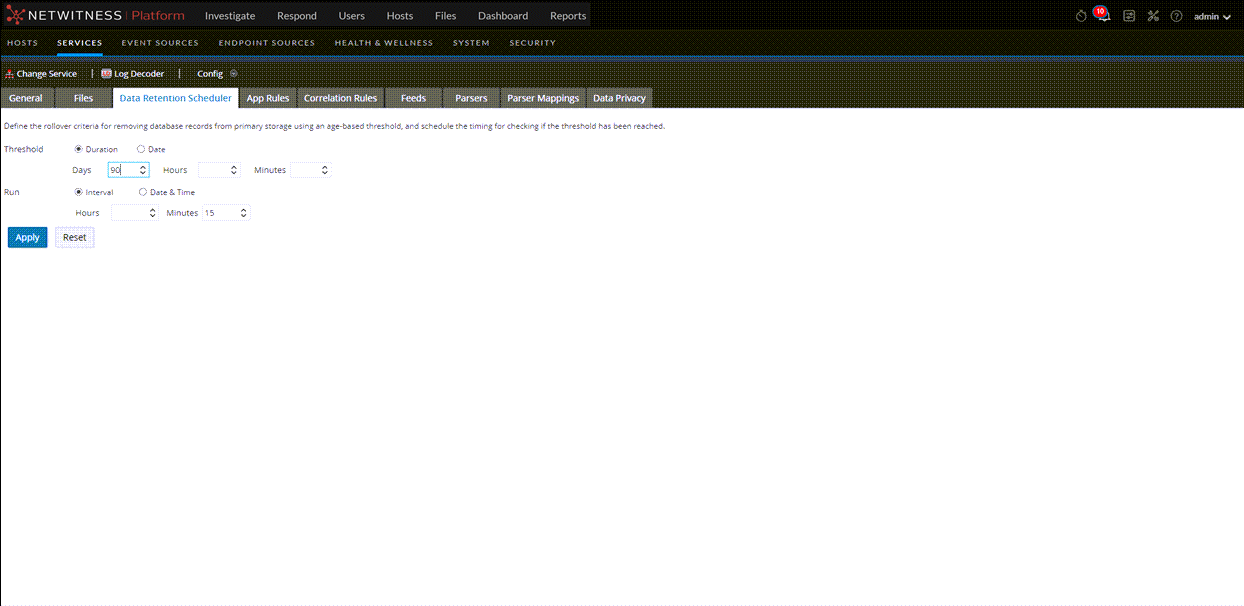
2. Define the data retention period. For example, set the **Threshold** to **Duration**, and type **90** in the **Days** field.
3. Define how often the scheduler checks to see if the threshold has been met. For example, set the runtime to **Interval** and select **15** in the **Minutes** field.
4. To save the configuration, click **Apply**.
## Validate Data Privacy Protection
At this point, users have been added with roles that have permissions around specific types of metadata. The next step is to make sure the restricted user (the analyst) cannot view what the unrestricted user (the DPO) can. Also you need to ensure that the data retention configuration is limiting how long data is kept on the systems.
1. View role-based obfuscation in action:
1. Log on as the unrestricted user (DPOadmin) and make sure this user can see all the data including the protected sensitive data `username` and `ip.src` along with any session that contains that metadata.
2. Log off and the back on as the DPO user.
3. For each Decoder and Log Decoder, import a PCAP or logfile into the Services System view. Go to ** (Admin)** \> Services, click a service, and use the **Upload Packet Capture File** option to upload a PCAP file that contains `username` and `ip.src` metadata.
4. When the import is complete, go to **Investigate \> Navigate**, select the Concentrator connected to the Decoder to which the data was just imported.
5. Scroll down to make sure the `username` and `ip.src` meta keys and corresponding values are visible.
6. Click one of the green numbers next to a `username` or `ip.src` value and verify that the session loads in the Events view.
7. Make a note of the session ID to check when logging on as the restricted user.
8. Log off and log on as the restricted user (NonprivAnalyst).
9. Repeat steps c through f to verify that the user cannot see any `username` or `ip.src` metadata or sessions with that metadata including the one previously mentioned.
10. To jump to a specific session in the **Navigate** view, in the **Actions** menu, select **Go to Event** and enter the session ID.
2. Validate that the data retained in the database falls within the retention time configured in the Data Retention Scheduler.
1. Log off and log on as the unrestricted user (DPOadmin).
2. On the Concentrator, navigate to the **Services \> Explore** view.
3. In the node tree, select the **database** node and then **stats**.
4. Observe the `meta.oldest.file.time` value and verify that this is not older then the threshold put on the data retention scheduler.
5. Change the service to the Decoder and repeat steps b through d, check for `stats meta.oldest.file.time` and `packet.oldest.file.time`.
[](https://mydev.netwitness.com/?hsLang=en)
Copyright © 2026, NetWitness LLC. All rights reserved.
[NetWitness Platform](https://www.netwitness.com/)
[Acceptable Use Policy](https://www.netwitness.com/wp-content/uploads/Acceptable-Use-Policy-092022.pdf) [Privacy Statement](https://www.netwitness.com/wp-content/uploads/NetWitness-Privacy-Statement-07292024.pdf)

[](https://www.linkedin.com/company/netwitness-platform/) [](https://www.youtube.com/@netwitness)
© 2026 NetWitness LLC. All rights reserved.