---
title: Configure the Option to Send Incidents to RSA Archer
description: "Configure the Option to Send Incidents to ArcherConfigure the Option to Send Incidents to Archer\nNote: The information in this topic applies to NetWi"
---
[Skip to content](https://mydev.netwitness.com/knowledge-base/configuretheoptiontosendincidentstorsaarcher#main-content)

- [Home](https://mydev.netwitness.com/home)
- Integrations
Show submenu for Integrations
- [Netwitness Platform Integrations](https://mydev.netwitness.com/netwitnessplatformintegrations)
- [Third Party Integrations](https://mydev.netwitness.com/thirdpartyintegrations)
- [Knowledge Center](https://mydev.netwitness.com/knowledge-base)
- Community
Show submenu for Community
- [Blogs](https://mydev.netwitness.com/netwitness-security-llc-blog)
- Discussions
- Customers
Show submenu for Customers
- [Manage Products and Licenses](https://mydev.netwitness.com/nwportal)
- Downloads
- Partners
Show submenu for Partners
- [Partner Program](https://mydev.netwitness.com/partner)
- [Partner Resources](https://mydev.netwitness.com/partnerresources)
- [Submit a New Deal Registration](https://mydev.netwitness.com/dealregistration)
- [Become a Partner](https://mydev.netwitness.com/becomeapartner)
- [Update Your Partner Locator Profile](https://www.netwitness.com/partner-locator/?utm_source=pardotnewsletter&utm_medium=email&utm_campaign=partner_march)
- [NetWitness LinkedIn Partner Hub](https://linkedin.com/showcase/netwitnesspartners/)
- Education
Show submenu for Education
- [Instructor Led Training Schedule](https://mydev.netwitness.com/instructorledtrainingschedule)
- [NetWitness Training Catalog](https://mydev.netwitness.com/netwitnesstrainingcatalog)
- [Security Awareness Training](https://mydev.netwitness.com/securityawarenesstraining)
- [New Product Readiness](https://mydev.netwitness.com/newproductreadiness)
- [On-Demand Virtual Labs](https://mydev.netwitness.com/ondemandvirtuallabs)
- [Additional Training Information](https://mydev.netwitness.com/additionaltraininginformation)
- [Frequently Asked Questions](https://mydev.netwitness.com/educationfaq)
- [Contact NetWitness Education Team](https://mydev.netwitness.com/contact-netwitness-education-team)
- Support
Show submenu for Support
- [Contact Support](https://mydev.netwitness.com/contact-support)
- [Create a New Case](https://mydev.netwitness.com/create-support-case)
- [View My Cases](https://mydev.netwitness.com/viewmycase)
- [Product Version Life Cycle](https://mydev.netwitness.com/product-version-life-cycle)
- [Warranty & Replacement Parts](https://mydev.netwitness.com/warranty-and-replacement-parts)
- [Community Support Forum](https://mydev.netwitness.com/community-support-forum)
- [Technical Support Guide](https://mydev.netwitness.com/technical-support-guide)
Open main navigation
Close main navigation
- [Home](https://mydev.netwitness.com/home)
- Integrations
Show submenu for Integrations
- [Netwitness Platform Integrations](https://mydev.netwitness.com/netwitnessplatformintegrations)
- [Third Party Integrations](https://mydev.netwitness.com/thirdpartyintegrations)
- [Knowledge Center](https://mydev.netwitness.com/knowledge-base)
- Community
Show submenu for Community
- [Blogs](https://mydev.netwitness.com/netwitness-security-llc-blog)
- Discussions
- Customers
Show submenu for Customers
- [Manage Products and Licenses](https://mydev.netwitness.com/nwportal)
- Downloads
- Partners
Show submenu for Partners
- [Partner Program](https://mydev.netwitness.com/partner)
- [Partner Resources](https://mydev.netwitness.com/partnerresources)
- [Submit a New Deal Registration](https://mydev.netwitness.com/dealregistration)
- [Become a Partner](https://mydev.netwitness.com/becomeapartner)
- [Update Your Partner Locator Profile](https://www.netwitness.com/partner-locator/?utm_source=pardotnewsletter&utm_medium=email&utm_campaign=partner_march)
- [NetWitness LinkedIn Partner Hub](https://linkedin.com/showcase/netwitnesspartners/)
- Education
Show submenu for Education
- [Instructor Led Training Schedule](https://mydev.netwitness.com/instructorledtrainingschedule)
- [NetWitness Training Catalog](https://mydev.netwitness.com/netwitnesstrainingcatalog)
- [Security Awareness Training](https://mydev.netwitness.com/securityawarenesstraining)
- [New Product Readiness](https://mydev.netwitness.com/newproductreadiness)
- [On-Demand Virtual Labs](https://mydev.netwitness.com/ondemandvirtuallabs)
- [Additional Training Information](https://mydev.netwitness.com/additionaltraininginformation)
- [Frequently Asked Questions](https://mydev.netwitness.com/educationfaq)
- [Contact NetWitness Education Team](https://mydev.netwitness.com/contact-netwitness-education-team)
- Support
Show submenu for Support
- [Contact Support](https://mydev.netwitness.com/contact-support)
- [Create a New Case](https://mydev.netwitness.com/create-support-case)
- [View My Cases](https://mydev.netwitness.com/viewmycase)
- [Product Version Life Cycle](https://mydev.netwitness.com/product-version-life-cycle)
- [Warranty & Replacement Parts](https://mydev.netwitness.com/warranty-and-replacement-parts)
- [Community Support Forum](https://mydev.netwitness.com/community-support-forum)
- [Technical Support Guide](https://mydev.netwitness.com/technical-support-guide)
How can we help you?
- There are no suggestions because the search field is empty.
1. [NetWitness Knowledge Base](https://mydev.netwitness.com/knowledge-base?hsLang=en)
2. [Documentation](https://mydev.netwitness.com/knowledge-base/documentation?hsLang=en)
April 26, 2026
# Configure the Option to Send Incidents to RSA Archer
## Configure the Option to Send Incidents to ArcherConfigure the Option to Send Incidents to Archer
**Note:** The information in this topic applies to NetWitness Version 11.2 and later.
If you want to manage incidents in NetWitness Respond, you have the option to configure the NetWitness so that you can send incidents to Archer Cyber Incident & Breach Response. If Archer is configured as a data source in Context Hub, you can send incidents to Archer Cyber Incident & Breach Response and you will be able to see a Send to Archer option and a Sent to Archer status in NetWitness Respond. For information on how to use the Send to Archer option and Sent to Archer status, see the *NetWitness Respond User Guide*. Go to the [NetWitness All Versions Documents](https://community.netwitness.com/t5/netwitness-platform-online/netwitness-platform-all-documents/ta-p/676246) page and find NetWitness Platform guides to troubleshoot issues.
## PrerequisitesPrerequisites
- Archer release 6.6 P4, 6.6 P5, or 6.7 P2 only is required for NetWitness 11.4 and 11.5.
- Archer release 6.4 or later is required for NetWitness 11.2 and 11.3.
## Add Archer as a Data Source for Context HubAdd Archer as a Data Source for Context Hub
To configure sending incidents to Archer Cyber Incident & Breach Response from NetWitness Respond, Archer must be configured as a data source for Context Hub. For more detailed instructions for configuring the Archer data source, see the "Configure Archer as Data Source" topic in the *Context Hub Configuration Guide*. Go to the [NetWitness All Versions Documents](https://community.netwitness.com/t5/netwitness-platform-online/netwitness-platform-all-documents/ta-p/676246) page and find NetWitness Platform guides to troubleshoot issues.
1. Go to ** (Admin) \> Services**.
The Services view is displayed.
2. Select the Context Hub service, and then select  **\> View \> Config**.
The Services Config view is displayed.
3. On the **Data Sources** tab, click  **\> Archer**.
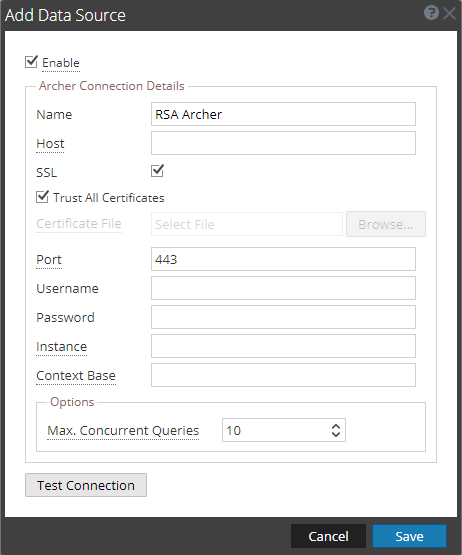
The **Add Data Source** dialog is displayed.
4. Provide the following information:
- By default, the **Enable** checkbox is selected. If this option is unchecked, the save button is disabled, you cannot add the data source, and cannot view the contextual information.
- Enter the following fields:
- **Name**: Enter a name for Archer data source.
- **Host**: Enter the hostname or IP address where Archer server is installed.
- **SSL**: By default this option is selected and enables SSL communication to Archer .
- **Trust All Certificates**: Select this checkbox to add the data source without validating the certificate. If you uncheck this option, you need to upload a valid Endpoint server certificate for the connection to be successful.
- **Port**: The default port is 443.
- **Username**: Enter the Archer Server username.
- **Password**: Enter the Archer Server password.
- **Instance**: Enter the Instance name from which you want to extract data. An Archer instance is a single setup that includes unique content in a database, the connection to the database, the interface, and login. You might have individual instances for each office location or region or for development, test, and production environments. The Instance Database stores the Archer content for a specific instance.
- **Context Base**: Enter the virtual directory name where the files are stored. For example, rsaarcher located at the Archer web address [https://archer.company.com/](https://archer.company.com/)**rsaarche**r/default.aspx. If the files are stored in the IIS default web address [https://archer.company.com/default.aspx](https://archer.company.com/default.aspx), then this field must be empty.
- **Max. Concurrent Queries**: You can configure the maximum number of concurrent queries defined by the Context Hub service to be run against the configured data sources. The default value is 10.
5. Click **Test Connection** to test the connection between Context Hub and the Archer data source.
6. Click **Save**.
Archer is added as a data source for Context Hub and is displayed in the **Data Sources** tab. A Send to Archer button and Sent to Archer status is visible in NetWitness Respond.
[](https://mydev.netwitness.com/?hsLang=en)
Copyright © 2026, NetWitness LLC. All rights reserved.
[NetWitness Platform](https://www.netwitness.com/)
[Acceptable Use Policy](https://www.netwitness.com/wp-content/uploads/Acceptable-Use-Policy-092022.pdf) [Privacy Statement](https://www.netwitness.com/wp-content/uploads/NetWitness-Privacy-Statement-07292024.pdf)

[](https://www.linkedin.com/company/netwitness-platform/) [](https://www.youtube.com/@netwitness)
© 2026 NetWitness LLC. All rights reserved.