---
title: Configure ODBC Event Sources
description: "Configure ODBC Event Sources in NetWitness\nThis topic tells you how to configure ODBC collection protocol which collects events from event sources th"
---
[Skip to content](https://mydev.netwitness.com/knowledge-base/configureodbceventsources#main-content)

- [Home](https://mydev.netwitness.com/home)
- Integrations
Show submenu for Integrations
- [Netwitness Platform Integrations](https://mydev.netwitness.com/netwitnessplatformintegrations)
- [Third Party Integrations](https://mydev.netwitness.com/thirdpartyintegrations)
- [Knowledge Center](https://mydev.netwitness.com/knowledge-base)
- Community
Show submenu for Community
- [Blogs](https://mydev.netwitness.com/netwitness-security-llc-blog)
- Discussions
- Customers
Show submenu for Customers
- [Manage Products and Licenses](https://mydev.netwitness.com/nwportal)
- Downloads
- Partners
Show submenu for Partners
- [Partner Program](https://mydev.netwitness.com/partner)
- [Partner Resources](https://mydev.netwitness.com/partnerresources)
- [Submit a New Deal Registration](https://mydev.netwitness.com/dealregistration)
- [Become a Partner](https://mydev.netwitness.com/becomeapartner)
- [Update Your Partner Locator Profile](https://www.netwitness.com/partner-locator/?utm_source=pardotnewsletter&utm_medium=email&utm_campaign=partner_march)
- [NetWitness LinkedIn Partner Hub](https://linkedin.com/showcase/netwitnesspartners/)
- Education
Show submenu for Education
- [Instructor Led Training Schedule](https://mydev.netwitness.com/instructorledtrainingschedule)
- [NetWitness Training Catalog](https://mydev.netwitness.com/netwitnesstrainingcatalog)
- [Security Awareness Training](https://mydev.netwitness.com/securityawarenesstraining)
- [New Product Readiness](https://mydev.netwitness.com/newproductreadiness)
- [On-Demand Virtual Labs](https://mydev.netwitness.com/ondemandvirtuallabs)
- [Additional Training Information](https://mydev.netwitness.com/additionaltraininginformation)
- [Frequently Asked Questions](https://mydev.netwitness.com/educationfaq)
- [Contact NetWitness Education Team](https://mydev.netwitness.com/contact-netwitness-education-team)
- Support
Show submenu for Support
- [Contact Support](https://mydev.netwitness.com/contact-support)
- [Create a New Case](https://mydev.netwitness.com/create-support-case)
- [View My Cases](https://mydev.netwitness.com/viewmycase)
- [Product Version Life Cycle](https://mydev.netwitness.com/product-version-life-cycle)
- [Warranty & Replacement Parts](https://mydev.netwitness.com/warranty-and-replacement-parts)
- [Community Support Forum](https://mydev.netwitness.com/community-support-forum)
- [Technical Support Guide](https://mydev.netwitness.com/technical-support-guide)
Open main navigation
Close main navigation
- [Home](https://mydev.netwitness.com/home)
- Integrations
Show submenu for Integrations
- [Netwitness Platform Integrations](https://mydev.netwitness.com/netwitnessplatformintegrations)
- [Third Party Integrations](https://mydev.netwitness.com/thirdpartyintegrations)
- [Knowledge Center](https://mydev.netwitness.com/knowledge-base)
- Community
Show submenu for Community
- [Blogs](https://mydev.netwitness.com/netwitness-security-llc-blog)
- Discussions
- Customers
Show submenu for Customers
- [Manage Products and Licenses](https://mydev.netwitness.com/nwportal)
- Downloads
- Partners
Show submenu for Partners
- [Partner Program](https://mydev.netwitness.com/partner)
- [Partner Resources](https://mydev.netwitness.com/partnerresources)
- [Submit a New Deal Registration](https://mydev.netwitness.com/dealregistration)
- [Become a Partner](https://mydev.netwitness.com/becomeapartner)
- [Update Your Partner Locator Profile](https://www.netwitness.com/partner-locator/?utm_source=pardotnewsletter&utm_medium=email&utm_campaign=partner_march)
- [NetWitness LinkedIn Partner Hub](https://linkedin.com/showcase/netwitnesspartners/)
- Education
Show submenu for Education
- [Instructor Led Training Schedule](https://mydev.netwitness.com/instructorledtrainingschedule)
- [NetWitness Training Catalog](https://mydev.netwitness.com/netwitnesstrainingcatalog)
- [Security Awareness Training](https://mydev.netwitness.com/securityawarenesstraining)
- [New Product Readiness](https://mydev.netwitness.com/newproductreadiness)
- [On-Demand Virtual Labs](https://mydev.netwitness.com/ondemandvirtuallabs)
- [Additional Training Information](https://mydev.netwitness.com/additionaltraininginformation)
- [Frequently Asked Questions](https://mydev.netwitness.com/educationfaq)
- [Contact NetWitness Education Team](https://mydev.netwitness.com/contact-netwitness-education-team)
- Support
Show submenu for Support
- [Contact Support](https://mydev.netwitness.com/contact-support)
- [Create a New Case](https://mydev.netwitness.com/create-support-case)
- [View My Cases](https://mydev.netwitness.com/viewmycase)
- [Product Version Life Cycle](https://mydev.netwitness.com/product-version-life-cycle)
- [Warranty & Replacement Parts](https://mydev.netwitness.com/warranty-and-replacement-parts)
- [Community Support Forum](https://mydev.netwitness.com/community-support-forum)
- [Technical Support Guide](https://mydev.netwitness.com/technical-support-guide)
How can we help you?
- There are no suggestions because the search field is empty.
1. [NetWitness Knowledge Base](https://mydev.netwitness.com/knowledge-base?hsLang=en)
2. [Documentation](https://mydev.netwitness.com/knowledge-base/documentation?hsLang=en)
April 28, 2026
# Configure ODBC Event Sources
## Configure ODBC Event Sources in NetWitness
This topic tells you how to configure ODBC collection protocol which collects events from event sources that store audit data in a database using the Open Database Connectivity (ODBC) software interface.
## Deployment Scenario
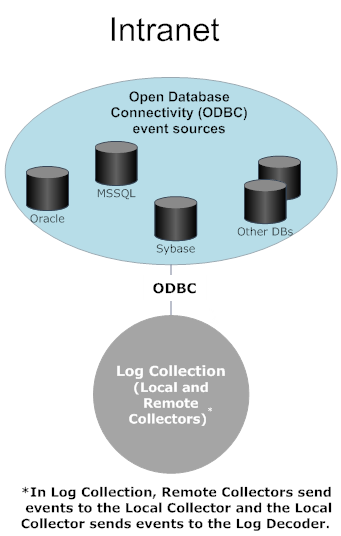
The following figure illustrates how you deploy the ODBC Collection Protocol in NetWitness.
## Configure an ODBC Event Source
To configure an ODBC event source, you need to configure an event source type, and also choose a DSN template.
### Configure a DSN
The following procedure describes how to add a DSN from an existing DSN template. For other procedures related to DSNs, see [Configure Data Source Names (DSNs)](https://50269063.hs-sites.com/knowledge-base/ConfigureDSNs?hsLang=en).
Configure a DSN (Data Source Name):
1. Go to ** (Admin) \> Services**.
2. In the **Services** grid, select a **Log Collector** service.
3. Click  under **Actions** and select **View** \> **Config**.
4. In the Log Collector **Event Sources** tab, select **ODBC/DSNs** from the drop-down menu.
5. The DSNs panel is displayed with the existing DSNs, if any.
6. Click  to open the **Add DSN** dialog.
7. Choose a DSN Template from the drop down menu and enter a name for the DSN. (You use the name when you set up the ODBC event source type.) If required, click  to add or delete DSN templates.
8. Fill in the parameters and click **Save**.
### Add an Event Source Type
For details on parameters used in the following procedure, see [ODBC Event Source Configuration Parameters](https://50269063.hs-sites.com/knowledge-base/ODBCParameters?hsLang=en).
To configure an ODBC Event Source Type:
1. Go to ** (Admin) \> Services**.
2. Select a Log Collection service.
3. Under Actions, select  **\> View \> Config** to display the Log Collection configuration parameter tabs.
4. Click the **Event Sources** tab.
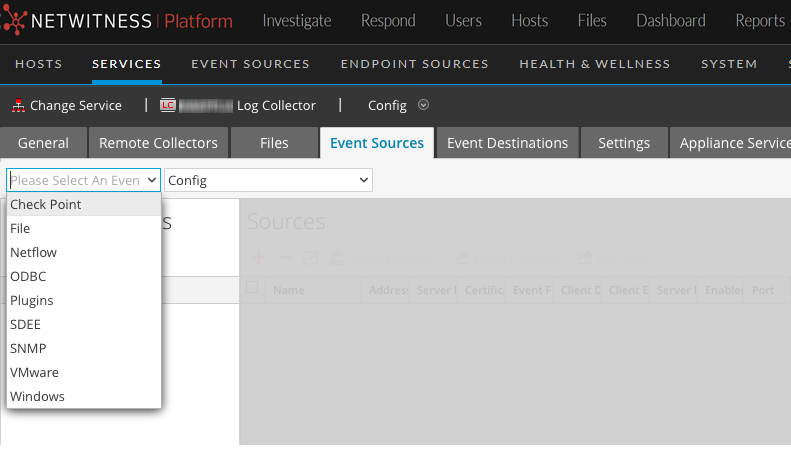
1. In the **Event Sources** tab, select **ODBC/Config** from the drop-down menu.
2. In the **Event Categories** panel toolbar, click .
The **Available Event Source Types** dialog is displayed.
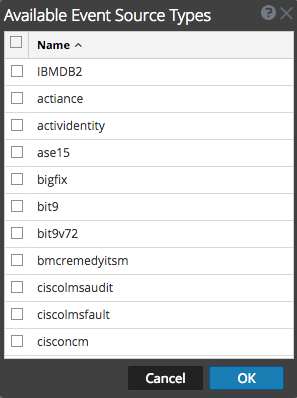
3. Select an event source category (for example **mssql** and click **OK**.
The newly added event source type is displayed in the **Event Categories** panel.
4. Select the new type in the **Event Categories** panel and click  in the **Sources** toolbar.
The **Add Source** dialog is displayed.
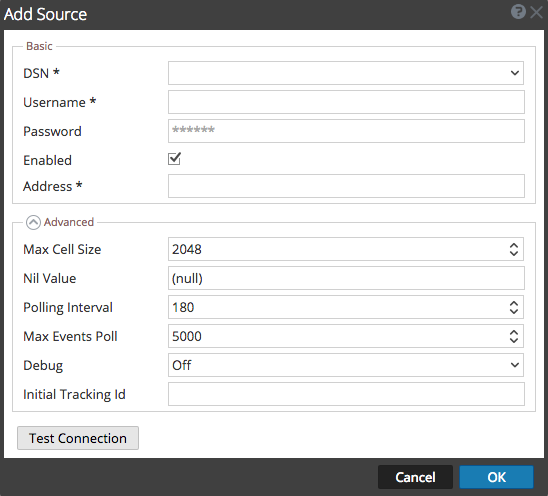
5. Select a DSN from the drop down list, specify or modify the other parameters as required, and click **OK**.
6. Click **Test Connection**.
The result of the test is displayed in the dialog box. If the test is unsuccessful, edit the DSN information and retry.
**Note:** Log Collector takes approximately 60 seconds to return the test results. If it exceeds the time limit, the test times out and the NetWitness server displays an error message.
7. If the test is successful, click **OK**.
The newly defined DSN is displayed in the **Sources** panel.
[](https://mydev.netwitness.com/?hsLang=en)
Copyright © 2026, NetWitness LLC. All rights reserved.
[NetWitness Platform](https://www.netwitness.com/)
[Acceptable Use Policy](https://www.netwitness.com/wp-content/uploads/Acceptable-Use-Policy-092022.pdf) [Privacy Statement](https://www.netwitness.com/wp-content/uploads/NetWitness-Privacy-Statement-07292024.pdf)

[](https://www.linkedin.com/company/netwitness-platform/) [](https://www.youtube.com/@netwitness)
© 2026 NetWitness LLC. All rights reserved.