---
title: Configure Live Services Settings
description: "Configure Live Services Settings\nOptions for configuring Live Services are in the System view > Live Services Configuration panel. The Live Config"
---
[Skip to content](https://mydev.netwitness.com/knowledge-base/configureliveservicessettings#main-content)

- [Home](https://mydev.netwitness.com/home)
- Integrations
Show submenu for Integrations
- [Netwitness Platform Integrations](https://mydev.netwitness.com/netwitnessplatformintegrations)
- [Third Party Integrations](https://mydev.netwitness.com/thirdpartyintegrations)
- [Knowledge Center](https://mydev.netwitness.com/knowledge-base)
- Community
Show submenu for Community
- [Blogs](https://mydev.netwitness.com/netwitness-security-llc-blog)
- Discussions
- Customers
Show submenu for Customers
- [Manage Products and Licenses](https://mydev.netwitness.com/nwportal)
- Downloads
- Partners
Show submenu for Partners
- [Partner Program](https://mydev.netwitness.com/partner)
- [Partner Resources](https://mydev.netwitness.com/partnerresources)
- [Submit a New Deal Registration](https://mydev.netwitness.com/dealregistration)
- [Become a Partner](https://mydev.netwitness.com/becomeapartner)
- [Update Your Partner Locator Profile](https://www.netwitness.com/partner-locator/?utm_source=pardotnewsletter&utm_medium=email&utm_campaign=partner_march)
- [NetWitness LinkedIn Partner Hub](https://linkedin.com/showcase/netwitnesspartners/)
- Education
Show submenu for Education
- [Instructor Led Training Schedule](https://mydev.netwitness.com/instructorledtrainingschedule)
- [NetWitness Training Catalog](https://mydev.netwitness.com/netwitnesstrainingcatalog)
- [Security Awareness Training](https://mydev.netwitness.com/securityawarenesstraining)
- [New Product Readiness](https://mydev.netwitness.com/newproductreadiness)
- [On-Demand Virtual Labs](https://mydev.netwitness.com/ondemandvirtuallabs)
- [Additional Training Information](https://mydev.netwitness.com/additionaltraininginformation)
- [Frequently Asked Questions](https://mydev.netwitness.com/educationfaq)
- [Contact NetWitness Education Team](https://mydev.netwitness.com/contact-netwitness-education-team)
- Support
Show submenu for Support
- [Contact Support](https://mydev.netwitness.com/contact-support)
- [Create a New Case](https://mydev.netwitness.com/create-support-case)
- [View My Cases](https://mydev.netwitness.com/viewmycase)
- [Product Version Life Cycle](https://mydev.netwitness.com/product-version-life-cycle)
- [Warranty & Replacement Parts](https://mydev.netwitness.com/warranty-and-replacement-parts)
- [Community Support Forum](https://mydev.netwitness.com/community-support-forum)
- [Technical Support Guide](https://mydev.netwitness.com/technical-support-guide)
Open main navigation
Close main navigation
- [Home](https://mydev.netwitness.com/home)
- Integrations
Show submenu for Integrations
- [Netwitness Platform Integrations](https://mydev.netwitness.com/netwitnessplatformintegrations)
- [Third Party Integrations](https://mydev.netwitness.com/thirdpartyintegrations)
- [Knowledge Center](https://mydev.netwitness.com/knowledge-base)
- Community
Show submenu for Community
- [Blogs](https://mydev.netwitness.com/netwitness-security-llc-blog)
- Discussions
- Customers
Show submenu for Customers
- [Manage Products and Licenses](https://mydev.netwitness.com/nwportal)
- Downloads
- Partners
Show submenu for Partners
- [Partner Program](https://mydev.netwitness.com/partner)
- [Partner Resources](https://mydev.netwitness.com/partnerresources)
- [Submit a New Deal Registration](https://mydev.netwitness.com/dealregistration)
- [Become a Partner](https://mydev.netwitness.com/becomeapartner)
- [Update Your Partner Locator Profile](https://www.netwitness.com/partner-locator/?utm_source=pardotnewsletter&utm_medium=email&utm_campaign=partner_march)
- [NetWitness LinkedIn Partner Hub](https://linkedin.com/showcase/netwitnesspartners/)
- Education
Show submenu for Education
- [Instructor Led Training Schedule](https://mydev.netwitness.com/instructorledtrainingschedule)
- [NetWitness Training Catalog](https://mydev.netwitness.com/netwitnesstrainingcatalog)
- [Security Awareness Training](https://mydev.netwitness.com/securityawarenesstraining)
- [New Product Readiness](https://mydev.netwitness.com/newproductreadiness)
- [On-Demand Virtual Labs](https://mydev.netwitness.com/ondemandvirtuallabs)
- [Additional Training Information](https://mydev.netwitness.com/additionaltraininginformation)
- [Frequently Asked Questions](https://mydev.netwitness.com/educationfaq)
- [Contact NetWitness Education Team](https://mydev.netwitness.com/contact-netwitness-education-team)
- Support
Show submenu for Support
- [Contact Support](https://mydev.netwitness.com/contact-support)
- [Create a New Case](https://mydev.netwitness.com/create-support-case)
- [View My Cases](https://mydev.netwitness.com/viewmycase)
- [Product Version Life Cycle](https://mydev.netwitness.com/product-version-life-cycle)
- [Warranty & Replacement Parts](https://mydev.netwitness.com/warranty-and-replacement-parts)
- [Community Support Forum](https://mydev.netwitness.com/community-support-forum)
- [Technical Support Guide](https://mydev.netwitness.com/technical-support-guide)
How can we help you?
- There are no suggestions because the search field is empty.
1. [NetWitness Knowledge Base](https://mydev.netwitness.com/knowledge-base?hsLang=en)
2. [Documentation](https://mydev.netwitness.com/knowledge-base/documentation?hsLang=en)
April 28, 2026
# Configure Live Services Settings
## Configure Live Services Settings
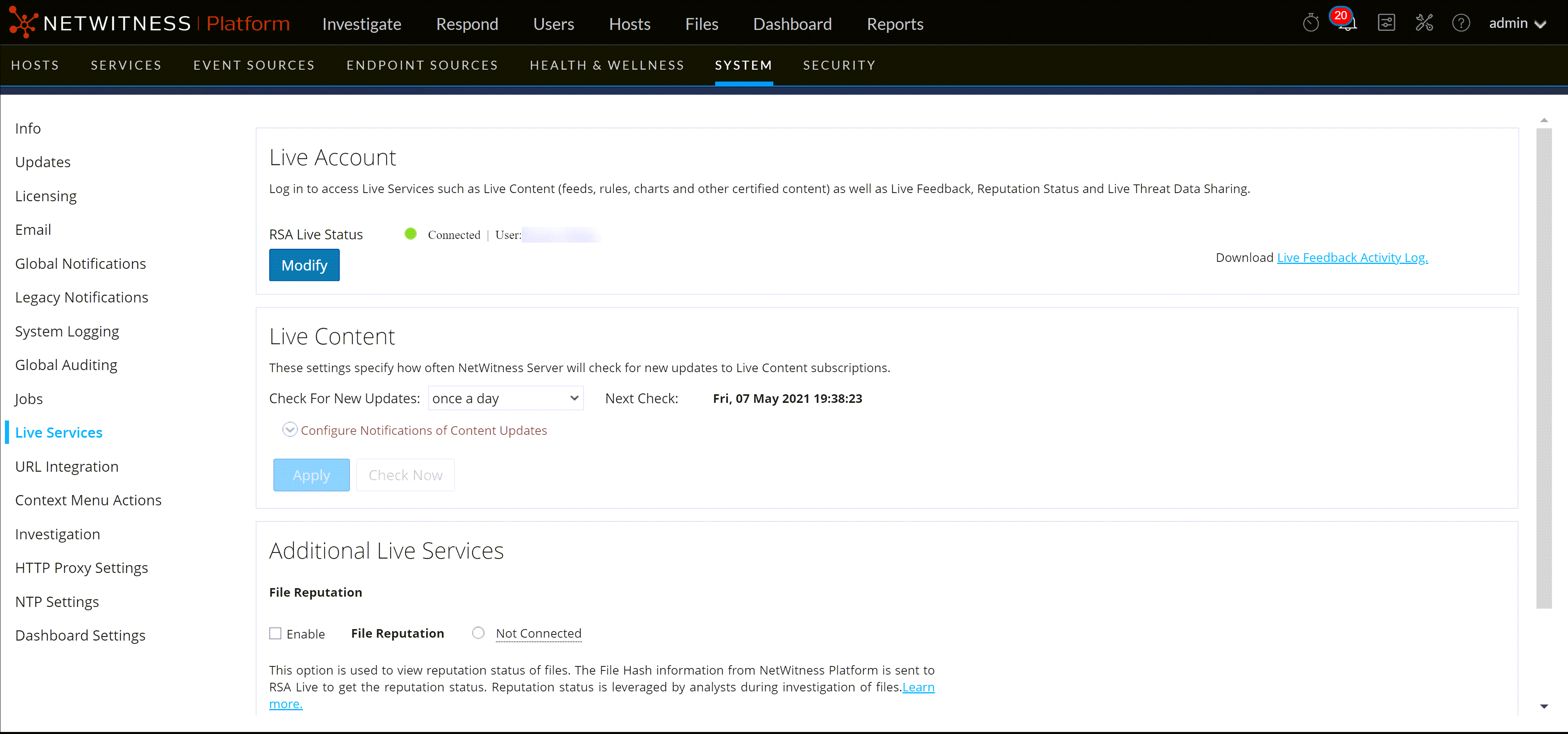
Options for configuring Live Services are in the System view \> Live Services Configuration panel. The Live Configuration panel allows you to configure:
- The Live account.
- The Live Content update schedule and preferences for notification of updates.
- Participation in Live Services Feedback.
- Sharing Live Content Usage
- RSA Live Connect.
**Note:** If you are logged into an Analyst UI, you can only view but cannot enable, disable, edit, or configure NetWitness Live.
## Prerequisites
To activate your Live account for NetWitness, please contact NetWitness Customer Support. When you have a confirmation that your Live account has been set up, you can configure and test the CMS server connection.
For information on Analyst Behaviors and Data Sharing, see "NetWitness Feedback and Data Sharing" topic in the *Live Services Management Guide*.
## About Live Feedback Participation
Once you sign up for a Live account, Live Feedback automatically collects relevant information for further improvement and anonymously sends it to RSA. The shared data is protected in accordance with the applicable license agreement. For information on Live Feedback, see [Live Feedback Overview](https://50269063.hs-sites.com/knowledge-base/LiveFeedbackOverview?hsLang=en). For information, see Configure Live Services Settings
If needed, you can manually download historical usage data and share it with RSA. For information on how to download historical usage data and share it with RSA, see [Upload Data to RSA for Live Feedback](https://50269063.hs-sites.com/knowledge-base/UploadDatatoRSA?hsLang=en).
This topic contains the following procedures:
- [Access the Live Services Configuration Panel](https://mydev.netwitness.com/knowledge-base/configureliveservicessettings#Access)
- [Configure Live Account](https://mydev.netwitness.com/knowledge-base/configureliveservicessettings#Configure)
- [Configure the Live Content Synchronization Interval and Notification](https://mydev.netwitness.com/knowledge-base/configureliveservicessettings#Configure_the_Live_)
- [Force Immediate Synchronization](https://mydev.netwitness.com/knowledge-base/configureliveservicessettings#Force)
### Access the Live Services Configuration PanelAccess the Live Services Configuration Panel
1. Go to ** (Admin)** \> **System**.
2. In the options panel, select **Live Services**.
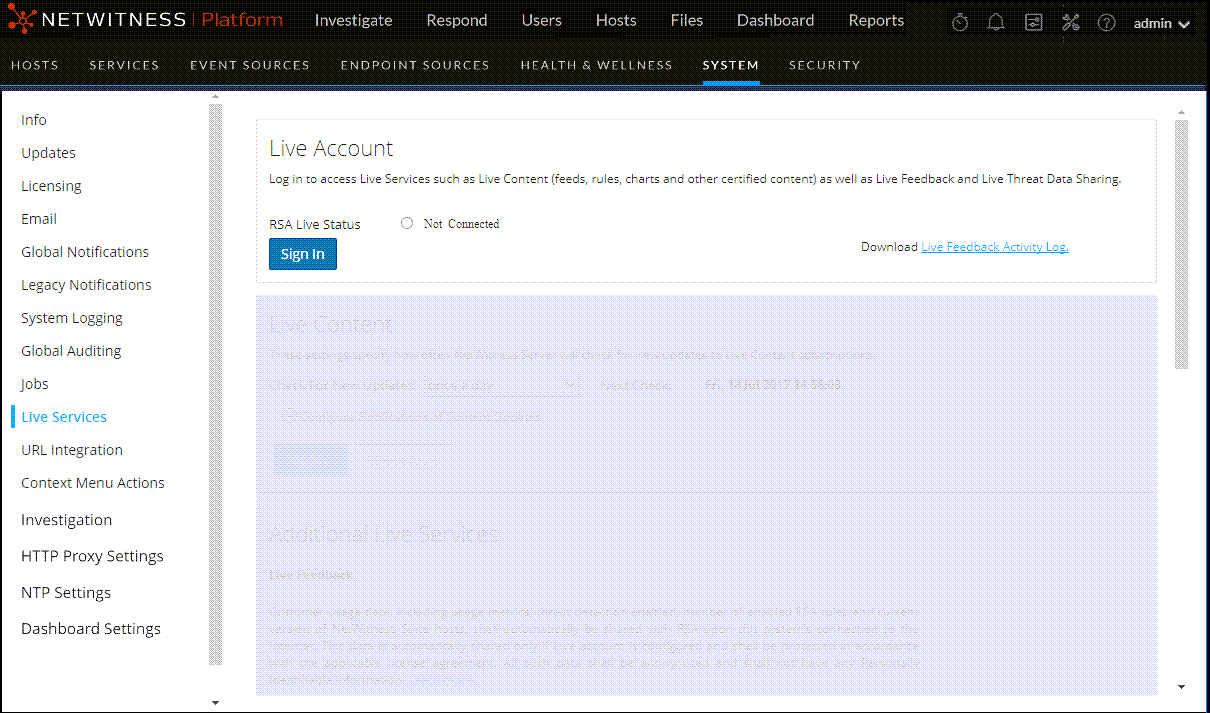
**Note:** If you are not signed in with your Live Account credentials, a masked screen is displayed.
### Configure Live AccountConfigure Live Account
In the **Live Account** section, you must set up the user's Live account. The information needed to set up the user’s Live account consists of the Username, Password, and Live URL for the Content Management System. This information is provided by Customer Care.
To configure a Live account:
1. In the **Live Account** section, click **Sign In**.
**Note:** The **Modify** button shows that the live account is configured. Click **Modify** to change the user that is accessing Live Services.
2. In the Live Services Account dialog box, enter the Host (typically **cms.netwitness.com**) and type your username and password.
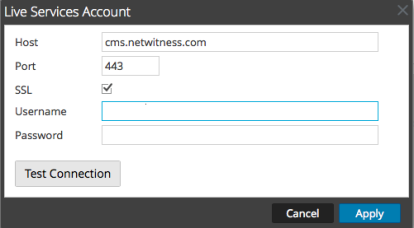
3. (Optional) If you are using a different CMS, type the host URL for the Content Management System. The default points to the CMS at **cms.netwitness.com**.
4. (Optional) If you are using a different CMS, type the communications port for Live to send requests to the Content Management System. The default for this field is **443**, which is the communications port on the Content Management System.
5. (Optional) If you do not want to use SSL, uncheck the **SSL** option. (SSL is enabled by default.)
6. Click **Test connection** to test the connection to CMS.
7. To save and apply the configuration, click **Apply**.
### Configure the Live Content Synchronization Interval and NotificationConfigure the Live Content Synchronization Interval and Notification
You can change the interval at which NetWitness checks for new updates to Live Content:
1. Use the **Check for New Updates** field to change the interval. Select an interval from the drop-down list. The default value for this setting is **once a day**.
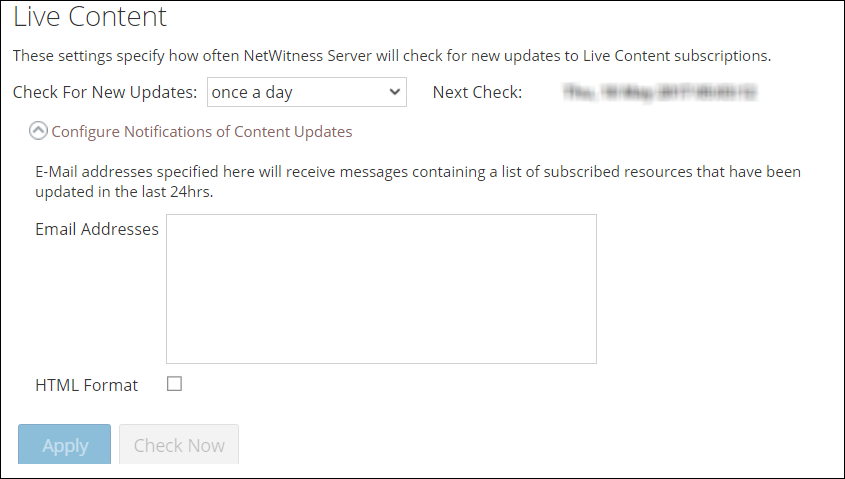
2. To configure Live Services to send update reports to one or more people, in the **Email Addresses** field, type the email addresses as a comma-separated list, for example, **john@company.com,ted@company.com,brian@company.com**
3. (Optional) To receive messages in HTML format rather than plain text, select **HTML Format**.
4. To save and apply, click **Apply**.
The time and date of the next scheduled Live synchronization based on the configured interval for checking is displayed.
### Force Immediate SynchronizationForce Immediate Synchronization
Instead of waiting for the next scheduled resource cycle, this option forces Live to begin immediate synchronization of the subscribed resources in this instance of NetWitness. One use for this is to see the immediate impact of a configuration change. For example, a new service has been added, or new resources have been toggled for automatic deployment. The scheduled synchronization could take place hours later if Live Services is set to synchronize a few times a day.
**Caution:** Synchronization can cause a parser reload if a FlexParser is deployed in the update cycle. This is acceptable once or twice a day, but a number of back-to-back parser reloads can cause packet loss at the Decoder. If this is the initial setup and you haven’t configured Live resource subscriptions, do not Synchronize Now. Wait until you have configured subscriptions.
To force immediate synchronization, click **Check Now**. NetWitness checks for updates in subscribed resources.
**File Reputation**
File Reputation provides analysts the opportunity to view reputation status of files.
By default, **File Reputation** is enabled in **Additional Live Services** section.
[](https://mydev.netwitness.com/?hsLang=en)
Copyright © 2026, NetWitness LLC. All rights reserved.
[NetWitness Platform](https://www.netwitness.com/)
[Acceptable Use Policy](https://www.netwitness.com/wp-content/uploads/Acceptable-Use-Policy-092022.pdf) [Privacy Statement](https://www.netwitness.com/wp-content/uploads/NetWitness-Privacy-Statement-07292024.pdf)

[](https://www.linkedin.com/company/netwitness-platform/) [](https://www.youtube.com/@netwitness)
© 2026 NetWitness LLC. All rights reserved.