---
title: Configure Installed Antivirus Vendors
description: "Configure Installed Antivirus VendorsConfigure Installed Antivirus Vendors\nYou can compare file analysis results from your installed antivirus (AV) v"
---
[Skip to content](https://mydev.netwitness.com/knowledge-base/configureinstalledantivirusvendors#main-content)

- [Home](https://mydev.netwitness.com/home)
- Integrations
Show submenu for Integrations
- [Netwitness Platform Integrations](https://mydev.netwitness.com/netwitnessplatformintegrations)
- [Third Party Integrations](https://mydev.netwitness.com/thirdpartyintegrations)
- [Knowledge Center](https://mydev.netwitness.com/knowledge-base)
- Community
Show submenu for Community
- [Blogs](https://mydev.netwitness.com/netwitness-security-llc-blog)
- Discussions
- Customers
Show submenu for Customers
- [Manage Products and Licenses](https://mydev.netwitness.com/nwportal)
- Downloads
- Partners
Show submenu for Partners
- [Partner Program](https://mydev.netwitness.com/partner)
- [Partner Resources](https://mydev.netwitness.com/partnerresources)
- [Submit a New Deal Registration](https://mydev.netwitness.com/dealregistration)
- [Become a Partner](https://mydev.netwitness.com/becomeapartner)
- [Update Your Partner Locator Profile](https://www.netwitness.com/partner-locator/?utm_source=pardotnewsletter&utm_medium=email&utm_campaign=partner_march)
- [NetWitness LinkedIn Partner Hub](https://linkedin.com/showcase/netwitnesspartners/)
- Education
Show submenu for Education
- [Instructor Led Training Schedule](https://mydev.netwitness.com/instructorledtrainingschedule)
- [NetWitness Training Catalog](https://mydev.netwitness.com/netwitnesstrainingcatalog)
- [Security Awareness Training](https://mydev.netwitness.com/securityawarenesstraining)
- [New Product Readiness](https://mydev.netwitness.com/newproductreadiness)
- [On-Demand Virtual Labs](https://mydev.netwitness.com/ondemandvirtuallabs)
- [Additional Training Information](https://mydev.netwitness.com/additionaltraininginformation)
- [Frequently Asked Questions](https://mydev.netwitness.com/educationfaq)
- [Contact NetWitness Education Team](https://mydev.netwitness.com/contact-netwitness-education-team)
- Support
Show submenu for Support
- [Contact Support](https://mydev.netwitness.com/contact-support)
- [Create a New Case](https://mydev.netwitness.com/create-support-case)
- [View My Cases](https://mydev.netwitness.com/viewmycase)
- [Product Version Life Cycle](https://mydev.netwitness.com/product-version-life-cycle)
- [Warranty & Replacement Parts](https://mydev.netwitness.com/warranty-and-replacement-parts)
- [Community Support Forum](https://mydev.netwitness.com/community-support-forum)
- [Technical Support Guide](https://mydev.netwitness.com/technical-support-guide)
Open main navigation
Close main navigation
- [Home](https://mydev.netwitness.com/home)
- Integrations
Show submenu for Integrations
- [Netwitness Platform Integrations](https://mydev.netwitness.com/netwitnessplatformintegrations)
- [Third Party Integrations](https://mydev.netwitness.com/thirdpartyintegrations)
- [Knowledge Center](https://mydev.netwitness.com/knowledge-base)
- Community
Show submenu for Community
- [Blogs](https://mydev.netwitness.com/netwitness-security-llc-blog)
- Discussions
- Customers
Show submenu for Customers
- [Manage Products and Licenses](https://mydev.netwitness.com/nwportal)
- Downloads
- Partners
Show submenu for Partners
- [Partner Program](https://mydev.netwitness.com/partner)
- [Partner Resources](https://mydev.netwitness.com/partnerresources)
- [Submit a New Deal Registration](https://mydev.netwitness.com/dealregistration)
- [Become a Partner](https://mydev.netwitness.com/becomeapartner)
- [Update Your Partner Locator Profile](https://www.netwitness.com/partner-locator/?utm_source=pardotnewsletter&utm_medium=email&utm_campaign=partner_march)
- [NetWitness LinkedIn Partner Hub](https://linkedin.com/showcase/netwitnesspartners/)
- Education
Show submenu for Education
- [Instructor Led Training Schedule](https://mydev.netwitness.com/instructorledtrainingschedule)
- [NetWitness Training Catalog](https://mydev.netwitness.com/netwitnesstrainingcatalog)
- [Security Awareness Training](https://mydev.netwitness.com/securityawarenesstraining)
- [New Product Readiness](https://mydev.netwitness.com/newproductreadiness)
- [On-Demand Virtual Labs](https://mydev.netwitness.com/ondemandvirtuallabs)
- [Additional Training Information](https://mydev.netwitness.com/additionaltraininginformation)
- [Frequently Asked Questions](https://mydev.netwitness.com/educationfaq)
- [Contact NetWitness Education Team](https://mydev.netwitness.com/contact-netwitness-education-team)
- Support
Show submenu for Support
- [Contact Support](https://mydev.netwitness.com/contact-support)
- [Create a New Case](https://mydev.netwitness.com/create-support-case)
- [View My Cases](https://mydev.netwitness.com/viewmycase)
- [Product Version Life Cycle](https://mydev.netwitness.com/product-version-life-cycle)
- [Warranty & Replacement Parts](https://mydev.netwitness.com/warranty-and-replacement-parts)
- [Community Support Forum](https://mydev.netwitness.com/community-support-forum)
- [Technical Support Guide](https://mydev.netwitness.com/technical-support-guide)
How can we help you?
- There are no suggestions because the search field is empty.
1. [NetWitness Knowledge Base](https://mydev.netwitness.com/knowledge-base?hsLang=en)
2. [Documentation](https://mydev.netwitness.com/knowledge-base/documentation?hsLang=en)
April 28, 2026
# Configure Installed Antivirus Vendors
## Configure Installed Antivirus VendorsConfigure Installed Antivirus Vendors
You can compare file analysis results from your installed antivirus (AV) vendors versus community results from the Malware Analysis knowledge base. While a file is being analyzed by community analysis, Malware Analysis checks an antivirus knowledge base to determine if the sample is already known to be malicious. If the file is known to be malicious, NetWitness flags the file to indicate whether a primary antivirus vendor or a secondary antivirus vendor identified the sample. NetWitness classifies vendors as primary and secondary to indicate the level of reputation the vendors have in the industry, and Indicators of Compromise factor the reputation into scoring. For example, detection made solely by secondary antivirus vendors may score less than detection by primary vendors.
**Note:** When choosing AV vendor software to install on your network, it is highly recommended that you include at least one from NetWitness Primary Vendors list. For more information, please see the [Supported Antivirus Vendors](https://50269063.hs-sites.com/knowledge-base/SupportedAntivirusVendors?hsLang=en).
You can identify the antivirus vendors installed on your network to NetWitness. NetWitness compares the antivirus results during community analysis against the results from the installed vendors selected in the AV tab. If a match is detected, the file being analyzed is flagged to indicate that your locally installed primary or secondary antivirus software detected the sample.
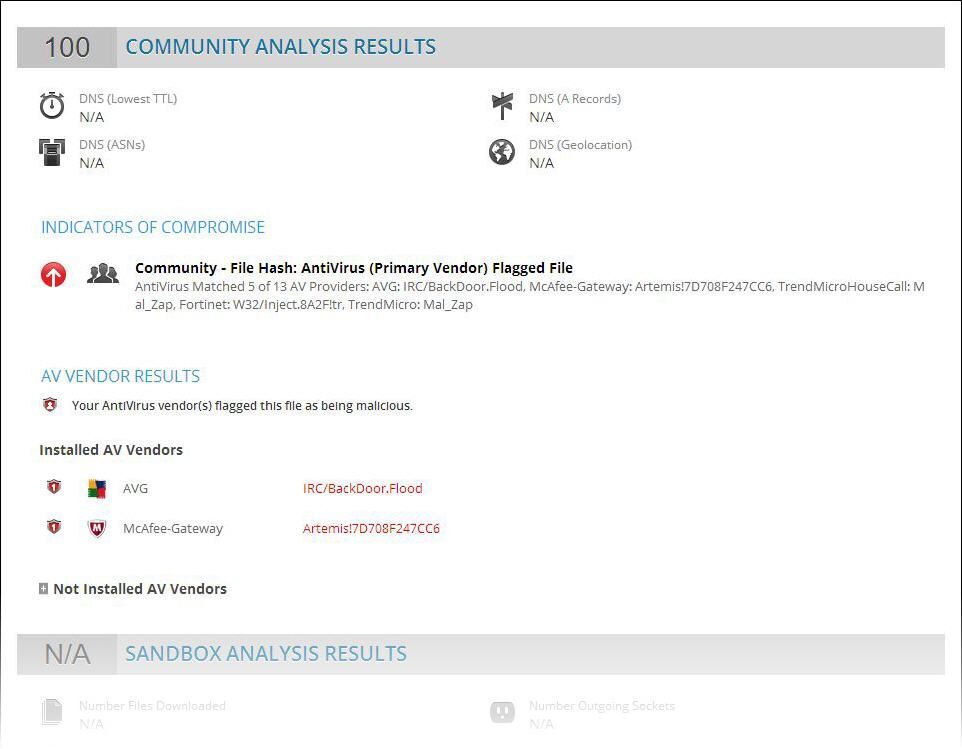
The example below shows the community analysis results for a file that had a score of 100. Under **Indicators of Compromise**, you can see that the file was flagged by the listed AV vendors in the Community. Under **AV Vendor Results**, NetWitness indicates whether the AV vendors installed in your environment flagged the file as malicious. If your installed AV vendors detected the virus, the name of the malware is displayed. If your installed AV vendors did not detected the virus, **--Not detected--** is displayed next the AV vendor name. Under **Not Installed Vendors**, you can click **+** to expand the section and see if other vendors not installed on your system detected the virus.
## Identify Installed AV SoftwareIdentify Installed AV Software
To identify Antivirus software installed on your network:
1. Go to ** (Admin) \> Services.**
2. Select a Malware Analysis service, and in the row select  **\> View \> Config**.
3. In the **Service Config View**, select the **AV** tab.
4. Select the checkbox next to each antivirus vendor (primary and other) whose software is installed on your network.
5. To save the changes, click **Apply**.
The Community Analysis results will indicate whether your software flagged an event.
6. (Optional) If you want to reset the list of installed AV software to the default value (none), click **Reset**.
All selections are removed.
7. To save changes, click **Apply**.
[](https://mydev.netwitness.com/?hsLang=en)
Copyright © 2026, NetWitness LLC. All rights reserved.
[NetWitness Platform](https://www.netwitness.com/)
[Acceptable Use Policy](https://www.netwitness.com/wp-content/uploads/Acceptable-Use-Policy-092022.pdf) [Privacy Statement](https://www.netwitness.com/wp-content/uploads/NetWitness-Privacy-Statement-07292024.pdf)

[](https://www.linkedin.com/company/netwitness-platform/) [](https://www.youtube.com/@netwitness)
© 2026 NetWitness LLC. All rights reserved.