---
title: Configure Event Source Monitoring
description: "Configure Event Source Monitoring\nNote: To manage Event Sources, use the (Admin) > Event Sources view. For details, see \"About Event Source Manag"
---
[Skip to content](https://mydev.netwitness.com/knowledge-base/configureeventsourcemonitoring#main-content)

- [Home](https://mydev.netwitness.com/home)
- Integrations
Show submenu for Integrations
- [Netwitness Platform Integrations](https://mydev.netwitness.com/netwitnessplatformintegrations)
- [Third Party Integrations](https://mydev.netwitness.com/thirdpartyintegrations)
- [Knowledge Center](https://mydev.netwitness.com/knowledge-base)
- Community
Show submenu for Community
- [Blogs](https://mydev.netwitness.com/netwitness-security-llc-blog)
- Discussions
- Customers
Show submenu for Customers
- [Manage Products and Licenses](https://mydev.netwitness.com/nwportal)
- Downloads
- Partners
Show submenu for Partners
- [Partner Program](https://mydev.netwitness.com/partner)
- [Partner Resources](https://mydev.netwitness.com/partnerresources)
- [Submit a New Deal Registration](https://mydev.netwitness.com/dealregistration)
- [Become a Partner](https://mydev.netwitness.com/becomeapartner)
- [Update Your Partner Locator Profile](https://www.netwitness.com/partner-locator/?utm_source=pardotnewsletter&utm_medium=email&utm_campaign=partner_march)
- [NetWitness LinkedIn Partner Hub](https://linkedin.com/showcase/netwitnesspartners/)
- Education
Show submenu for Education
- [Instructor Led Training Schedule](https://mydev.netwitness.com/instructorledtrainingschedule)
- [NetWitness Training Catalog](https://mydev.netwitness.com/netwitnesstrainingcatalog)
- [Security Awareness Training](https://mydev.netwitness.com/securityawarenesstraining)
- [New Product Readiness](https://mydev.netwitness.com/newproductreadiness)
- [On-Demand Virtual Labs](https://mydev.netwitness.com/ondemandvirtuallabs)
- [Additional Training Information](https://mydev.netwitness.com/additionaltraininginformation)
- [Frequently Asked Questions](https://mydev.netwitness.com/educationfaq)
- [Contact NetWitness Education Team](https://mydev.netwitness.com/contact-netwitness-education-team)
- Support
Show submenu for Support
- [Contact Support](https://mydev.netwitness.com/contact-support)
- [Create a New Case](https://mydev.netwitness.com/create-support-case)
- [View My Cases](https://mydev.netwitness.com/viewmycase)
- [Product Version Life Cycle](https://mydev.netwitness.com/product-version-life-cycle)
- [Warranty & Replacement Parts](https://mydev.netwitness.com/warranty-and-replacement-parts)
- [Community Support Forum](https://mydev.netwitness.com/community-support-forum)
- [Technical Support Guide](https://mydev.netwitness.com/technical-support-guide)
Open main navigation
Close main navigation
- [Home](https://mydev.netwitness.com/home)
- Integrations
Show submenu for Integrations
- [Netwitness Platform Integrations](https://mydev.netwitness.com/netwitnessplatformintegrations)
- [Third Party Integrations](https://mydev.netwitness.com/thirdpartyintegrations)
- [Knowledge Center](https://mydev.netwitness.com/knowledge-base)
- Community
Show submenu for Community
- [Blogs](https://mydev.netwitness.com/netwitness-security-llc-blog)
- Discussions
- Customers
Show submenu for Customers
- [Manage Products and Licenses](https://mydev.netwitness.com/nwportal)
- Downloads
- Partners
Show submenu for Partners
- [Partner Program](https://mydev.netwitness.com/partner)
- [Partner Resources](https://mydev.netwitness.com/partnerresources)
- [Submit a New Deal Registration](https://mydev.netwitness.com/dealregistration)
- [Become a Partner](https://mydev.netwitness.com/becomeapartner)
- [Update Your Partner Locator Profile](https://www.netwitness.com/partner-locator/?utm_source=pardotnewsletter&utm_medium=email&utm_campaign=partner_march)
- [NetWitness LinkedIn Partner Hub](https://linkedin.com/showcase/netwitnesspartners/)
- Education
Show submenu for Education
- [Instructor Led Training Schedule](https://mydev.netwitness.com/instructorledtrainingschedule)
- [NetWitness Training Catalog](https://mydev.netwitness.com/netwitnesstrainingcatalog)
- [Security Awareness Training](https://mydev.netwitness.com/securityawarenesstraining)
- [New Product Readiness](https://mydev.netwitness.com/newproductreadiness)
- [On-Demand Virtual Labs](https://mydev.netwitness.com/ondemandvirtuallabs)
- [Additional Training Information](https://mydev.netwitness.com/additionaltraininginformation)
- [Frequently Asked Questions](https://mydev.netwitness.com/educationfaq)
- [Contact NetWitness Education Team](https://mydev.netwitness.com/contact-netwitness-education-team)
- Support
Show submenu for Support
- [Contact Support](https://mydev.netwitness.com/contact-support)
- [Create a New Case](https://mydev.netwitness.com/create-support-case)
- [View My Cases](https://mydev.netwitness.com/viewmycase)
- [Product Version Life Cycle](https://mydev.netwitness.com/product-version-life-cycle)
- [Warranty & Replacement Parts](https://mydev.netwitness.com/warranty-and-replacement-parts)
- [Community Support Forum](https://mydev.netwitness.com/community-support-forum)
- [Technical Support Guide](https://mydev.netwitness.com/technical-support-guide)
How can we help you?
- There are no suggestions because the search field is empty.
1. [NetWitness Knowledge Base](https://mydev.netwitness.com/knowledge-base?hsLang=en)
2. [Documentation](https://mydev.netwitness.com/knowledge-base/documentation?hsLang=en)
April 28, 2026
# Configure Event Source Monitoring
## Configure Event Source Monitoring
**Note:** To manage Event Sources, use the  (Admin) \> Event Sources view. For details, see "About Event Source Management" in the [**NetWitness Event Source Management Guide**](https://50269063.hs-sites.com/knowledge-base/EventSourceManagementGuidefor12-5?hsLang=en).
To monitor event sources, you must configure the event sources so that they generate and send out notifications when required. For the related reference topic, see [Health and Wellness Settings View - Event Sources](https://50269063.hs-sites.com/knowledge-base/HealthandWellnessSettingsView-EventSources?hsLang=en).
To configure and enable event monitoring in NetWitness:
1. Go to **ADMIN** \> **Health & Wellness**.
2. Select **Settings** \> **Event Source**.
The Event Source tab is displayed.
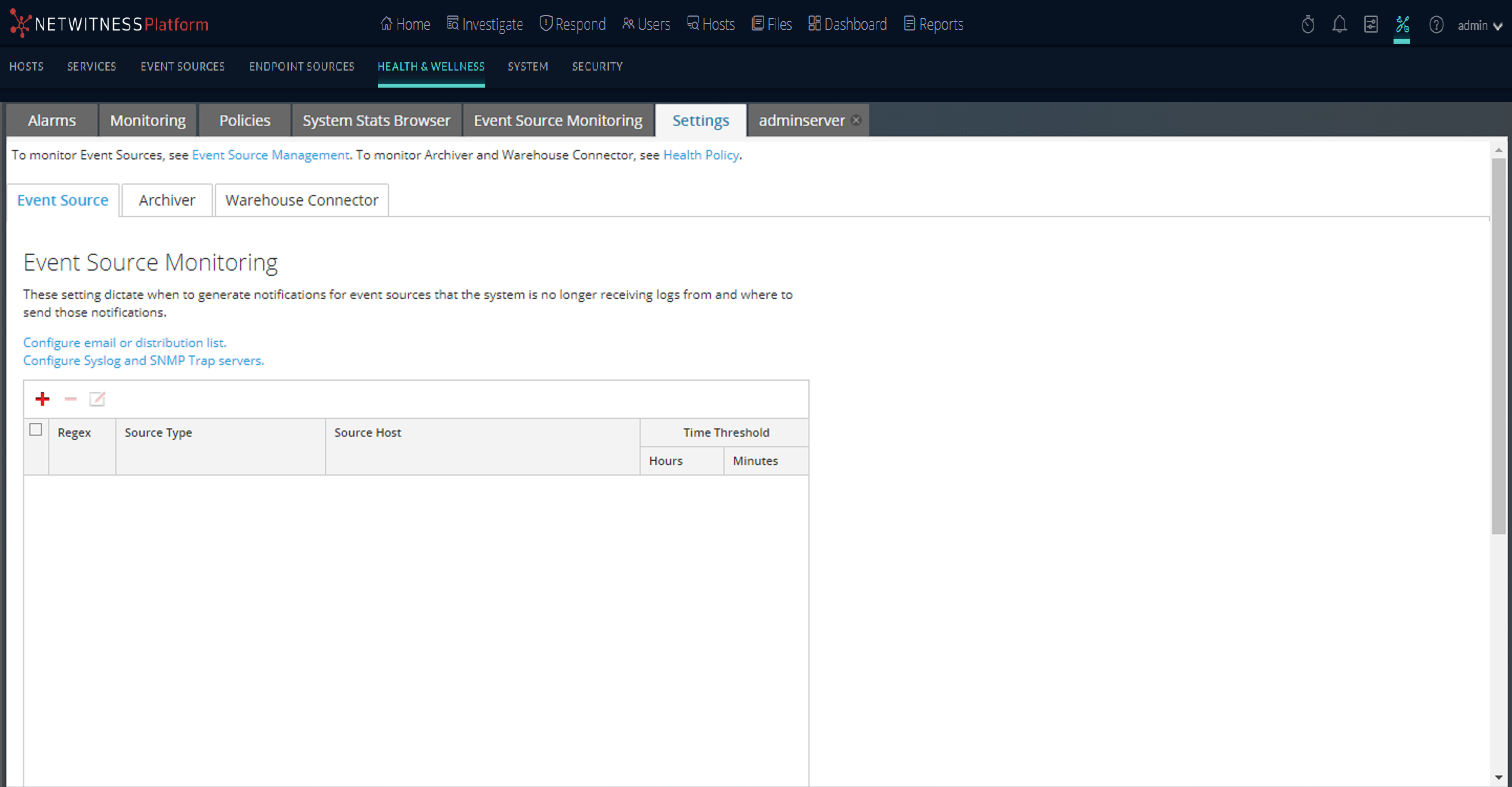
3. Under **Event Source Monitoring**, click .
The Add/Edit Source Monitor dialog is displayed.
4. Define the **Source Type**, **Source Host**, and **Time Threshold** for the source of the event source that you want to monitor to detect when NetWitness stops receiving logs from it. If you do not specify a **Time Threshold**, NetWitness monitors the event source until you set a threshold.
**Note:** For **Source Type** and **Source Host**, you must specify the values that you configured for the event source in the **Event Sources** tab of the **ADMIN** \> **Services** \> Log Collector service \> **View** \> **Config** view. You add or modify the event sources that you want to monitor. The two parameters that identify an event source are **Source Type** and **Source Host**. You can use **globbing** (pattern matching and wildcard characters) to specify the **Source Type** and **Source Host** of event sources
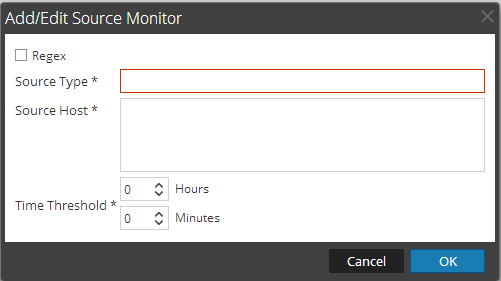
1. Click **OK**.
The event source is displayed in the panel.
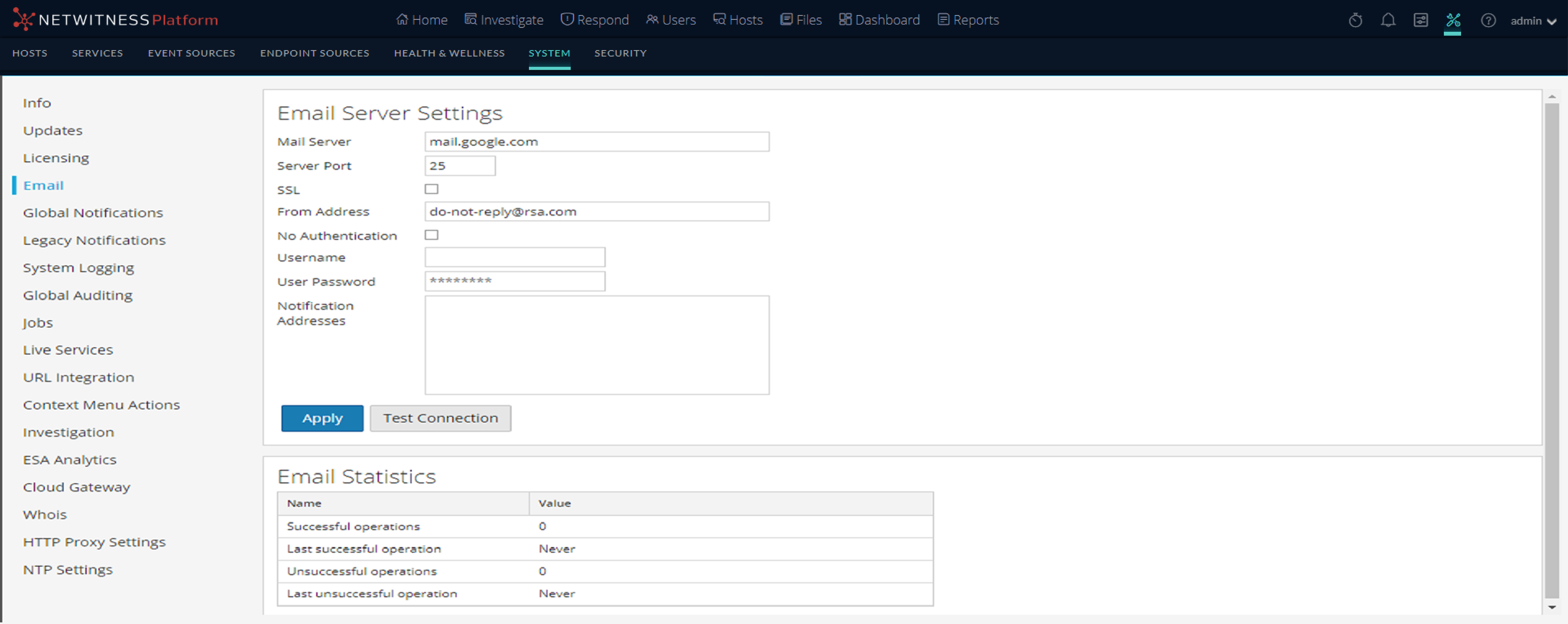
2. Configure the method of notification by doing one of the following in the Settings tab:
- Select **Configure email or distribution list**.
The Email configuration panel is displayed so that you can specify to whom the notifications are sent.
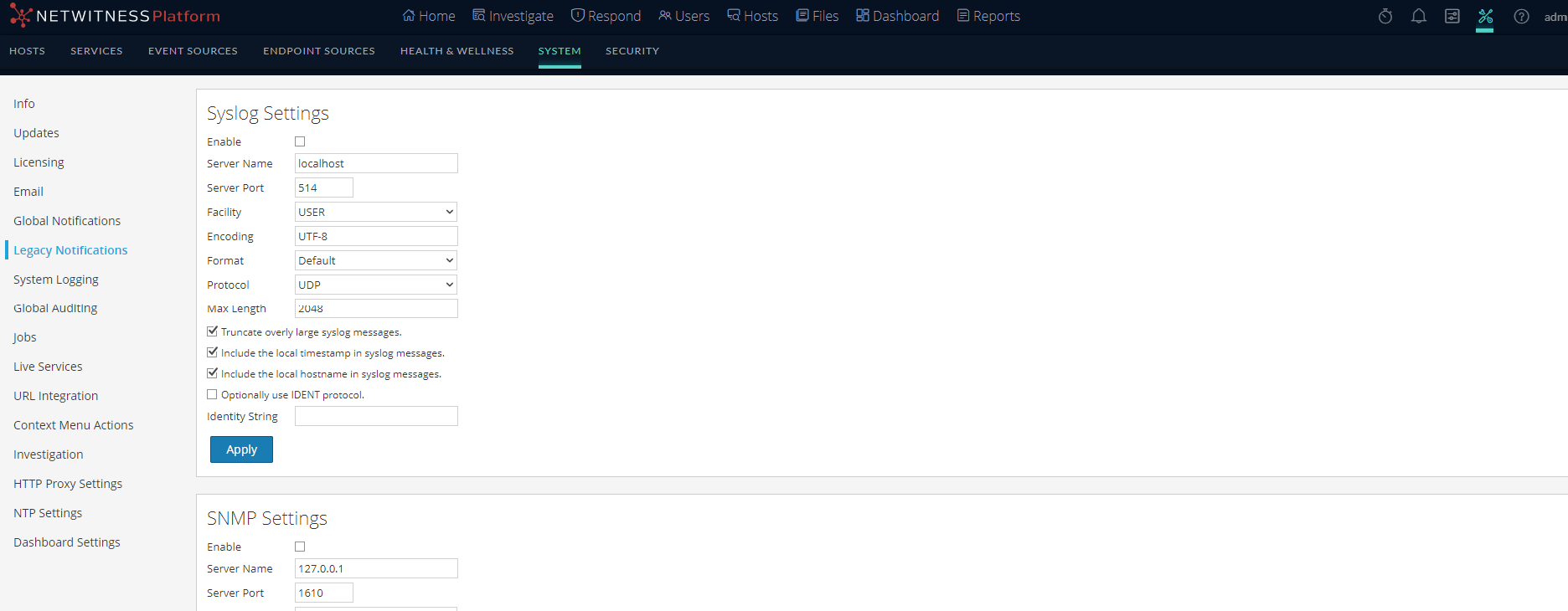
- Select **Configure Syslog and SNMP Trap servers**.
The Legacy Notifications panel is displayed so that you can configure the Syslog and SNMP Traps to which the notifications are sent.
1. Click **Apply**.
NetWitness begins sending notifications when it stops receiving events from this event source after the time threshold has elapsed.
For details on parameters in the Event Source Monitoring settings view, see [Event Source Monitoring View](https://50269063.hs-sites.com/knowledge-base/EventSourceMonitoringView?hsLang=en).
## Decommission Event Source Monitoring
If a Log Collector service (Local Collector or Remote Collector) for which you set up Event Source monitoring becomes inoperable, NetWitness continues to notify that you it is not receiving events from it until you decommission the Collector.
**Caution:** If you configured a failover Local Collector for a Remote Collector and the Local Collector fails over to a standby Log Decoder, you must decommission the Local Collector to stop the notifications.
To decommission event source monitoring for an event source:
1. Go to **ADMIN**\> **Health & Wellness**.
2. Select **Settings** \> **Event Source**.
The **Event Source** tab is displayed.
3. Under **Decommission**, click .
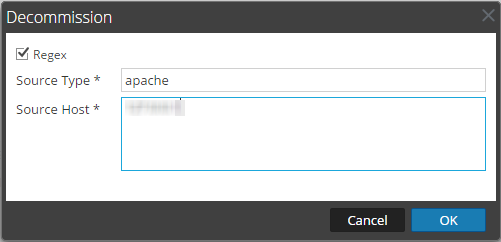
The **Decommission** dialog displays.
4. Define the **Source Type** and the **Source Host** for the source for which you want to decommission event monitoring notifications.
[](https://mydev.netwitness.com/?hsLang=en)
Copyright © 2026, NetWitness LLC. All rights reserved.
[NetWitness Platform](https://www.netwitness.com/)
[Acceptable Use Policy](https://www.netwitness.com/wp-content/uploads/Acceptable-Use-Policy-092022.pdf) [Privacy Statement](https://www.netwitness.com/wp-content/uploads/NetWitness-Privacy-Statement-07292024.pdf)

[](https://www.linkedin.com/company/netwitness-platform/) [](https://www.youtube.com/@netwitness)
© 2026 NetWitness LLC. All rights reserved.