---
title: Configure Endpoint Alerts via Syslog into a Log Decoder
description: Configure Endpoint Alerts Through Syslog into a Log DecoderConfigure Endpoint Alerts Through Syslog into a Log Decoder You can configure the use of N
---
[Skip to content](https://mydev.netwitness.com/knowledge-base/configureendpointalertsviasyslogintoalogdecoder#main-content)

- [Home](https://mydev.netwitness.com/home)
- Integrations
Show submenu for Integrations
- [Netwitness Platform Integrations](https://mydev.netwitness.com/netwitnessplatformintegrations)
- [Third Party Integrations](https://mydev.netwitness.com/thirdpartyintegrations)
- [Knowledge Center](https://mydev.netwitness.com/knowledge-base)
- Community
Show submenu for Community
- [Blogs](https://mydev.netwitness.com/netwitness-security-llc-blog)
- Discussions
- Customers
Show submenu for Customers
- [Manage Products and Licenses](https://mydev.netwitness.com/nwportal)
- Downloads
- Partners
Show submenu for Partners
- [Partner Program](https://mydev.netwitness.com/partner)
- [Partner Resources](https://mydev.netwitness.com/partnerresources)
- [Submit a New Deal Registration](https://mydev.netwitness.com/dealregistration)
- [Become a Partner](https://mydev.netwitness.com/becomeapartner)
- [Update Your Partner Locator Profile](https://www.netwitness.com/partner-locator/?utm_source=pardotnewsletter&utm_medium=email&utm_campaign=partner_march)
- [NetWitness LinkedIn Partner Hub](https://linkedin.com/showcase/netwitnesspartners/)
- Education
Show submenu for Education
- [Instructor Led Training Schedule](https://mydev.netwitness.com/instructorledtrainingschedule)
- [NetWitness Training Catalog](https://mydev.netwitness.com/netwitnesstrainingcatalog)
- [Security Awareness Training](https://mydev.netwitness.com/securityawarenesstraining)
- [New Product Readiness](https://mydev.netwitness.com/newproductreadiness)
- [On-Demand Virtual Labs](https://mydev.netwitness.com/ondemandvirtuallabs)
- [Additional Training Information](https://mydev.netwitness.com/additionaltraininginformation)
- [Frequently Asked Questions](https://mydev.netwitness.com/educationfaq)
- [Contact NetWitness Education Team](https://mydev.netwitness.com/contact-netwitness-education-team)
- Support
Show submenu for Support
- [Contact Support](https://mydev.netwitness.com/contact-support)
- [Create a New Case](https://mydev.netwitness.com/create-support-case)
- [View My Cases](https://mydev.netwitness.com/viewmycase)
- [Product Version Life Cycle](https://mydev.netwitness.com/product-version-life-cycle)
- [Warranty & Replacement Parts](https://mydev.netwitness.com/warranty-and-replacement-parts)
- [Community Support Forum](https://mydev.netwitness.com/community-support-forum)
- [Technical Support Guide](https://mydev.netwitness.com/technical-support-guide)
Open main navigation
Close main navigation
- [Home](https://mydev.netwitness.com/home)
- Integrations
Show submenu for Integrations
- [Netwitness Platform Integrations](https://mydev.netwitness.com/netwitnessplatformintegrations)
- [Third Party Integrations](https://mydev.netwitness.com/thirdpartyintegrations)
- [Knowledge Center](https://mydev.netwitness.com/knowledge-base)
- Community
Show submenu for Community
- [Blogs](https://mydev.netwitness.com/netwitness-security-llc-blog)
- Discussions
- Customers
Show submenu for Customers
- [Manage Products and Licenses](https://mydev.netwitness.com/nwportal)
- Downloads
- Partners
Show submenu for Partners
- [Partner Program](https://mydev.netwitness.com/partner)
- [Partner Resources](https://mydev.netwitness.com/partnerresources)
- [Submit a New Deal Registration](https://mydev.netwitness.com/dealregistration)
- [Become a Partner](https://mydev.netwitness.com/becomeapartner)
- [Update Your Partner Locator Profile](https://www.netwitness.com/partner-locator/?utm_source=pardotnewsletter&utm_medium=email&utm_campaign=partner_march)
- [NetWitness LinkedIn Partner Hub](https://linkedin.com/showcase/netwitnesspartners/)
- Education
Show submenu for Education
- [Instructor Led Training Schedule](https://mydev.netwitness.com/instructorledtrainingschedule)
- [NetWitness Training Catalog](https://mydev.netwitness.com/netwitnesstrainingcatalog)
- [Security Awareness Training](https://mydev.netwitness.com/securityawarenesstraining)
- [New Product Readiness](https://mydev.netwitness.com/newproductreadiness)
- [On-Demand Virtual Labs](https://mydev.netwitness.com/ondemandvirtuallabs)
- [Additional Training Information](https://mydev.netwitness.com/additionaltraininginformation)
- [Frequently Asked Questions](https://mydev.netwitness.com/educationfaq)
- [Contact NetWitness Education Team](https://mydev.netwitness.com/contact-netwitness-education-team)
- Support
Show submenu for Support
- [Contact Support](https://mydev.netwitness.com/contact-support)
- [Create a New Case](https://mydev.netwitness.com/create-support-case)
- [View My Cases](https://mydev.netwitness.com/viewmycase)
- [Product Version Life Cycle](https://mydev.netwitness.com/product-version-life-cycle)
- [Warranty & Replacement Parts](https://mydev.netwitness.com/warranty-and-replacement-parts)
- [Community Support Forum](https://mydev.netwitness.com/community-support-forum)
- [Technical Support Guide](https://mydev.netwitness.com/technical-support-guide)
How can we help you?
- There are no suggestions because the search field is empty.
1. [NetWitness Knowledge Base](https://mydev.netwitness.com/knowledge-base?hsLang=en)
2. [Documentation](https://mydev.netwitness.com/knowledge-base/documentation?hsLang=en)
April 7, 2026
# Configure Endpoint Alerts via Syslog into a Log Decoder
## Configure Endpoint Alerts Through Syslog into a Log DecoderConfigure Endpoint Alerts Through Syslog into a Log Decoder
You can configure the use of NetWitness Endpoint data in NetWitness to provide NetWitness Endpoint alerts through Syslog into Log Decoder sessions. This generates metadata that is used by NetWitness Investigation, Alerts, and Reporting Engine.
For NetWitness networks that are consuming logs, this integration of NetWitness Endpoint with NetWitness pushes NetWitness Endpoint events to the Log Decoder through common event format (CEF) syslog messages and generates metadata that is used by NetWitness Investigation, Alerts, and Reporting Engine. The use case for this integration is SIEM Integration to allow centralized event management, correlation of NetWitness Endpoint events with other Log Decoder data, NetWitness reporting on NetWitness Endpoint events, and NetWitness alerting of NetWitness Endpoint events.
Prerequisites
The following are required for this integration:
- Version 4.3.0.4, 4.3.0.5, 4.4, 4.4.0.2, or later NetWitness Endpoint UI.
- NetWitness Server Version 11.1 is installed.
- Version 10.4 or later NetWitness Log Decoder and Concentrator connected to the NetWitness Server in the network.
- Port UDP- 514 or TCP - 1514 open from NetWitness Endpoint server to Log Decoder in the firewall.
Procedure
1. Deploy the required parser (CEF or rsaecat) to the Log Decoder as described in the "Manage Live Resources" topic in *Live Services Management*. After you deploy the parser, make sure the parser is enabled. For more information, see "Services Config View - General Tab" in the *Malware Analysis Configuration Guide*.
**Note:** Use only one of these parsers. When the CEF parser is deployed, it supersedes the NetWitness Endpoint parser, and all CEF messages into NetWitness are processed by the CEF parser. Enabling both parsers is an unnecessary burden on performance.
1. Configure NetWitness Endpoint to send syslog output to NetWitness and generate NetWitness Endpoint alerts to the Log Decoder.
2. (Optional) Edit the table mapping in table-map-custom.xml and the index-concentrator-custom.xml to add fields based on user preferences for metadata to be mapped to NetWitness.
## Configure NetWitness Endpoint to Send Syslog Output to NetWitnessConfigure NetWitness Endpoint to Send Syslog Output to NetWitness
To add the Log Decoder as a Syslog external component and generate NetWitness Endpoint alerts to the Log Decoder:
1. Open the NetWitness Endpoint user interface and log on using the proper credentials.
2. From the menu bar, select ** (Configure) \> Monitoring and External Components**.
The External Components Configuration dialog is displayed.
3. In **SYSLOG Server**, click .
The SYSLOG Server dialog is displayed.
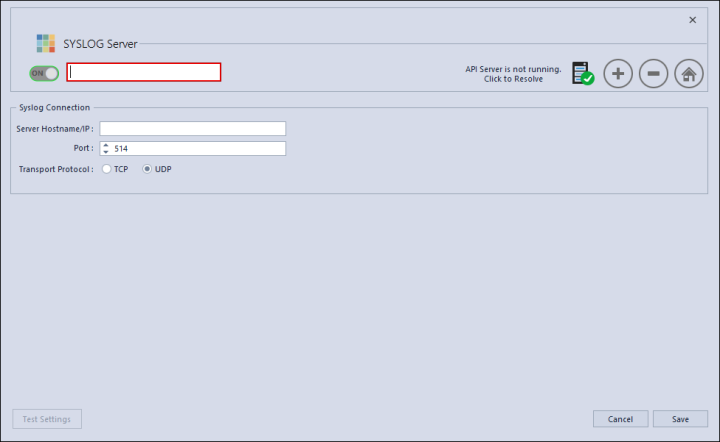
4. In the **NetWitness** panel, in **On**, enter the descriptive name for the Log Decoder.
5. In the **Syslog Connection** panel, perform the following to enable Syslog messaging:
> **Server Hostname/IP** = The hostname DNS or IP address of the NetWitness Log Decoder
> **Port** = 514
> **Transport Protocol** = Select **UDP** or **TCP** as appropriate for your Syslog server for the transport protocol.
1. Click **Save**.
2. Open the **InstantIOCs** window in the NetWitness Endpoint UI and, in the **Alertable** column, click to enable each IIOC for which you want alerts sent to the Log Decoder.
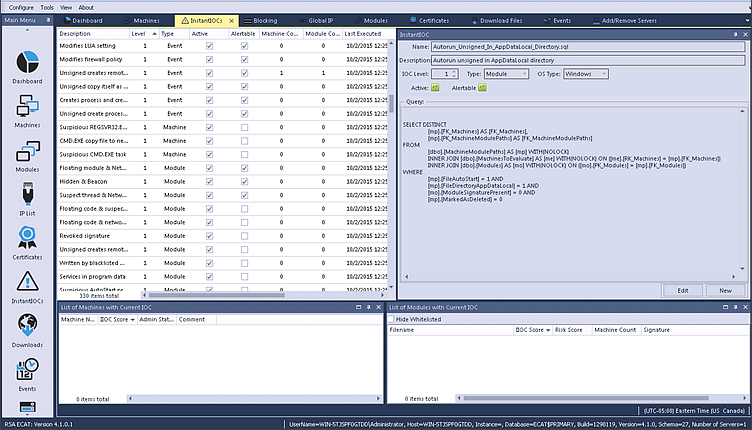
When the instant IOCs are triggered, Syslog alerts from the NetWitness Endpoint server are sent to the Log Decoder. Log Decoder alerts are then aggregated to the Concentrator. These events are injected into the Concentrator as metadata.
## Edit the Table Mapping in table-map-custom.xmlEdit the Table Mapping in table-map-custom.xml
In the default NetWitness table-map.xml provided by NetWitness, the meta keys in the table-map.xml file are set to Transient. In order to view the meta keys in Investigation, the keys must be set to None. To make changes to the mapping, you must add the entries to the table-map-custom.xml on the Log Decoder.
This is the list of meta keys in table-map.xml.
- **NetWitness Endpoint Fields:** agentid
- **NetWitness Mapping:** client
- **Transient in NetWitness:** No
- **NetWitness Endpoint Fields:** CEF Header Hostname Field
- **NetWitness Mapping:** alias.host
- **Transient in NetWitness:** No
- **NetWitness Endpoint Fields:** CEF Header Product Version
- **NetWitness Mapping:** version
- **Transient in NetWitness:** No
- **NetWitness Endpoint Fields:** CEF Header Product Name
- **NetWitness Mapping:** Product
- **Transient in NetWitness:** Yes
- **NetWitness Endpoint Fields:** CEF Header Severity
- **NetWitness Mapping:** severity
- **Transient in NetWitness:** Yes
- **NetWitness Endpoint Fields:** CEF Header Signature ID
- **NetWitness Mapping:** event.type
- **Transient in NetWitness:** No
- **NetWitness Endpoint Fields:** CEF Header Signature Name
- **NetWitness Mapping:** event.desc
- **Transient in NetWitness:** No
- **NetWitness Endpoint Fields:** destinationDnsDomain
- **NetWitness Mapping:** ddomain
- **Transient in NetWitness:** Yes
- **NetWitness Endpoint Fields:** deviceDnsDomain
- **NetWitness Mapping:** domain
- **Transient in NetWitness:** Yes
- **NetWitness Endpoint Fields:** dhost
- **NetWitness Mapping:** host.dst
- **Transient in NetWitness:** No
- **NetWitness Endpoint Fields:** dst
- **NetWitness Mapping:** ip.dst
- **Transient in NetWitness:** No
- **NetWitness Endpoint Fields:** end
- **NetWitness Mapping:** endtime
- **Transient in NetWitness:** Yes
- **NetWitness Endpoint Fields:** fileHash
- **NetWitness Mapping:** checksum
- **Transient in NetWitness:** No
- **NetWitness Endpoint Fields:** fname
- **NetWitness Mapping:** filename
- **Transient in NetWitness:** No
- **NetWitness Endpoint Fields:** fsize
- **NetWitness Mapping:** filename.size
- **Transient in NetWitness:** No
- **NetWitness Endpoint Fields:** gatewayip
- **NetWitness Mapping:** gateway
- **Transient in NetWitness:** Yes
- **NetWitness Endpoint Fields:** instantIOCLevel
- **NetWitness Mapping:** threat.desc
- **Transient in NetWitness:** No
- **NetWitness Endpoint Fields:** instantIOCName
- **NetWitness Mapping:** threat.category
- **Transient in NetWitness:** No
- **NetWitness Endpoint Fields:** machineOU
- **NetWitness Mapping:** dn
- **Transient in NetWitness:** No
- **NetWitness Endpoint Fields:** machineScore
- **NetWitness Mapping:** risk.num
- **Transient in NetWitness:** No
- **NetWitness Endpoint Fields:** md5sum
- **NetWitness Mapping:** checksum
- **Transient in NetWitness:** No
- **NetWitness Endpoint Fields:** os
- **NetWitness Mapping:** OS
- **Transient in NetWitness:** No
- **NetWitness Endpoint Fields:** port
- **NetWitness Mapping:** ip.dstport
- **Transient in NetWitness:** No
- **NetWitness Endpoint Fields:** protocol
- **NetWitness Mapping:** protocol
- **Transient in NetWitness:** Yes
- **NetWitness Endpoint Fields:** Raw Message
- **NetWitness Mapping:** msg
- **Transient in NetWitness:** Yes
- **NetWitness Endpoint Fields:** remoteip
- **NetWitness Mapping:** stransaddr
- **Transient in NetWitness:** Yes
- **NetWitness Endpoint Fields:** rt
- **NetWitness Mapping:** alias.host
- **Transient in NetWitness:** No
- **NetWitness Endpoint Fields:** sha256sum
- **NetWitness Mapping:** checksum
- **Transient in NetWitness:** No
- **NetWitness Endpoint Fields:** shost
- **NetWitness Mapping:** host.src
- **Transient in NetWitness:** No
- **NetWitness Endpoint Fields:** smac
- **NetWitness Mapping:** eth.src
- **Transient in NetWitness:** No
- **NetWitness Endpoint Fields:** src
- **NetWitness Mapping:** ip.src
- **Transient in NetWitness:** No
- **NetWitness Endpoint Fields:** start
- **NetWitness Mapping:** starttime
- **Transient in NetWitness:** No
- **NetWitness Endpoint Fields:** suser
- **NetWitness Mapping:** user.dst
- **Transient in NetWitness:** No
- **NetWitness Endpoint Fields:** timezone
- **NetWitness Mapping:** timezone
- **Transient in NetWitness:** No
- **NetWitness Endpoint Fields:** totalreceived
- **NetWitness Mapping:** rbytes
- **Transient in NetWitness:** Yes
- **NetWitness Endpoint Fields:** totalsent
- **NetWitness Mapping:** bytes.src
- **Transient in NetWitness:** No
- **NetWitness Endpoint Fields:** useragent
- **NetWitness Mapping:** user.agent
- **Transient in NetWitness:** No
- **NetWitness Endpoint Fields:** userOU
- **NetWitness Mapping:** org
- **Transient in NetWitness:** Yes
The following seven keys are not in table-map.xml; to use these keys in NetWitness you need to add them to table-map-custom.xml, and set the flags to None.
- **NetWitness Endpoint Fields:** moduleScore
- **NetWitness Mapping:** cs.modulescore
- **Transient in NetWitness:** Yes
- **NetWitness Endpoint Fields:** moduleSignature
- **NetWitness Mapping:** cs.modulesign
- **Transient in NetWitness:** Yes
- **NetWitness Endpoint Fields:** Target module
- **NetWitness Mapping:** cs.targetmodule
- **Transient in NetWitness:** Yes
- **NetWitness Endpoint Fields:** YARA result
- **NetWitness Mapping:** cs.yararesult
- **Transient in NetWitness:** Yes
- **NetWitness Endpoint Fields:** Source module
- **NetWitness Mapping:** cs.sourcemodule
- **Transient in NetWitness:** Yes
- **NetWitness Endpoint Fields:** OPSWATResult
- **NetWitness Mapping:** cs.opswatresult
- **Transient in NetWitness:** Yes
- **NetWitness Endpoint Fields:** ReputationResult
- **NetWitness Mapping:** cs.represult
- **Transient in NetWitness:** Yes
Here are the entries to be added to the table-map-custom.xml if required.
**Note:** Restart the Log Decoder or reload the log parsers for the changes to take effect.
### Configure the NetWitness Suite Concentrator ServiceConfigure the NetWitness Suite Concentrator Service
1. Log on to NetWitness and go to ** (Admin) \> Services**.
1. Select a **Concentrator** from the list and select **View \> Config.**
2. Select the **Files** tab, and from the **Files to Edit** drop-down list, select **index-concentrator-custom.xml**.
3. Add the NetWitness Endpoint meta keys to the file and click **Apply**. Make sure that this file contains the XML sections already; if the lines are not included, add them.
4. Restart the Concentrator.
5. To add the Concentrator as a data source in the Reporting Engine, in the ** (Admin) \> Services** view, select the **Reporting Engine** and Select **View\> Config \> Sources.**
NetWitness Endpoint meta is populated in Reporting Engine, and you can run reports by selecting the appropriate meta keys.
Example
**Note:** The following lines are examples; make sure the values match your configuration and the column names you included in the feed definition, where:
**description** is the name of the meta key you want to display in NetWitness Investigation.
**level** is "IndexValues"
**name** is the NetWitness Endpoint meta key name from the table below
[](https://mydev.netwitness.com/?hsLang=en)
Copyright © 2026, NetWitness LLC. All rights reserved.
[NetWitness Platform](https://www.netwitness.com/)
[Acceptable Use Policy](https://www.netwitness.com/wp-content/uploads/Acceptable-Use-Policy-092022.pdf) [Privacy Statement](https://www.netwitness.com/wp-content/uploads/NetWitness-Privacy-Statement-07292024.pdf)

[](https://www.linkedin.com/company/netwitness-platform/) [](https://www.youtube.com/@netwitness)
© 2026 NetWitness LLC. All rights reserved.