---
title: Configure Check Point Event Sources
description: "Configure Check Point Event Sources in NetWitness\nThis topic tells you how to configure the Check Point collection protocol, which collects events fr"
---
[Skip to content](https://mydev.netwitness.com/knowledge-base/configurecheckpointeventsources#main-content)

- [Home](https://mydev.netwitness.com/home)
- Integrations
Show submenu for Integrations
- [Netwitness Platform Integrations](https://mydev.netwitness.com/netwitnessplatformintegrations)
- [Third Party Integrations](https://mydev.netwitness.com/thirdpartyintegrations)
- [Knowledge Center](https://mydev.netwitness.com/knowledge-base)
- Community
Show submenu for Community
- [Blogs](https://mydev.netwitness.com/netwitness-security-llc-blog)
- Discussions
- Customers
Show submenu for Customers
- [Manage Products and Licenses](https://mydev.netwitness.com/nwportal)
- Downloads
- Partners
Show submenu for Partners
- [Partner Program](https://mydev.netwitness.com/partner)
- [Partner Resources](https://mydev.netwitness.com/partnerresources)
- [Submit a New Deal Registration](https://mydev.netwitness.com/dealregistration)
- [Become a Partner](https://mydev.netwitness.com/becomeapartner)
- [Update Your Partner Locator Profile](https://www.netwitness.com/partner-locator/?utm_source=pardotnewsletter&utm_medium=email&utm_campaign=partner_march)
- [NetWitness LinkedIn Partner Hub](https://linkedin.com/showcase/netwitnesspartners/)
- Education
Show submenu for Education
- [Instructor Led Training Schedule](https://mydev.netwitness.com/instructorledtrainingschedule)
- [NetWitness Training Catalog](https://mydev.netwitness.com/netwitnesstrainingcatalog)
- [Security Awareness Training](https://mydev.netwitness.com/securityawarenesstraining)
- [New Product Readiness](https://mydev.netwitness.com/newproductreadiness)
- [On-Demand Virtual Labs](https://mydev.netwitness.com/ondemandvirtuallabs)
- [Additional Training Information](https://mydev.netwitness.com/additionaltraininginformation)
- [Frequently Asked Questions](https://mydev.netwitness.com/educationfaq)
- [Contact NetWitness Education Team](https://mydev.netwitness.com/contact-netwitness-education-team)
- Support
Show submenu for Support
- [Contact Support](https://mydev.netwitness.com/contact-support)
- [Create a New Case](https://mydev.netwitness.com/create-support-case)
- [View My Cases](https://mydev.netwitness.com/viewmycase)
- [Product Version Life Cycle](https://mydev.netwitness.com/product-version-life-cycle)
- [Warranty & Replacement Parts](https://mydev.netwitness.com/warranty-and-replacement-parts)
- [Community Support Forum](https://mydev.netwitness.com/community-support-forum)
- [Technical Support Guide](https://mydev.netwitness.com/technical-support-guide)
Open main navigation
Close main navigation
- [Home](https://mydev.netwitness.com/home)
- Integrations
Show submenu for Integrations
- [Netwitness Platform Integrations](https://mydev.netwitness.com/netwitnessplatformintegrations)
- [Third Party Integrations](https://mydev.netwitness.com/thirdpartyintegrations)
- [Knowledge Center](https://mydev.netwitness.com/knowledge-base)
- Community
Show submenu for Community
- [Blogs](https://mydev.netwitness.com/netwitness-security-llc-blog)
- Discussions
- Customers
Show submenu for Customers
- [Manage Products and Licenses](https://mydev.netwitness.com/nwportal)
- Downloads
- Partners
Show submenu for Partners
- [Partner Program](https://mydev.netwitness.com/partner)
- [Partner Resources](https://mydev.netwitness.com/partnerresources)
- [Submit a New Deal Registration](https://mydev.netwitness.com/dealregistration)
- [Become a Partner](https://mydev.netwitness.com/becomeapartner)
- [Update Your Partner Locator Profile](https://www.netwitness.com/partner-locator/?utm_source=pardotnewsletter&utm_medium=email&utm_campaign=partner_march)
- [NetWitness LinkedIn Partner Hub](https://linkedin.com/showcase/netwitnesspartners/)
- Education
Show submenu for Education
- [Instructor Led Training Schedule](https://mydev.netwitness.com/instructorledtrainingschedule)
- [NetWitness Training Catalog](https://mydev.netwitness.com/netwitnesstrainingcatalog)
- [Security Awareness Training](https://mydev.netwitness.com/securityawarenesstraining)
- [New Product Readiness](https://mydev.netwitness.com/newproductreadiness)
- [On-Demand Virtual Labs](https://mydev.netwitness.com/ondemandvirtuallabs)
- [Additional Training Information](https://mydev.netwitness.com/additionaltraininginformation)
- [Frequently Asked Questions](https://mydev.netwitness.com/educationfaq)
- [Contact NetWitness Education Team](https://mydev.netwitness.com/contact-netwitness-education-team)
- Support
Show submenu for Support
- [Contact Support](https://mydev.netwitness.com/contact-support)
- [Create a New Case](https://mydev.netwitness.com/create-support-case)
- [View My Cases](https://mydev.netwitness.com/viewmycase)
- [Product Version Life Cycle](https://mydev.netwitness.com/product-version-life-cycle)
- [Warranty & Replacement Parts](https://mydev.netwitness.com/warranty-and-replacement-parts)
- [Community Support Forum](https://mydev.netwitness.com/community-support-forum)
- [Technical Support Guide](https://mydev.netwitness.com/technical-support-guide)
How can we help you?
- There are no suggestions because the search field is empty.
1. [NetWitness Knowledge Base](https://mydev.netwitness.com/knowledge-base?hsLang=en)
2. [Documentation](https://mydev.netwitness.com/knowledge-base/documentation?hsLang=en)
April 26, 2026
# Configure Check Point Event Sources
## Configure Check Point Event Sources in NetWitness
This topic tells you how to configure the Check Point collection protocol, which collects events from Check Point event sources.
This protocol collects events from Check Point event sources using OPSEC LEA. OPSEC LEA is the Check Point Operations Security Log Export API that facilitates the extraction of logs.
## How Check Point Collection Works
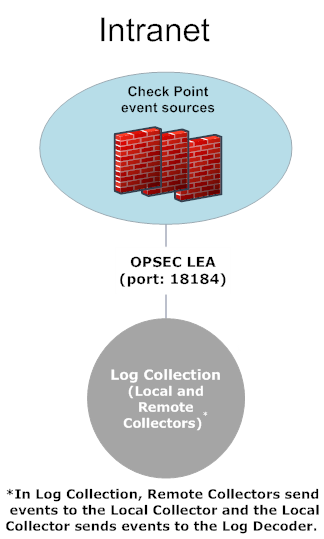
The Log Collector service collects events from Check Point event sources using OPSEC LEA. OPSEC LEA is the Check Point Operations Security Log Export API that facilitates the extraction of logs.
**Note:** OPSEC LEA (Log Export API) supports extraction of logs from Check Point event sources configured with a SHA-256 or SHA-1 certificate.
## Deployment Scenario
The following figure illustrates how you deploy the Check Point Collection Protocol in NetWitness.
## Configuration in NetWitness
To configure a Check Point Event Source:
1. Go to ** (Admin) \> Services** from the NetWitness menu.
2. Select a Log Collection service.
3. Select  **\> View \> Config** to display the Log Collection configuration parameter tabs.
4. Click the **Event Sources** tab.
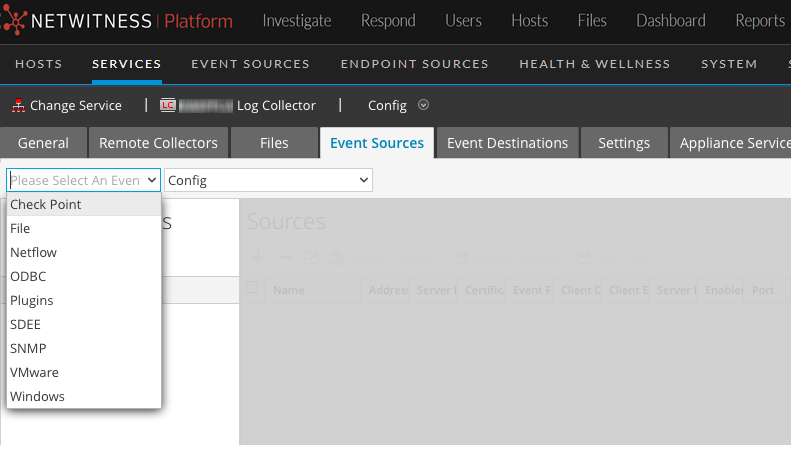
1. In the **Event Sources** tab, select **Check Point/Config** from the drop-down menu.
2. In the **Event Categories** panel toolbar, click .
The **Available Event Source Types** dialog is displayed.
3. Select a check point event source type and click **OK**.
The newly added event source type is displayed in the **Event Categories** panel.
4. Select the new type in the **Event Categories** panel and click  in the **Sources** toolbar.
The **Add Source** dialog is displayed.
5. Define parameter values. For details, see [Check Point Parameters](https://mydev.netwitness.com/knowledge-base/configurecheckpointeventsources#Check) below.
6. Click **Test Connection**.
The result of the test is displayed in the dialog box. If the test is unsuccessful, edit the device or service information and retry.
Log Collector takes approximately 60 seconds to return the test results. If it exceeds the time limit, the test times out and the NetWitness displays an error message.
7. If the test is successful, click **OK**.
The new event source is displayed in the **Sources** panel.
## Check Point ParametersCheck Point Parameters
This section describes the Check Point event source configuration parameters.
## Basic Parameters
## Determine Advanced Parameter Values for Check Point Collection
You use less system resources when you configure a Check Point event source connection to stay open for a specific time and specific event volume (transient connection). NetWitness defaults to the following connection parameters that establish a transient connection:
- Polling Interval = **180** (3 minutes)
- Max Duration Poll = **120** (2 minutes)
- Max Events Poll = **5000** (5000 events per polling interval)
- Max Idle Time Poll = **0**
For very active Check Point event sources, it is a good practice to set up a connection that stays open until you stop collection (persistent connection). This ensures that Check Point collection maintains the pace of the events generated by these active event sources. The persistent connection avoids restart and connection delays and prevents Check Point collection from lagging behind event generation.
To establish a persistent connection for a Check Point event source, set the following parameters to the following values:
- Polling Interval = **-1**
- Max Duration Poll = **0**
- Max Events Poll = **0**
- Max Idle Time Poll = **0**
## Verify Check Point Collection is Working
The following procedure illustrates how you can verify that Check Point collection is working from the **Administration \> Health & Wellness \> Event Source Monitoring** tab.
To verify Check Point collection from the Event Source Monitoring tab:
1. Access the **Manage** tab from the ** (Admin) \> Event Sources** view.
2. Find a checkpoint event source in the **Event Sources** column.
3. Look for activity in the **Total Count** column to verify that Check Point collection is accepting events.
To verify Check Point collection from the Investigation \> Events view:
The following procedure illustrates how you can verify that Check Point collection is working from the **Investigation \> Events** view.
1. Access the **Investigation \> Events** view.
2. Select the Log Decoder (for example, **LD1**) collecting Check Point events in the **Investigate a Device** dialog.
3. Look for a Check Point event source parser (for example, **checkpointfw1**) in the **device.type** field in the **Details** column to verify that Check Point collection is accepting events.
**Note:** If the logs from the VSX Checkpoint firewall server are collected by the Log Collector checkpoint service, to translate the VSX IP in the logs to **ip.orig** meta, you must add the VSX hostname and the VSX IP address to the /etc/hosts file in the Log Collector.
[](https://mydev.netwitness.com/?hsLang=en)
Copyright © 2026, NetWitness LLC. All rights reserved.
[NetWitness Platform](https://www.netwitness.com/)
[Acceptable Use Policy](https://www.netwitness.com/wp-content/uploads/Acceptable-Use-Policy-092022.pdf) [Privacy Statement](https://www.netwitness.com/wp-content/uploads/NetWitness-Privacy-Statement-07292024.pdf)

[](https://www.linkedin.com/company/netwitness-platform/) [](https://www.youtube.com/@netwitness)
© 2026 NetWitness LLC. All rights reserved.