---
title: Configure Character Case for Advanced ESA Rules
description: "Configure Character Case for Advanced ESA RulesConfigure Character Case for Advanced ESA Rules\nNote: This procedure applies only to ESA Correlation R"
---
[Skip to content](https://mydev.netwitness.com/knowledge-base/configurecharactercaseforadvancedesarules#main-content)

- [Home](https://mydev.netwitness.com/home)
- Integrations
Show submenu for Integrations
- [Netwitness Platform Integrations](https://mydev.netwitness.com/netwitnessplatformintegrations)
- [Third Party Integrations](https://mydev.netwitness.com/thirdpartyintegrations)
- [Knowledge Center](https://mydev.netwitness.com/knowledge-base)
- Community
Show submenu for Community
- [Blogs](https://mydev.netwitness.com/netwitness-security-llc-blog)
- Discussions
- Customers
Show submenu for Customers
- [Manage Products and Licenses](https://mydev.netwitness.com/nwportal)
- Downloads
- Partners
Show submenu for Partners
- [Partner Program](https://mydev.netwitness.com/partner)
- [Partner Resources](https://mydev.netwitness.com/partnerresources)
- [Submit a New Deal Registration](https://mydev.netwitness.com/dealregistration)
- [Become a Partner](https://mydev.netwitness.com/becomeapartner)
- [Update Your Partner Locator Profile](https://www.netwitness.com/partner-locator/?utm_source=pardotnewsletter&utm_medium=email&utm_campaign=partner_march)
- [NetWitness LinkedIn Partner Hub](https://linkedin.com/showcase/netwitnesspartners/)
- Education
Show submenu for Education
- [Instructor Led Training Schedule](https://mydev.netwitness.com/instructorledtrainingschedule)
- [NetWitness Training Catalog](https://mydev.netwitness.com/netwitnesstrainingcatalog)
- [Security Awareness Training](https://mydev.netwitness.com/securityawarenesstraining)
- [New Product Readiness](https://mydev.netwitness.com/newproductreadiness)
- [On-Demand Virtual Labs](https://mydev.netwitness.com/ondemandvirtuallabs)
- [Additional Training Information](https://mydev.netwitness.com/additionaltraininginformation)
- [Frequently Asked Questions](https://mydev.netwitness.com/educationfaq)
- [Contact NetWitness Education Team](https://mydev.netwitness.com/contact-netwitness-education-team)
- Support
Show submenu for Support
- [Contact Support](https://mydev.netwitness.com/contact-support)
- [Create a New Case](https://mydev.netwitness.com/create-support-case)
- [View My Cases](https://mydev.netwitness.com/viewmycase)
- [Product Version Life Cycle](https://mydev.netwitness.com/product-version-life-cycle)
- [Warranty & Replacement Parts](https://mydev.netwitness.com/warranty-and-replacement-parts)
- [Community Support Forum](https://mydev.netwitness.com/community-support-forum)
- [Technical Support Guide](https://mydev.netwitness.com/technical-support-guide)
Open main navigation
Close main navigation
- [Home](https://mydev.netwitness.com/home)
- Integrations
Show submenu for Integrations
- [Netwitness Platform Integrations](https://mydev.netwitness.com/netwitnessplatformintegrations)
- [Third Party Integrations](https://mydev.netwitness.com/thirdpartyintegrations)
- [Knowledge Center](https://mydev.netwitness.com/knowledge-base)
- Community
Show submenu for Community
- [Blogs](https://mydev.netwitness.com/netwitness-security-llc-blog)
- Discussions
- Customers
Show submenu for Customers
- [Manage Products and Licenses](https://mydev.netwitness.com/nwportal)
- Downloads
- Partners
Show submenu for Partners
- [Partner Program](https://mydev.netwitness.com/partner)
- [Partner Resources](https://mydev.netwitness.com/partnerresources)
- [Submit a New Deal Registration](https://mydev.netwitness.com/dealregistration)
- [Become a Partner](https://mydev.netwitness.com/becomeapartner)
- [Update Your Partner Locator Profile](https://www.netwitness.com/partner-locator/?utm_source=pardotnewsletter&utm_medium=email&utm_campaign=partner_march)
- [NetWitness LinkedIn Partner Hub](https://linkedin.com/showcase/netwitnesspartners/)
- Education
Show submenu for Education
- [Instructor Led Training Schedule](https://mydev.netwitness.com/instructorledtrainingschedule)
- [NetWitness Training Catalog](https://mydev.netwitness.com/netwitnesstrainingcatalog)
- [Security Awareness Training](https://mydev.netwitness.com/securityawarenesstraining)
- [New Product Readiness](https://mydev.netwitness.com/newproductreadiness)
- [On-Demand Virtual Labs](https://mydev.netwitness.com/ondemandvirtuallabs)
- [Additional Training Information](https://mydev.netwitness.com/additionaltraininginformation)
- [Frequently Asked Questions](https://mydev.netwitness.com/educationfaq)
- [Contact NetWitness Education Team](https://mydev.netwitness.com/contact-netwitness-education-team)
- Support
Show submenu for Support
- [Contact Support](https://mydev.netwitness.com/contact-support)
- [Create a New Case](https://mydev.netwitness.com/create-support-case)
- [View My Cases](https://mydev.netwitness.com/viewmycase)
- [Product Version Life Cycle](https://mydev.netwitness.com/product-version-life-cycle)
- [Warranty & Replacement Parts](https://mydev.netwitness.com/warranty-and-replacement-parts)
- [Community Support Forum](https://mydev.netwitness.com/community-support-forum)
- [Technical Support Guide](https://mydev.netwitness.com/technical-support-guide)
How can we help you?
- There are no suggestions because the search field is empty.
1. [NetWitness Knowledge Base](https://mydev.netwitness.com/knowledge-base?hsLang=en)
2. [Documentation](https://mydev.netwitness.com/knowledge-base/documentation?hsLang=en)
April 28, 2026
# Configure Character Case for Advanced ESA Rules
## Configure Character Case for Advanced ESA RulesConfigure Character Case for Advanced ESA Rules
**Note:** This procedure applies only to ESA Correlation Rules in NetWitness Platform 11.3.0.2 and later versions, however, it is not supported in version 11.3.1.0.
Advanced Event Processing Language (EPL) rules require correct character case, but in the Investigate Navigate view all characters are converted to lowercase. However, the meta keys may not be lowercase despite appearances in the Investigate Navigate view. To ensure you are using the correct case, you can use the toLowerCase() function. However, care should be taken to only add the case-insensitive toLowerCase() function on string and string array meta keys as needed. The toLowerCase() function can cause significant performance decreases. Consider checking the Investigate Events view or the Event Analysis view to see the real character case for meta fields and avoid unnecessary usage of the function. For more information, see "Event Process Language (EPL)" in the *Alerting with ESA Correlation Rules User Guide*.
You can optimize your rule performance by identifying the meta keys used most often in your environment. Instead of using the toLowerCase() function with the original meta key, replace the meta key throughout the rule with \_lower. You can also use the special case-insensitive meta keys in your Rule Builder rules.
For example, you can configure ESA Correlation to use filename\_lower (which is case insensitive) instead of using the original filename meta key. In your rule, replace filename with filename\_lower.
To configure special case-insensitive meta keys to use in your ESA rules:
1. Go to ** (Configure) \> ESA Rules \> Rules** tab. In your ESA rule deployments, identify any ESA rules using the toLowerCase() function more than ten times for a particular string or string array meta key. Keep track of these ESA rules and meta keys.
2. Go to ** (Admin) \> Services**, select an ESA Correlation service, and then select  **\> View \> Explore**.
3. In the Explore view node list, select **correlation \> stream**.
Notice that there is a lowercase parameter with empty values.
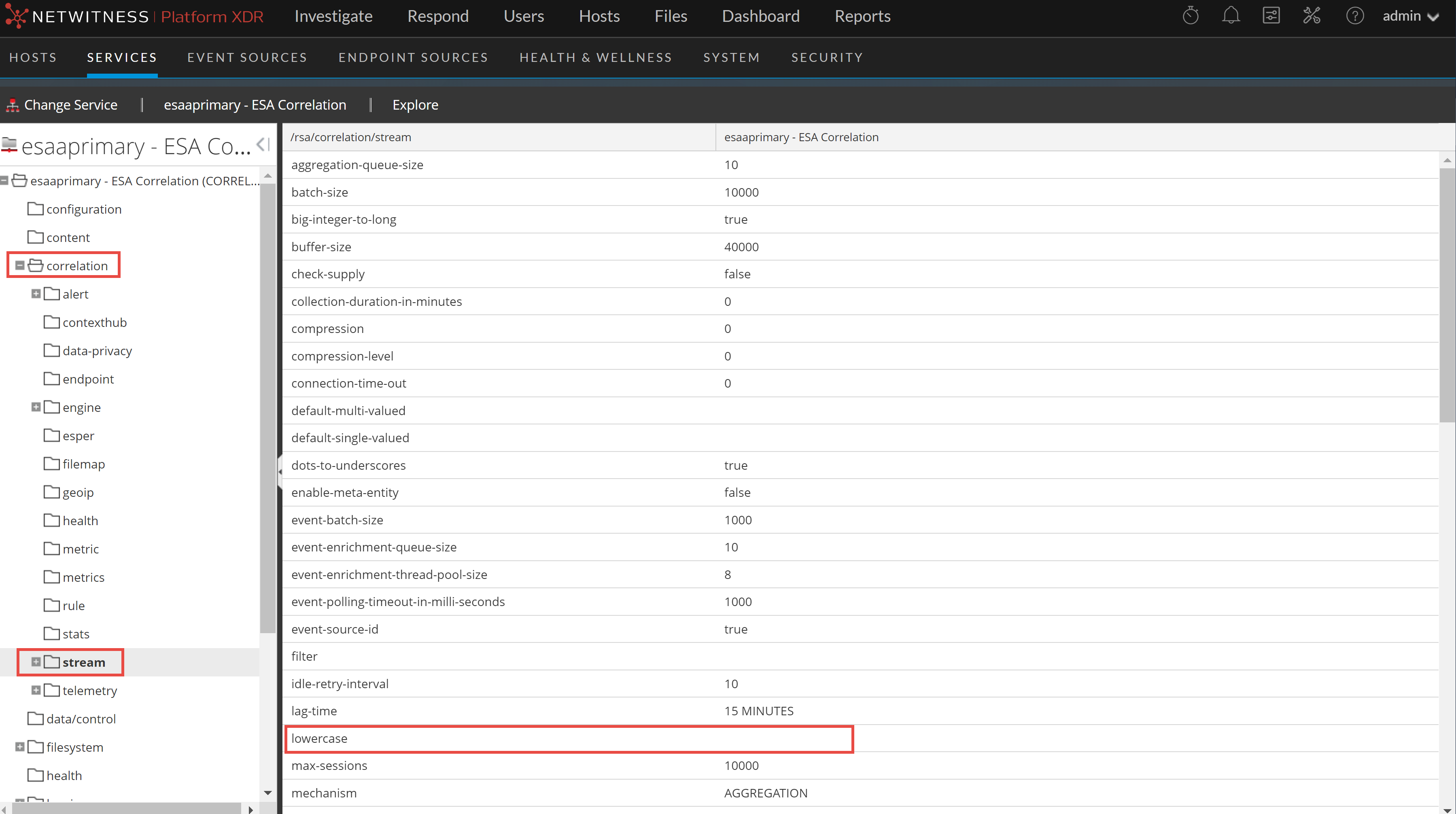
4. Update the lowercase parameter with the string or string array meta keys identified in step 1 using a comma separated list, for example: protocol,alias.host,action,alert
**Note:** String and string array are the only data types supported for the ESA Correlation service lowercase parameter.
Use NWDB format (decimal), NOT Esper format (underscore). Do not press **Enter** to commit or it will put in a return. Instead, click another parameter.
5. After you add all of the meta keys, validate the meta keys on ESA.
1. Go to ** (Configure) \> ESA Rules \> Settings tab \> Meta Key References** and click the Meta Re-Sync (Refresh) icon ().
2. Search for \_lower or \_lower, for example: protocol\_lower.
- The meta keys with a string array type should show a value of string\[\].
- The meta keys with a string type should show a value of string (without the brackets).
6. Update all of your ESA rules that use .toLowerCase meta keys and replace them with \_lower (Example: filename\_lower IN ('svchost.exe'))
7. Deploy the ESA rule deployment again.
**Note:** If you remove a meta key from the lowercase parameter list and re-sync the meta key references, you also need to update the rules that use the corresponding lowercase meta key ( \_lower).
[](https://mydev.netwitness.com/?hsLang=en)
Copyright © 2026, NetWitness LLC. All rights reserved.
[NetWitness Platform](https://www.netwitness.com/)
[Acceptable Use Policy](https://www.netwitness.com/wp-content/uploads/Acceptable-Use-Policy-092022.pdf) [Privacy Statement](https://www.netwitness.com/wp-content/uploads/NetWitness-Privacy-Statement-07292024.pdf)

[](https://www.linkedin.com/company/netwitness-platform/) [](https://www.youtube.com/@netwitness)
© 2026 NetWitness LLC. All rights reserved.