---
title: Configure Application Rules
description: "Configure Application Rules\nApplication layer rules are applied at the session level. The following are sample application rules.\nTo truncate packets"
---
[Skip to content](https://mydev.netwitness.com/knowledge-base/configureapplicationrules#main-content)

- [Home](https://mydev.netwitness.com/home)
- Integrations
Show submenu for Integrations
- [Netwitness Platform Integrations](https://mydev.netwitness.com/netwitnessplatformintegrations)
- [Third Party Integrations](https://mydev.netwitness.com/thirdpartyintegrations)
- [Knowledge Center](https://mydev.netwitness.com/knowledge-base)
- Community
Show submenu for Community
- [Blogs](https://mydev.netwitness.com/netwitness-security-llc-blog)
- Discussions
- Customers
Show submenu for Customers
- [Manage Products and Licenses](https://mydev.netwitness.com/nwportal)
- Downloads
- Partners
Show submenu for Partners
- [Partner Program](https://mydev.netwitness.com/partner)
- [Partner Resources](https://mydev.netwitness.com/partnerresources)
- [Submit a New Deal Registration](https://mydev.netwitness.com/dealregistration)
- [Become a Partner](https://mydev.netwitness.com/becomeapartner)
- [Update Your Partner Locator Profile](https://www.netwitness.com/partner-locator/?utm_source=pardotnewsletter&utm_medium=email&utm_campaign=partner_march)
- [NetWitness LinkedIn Partner Hub](https://linkedin.com/showcase/netwitnesspartners/)
- Education
Show submenu for Education
- [Instructor Led Training Schedule](https://mydev.netwitness.com/instructorledtrainingschedule)
- [NetWitness Training Catalog](https://mydev.netwitness.com/netwitnesstrainingcatalog)
- [Security Awareness Training](https://mydev.netwitness.com/securityawarenesstraining)
- [New Product Readiness](https://mydev.netwitness.com/newproductreadiness)
- [On-Demand Virtual Labs](https://mydev.netwitness.com/ondemandvirtuallabs)
- [Additional Training Information](https://mydev.netwitness.com/additionaltraininginformation)
- [Frequently Asked Questions](https://mydev.netwitness.com/educationfaq)
- [Contact NetWitness Education Team](https://mydev.netwitness.com/contact-netwitness-education-team)
- Support
Show submenu for Support
- [Contact Support](https://mydev.netwitness.com/contact-support)
- [Create a New Case](https://mydev.netwitness.com/create-support-case)
- [View My Cases](https://mydev.netwitness.com/viewmycase)
- [Product Version Life Cycle](https://mydev.netwitness.com/product-version-life-cycle)
- [Warranty & Replacement Parts](https://mydev.netwitness.com/warranty-and-replacement-parts)
- [Community Support Forum](https://mydev.netwitness.com/community-support-forum)
- [Technical Support Guide](https://mydev.netwitness.com/technical-support-guide)
Open main navigation
Close main navigation
- [Home](https://mydev.netwitness.com/home)
- Integrations
Show submenu for Integrations
- [Netwitness Platform Integrations](https://mydev.netwitness.com/netwitnessplatformintegrations)
- [Third Party Integrations](https://mydev.netwitness.com/thirdpartyintegrations)
- [Knowledge Center](https://mydev.netwitness.com/knowledge-base)
- Community
Show submenu for Community
- [Blogs](https://mydev.netwitness.com/netwitness-security-llc-blog)
- Discussions
- Customers
Show submenu for Customers
- [Manage Products and Licenses](https://mydev.netwitness.com/nwportal)
- Downloads
- Partners
Show submenu for Partners
- [Partner Program](https://mydev.netwitness.com/partner)
- [Partner Resources](https://mydev.netwitness.com/partnerresources)
- [Submit a New Deal Registration](https://mydev.netwitness.com/dealregistration)
- [Become a Partner](https://mydev.netwitness.com/becomeapartner)
- [Update Your Partner Locator Profile](https://www.netwitness.com/partner-locator/?utm_source=pardotnewsletter&utm_medium=email&utm_campaign=partner_march)
- [NetWitness LinkedIn Partner Hub](https://linkedin.com/showcase/netwitnesspartners/)
- Education
Show submenu for Education
- [Instructor Led Training Schedule](https://mydev.netwitness.com/instructorledtrainingschedule)
- [NetWitness Training Catalog](https://mydev.netwitness.com/netwitnesstrainingcatalog)
- [Security Awareness Training](https://mydev.netwitness.com/securityawarenesstraining)
- [New Product Readiness](https://mydev.netwitness.com/newproductreadiness)
- [On-Demand Virtual Labs](https://mydev.netwitness.com/ondemandvirtuallabs)
- [Additional Training Information](https://mydev.netwitness.com/additionaltraininginformation)
- [Frequently Asked Questions](https://mydev.netwitness.com/educationfaq)
- [Contact NetWitness Education Team](https://mydev.netwitness.com/contact-netwitness-education-team)
- Support
Show submenu for Support
- [Contact Support](https://mydev.netwitness.com/contact-support)
- [Create a New Case](https://mydev.netwitness.com/create-support-case)
- [View My Cases](https://mydev.netwitness.com/viewmycase)
- [Product Version Life Cycle](https://mydev.netwitness.com/product-version-life-cycle)
- [Warranty & Replacement Parts](https://mydev.netwitness.com/warranty-and-replacement-parts)
- [Community Support Forum](https://mydev.netwitness.com/community-support-forum)
- [Technical Support Guide](https://mydev.netwitness.com/technical-support-guide)
How can we help you?
- There are no suggestions because the search field is empty.
1. [NetWitness Knowledge Base](https://mydev.netwitness.com/knowledge-base?hsLang=en)
2. [Documentation](https://mydev.netwitness.com/knowledge-base/documentation?hsLang=en)
April 27, 2026
# Configure Application Rules
## Configure Application Rules
Application layer rules are applied at the session level. The following are sample application rules.
To truncate packets carried via Server Message Block protocol (SMB), create a rule as follows:
- Rule Name: Truncate SMB
- Condition: service=139
- Rule Action: Truncate All
To retain email to and from a specific e‐mail address, create a rule as follows:
- Rule Name: Retain Email Tom Jones
- Condition: email='Tom.Jones@TheShop.com'
- Rule Action: Keep
To add or edit an application rule:
1. Go to  (Admin) \> **Services**.
2. Select a Decoder or Log Decoder service and  \> **View** \> **Confi**g.
The Systems Config view for the selected service is displayed.
3. Select the **App Rules** tab.
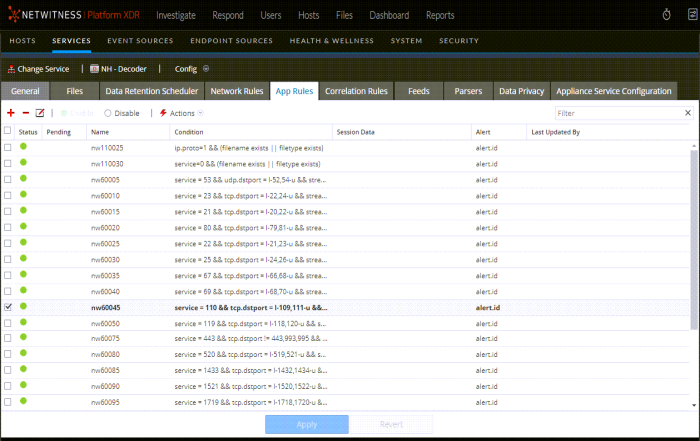
4. Do one of the following:
- If adding a new rule, click  .
- If editing a rule, select the rule from the rules list and click .
5. The Rule Editor Dialog is displayed with application rule parameters.
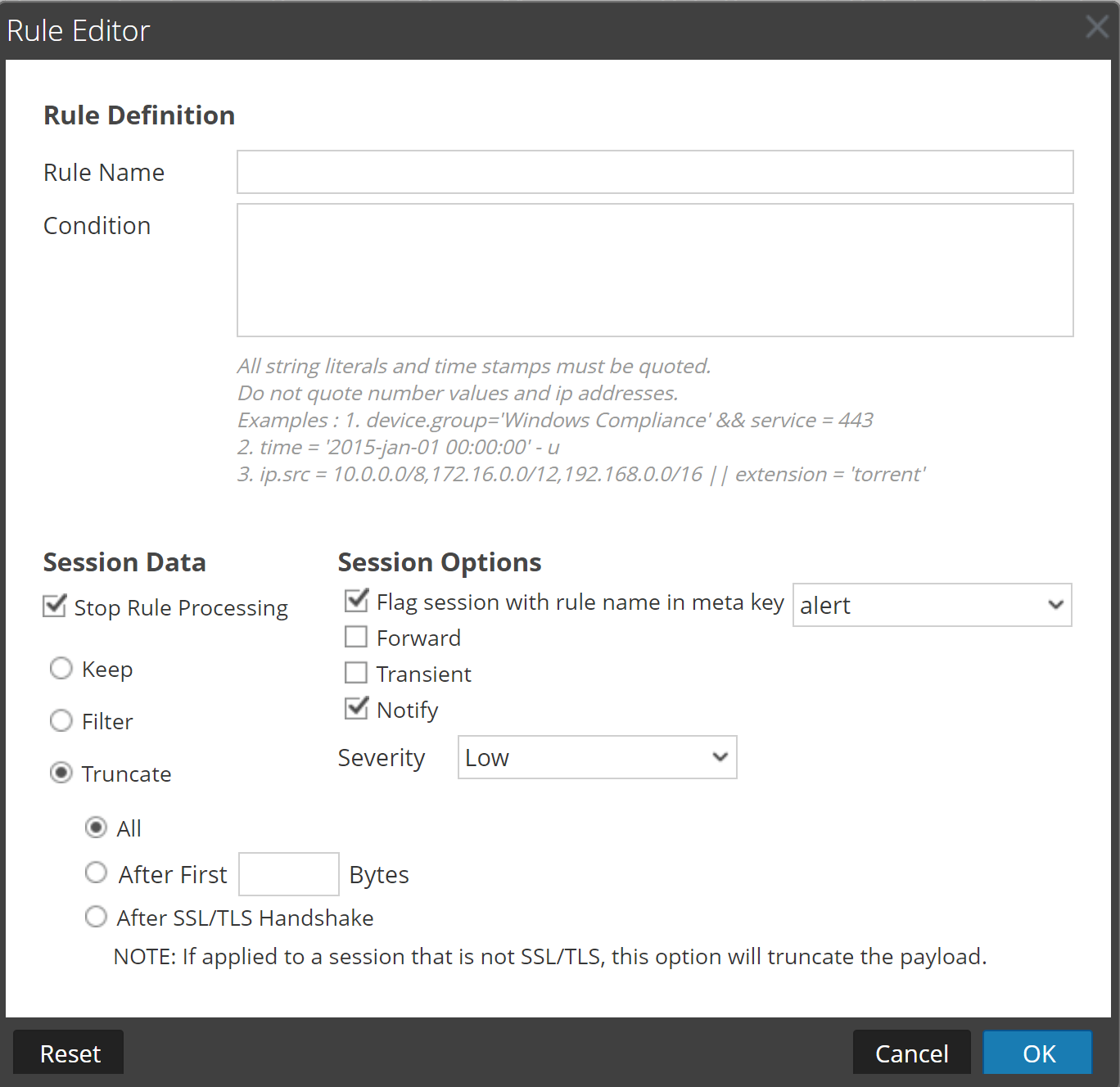
1. In the **Rule Name** field, type a name for the rule. For example, for a rule that truncates all SMB, type **Truncate SMB**.
2. In the **Condition** field, build the rule condition that triggers an action when matched. You can type directly in the field or build the condition in this field using meta from the window actions. As you build the rule definition, NetWitness displays syntax errors and warnings. For example, to truncate all SMB, type **service=139**.
All string literals and time stamps must be quoted. Do not quote number values and IP addresses. [Configure Decoder Rules](https://50269063.hs-sites.com/knowledge-base/ConfigureDecoderRules?hsLang=en) provides additional details.
3. If you want rule evaluation to end with this rule, check the **Stop Rule Processing** checkbox.
4. In the **Session Data** section, choose one of the following actions to apply when a matching packet is found:
- **Keep**: The packet payload and associated meta are saved when they match the rule.
- **Filter**: The packet is not saved when it matches the rule.
- **Truncate**: Select a truncate option to execute when a packet matches the rule. The example uses the **All** option.
- **Truncate All** to save the packet headers and associated metadata, and do not save the packet payload.
- **Truncate After First Bytes** to save the packet headers and associated metadata, and do not save the packet payload after the specified first bytes, where is a number of bytes.
- **Truncate SSL/TLS Handshake** to truncates the payload for all sessions except in the case of an SSL/TLS session, where the SSL exchange is preserved, but the rest of the payload is not saved. This option is for use with SSL parsers.
5. In the **Session Options** section, do any of the following:
- Enable the **Flag session with rule name in meta key** and select the metadata for the alert from the drop-down list, which generates a custom alert when metadata matches the rule. This is mandatory.
- **To perform syslog forwarding** when the log matches the rule, enable the **Forward** flag. Make sure that:
- You have enabled both the Alert and Forward flags to carry out syslog forwarding.
- The name of the rule mentioned in the Rule Editor dialog matches the syslog forwarding destination name specified in the Log Decoder \> View \> Explore \> /decoder/config/logs.forwarding.destination parameter
- **To prevent the alert metadata that is created from being written to the disk**, enable the **Transient** flag.
- Enable the **Notify** option to choose the **Severity** level from the drop-down menu for the application rule created. The available options are listed below:
- Low
- Medium
- High
- Critical
**Note:** Severity is selected by default as **Low**.
- To save the rule and add it to the grid, click **OK**.
The rule is added at the end of the grid or inserted where you specified in the context menu. The plus sign is displayed in the **Pending** column.
- Check that the rule is in the correct execution sequence with other rules in the grid. If necessary, move the rule.
- To apply the updated rule set to the Decoder or Log Decoder, click **Apply**.
NetWitness saves a snapshot of the currently applied rules, then applies the updated set to the Decoder and removes the pending indicator from the rules that were pending.
### Monitor Application Rules
The Decoder and Log Decoder keep track of how many times each application rule matches a session. These stats can be viewed by connecting to the Decoder or Log Decoder Explore view and viewing the properties on the /decoder/config/rules/application folder. Then, send the command "statdump" to that folder. The output of this message is a listing of the number of times each application rule is hit. The listing is ordered in the same order as the contents of the rule definitions in the /decoder/config/rules/application folder.
**Note:** Any existing client code using statdump for app rules may require updates to include the new payload fields "treeHandle, name, and uuid" in the response.
> 0001: hits=6 loaded=true treeHandle=1 name=1.2.3.4.app uuid
>
> 0002: hits=6 loaded=true treeHandle=2 name=5.6.7.8.app uuid
>
> 0003: hits=65 loaded=true treeHandle=3 name=9.1.0.1.app uuid
The hit counters for the application rules are reset whenever the parsers are reloaded.
[](https://mydev.netwitness.com/?hsLang=en)
Copyright © 2026, NetWitness LLC. All rights reserved.
[NetWitness Platform](https://www.netwitness.com/)
[Acceptable Use Policy](https://www.netwitness.com/wp-content/uploads/Acceptable-Use-Policy-092022.pdf) [Privacy Statement](https://www.netwitness.com/wp-content/uploads/NetWitness-Privacy-Statement-07292024.pdf)

[](https://www.linkedin.com/company/netwitness-platform/) [](https://www.youtube.com/@netwitness)
© 2026 NetWitness LLC. All rights reserved.