---
title: Configure an Alert
description: "Configure an Alert Configure an Alert \nYou can configure an alert by setting up alert notifications and adding a notification method to a rule. \nNot"
---
[Skip to content](https://mydev.netwitness.com/knowledge-base/configureanalert#main-content)

- [Home](https://mydev.netwitness.com/home)
- Integrations
Show submenu for Integrations
- [Netwitness Platform Integrations](https://mydev.netwitness.com/netwitnessplatformintegrations)
- [Third Party Integrations](https://mydev.netwitness.com/thirdpartyintegrations)
- [Knowledge Center](https://mydev.netwitness.com/knowledge-base)
- Community
Show submenu for Community
- [Blogs](https://mydev.netwitness.com/netwitness-security-llc-blog)
- Discussions
- Customers
Show submenu for Customers
- [Manage Products and Licenses](https://mydev.netwitness.com/nwportal)
- Downloads
- Partners
Show submenu for Partners
- [Partner Program](https://mydev.netwitness.com/partner)
- [Partner Resources](https://mydev.netwitness.com/partnerresources)
- [Submit a New Deal Registration](https://mydev.netwitness.com/dealregistration)
- [Become a Partner](https://mydev.netwitness.com/becomeapartner)
- [Update Your Partner Locator Profile](https://www.netwitness.com/partner-locator/?utm_source=pardotnewsletter&utm_medium=email&utm_campaign=partner_march)
- [NetWitness LinkedIn Partner Hub](https://linkedin.com/showcase/netwitnesspartners/)
- Education
Show submenu for Education
- [Instructor Led Training Schedule](https://mydev.netwitness.com/instructorledtrainingschedule)
- [NetWitness Training Catalog](https://mydev.netwitness.com/netwitnesstrainingcatalog)
- [Security Awareness Training](https://mydev.netwitness.com/securityawarenesstraining)
- [New Product Readiness](https://mydev.netwitness.com/newproductreadiness)
- [On-Demand Virtual Labs](https://mydev.netwitness.com/ondemandvirtuallabs)
- [Additional Training Information](https://mydev.netwitness.com/additionaltraininginformation)
- [Frequently Asked Questions](https://mydev.netwitness.com/educationfaq)
- [Contact NetWitness Education Team](https://mydev.netwitness.com/contact-netwitness-education-team)
- Support
Show submenu for Support
- [Contact Support](https://mydev.netwitness.com/contact-support)
- [Create a New Case](https://mydev.netwitness.com/create-support-case)
- [View My Cases](https://mydev.netwitness.com/viewmycase)
- [Product Version Life Cycle](https://mydev.netwitness.com/product-version-life-cycle)
- [Warranty & Replacement Parts](https://mydev.netwitness.com/warranty-and-replacement-parts)
- [Community Support Forum](https://mydev.netwitness.com/community-support-forum)
- [Technical Support Guide](https://mydev.netwitness.com/technical-support-guide)
Open main navigation
Close main navigation
- [Home](https://mydev.netwitness.com/home)
- Integrations
Show submenu for Integrations
- [Netwitness Platform Integrations](https://mydev.netwitness.com/netwitnessplatformintegrations)
- [Third Party Integrations](https://mydev.netwitness.com/thirdpartyintegrations)
- [Knowledge Center](https://mydev.netwitness.com/knowledge-base)
- Community
Show submenu for Community
- [Blogs](https://mydev.netwitness.com/netwitness-security-llc-blog)
- Discussions
- Customers
Show submenu for Customers
- [Manage Products and Licenses](https://mydev.netwitness.com/nwportal)
- Downloads
- Partners
Show submenu for Partners
- [Partner Program](https://mydev.netwitness.com/partner)
- [Partner Resources](https://mydev.netwitness.com/partnerresources)
- [Submit a New Deal Registration](https://mydev.netwitness.com/dealregistration)
- [Become a Partner](https://mydev.netwitness.com/becomeapartner)
- [Update Your Partner Locator Profile](https://www.netwitness.com/partner-locator/?utm_source=pardotnewsletter&utm_medium=email&utm_campaign=partner_march)
- [NetWitness LinkedIn Partner Hub](https://linkedin.com/showcase/netwitnesspartners/)
- Education
Show submenu for Education
- [Instructor Led Training Schedule](https://mydev.netwitness.com/instructorledtrainingschedule)
- [NetWitness Training Catalog](https://mydev.netwitness.com/netwitnesstrainingcatalog)
- [Security Awareness Training](https://mydev.netwitness.com/securityawarenesstraining)
- [New Product Readiness](https://mydev.netwitness.com/newproductreadiness)
- [On-Demand Virtual Labs](https://mydev.netwitness.com/ondemandvirtuallabs)
- [Additional Training Information](https://mydev.netwitness.com/additionaltraininginformation)
- [Frequently Asked Questions](https://mydev.netwitness.com/educationfaq)
- [Contact NetWitness Education Team](https://mydev.netwitness.com/contact-netwitness-education-team)
- Support
Show submenu for Support
- [Contact Support](https://mydev.netwitness.com/contact-support)
- [Create a New Case](https://mydev.netwitness.com/create-support-case)
- [View My Cases](https://mydev.netwitness.com/viewmycase)
- [Product Version Life Cycle](https://mydev.netwitness.com/product-version-life-cycle)
- [Warranty & Replacement Parts](https://mydev.netwitness.com/warranty-and-replacement-parts)
- [Community Support Forum](https://mydev.netwitness.com/community-support-forum)
- [Technical Support Guide](https://mydev.netwitness.com/technical-support-guide)
How can we help you?
- There are no suggestions because the search field is empty.
1. [NetWitness Knowledge Base](https://mydev.netwitness.com/knowledge-base?hsLang=en)
2. [Documentation](https://mydev.netwitness.com/knowledge-base/documentation?hsLang=en)
April 28, 2026
# Configure an Alert
## Configure an Alert Configure an Alert
You can configure an alert by setting up alert notifications and adding a notification method to a rule.
**Note:** Only Administrators can set up these notifications.
To configure an alert:
1. Go to **Reports**.
The Manage tab is displayed.
2. Click **Alerts**.
The Alert view is displayed.
3. In the **Alert** toolbar, click .
The Create/Modify Alert panel is displayed.
4. Click **Enable** to enable the alert.
5. In the **Rule Basis** field:
1. Click **Browse**.
The Lookup Rule Basis dialog box is displayed.
2. Navigate the Rule tree and select a rule.
3. Click **OK**.
The Rule name is displayed in the Rule Basis field.
6. From the **Data Sources** drop-down list, select a data source.
**Note:** If the data source is not listed, then ensure you have **Read** permissions set for the data source. This is applicable for NWDB and Warehouse Connector data sources. For more information, see **"Configure Data Source Permissions"** topic in the *Host and Services Configuration Guide*.
7. Select the **Push to decoders** checkbox for the Reporting Engine to send the rule to the Decoder.
8. (Optional) Enter an alert description in the **Description** field.
9. From the **Severity** drop-down list, select the severity level.
10. In the **Notification** field:
1. Select the appropriate notification.
The selected notification tab is displayed in the Create/Modify Alert dialog box.
2. (Optional) Deselect the notification to disable the notification tab.
3. Define an action in one of the **Notification** tabs:
1. In the **Record** tab field:
1. From the **Execute** drop-down list, select the frequency for recording an alert.
2. Enter the RECORD message. You can create a new message or select a template in the **Body Template** field and modify the template here.
3. (Optional) If templates have been defined, select a template for the RECORD message that you can use as is or modify.
2. In the **SMTP** tab field:
1. From the **Execute** drop-down list, select a value to identify the number of times to send an email message for the alert.
2. Enter an email address or comma-separated list of email addresses to send this alert.
3. Enter the subject of the email message.
4. Enter the body of the message. You can create a new message or select a template in the **Body Template** field and modify the template here.
3. In the **SNMP** tab field:
1. From the **Execute** drop-down list, select a value to identify the number of times that you want to send an SNMP message for the alert.
2. Enter the SNMP message. You can create a new message or select a template in the **Body Template** field and modify the template here.
4. In the **Syslog** tab field:
**Note:** You can configure Multiple Syslog servers on the Syslog Configuration panel. For more information, see **"Reporting Engine Output Actions"** topic in the *Host and Services Configuration Guide*.
1. Click .
The New Syslog Configuration dialog box is displayed.
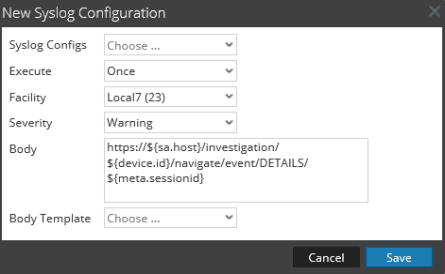
2. From the **Syslog Configs** drop-down list, select a value for the syslog configuration.
3. From the **Execute** drop-down list, select a value to identify the number of times to send a Syslog message for the alert.
4. From the **Facility** drop-down list, select the facility.
5. From the **Severity** drop-down list, select the severity level.
6. Enter the Syslog message. You can create a new message or select a template in the **Body Template** field and modify the template here.
**Note:** If you want to add a metakey, specify the same in the format: ${meta.metakey}. For example, ${meta.ip.dst}.
7. Click **Save**.
The Syslog configuration gets added to the alert.
11. Click **Create**.
NetWitness creates an alert with a confirmation message that the alert is saved successfully. NetWitness generates the alert and executes the output actions every minute.
[](https://mydev.netwitness.com/?hsLang=en)
Copyright © 2026, NetWitness LLC. All rights reserved.
[NetWitness Platform](https://www.netwitness.com/)
[Acceptable Use Policy](https://www.netwitness.com/wp-content/uploads/Acceptable-Use-Policy-092022.pdf) [Privacy Statement](https://www.netwitness.com/wp-content/uploads/NetWitness-Privacy-Statement-07292024.pdf)

[](https://www.linkedin.com/company/netwitness-platform/) [](https://www.youtube.com/@netwitness)
© 2026 NetWitness LLC. All rights reserved.