---
title: Configure Advanced Settings for ESA Correlation
description: "Configure Advanced Settings for an ESA Correlation ServiceConfigure Advanced Settings for an ESA Correlation Service\nThese procedures are optional an"
---
[Skip to content](https://mydev.netwitness.com/knowledge-base/configureadvancedsettingsforesacorrelation#main-content)

- [Home](https://mydev.netwitness.com/home)
- Integrations
Show submenu for Integrations
- [Netwitness Platform Integrations](https://mydev.netwitness.com/netwitnessplatformintegrations)
- [Third Party Integrations](https://mydev.netwitness.com/thirdpartyintegrations)
- [Knowledge Center](https://mydev.netwitness.com/knowledge-base)
- Community
Show submenu for Community
- [Blogs](https://mydev.netwitness.com/netwitness-security-llc-blog)
- Discussions
- Customers
Show submenu for Customers
- [Manage Products and Licenses](https://mydev.netwitness.com/nwportal)
- Downloads
- Partners
Show submenu for Partners
- [Partner Program](https://mydev.netwitness.com/partner)
- [Partner Resources](https://mydev.netwitness.com/partnerresources)
- [Submit a New Deal Registration](https://mydev.netwitness.com/dealregistration)
- [Become a Partner](https://mydev.netwitness.com/becomeapartner)
- [Update Your Partner Locator Profile](https://www.netwitness.com/partner-locator/?utm_source=pardotnewsletter&utm_medium=email&utm_campaign=partner_march)
- [NetWitness LinkedIn Partner Hub](https://linkedin.com/showcase/netwitnesspartners/)
- Education
Show submenu for Education
- [Instructor Led Training Schedule](https://mydev.netwitness.com/instructorledtrainingschedule)
- [NetWitness Training Catalog](https://mydev.netwitness.com/netwitnesstrainingcatalog)
- [Security Awareness Training](https://mydev.netwitness.com/securityawarenesstraining)
- [New Product Readiness](https://mydev.netwitness.com/newproductreadiness)
- [On-Demand Virtual Labs](https://mydev.netwitness.com/ondemandvirtuallabs)
- [Additional Training Information](https://mydev.netwitness.com/additionaltraininginformation)
- [Frequently Asked Questions](https://mydev.netwitness.com/educationfaq)
- [Contact NetWitness Education Team](https://mydev.netwitness.com/contact-netwitness-education-team)
- Support
Show submenu for Support
- [Contact Support](https://mydev.netwitness.com/contact-support)
- [Create a New Case](https://mydev.netwitness.com/create-support-case)
- [View My Cases](https://mydev.netwitness.com/viewmycase)
- [Product Version Life Cycle](https://mydev.netwitness.com/product-version-life-cycle)
- [Warranty & Replacement Parts](https://mydev.netwitness.com/warranty-and-replacement-parts)
- [Community Support Forum](https://mydev.netwitness.com/community-support-forum)
- [Technical Support Guide](https://mydev.netwitness.com/technical-support-guide)
Open main navigation
Close main navigation
- [Home](https://mydev.netwitness.com/home)
- Integrations
Show submenu for Integrations
- [Netwitness Platform Integrations](https://mydev.netwitness.com/netwitnessplatformintegrations)
- [Third Party Integrations](https://mydev.netwitness.com/thirdpartyintegrations)
- [Knowledge Center](https://mydev.netwitness.com/knowledge-base)
- Community
Show submenu for Community
- [Blogs](https://mydev.netwitness.com/netwitness-security-llc-blog)
- Discussions
- Customers
Show submenu for Customers
- [Manage Products and Licenses](https://mydev.netwitness.com/nwportal)
- Downloads
- Partners
Show submenu for Partners
- [Partner Program](https://mydev.netwitness.com/partner)
- [Partner Resources](https://mydev.netwitness.com/partnerresources)
- [Submit a New Deal Registration](https://mydev.netwitness.com/dealregistration)
- [Become a Partner](https://mydev.netwitness.com/becomeapartner)
- [Update Your Partner Locator Profile](https://www.netwitness.com/partner-locator/?utm_source=pardotnewsletter&utm_medium=email&utm_campaign=partner_march)
- [NetWitness LinkedIn Partner Hub](https://linkedin.com/showcase/netwitnesspartners/)
- Education
Show submenu for Education
- [Instructor Led Training Schedule](https://mydev.netwitness.com/instructorledtrainingschedule)
- [NetWitness Training Catalog](https://mydev.netwitness.com/netwitnesstrainingcatalog)
- [Security Awareness Training](https://mydev.netwitness.com/securityawarenesstraining)
- [New Product Readiness](https://mydev.netwitness.com/newproductreadiness)
- [On-Demand Virtual Labs](https://mydev.netwitness.com/ondemandvirtuallabs)
- [Additional Training Information](https://mydev.netwitness.com/additionaltraininginformation)
- [Frequently Asked Questions](https://mydev.netwitness.com/educationfaq)
- [Contact NetWitness Education Team](https://mydev.netwitness.com/contact-netwitness-education-team)
- Support
Show submenu for Support
- [Contact Support](https://mydev.netwitness.com/contact-support)
- [Create a New Case](https://mydev.netwitness.com/create-support-case)
- [View My Cases](https://mydev.netwitness.com/viewmycase)
- [Product Version Life Cycle](https://mydev.netwitness.com/product-version-life-cycle)
- [Warranty & Replacement Parts](https://mydev.netwitness.com/warranty-and-replacement-parts)
- [Community Support Forum](https://mydev.netwitness.com/community-support-forum)
- [Technical Support Guide](https://mydev.netwitness.com/technical-support-guide)
How can we help you?
- There are no suggestions because the search field is empty.
1. [NetWitness Knowledge Base](https://mydev.netwitness.com/knowledge-base?hsLang=en)
2. [Documentation](https://mydev.netwitness.com/knowledge-base/documentation?hsLang=en)
April 27, 2026
# Configure Advanced Settings for ESA Correlation
## Configure Advanced Settings for an ESA Correlation ServiceConfigure Advanced Settings for an ESA Correlation Service
These procedures are optional and they apply only to ESA Correlation Rules.
In the Explore view for an ESA Correlation service, you can manage sending ESA rule alerts to the Respond view, turn on debugging for all rules, configure the events to preserve for rules with multiple events, and configure meta keys as string array values on ESA.
- [Enable or Disable Sending ESA Rule Alerts to the Respond View](https://mydev.netwitness.com/knowledge-base/configureadvancedsettingsforesacorrelation#Enable_Respond)
- [Enable ESA Correlation Service Debugging for All Rules](https://mydev.netwitness.com/knowledge-base/configureadvancedsettingsforesacorrelation#Enable_AllRuleDebugging)
- [Configure Maximum Events per Alert for All Rules](https://mydev.netwitness.com/knowledge-base/configureadvancedsettingsforesacorrelation#CfgMaxEventsPerAllRules)
- [Adjust Maximum Sessions for the ESA Data Source Filter](https://mydev.netwitness.com/knowledge-base/configureadvancedsettingsforesacorrelation#AdjustMaxSession)
- [Configure Meta Keys as Arrays in ESA Correlation Rule Values](https://mydev.netwitness.com/knowledge-base/configureadvancedsettingsforesacorrelation#Meta_Arrays)
- [Remove Sensitive Meta Keys Globally from All Alerts for Data Privacy](https://mydev.netwitness.com/knowledge-base/configureadvancedsettingsforesacorrelation#RemoveKeysForDataPrivacy)
## Access Advanced Settings for an ESA Correlation ServiceAccess Advanced Settings for an ESA Correlation Service
1. Go to ** (Admin) \> Services**.
The Services view is displayed.
2. In Services view, select an ESA Correlation service and then select  **\> View \> Explore**.
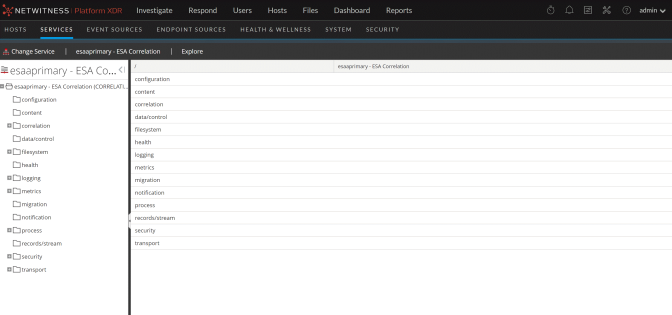
The Explore view is displayed.
## Enable or Disable Sending ESA Rule Alerts to the Respond ViewEnable or Disable Sending ESA Rule Alerts to the Respond View
ESA gathers data, runs ESA Correlation rules against the data, captures events that meet rule criteria, and creates alerts for those captured events. You can view those alerts in the Respond view.
Before an ESA Correlation rule alert can go to the Respond view, both of the following settings must be enabled:
1. For all rules, the ESA Correlation service must have the respond-enabled parameter set to **true**. (The default is true.)
2. For an individual rule, the ESA Correlation rule must have the **Alert** option selected in the rule builder for that rule.
To enable or disable alert forwarding to the Respond view for ALL ESA Correlation rules:
1. In the Explore view node list for an ESA Correlation service, select **correlation \> alert**.
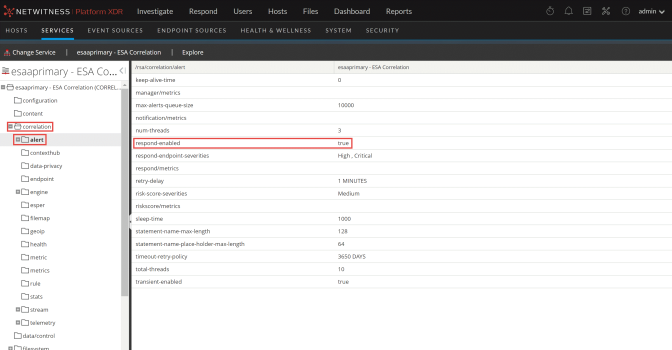
2. To allow all ESA Correlation Rule alerts to go to the Respond view, set respond-enabled to **true**. Alerts for ESA rules that have the **Alert** option selected are visible in the Respond view.
3. To stop all ESA Correlation Rule alerts from going to the Respond view, set respond-enabled to **false**.
ESA Correlation Rules do not go to the Respond view, even if you select the **Alert** option in the rule.
The changes take effect immediately.
**Note:** The respond-enabled parameter is equivalent to the **Forward Alerts On Message Bus** option in the Event Stream Analysis service in NetWitness Platform version 11.2 and earlier.
To send or not send alerts to the Respond view for a single ESA Correlation rule:
Content experts managing the ESA Correlation rules can decide whether to send alerts to the Respond view for each rule.
1. Go to ** (Configure) \> ESA Rules \> Rules** tab.
The Rules tab is displayed.
2. In the **Rule Library**, select the rule you want to edit and click .
Depending on the rule type, the respective rule tab is displayed.
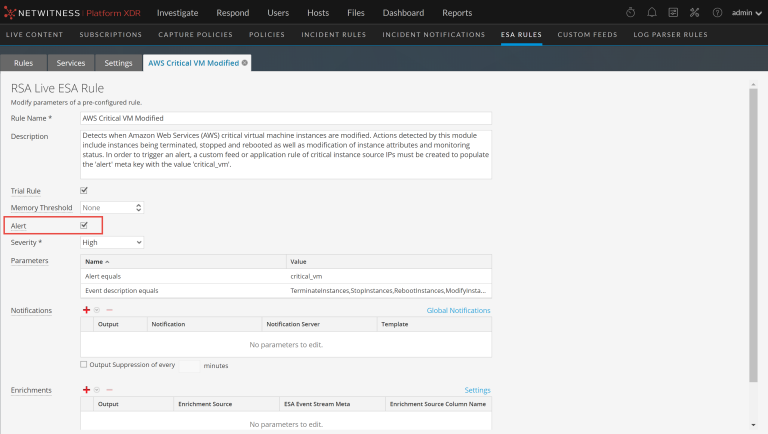
- To turn on Respond alerts for a rule, select the **Alert** checkbox.
- To turn off Respond alerts for a rule, clear the **Alert** checkbox.
3. Click **Save**.
For more information, see the *Alerting with ESA Correlation Rules User Guide*.
## Enable ESA Correlation Service Debugging for All RulesEnable ESA Correlation Service Debugging for All Rules
You can turn on debugging for all ESA rules to see if rules are creating (firing) alerts and data is being processed properly by the ESA Correlation service. This can also be helpful when writing or fixing global notification templates, such as syslog or email. You can see the actual content of an alert before sending the notification.
When you disable ESA Correlation service debugging for all rules, you can still turn on debugging for an individual rule at any time.
1. In the Explore view node list for an ESA Correlation service, select **correlation \> rule**.
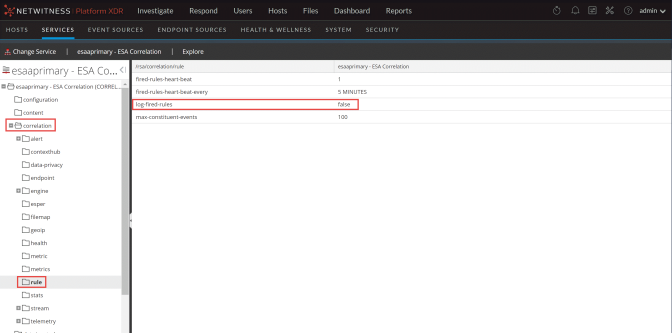
2. Set log-fired-rules to **true** to print alerts to the /var/log/netwitness/correlation-server/correlation-server.log for troubleshooting. This is the same as the Debug option in the rule builders for individual ESA rules except that this option enables debugging for all rules.
3. When you are ready to turn off debugging for all ESA rules, set log-fired-rules to **false**.
The changes take effect immediately.
**Note:** The log-fired-rules parameter is equivalent to the **Debug Rules?** option in the Event Stream Analysis service in NetWitness Platform version 11.2 and earlier.
## Configure Maximum Events per Alert for All RulesConfigure Maximum Events per Alert for All Rules
1. In the Explore view node list for an ESA Correlation service, select **correlation \> rule**.
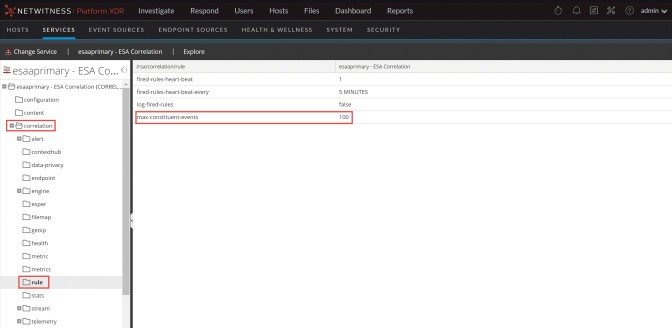
2. For rules that contain multiple events, in max-constituent-events, enter how many of the associated events to preserve. For example, if a rule fires an alert with 200 associated events and this parameter is set to 100, only the first 100 are preserved by ESA, the rest are dropped. The default value is **100**.
The changes take effect immediately.
**Note:** The max-constituent-events parameter is equivalent to the **Max Constituent Events** option in the Event Stream Analysis service in NetWitness Platform version 11.2 and earlier.
## Adjust Maximum Sessions for the ESA Data Source FilterAdjust Maximum Sessions for the ESA Data Source Filter
**Note:** This procedure applies only to NetWitness Platform version 11.5 and later.
In NetWitness Platform 11.5 and later, you can add an optional data source filter to the data sources in your ESA rule deployments to improve performance. This allows your data sources to be filtered further so that only the data relevant to the deployment is forwarded to ESA. The filter is comprised of application rules, which are applied to the Decoders mapped to your selected data sources.
**Caution:** The data source filter is intended for advanced users familiar with Decoder application rules. Improper filtering can cause the required data to not be forwarded to and analyzed by ESA.
Using a data source filter can be performance intensive for data aggregation. A filter slows the event aggregation rate, but when you are filtering a large amount of traffic, it can have performance benefits on ESA Correlation server. However, if you use a complex filter and do not filter a large amount of traffic, the event aggregation rate may be lower than expected.
## 11.5 Adjust Maximum Sessions for the ESA Data Source Filter11.5 Adjust Maximum Sessions for the ESA Data Source Filter
When filtering out a large portion of the traffic, you may see an "Invalid header size" error while communicating with Core services in the ESA Correlation log file. (You can use SSH to get in the system and go to: /var/log/netwitness/correlation-server/correlation-server.log). Lower the max-sessions parameter until you no longer see the error in the log. The more you filter out the traffic, the lower you should set the max-sessions parameter.
1. In the Explore view node list for an ESA Correlation service, select **correlation \> stream**.
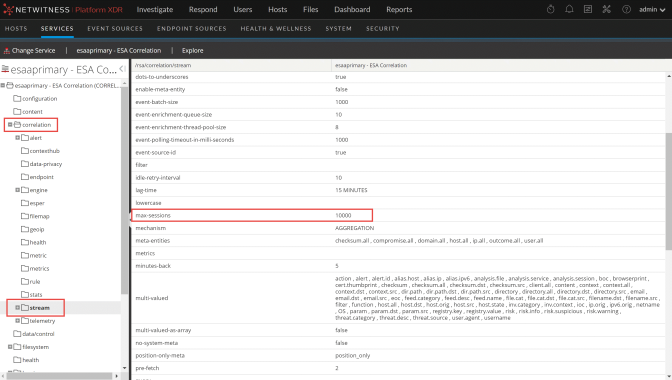
2. In max-sessions, lower the value until you no longer see the error in the ESA Correlation log file. The default value is **10000**.
3. Restart the ESA Correlation service. Go to ** (Admin) \> Services**, select the ESA Correlation service, and then select ** \> Restart**.
**IMPORTANT:** If an application rule linked to a data source filter is modified on a Decoder, the filter must be removed, added again, and redeployed. The changes take effect on ESA after the deployment is redeployed.
For more information, see “(Optional) Add a Data Source Filter” in the *Alerting with ESA Correlation Rules User Guide*.
## Configure Meta Keys as Arrays in ESA Correlation Rule ValuesConfigure Meta Keys as Arrays in ESA Correlation Rule Values
A common reason for an ESA rule to generate an error during deployment is because a meta key in the rule is a string array type, but it shows as a string type on ESA. To prevent or fix this issue, do the following:
- [Determine if a Meta Key is a String Array Type on ESA](https://mydev.netwitness.com/knowledge-base/configureadvancedsettingsforesacorrelation#DetermineArrayType)
- [Add the String Array Type Meta Key to ESA](https://mydev.netwitness.com/knowledge-base/configureadvancedsettingsforesacorrelation#AddMetaKeyToESA)
- [Verify that the String Array Type Meta Key is Configured Correctly on ESA](https://mydev.netwitness.com/knowledge-base/configureadvancedsettingsforesacorrelation#VerifyTypeOnESA)
**Caution:** Changing string to string array type is not necessary for all fields. To support Endpoint, UEBA, and RSA Live content, specific string array (multi-value) and string (single-value) meta keys are required. See [Update Your ESA Rules for the Required Multi-Value and Single-Value Meta Keys](https://50269063.hs-sites.com/knowledge-base/UpdateYourESARulesfortheRequiredMulti-ValueandSingle-ValueMetaKeys?hsLang=en).
### Determine if a Meta Key is a String Array Type on ESADetermine if a Meta Key is a String Array Type on ESA
1. Go to ** (Configure) \> ESA Rules** and click the **Settings** tab.
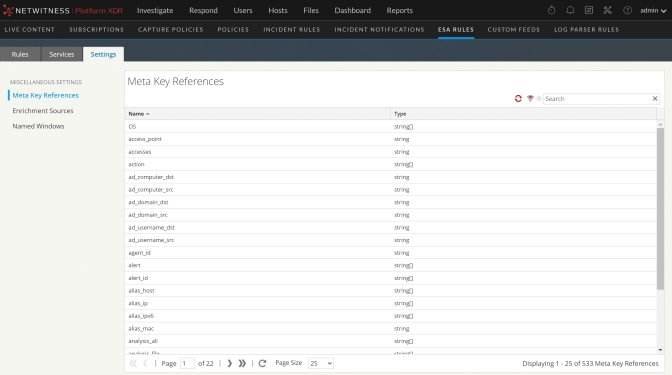
2. In the Meta Key References, for each meta key that is a string array type, locate the meta key in the Name field and then check the value.
- If it shows string\[\], it is configured as a string array type on ESA. This is fine.
- If it shows string without the brackets, it is configured as a string type and you need to fix it on ESA. Go to [Add the String Array Type Meta Key to ESA](https://mydev.netwitness.com/knowledge-base/configureadvancedsettingsforesacorrelation#AddMetaKeyToESA).
**Caution:** Changing string to string array type is not necessary for all fields. To support Endpoint, UEBA, and RSA Live content, specific string array (multi-value) and string (single-value) meta keys are required. See [Update Your ESA Rules for the Required Multi-Value and Single-Value Meta Keys](https://50269063.hs-sites.com/knowledge-base/UpdateYourESARulesfortheRequiredMulti-ValueandSingle-ValueMetaKeys?hsLang=en).
### Add the String Array Type Meta Key to ESAAdd the String Array Type Meta Key to ESA
**Caution:** Any changes that you make to the multi-valued parameter may cause an error when you deploy your existing rules. If you add a meta key to the multi-valued parameter field that you use in other ESA rules, ensure that those rules are using the string array syntax.
1. In the Explore view node list for an ESA Correlation service, select **correlation \> stream**.
2. Add string array meta keys to the **multi-valued** list to allow them to be used as an array in ESA rules.
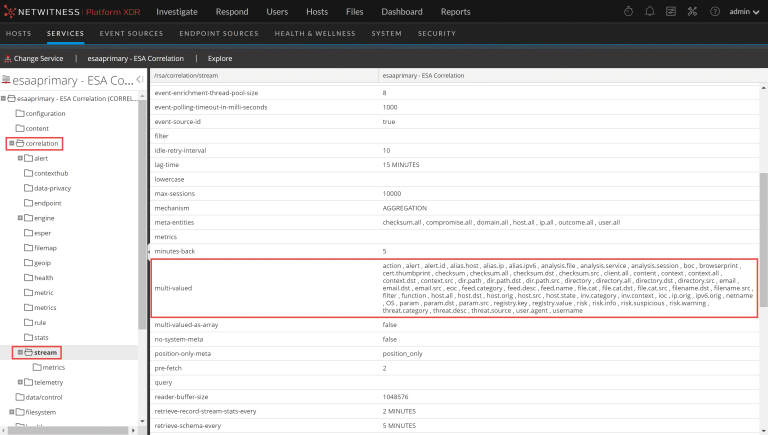
3. Verify the configuration on ESA. Go to [Verify that the String Array Type Meta Key is Configured Correctly on ESA](https://mydev.netwitness.com/knowledge-base/configureadvancedsettingsforesacorrelation#VerifyTypeOnESA).
**Note:** The multi-valued parameter is equivalent to the arrayFieldNames parameter in the Event Stream Analysis service in NetWitness version 11.2 and earlier.
### Verify that the String Array Type Meta Key is Configured Correctly on ESAVerify that the String Array Type Meta Key is Configured Correctly on ESA
1. Go back to ** (Configure) \> ESA Rules** and click the **Settings** tab.
2. In the Meta Key References, click the Meta Re-Sync (Refresh) icon ().
3. Verify that the meta keys with a string array type show a value of string\[\].
### Required String Array Meta Keys on the ESA Correlation ServiceRequired String Array Meta Keys on the ESA Correlation Service
To use the latest Endpoint, UEBA, and Live content rules, the following default **multi-valued** meta keys are required on the ESA Correlation service in NetWitness Platform version 11.3 and later:
action , alert , alert.id , alias.host , alias.ip , alias.ipv6 , analysis.file , analysis.service , analysis.session , boc , browserprint , cert.thumbprint , checksum , checksum.all , checksum.dst , checksum.src , client.all , content , context , context.all , context.dst , context.src , dir.path , dir.path.dst , dir.path.src , directory , directory.all , directory.dst , directory.src , email , email.dst , email.src , eoc , feed.category , feed.desc , feed.name , file.cat , file.cat.dst , file.cat.src , filename.dst , filename.src , filter , function , host.all , host.dst , host.orig , host.src , host.state , inv.category , inv.context , ioc , ip.orig , ipv6.orig , netname , OS , param , param.dst , param.src , registry.key , registry.value , risk , risk.info , risk.suspicious , risk.warning , threat.category , threat.desc , threat.source , user.agent , username
The following default **single-valued** meta keys are also required on the ESA Correlation service in NetWitness Platform 11.3.0.2 and later:
accesses , context.target , file.attributes , logon.type.desc , packets
**Note:** Check the default-multi-valued and default-single-valued parameters on your ESA Correlation service for the latest required fields. For more information, see [Update Your ESA Rules for the Required Multi-Value and Single-Value Meta Keys](https://50269063.hs-sites.com/knowledge-base/UpdateYourESARulesfortheRequiredMulti-ValueandSingle-ValueMetaKeys?hsLang=en).
## Remove Sensitive Meta Keys Globally from All Alerts for Data PrivacyRemove Sensitive Meta Keys Globally from All Alerts for Data Privacy
## 11.4 Remove Sensitive Meta Keys from Global Alerts for Data Privacy11.4 Remove Sensitive Meta Keys from Global Alerts for Data Privacy
**Note:** This procedure applies only to ESA Correlation Rules in NetWitness Platform 11.4 and later versions.
For data privacy reasons, it may be necessary to remove some sensitive meta keys from the alert output globally, regardless of the data source. In the ESA Correlation service, you can set the global-private-fields parameter to remove the meta keys from all alert output.
1. Go to ** (Admin) \> Services**, and in the Services view, select an ESA Correlation service and then select  **\> View \> Explore**.
2. In the Explore view node list for the ESA Correlation service, select **correlation \> data-privacy**.
3. In the global-private-fields parameter, add the sensitive meta keys that you want removed from all alerts.
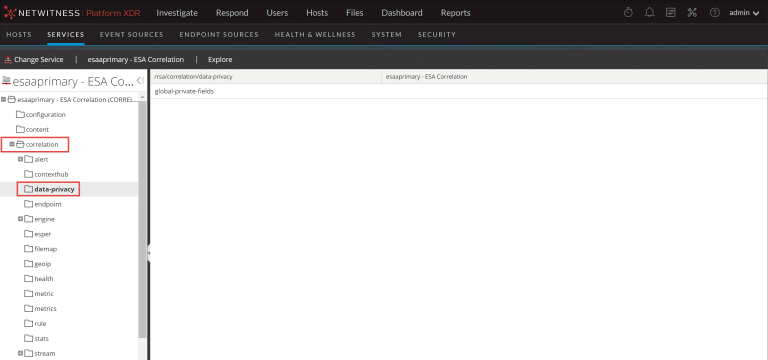
The changes are effective immediately.
For more information, see "How ESA Handles Sensitive Data" in the *Alerting with ESA Correlation Rules Configuration Guide*. For more information on the strategy and benefits of obfuscating data, see the *Data Privacy Management Guide*.
[](https://mydev.netwitness.com/?hsLang=en)
Copyright © 2026, NetWitness LLC. All rights reserved.
[NetWitness Platform](https://www.netwitness.com/)
[Acceptable Use Policy](https://www.netwitness.com/wp-content/uploads/Acceptable-Use-Policy-092022.pdf) [Privacy Statement](https://www.netwitness.com/wp-content/uploads/NetWitness-Privacy-Statement-07292024.pdf)

[](https://www.linkedin.com/company/netwitness-platform/) [](https://www.youtube.com/@netwitness)
© 2026 NetWitness LLC. All rights reserved.