---
title: Configure Active Directory Data Source
description: "Configure Active Directory as a Data Source\nYou can configure Active Directory (AD) as a data source for Context Hub using LDAP and use the Context H"
---
[Skip to content](https://mydev.netwitness.com/knowledge-base/configureactivedirectorydatasource#main-content)

- [Home](https://mydev.netwitness.com/home)
- Integrations
Show submenu for Integrations
- [Netwitness Platform Integrations](https://mydev.netwitness.com/netwitnessplatformintegrations)
- [Third Party Integrations](https://mydev.netwitness.com/thirdpartyintegrations)
- [Knowledge Center](https://mydev.netwitness.com/knowledge-base)
- Community
Show submenu for Community
- [Blogs](https://mydev.netwitness.com/netwitness-security-llc-blog)
- Discussions
- Customers
Show submenu for Customers
- [Manage Products and Licenses](https://mydev.netwitness.com/nwportal)
- Downloads
- Partners
Show submenu for Partners
- [Partner Program](https://mydev.netwitness.com/partner)
- [Partner Resources](https://mydev.netwitness.com/partnerresources)
- [Submit a New Deal Registration](https://mydev.netwitness.com/dealregistration)
- [Become a Partner](https://mydev.netwitness.com/becomeapartner)
- [Update Your Partner Locator Profile](https://www.netwitness.com/partner-locator/?utm_source=pardotnewsletter&utm_medium=email&utm_campaign=partner_march)
- [NetWitness LinkedIn Partner Hub](https://linkedin.com/showcase/netwitnesspartners/)
- Education
Show submenu for Education
- [Instructor Led Training Schedule](https://mydev.netwitness.com/instructorledtrainingschedule)
- [NetWitness Training Catalog](https://mydev.netwitness.com/netwitnesstrainingcatalog)
- [Security Awareness Training](https://mydev.netwitness.com/securityawarenesstraining)
- [New Product Readiness](https://mydev.netwitness.com/newproductreadiness)
- [On-Demand Virtual Labs](https://mydev.netwitness.com/ondemandvirtuallabs)
- [Additional Training Information](https://mydev.netwitness.com/additionaltraininginformation)
- [Frequently Asked Questions](https://mydev.netwitness.com/educationfaq)
- [Contact NetWitness Education Team](https://mydev.netwitness.com/contact-netwitness-education-team)
- Support
Show submenu for Support
- [Contact Support](https://mydev.netwitness.com/contact-support)
- [Create a New Case](https://mydev.netwitness.com/create-support-case)
- [View My Cases](https://mydev.netwitness.com/viewmycase)
- [Product Version Life Cycle](https://mydev.netwitness.com/product-version-life-cycle)
- [Warranty & Replacement Parts](https://mydev.netwitness.com/warranty-and-replacement-parts)
- [Community Support Forum](https://mydev.netwitness.com/community-support-forum)
- [Technical Support Guide](https://mydev.netwitness.com/technical-support-guide)
Open main navigation
Close main navigation
- [Home](https://mydev.netwitness.com/home)
- Integrations
Show submenu for Integrations
- [Netwitness Platform Integrations](https://mydev.netwitness.com/netwitnessplatformintegrations)
- [Third Party Integrations](https://mydev.netwitness.com/thirdpartyintegrations)
- [Knowledge Center](https://mydev.netwitness.com/knowledge-base)
- Community
Show submenu for Community
- [Blogs](https://mydev.netwitness.com/netwitness-security-llc-blog)
- Discussions
- Customers
Show submenu for Customers
- [Manage Products and Licenses](https://mydev.netwitness.com/nwportal)
- Downloads
- Partners
Show submenu for Partners
- [Partner Program](https://mydev.netwitness.com/partner)
- [Partner Resources](https://mydev.netwitness.com/partnerresources)
- [Submit a New Deal Registration](https://mydev.netwitness.com/dealregistration)
- [Become a Partner](https://mydev.netwitness.com/becomeapartner)
- [Update Your Partner Locator Profile](https://www.netwitness.com/partner-locator/?utm_source=pardotnewsletter&utm_medium=email&utm_campaign=partner_march)
- [NetWitness LinkedIn Partner Hub](https://linkedin.com/showcase/netwitnesspartners/)
- Education
Show submenu for Education
- [Instructor Led Training Schedule](https://mydev.netwitness.com/instructorledtrainingschedule)
- [NetWitness Training Catalog](https://mydev.netwitness.com/netwitnesstrainingcatalog)
- [Security Awareness Training](https://mydev.netwitness.com/securityawarenesstraining)
- [New Product Readiness](https://mydev.netwitness.com/newproductreadiness)
- [On-Demand Virtual Labs](https://mydev.netwitness.com/ondemandvirtuallabs)
- [Additional Training Information](https://mydev.netwitness.com/additionaltraininginformation)
- [Frequently Asked Questions](https://mydev.netwitness.com/educationfaq)
- [Contact NetWitness Education Team](https://mydev.netwitness.com/contact-netwitness-education-team)
- Support
Show submenu for Support
- [Contact Support](https://mydev.netwitness.com/contact-support)
- [Create a New Case](https://mydev.netwitness.com/create-support-case)
- [View My Cases](https://mydev.netwitness.com/viewmycase)
- [Product Version Life Cycle](https://mydev.netwitness.com/product-version-life-cycle)
- [Warranty & Replacement Parts](https://mydev.netwitness.com/warranty-and-replacement-parts)
- [Community Support Forum](https://mydev.netwitness.com/community-support-forum)
- [Technical Support Guide](https://mydev.netwitness.com/technical-support-guide)
How can we help you?
- There are no suggestions because the search field is empty.
1. [NetWitness Knowledge Base](https://mydev.netwitness.com/knowledge-base?hsLang=en)
2. [Documentation](https://mydev.netwitness.com/knowledge-base/documentation?hsLang=en)
April 26, 2026
# Configure Active Directory Data Source
## Configure Active Directory as a Data Source
You can configure Active Directory (AD) as a data source for Context Hub using LDAP and use the Context Hub service to fetch contextual information from AD. Use the procedures in this topic to add AD as a data source for Context Hub service and configure the settings(if required) for AD.
Prerequisites
Before you configure Active Directory data source, ensure that:
- Context Hub service is available in ** (Admin) \> Services** view of NetWitness.
- AD is available and is running on Windows versions 2003, 2008, and 2012 are supported.
To add AD as a data source for Context Hub:
1. Go to ** (Admin) \> Services**.
The services view is displayed.
2. Select the Context Hub service and click  **\> View\> Config**.
The Services Config View of Context Hub is displayed.
3. In the **Data Sources** tab, click  **\> Active Directory**.
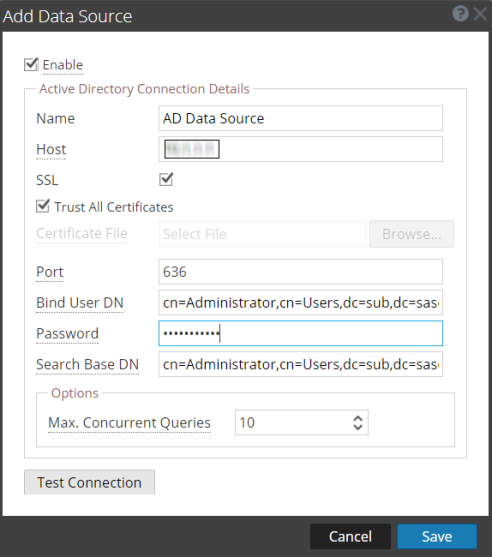
The **Add Data Source** dialog is displayed.
- You need to configure the Active Directory schema to replicate the following attributes to view the data in the Respond page:
- Employee ID
- Department
- Company
- Title
- Postal Code
All the other attributes replicate automatically.
1. Provide the following database connection details:
> - By default, the **Enable** checkbox is selected. If this option is unchecked, the save button is disabled, you cannot add the data source, and cannot view the contextual information.
> - Enter the following fields.
> - **Name:** Enter a name for the AD data source.
> - **Host:** Enter the host name or IP address of the AD.
> - **SSL:** By default this will be checked with 636 port number which will connect to the data source using Secure Sockets Layer (SSL) connection.
> - **Trust All Certificates**: Select this checkbox to add the data source without validating the certificate. If you uncheck this option, you need to upload a valid .cer or .crt format Active Directory server certificate for the connection to be successful. If you add multiple AD data sources with ssl, you should configure all the data sources with either a valid certificate or a Trust All Certificates.
> - **Port:** The default port is 636 with SSL and 389 without SSL.
> If you want to fetch data from multi-domains you can configure a single data source with the Global catalog port (3269 with SSL or 3268 without SSL).
>
> Alternately, for multi-domain, you can configure a single data source for each domain with the default port (389 with SSL or 636 without SSL).
>
> Multi-forest is a collection of multi-domains. If you want to fetch data from multi-forest you need to configure each forest with the Global catalog port (3269 with SSL or 3268 without SSL).
>
> - **Password:** Enter password of the user DN used to bind with AD.
> - **Bind User DN:** The distinguished name of the user that will authenticate to the search directory. For example, cn=Administrator,cn=Users,dc=sub,dc=saserver,dc=local.
> - **Search Base DN:** The base distinguished name, or base DN, identifies the entry in the directory from which searches are initiated; the base DN is often referred to as the search base. For example, dc=sub,dc=saserver,dc=local.
1. Click **Test Connection** to test the connection between Context Hub and the data source.
2. Click **Save**.
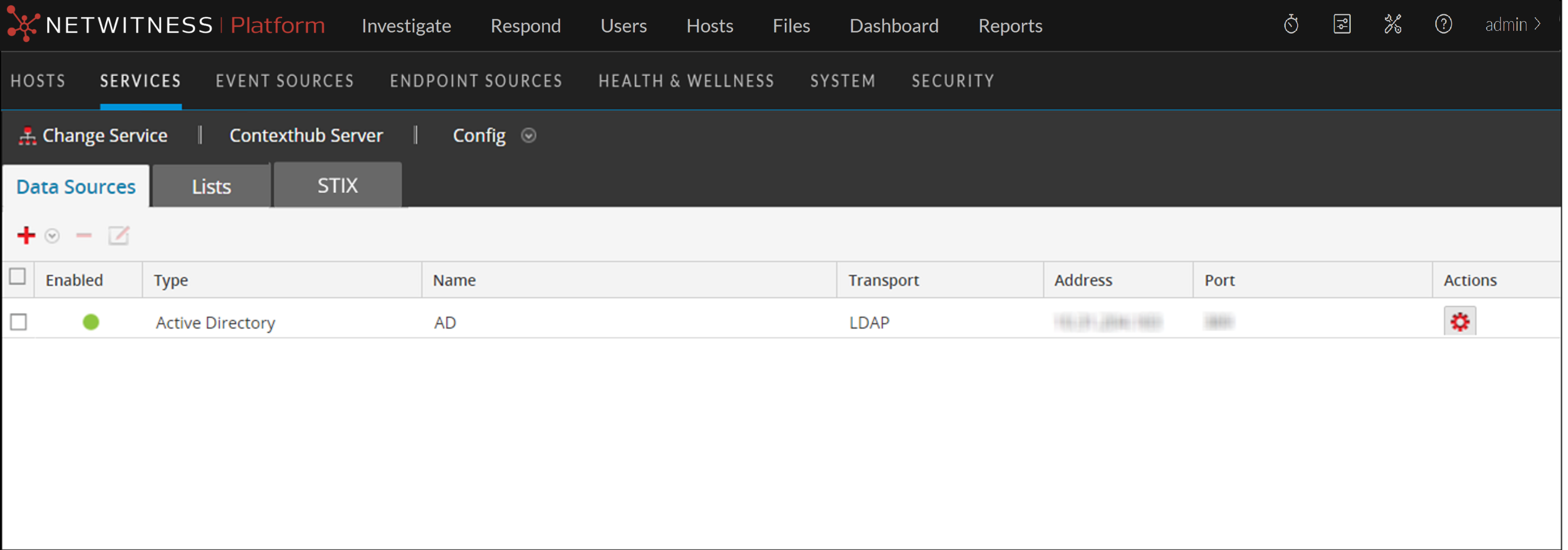
AD is added as a data source for the configured Context Hub. The added AD data source is displayed in the **Data Sources** tab.
After adding the data source, you can configure the data source settings. For instructions, see [Configure Context Hub Data Source Settings](https://50269063.hs-sites.com/knowledge-base/ConfigureDataSourcesSettings?hsLang=en).
**Next steps**
After completing the configuration, you can view the contextual data in the Context Summary Panel of the Respond view or Investigate view. For instructions, see the **Navigate to Context Summary Panel and View Additional Context** topic in the *Investigate User Guide*.
[](https://mydev.netwitness.com/?hsLang=en)
Copyright © 2026, NetWitness LLC. All rights reserved.
[NetWitness Platform](https://www.netwitness.com/)
[Acceptable Use Policy](https://www.netwitness.com/wp-content/uploads/Acceptable-Use-Policy-092022.pdf) [Privacy Statement](https://www.netwitness.com/wp-content/uploads/NetWitness-Privacy-Statement-07292024.pdf)

[](https://www.linkedin.com/company/netwitness-platform/) [](https://www.youtube.com/@netwitness)
© 2026 NetWitness LLC. All rights reserved.