---
title: Boot RSA NetWitness Platform 11.x appliance into Single User Mode
description: "Issue\nSome reasons to boot into Single-User mode\nReset a forgotten root password.Repair OS file system.Fix an /etc/fstab entry.Disable a service.\nNote"
---
[Skip to content](https://mydev.netwitness.com/knowledge-base/boot-rsa-netwitness-platform-11-x-appliance-into-single-user-mode#main-content)

- [Home](https://mydev.netwitness.com/home)
- Integrations
Show submenu for Integrations
- [Netwitness Platform Integrations](https://mydev.netwitness.com/netwitnessplatformintegrations)
- [Third Party Integrations](https://mydev.netwitness.com/thirdpartyintegrations)
- [Knowledge Center](https://mydev.netwitness.com/knowledge-base)
- Community
Show submenu for Community
- [Blogs](https://mydev.netwitness.com/netwitness-security-llc-blog)
- Discussions
- Customers
Show submenu for Customers
- [Manage Products and Licenses](https://mydev.netwitness.com/nwportal)
- Downloads
- Partners
Show submenu for Partners
- [Partner Program](https://mydev.netwitness.com/partner)
- [Partner Resources](https://mydev.netwitness.com/partnerresources)
- [Submit a New Deal Registration](https://mydev.netwitness.com/dealregistration)
- [Become a Partner](https://mydev.netwitness.com/becomeapartner)
- [Update Your Partner Locator Profile](https://www.netwitness.com/partner-locator/?utm_source=pardotnewsletter&utm_medium=email&utm_campaign=partner_march)
- [NetWitness LinkedIn Partner Hub](https://linkedin.com/showcase/netwitnesspartners/)
- Education
Show submenu for Education
- [Instructor Led Training Schedule](https://mydev.netwitness.com/instructorledtrainingschedule)
- [NetWitness Training Catalog](https://mydev.netwitness.com/netwitnesstrainingcatalog)
- [Security Awareness Training](https://mydev.netwitness.com/securityawarenesstraining)
- [New Product Readiness](https://mydev.netwitness.com/newproductreadiness)
- [On-Demand Virtual Labs](https://mydev.netwitness.com/ondemandvirtuallabs)
- [Additional Training Information](https://mydev.netwitness.com/additionaltraininginformation)
- [Frequently Asked Questions](https://mydev.netwitness.com/educationfaq)
- [Contact NetWitness Education Team](https://mydev.netwitness.com/contact-netwitness-education-team)
- Support
Show submenu for Support
- [Contact Support](https://mydev.netwitness.com/contact-support)
- [Create a New Case](https://mydev.netwitness.com/create-support-case)
- [View My Cases](https://mydev.netwitness.com/viewmycase)
- [Product Version Life Cycle](https://mydev.netwitness.com/product-version-life-cycle)
- [Warranty & Replacement Parts](https://mydev.netwitness.com/warranty-and-replacement-parts)
- [Community Support Forum](https://mydev.netwitness.com/community-support-forum)
- [Technical Support Guide](https://mydev.netwitness.com/technical-support-guide)
Open main navigation
Close main navigation
- [Home](https://mydev.netwitness.com/home)
- Integrations
Show submenu for Integrations
- [Netwitness Platform Integrations](https://mydev.netwitness.com/netwitnessplatformintegrations)
- [Third Party Integrations](https://mydev.netwitness.com/thirdpartyintegrations)
- [Knowledge Center](https://mydev.netwitness.com/knowledge-base)
- Community
Show submenu for Community
- [Blogs](https://mydev.netwitness.com/netwitness-security-llc-blog)
- Discussions
- Customers
Show submenu for Customers
- [Manage Products and Licenses](https://mydev.netwitness.com/nwportal)
- Downloads
- Partners
Show submenu for Partners
- [Partner Program](https://mydev.netwitness.com/partner)
- [Partner Resources](https://mydev.netwitness.com/partnerresources)
- [Submit a New Deal Registration](https://mydev.netwitness.com/dealregistration)
- [Become a Partner](https://mydev.netwitness.com/becomeapartner)
- [Update Your Partner Locator Profile](https://www.netwitness.com/partner-locator/?utm_source=pardotnewsletter&utm_medium=email&utm_campaign=partner_march)
- [NetWitness LinkedIn Partner Hub](https://linkedin.com/showcase/netwitnesspartners/)
- Education
Show submenu for Education
- [Instructor Led Training Schedule](https://mydev.netwitness.com/instructorledtrainingschedule)
- [NetWitness Training Catalog](https://mydev.netwitness.com/netwitnesstrainingcatalog)
- [Security Awareness Training](https://mydev.netwitness.com/securityawarenesstraining)
- [New Product Readiness](https://mydev.netwitness.com/newproductreadiness)
- [On-Demand Virtual Labs](https://mydev.netwitness.com/ondemandvirtuallabs)
- [Additional Training Information](https://mydev.netwitness.com/additionaltraininginformation)
- [Frequently Asked Questions](https://mydev.netwitness.com/educationfaq)
- [Contact NetWitness Education Team](https://mydev.netwitness.com/contact-netwitness-education-team)
- Support
Show submenu for Support
- [Contact Support](https://mydev.netwitness.com/contact-support)
- [Create a New Case](https://mydev.netwitness.com/create-support-case)
- [View My Cases](https://mydev.netwitness.com/viewmycase)
- [Product Version Life Cycle](https://mydev.netwitness.com/product-version-life-cycle)
- [Warranty & Replacement Parts](https://mydev.netwitness.com/warranty-and-replacement-parts)
- [Community Support Forum](https://mydev.netwitness.com/community-support-forum)
- [Technical Support Guide](https://mydev.netwitness.com/technical-support-guide)
How can we help you?
- There are no suggestions because the search field is empty.
1. [NetWitness Knowledge Base](https://mydev.netwitness.com/knowledge-base?hsLang=en)
2. [Break Fix](https://mydev.netwitness.com/knowledge-base/break-fix?hsLang=en)
April 30, 2026
# Boot RSA NetWitness Platform 11.x appliance into Single User Mode
#### Issue
Some reasons to boot into Single-User mode
- Reset a forgotten root password.
- Repair OS file system.
- Fix an /etc/fstab entry.
- Disable a service.
**Note:** This article shows how to get into Single User mode, and not how to do any of the above.
Single user mode is also seen as maintenance or emergency mode.
#### Resolution
Access the NetWitness appliance using the Console that is attached to the appliance, or over the configured iDRAC interface.
Reboot or power on the appliance.
After the BIOS and RAID controller checks, when the CentOS kernel boot starts to display the Grub Menu screen.
Press the down arrow to pause on the Grub Menu screen.
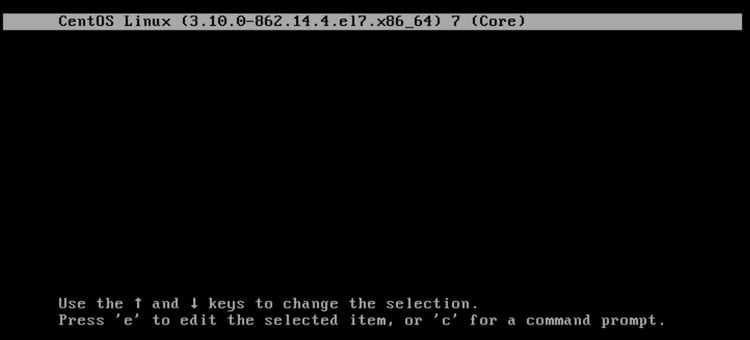
There should be one of more CentOS Linux kernel versions that can be selected.
Select by selecting a CentOS Linux kernel version and enter "e" to edit the kernel boot parameters for that kernel version.
Enter the root login and password. Grub password is "netwitness" (without quotation-marks).
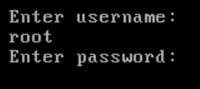
Edit the kernel boot parameters using either of the 2 below methods (where Method 1 seems easier).
**Method 1:**
Use the down arrow key to scroll through the lines of the kernel boot parameters.
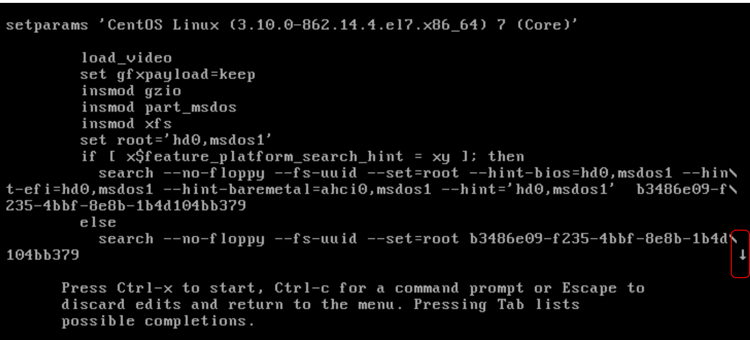
Look for the line that starts with "linux16", and with the cursor on this line press \[End\] to go to the end of the line.
Change the parameter "rd.shell=0" at the end of the line to "rd.break".
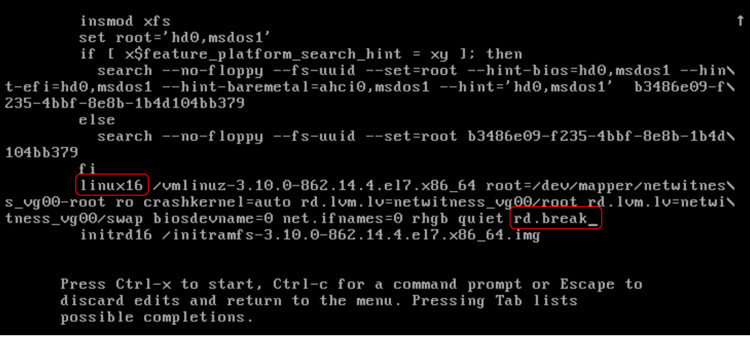
Press \[Ctrl\]-x to boot the kernel with this change, and it should boot to the switch\_root prompt.
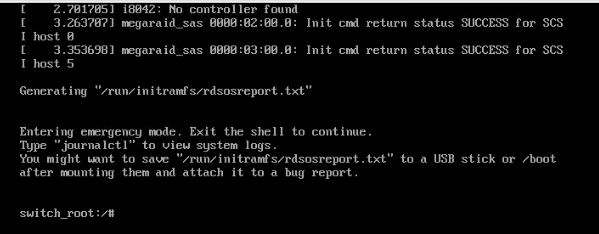
Remount the /sysroot in "rw" mode, and set the mount /sysroot as the root (/) directory.
mount -o remount,rw /sysroot
chroot /sysroot
Or **Method 2:**
Use the down arrow key to scroll through the lines of the kernel boot parameter. Look for the line that starts with "linux16", and with the cursor on this line, use the arrow keys to move on the line.
Change the parameter "ro" in the middle of the line to "rw init=/sysroot/bin/bash".
Press \[End\] to go to the end of the line and remove the parameter "rd.shell=0" at the end of the line.
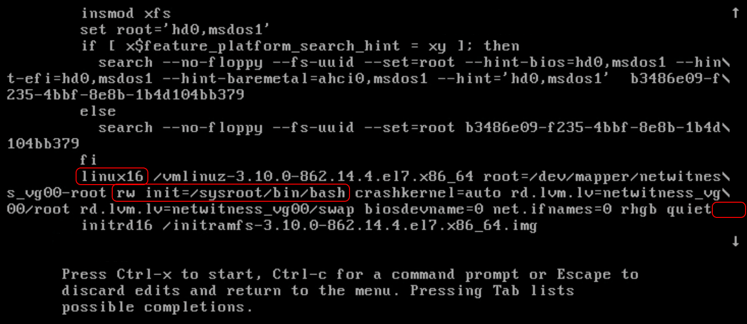
Press \[Ctrl\]-x to boot the kernel with this change, and it should boot to the bash prompt.
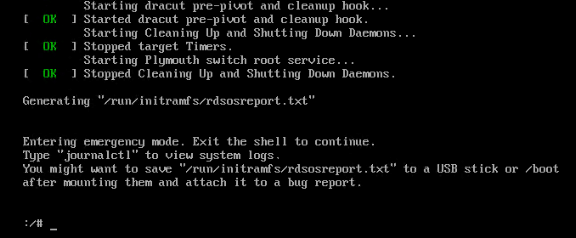
Set the mount /sysroot as the root (/) directory.
chroot /sysroot
The NetWitness appliance is now in Single user/maintenance/emergency mode.
#### Notes
For more verbose output during the kernel boot also remove the parameters "rhgb quiet",
rhgb (redhat graphical boot) = This is a GUI mode booting screen with most of the information hidden whilst displaying a rotating activity icon spinning and shows only brief information as to what the computer is doing.
quiet = Hides the majority of the boot messages before rhgb starts.
For additional reference see Red Hat article, [26.10. Terminal Menu Editing During Boot](https://access.redhat.com/documentation/en-us/red_hat_enterprise_linux/7/html/system_administrators_guide/sec-terminal_menu_editing_during_boot#proc-Resetting_the_Root_Password_Using_rd.break)
#### Product Details
**RSA Product Set:** NetWitness Platform
**RSA Product/Service Type:** NetWitness appliance
**RSA Version/Condition:** 11.x
**O/S Version:** CentOS 7
#### Summary
How to boot in CentOS 7 kernel Single User Mode?
#### Approval Reviewer Queue
Technical approval queue
[](https://mydev.netwitness.com/?hsLang=en)
Copyright © 2026, NetWitness LLC. All rights reserved.
[NetWitness Platform](https://www.netwitness.com/)
[Acceptable Use Policy](https://www.netwitness.com/wp-content/uploads/Acceptable-Use-Policy-092022.pdf) [Privacy Statement](https://www.netwitness.com/wp-content/uploads/NetWitness-Privacy-Statement-07292024.pdf)

[](https://www.linkedin.com/company/netwitness-platform/) [](https://www.youtube.com/@netwitness)
© 2026 NetWitness LLC. All rights reserved.