---
title: Appendix G. Sample Storage Configuration for Concentrator Index with One Meta Disk Kit
description: "Tags: Configuration, Staging Documentation, Version 12.1Appendix G. Sample Storage Configuration for Concentrator Index with One Meta Disk Kit This ap"
---
[Skip to content](https://mydev.netwitness.com/knowledge-base/appendixg-samplestorageconfigurationforconcentratorindexwithonemetadiskkit#main-content)

- [Home](https://mydev.netwitness.com/home)
- Integrations
Show submenu for Integrations
- [Netwitness Platform Integrations](https://mydev.netwitness.com/netwitnessplatformintegrations)
- [Third Party Integrations](https://mydev.netwitness.com/thirdpartyintegrations)
- [Knowledge Center](https://mydev.netwitness.com/knowledge-base)
- Community
Show submenu for Community
- [Blogs](https://mydev.netwitness.com/netwitness-security-llc-blog)
- Discussions
- Customers
Show submenu for Customers
- [Manage Products and Licenses](https://mydev.netwitness.com/nwportal)
- Downloads
- Partners
Show submenu for Partners
- [Partner Program](https://mydev.netwitness.com/partner)
- [Partner Resources](https://mydev.netwitness.com/partnerresources)
- [Submit a New Deal Registration](https://mydev.netwitness.com/dealregistration)
- [Become a Partner](https://mydev.netwitness.com/becomeapartner)
- [Update Your Partner Locator Profile](https://www.netwitness.com/partner-locator/?utm_source=pardotnewsletter&utm_medium=email&utm_campaign=partner_march)
- [NetWitness LinkedIn Partner Hub](https://linkedin.com/showcase/netwitnesspartners/)
- Education
Show submenu for Education
- [Instructor Led Training Schedule](https://mydev.netwitness.com/instructorledtrainingschedule)
- [NetWitness Training Catalog](https://mydev.netwitness.com/netwitnesstrainingcatalog)
- [Security Awareness Training](https://mydev.netwitness.com/securityawarenesstraining)
- [New Product Readiness](https://mydev.netwitness.com/newproductreadiness)
- [On-Demand Virtual Labs](https://mydev.netwitness.com/ondemandvirtuallabs)
- [Additional Training Information](https://mydev.netwitness.com/additionaltraininginformation)
- [Frequently Asked Questions](https://mydev.netwitness.com/educationfaq)
- [Contact NetWitness Education Team](https://mydev.netwitness.com/contact-netwitness-education-team)
- Support
Show submenu for Support
- [Contact Support](https://mydev.netwitness.com/contact-support)
- [Create a New Case](https://mydev.netwitness.com/create-support-case)
- [View My Cases](https://mydev.netwitness.com/viewmycase)
- [Product Version Life Cycle](https://mydev.netwitness.com/product-version-life-cycle)
- [Warranty & Replacement Parts](https://mydev.netwitness.com/warranty-and-replacement-parts)
- [Community Support Forum](https://mydev.netwitness.com/community-support-forum)
- [Technical Support Guide](https://mydev.netwitness.com/technical-support-guide)
Open main navigation
Close main navigation
- [Home](https://mydev.netwitness.com/home)
- Integrations
Show submenu for Integrations
- [Netwitness Platform Integrations](https://mydev.netwitness.com/netwitnessplatformintegrations)
- [Third Party Integrations](https://mydev.netwitness.com/thirdpartyintegrations)
- [Knowledge Center](https://mydev.netwitness.com/knowledge-base)
- Community
Show submenu for Community
- [Blogs](https://mydev.netwitness.com/netwitness-security-llc-blog)
- Discussions
- Customers
Show submenu for Customers
- [Manage Products and Licenses](https://mydev.netwitness.com/nwportal)
- Downloads
- Partners
Show submenu for Partners
- [Partner Program](https://mydev.netwitness.com/partner)
- [Partner Resources](https://mydev.netwitness.com/partnerresources)
- [Submit a New Deal Registration](https://mydev.netwitness.com/dealregistration)
- [Become a Partner](https://mydev.netwitness.com/becomeapartner)
- [Update Your Partner Locator Profile](https://www.netwitness.com/partner-locator/?utm_source=pardotnewsletter&utm_medium=email&utm_campaign=partner_march)
- [NetWitness LinkedIn Partner Hub](https://linkedin.com/showcase/netwitnesspartners/)
- Education
Show submenu for Education
- [Instructor Led Training Schedule](https://mydev.netwitness.com/instructorledtrainingschedule)
- [NetWitness Training Catalog](https://mydev.netwitness.com/netwitnesstrainingcatalog)
- [Security Awareness Training](https://mydev.netwitness.com/securityawarenesstraining)
- [New Product Readiness](https://mydev.netwitness.com/newproductreadiness)
- [On-Demand Virtual Labs](https://mydev.netwitness.com/ondemandvirtuallabs)
- [Additional Training Information](https://mydev.netwitness.com/additionaltraininginformation)
- [Frequently Asked Questions](https://mydev.netwitness.com/educationfaq)
- [Contact NetWitness Education Team](https://mydev.netwitness.com/contact-netwitness-education-team)
- Support
Show submenu for Support
- [Contact Support](https://mydev.netwitness.com/contact-support)
- [Create a New Case](https://mydev.netwitness.com/create-support-case)
- [View My Cases](https://mydev.netwitness.com/viewmycase)
- [Product Version Life Cycle](https://mydev.netwitness.com/product-version-life-cycle)
- [Warranty & Replacement Parts](https://mydev.netwitness.com/warranty-and-replacement-parts)
- [Community Support Forum](https://mydev.netwitness.com/community-support-forum)
- [Technical Support Guide](https://mydev.netwitness.com/technical-support-guide)
How can we help you?
- There are no suggestions because the search field is empty.
1. [NetWitness Knowledge Base](https://mydev.netwitness.com/knowledge-base?hsLang=en)
2. [Documentation](https://mydev.netwitness.com/knowledge-base/documentation?hsLang=en)
April 8, 2026
# Appendix G. Sample Storage Configuration for Concentrator Index with One Meta Disk Kit
**Tags:** Configuration, Staging Documentation, Version 12.1
## Appendix G. Sample Storage Configuration for Concentrator Index with One Meta Disk Kit
This appendix illustrates the examples of how to configure concentrator index with one Meta Disk Kit.
**Note:**
\- Concentrator index meta kit supports a minimum of two to a maximum of 6 drives (SSD).
\- A single Meta Disk pack is configured as RAID5 (3 drives) or two Meta Disk packs (6 drives) are configured as RAID6. Two drive configuration is also supported. The two drives are added in slots 4,5 and configured as RAID1.
\- When configuring two Meta Disk Packs or adding the second Meta Disk pack, use appropriate disk slot numbers when creating the virtual drive (step 5 below).
On the Series 6 (Dell R640) appliance, the Meta Drive Pack disks are installed in slots 4, 5 and 6. The virtual drive configuration requires identifying the controller ID and Enclosure ID (EID). On Series 6 appliance, the controller ID and Enclosure IDs are 0 and 64. However, the nwraidtool.py script that is installed on every server can help to confirm these ID numbers, or the PercCLI commands as shown in the below steps.
**Identify Controller/Enclosures**
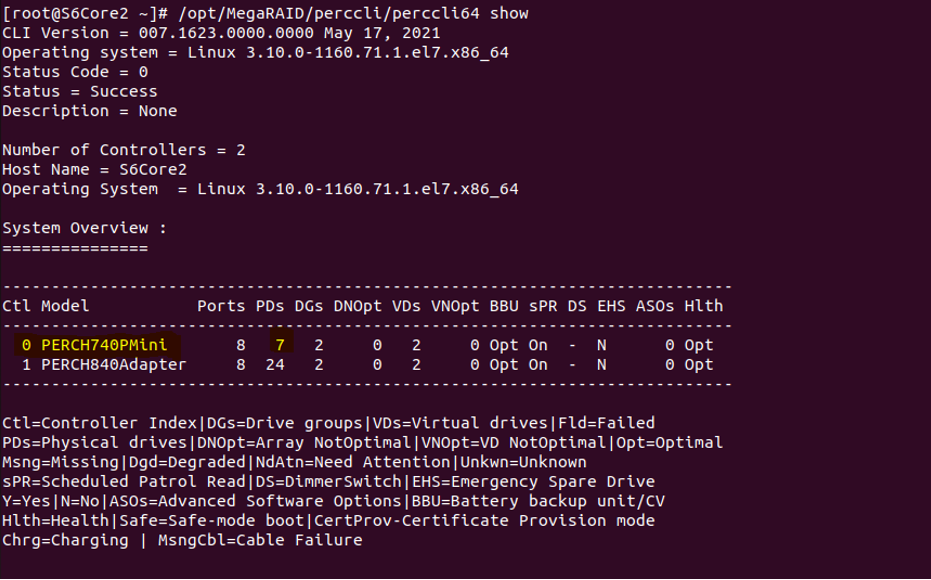
1. Identify the controller ID (Ctl) for the internal controller (PERC H740P Mini/ PERC H750). In the below figure the controller ID is 0 and highlighted in yellow. The drive count is displayed under PDs.
/opt/MegaRAID/perccli/perccli64 show
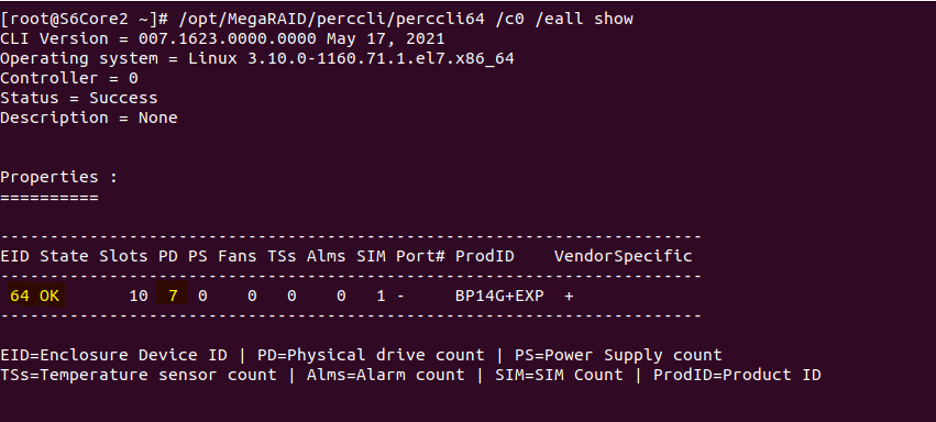
2. Identify the Enclosure ID (EID) for controller ‘0’. In this case the EID is ‘64’ and highlighted in yellow.
/opt/MegaRAID/perccli/perccli64 /c0 /eall show
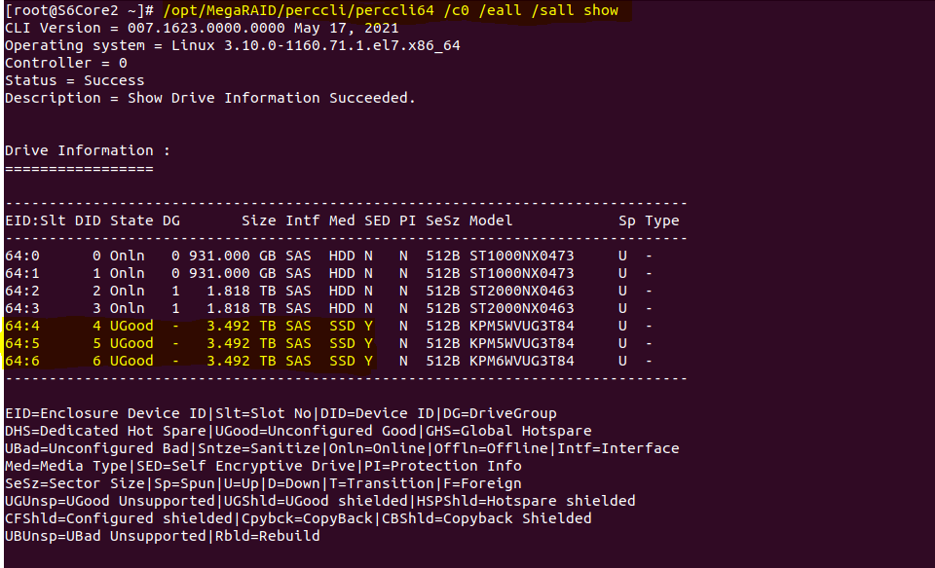
3. Identify the new Meta Disk kit disk slot numbers (Slots 4 through 9) on the controller PERC H740P Mini. These drives do not belong to any Drive Group (DG). The DG column for these drives display a dash ‘-‘, the State column shows ‘UGood’, and the SED value as ‘Y’. See the entries highlighted in yellow.
/opt/MegaRAID/perccli/perccli64 /c0 /eall /sall show
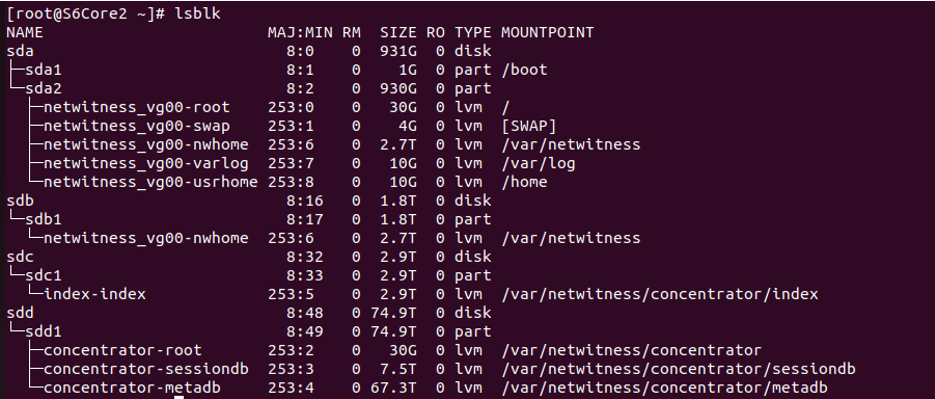
4. Identify the existing block devices (sda and sdb) on the host used by the OS and NetWitness. ‘sdc’ and ‘sdd’ are block devices corresponding to configured PowerVault. Use the command lsblk to list out the block devices.
**Configure Virtual Drive(s) on the Installed Meta Disk kit (Slots 4,5, and 6):**
5. Create the Virtual Drive/Drive Group (DG) on the internal controller using the disks in slot 4 through 6 using the below command.
/opt/MegaRAID/perccli/perccli64 /c0 add vd type=raid5 drives=64:4-6 strip=128

6. The new virtual drive shows up as ‘2/2’ under DG/VD column.
/opt/MegaRAID/perccli/perccli64 /c0 /vall show
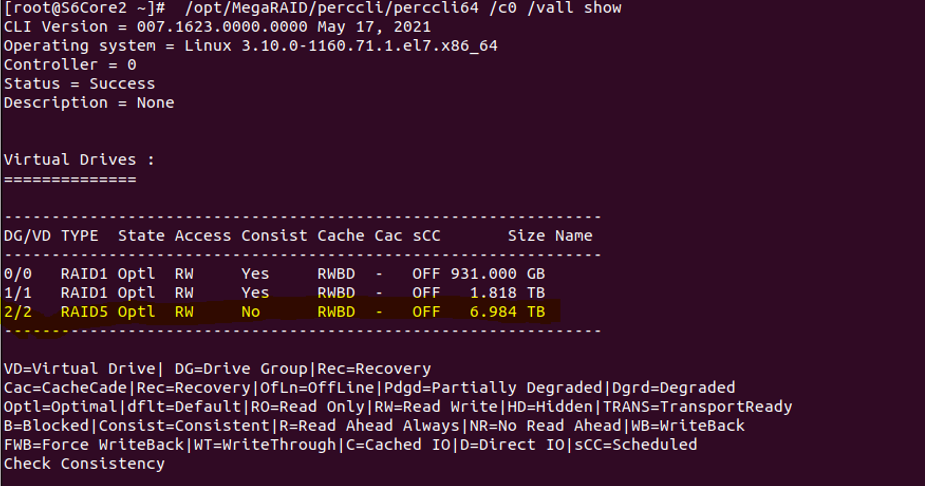
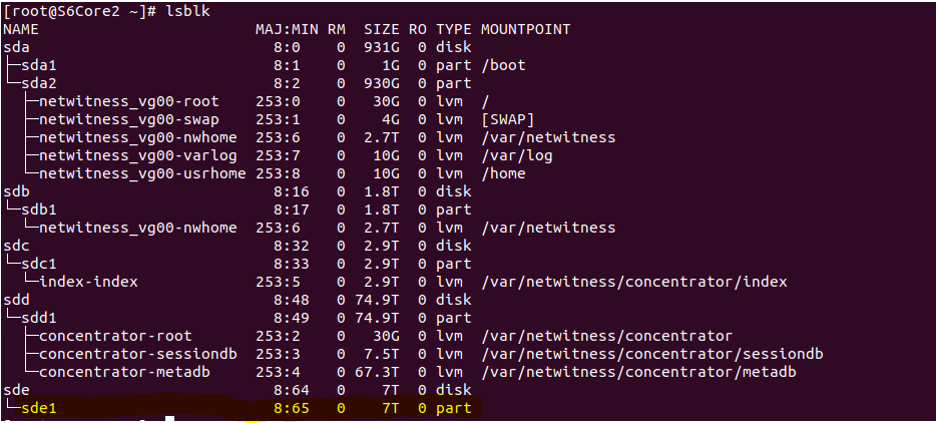
7. Identify the new block device on the host. The block device name is identified under the NAME column. In this example the new block device is 'sdc'. This block device name is required when configuring storage. Use lsblk to list the block devices.
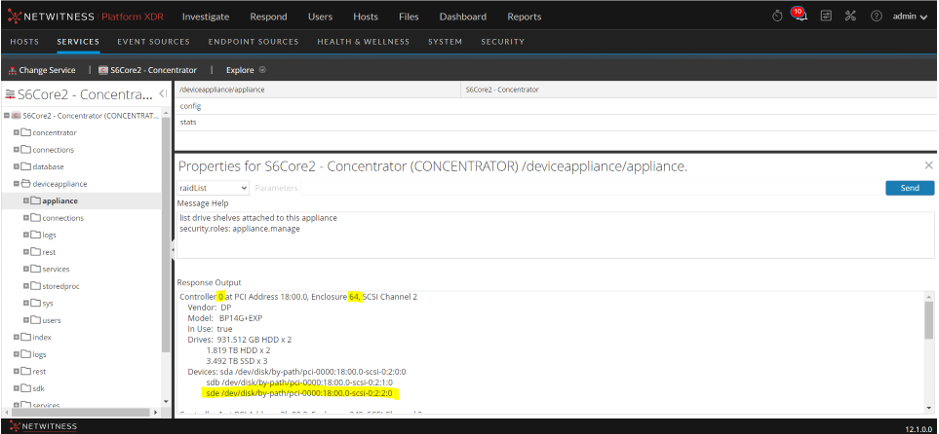
8. Now, you must Configure the above block device as index for Concentrator. Use the Explorer view (Login into UI, select Hosts-\>Service-\>Action-\>View-\>Explorer-\>deviceAppliance-\>appliance-\>properties) to complete configuration. Use ‘raidList’ to retrieve the existing raid list. Note the block device name corresponding to the Meta Disk kit. In this case it is ‘sde’.
**Note:** If a second Meta Disk kit is being configured, the block device would be ‘sdf’.
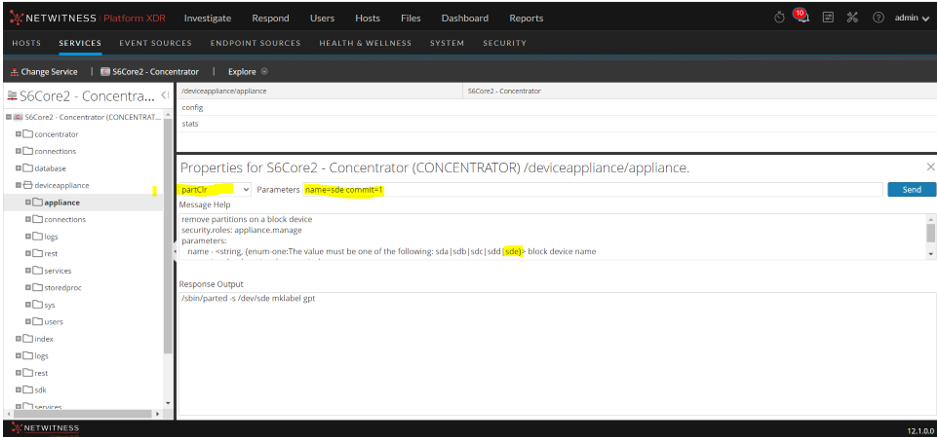
9. Clear partitions on the above block device (‘sde’) with the following parameters:
name=sde commit=1
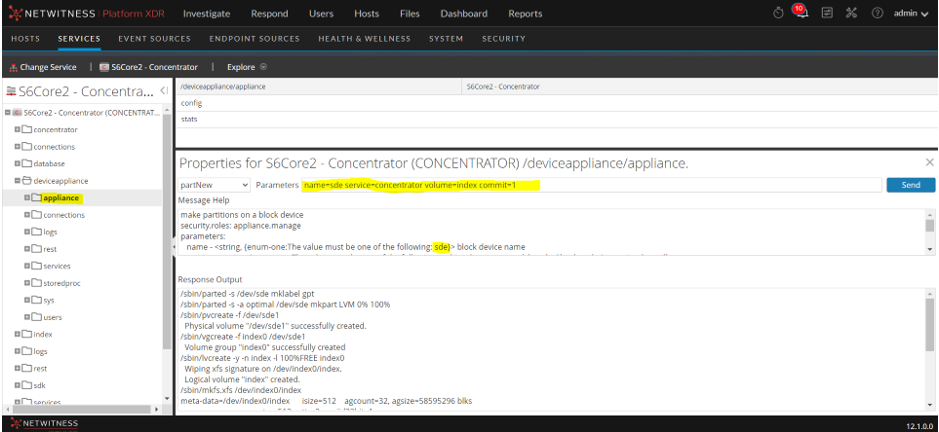
10. Make partitions on the block device (‘sde’) with the following parameters:
name=sde service=concentrator volume=index commit=1
**Note:** If a second Meta Disk kit is being configured, the volume would be ‘index1’.
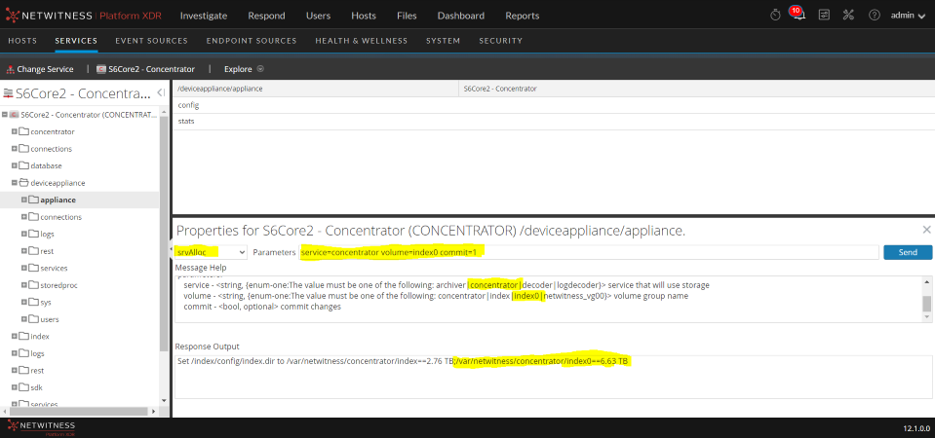
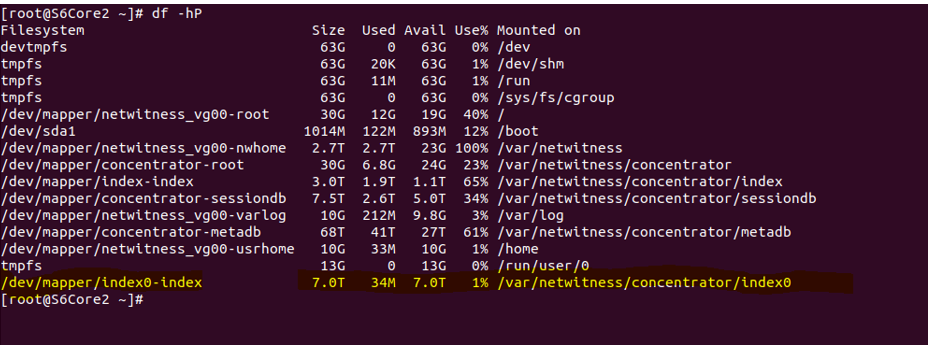
11. Allocate the index to Concentrator service using ‘srvAlloc’
service=concentrator volume=index commit=1
[](https://mydev.netwitness.com/?hsLang=en)
Copyright © 2026, NetWitness LLC. All rights reserved.
[NetWitness Platform](https://www.netwitness.com/)
[Acceptable Use Policy](https://www.netwitness.com/wp-content/uploads/Acceptable-Use-Policy-092022.pdf) [Privacy Statement](https://www.netwitness.com/wp-content/uploads/NetWitness-Privacy-Statement-07292024.pdf)

[](https://www.linkedin.com/company/netwitness-platform/) [](https://www.youtube.com/@netwitness)
© 2026 NetWitness LLC. All rights reserved.