---
title: Appendix D. Sample Storage Configuration Scenarios
description: "Appendix D. Sample Storage Configuration Scenarios for 15-Drive DACsAppendix D. Sample Storage Configuration Scenarios for 15-Drive DACs\n This append"
---
[Skip to content](https://mydev.netwitness.com/knowledge-base/appendixd-samplestorageconfigurationscenarios#main-content)

- [Home](https://mydev.netwitness.com/home)
- Integrations
Show submenu for Integrations
- [Netwitness Platform Integrations](https://mydev.netwitness.com/netwitnessplatformintegrations)
- [Third Party Integrations](https://mydev.netwitness.com/thirdpartyintegrations)
- [Knowledge Center](https://mydev.netwitness.com/knowledge-base)
- Community
Show submenu for Community
- [Blogs](https://mydev.netwitness.com/netwitness-security-llc-blog)
- Discussions
- Customers
Show submenu for Customers
- [Manage Products and Licenses](https://mydev.netwitness.com/nwportal)
- Downloads
- Partners
Show submenu for Partners
- [Partner Program](https://mydev.netwitness.com/partner)
- [Partner Resources](https://mydev.netwitness.com/partnerresources)
- [Submit a New Deal Registration](https://mydev.netwitness.com/dealregistration)
- [Become a Partner](https://mydev.netwitness.com/becomeapartner)
- [Update Your Partner Locator Profile](https://www.netwitness.com/partner-locator/?utm_source=pardotnewsletter&utm_medium=email&utm_campaign=partner_march)
- [NetWitness LinkedIn Partner Hub](https://linkedin.com/showcase/netwitnesspartners/)
- Education
Show submenu for Education
- [Instructor Led Training Schedule](https://mydev.netwitness.com/instructorledtrainingschedule)
- [NetWitness Training Catalog](https://mydev.netwitness.com/netwitnesstrainingcatalog)
- [Security Awareness Training](https://mydev.netwitness.com/securityawarenesstraining)
- [New Product Readiness](https://mydev.netwitness.com/newproductreadiness)
- [On-Demand Virtual Labs](https://mydev.netwitness.com/ondemandvirtuallabs)
- [Additional Training Information](https://mydev.netwitness.com/additionaltraininginformation)
- [Frequently Asked Questions](https://mydev.netwitness.com/educationfaq)
- [Contact NetWitness Education Team](https://mydev.netwitness.com/contact-netwitness-education-team)
- Support
Show submenu for Support
- [Contact Support](https://mydev.netwitness.com/contact-support)
- [Create a New Case](https://mydev.netwitness.com/create-support-case)
- [View My Cases](https://mydev.netwitness.com/viewmycase)
- [Product Version Life Cycle](https://mydev.netwitness.com/product-version-life-cycle)
- [Warranty & Replacement Parts](https://mydev.netwitness.com/warranty-and-replacement-parts)
- [Community Support Forum](https://mydev.netwitness.com/community-support-forum)
- [Technical Support Guide](https://mydev.netwitness.com/technical-support-guide)
Open main navigation
Close main navigation
- [Home](https://mydev.netwitness.com/home)
- Integrations
Show submenu for Integrations
- [Netwitness Platform Integrations](https://mydev.netwitness.com/netwitnessplatformintegrations)
- [Third Party Integrations](https://mydev.netwitness.com/thirdpartyintegrations)
- [Knowledge Center](https://mydev.netwitness.com/knowledge-base)
- Community
Show submenu for Community
- [Blogs](https://mydev.netwitness.com/netwitness-security-llc-blog)
- Discussions
- Customers
Show submenu for Customers
- [Manage Products and Licenses](https://mydev.netwitness.com/nwportal)
- Downloads
- Partners
Show submenu for Partners
- [Partner Program](https://mydev.netwitness.com/partner)
- [Partner Resources](https://mydev.netwitness.com/partnerresources)
- [Submit a New Deal Registration](https://mydev.netwitness.com/dealregistration)
- [Become a Partner](https://mydev.netwitness.com/becomeapartner)
- [Update Your Partner Locator Profile](https://www.netwitness.com/partner-locator/?utm_source=pardotnewsletter&utm_medium=email&utm_campaign=partner_march)
- [NetWitness LinkedIn Partner Hub](https://linkedin.com/showcase/netwitnesspartners/)
- Education
Show submenu for Education
- [Instructor Led Training Schedule](https://mydev.netwitness.com/instructorledtrainingschedule)
- [NetWitness Training Catalog](https://mydev.netwitness.com/netwitnesstrainingcatalog)
- [Security Awareness Training](https://mydev.netwitness.com/securityawarenesstraining)
- [New Product Readiness](https://mydev.netwitness.com/newproductreadiness)
- [On-Demand Virtual Labs](https://mydev.netwitness.com/ondemandvirtuallabs)
- [Additional Training Information](https://mydev.netwitness.com/additionaltraininginformation)
- [Frequently Asked Questions](https://mydev.netwitness.com/educationfaq)
- [Contact NetWitness Education Team](https://mydev.netwitness.com/contact-netwitness-education-team)
- Support
Show submenu for Support
- [Contact Support](https://mydev.netwitness.com/contact-support)
- [Create a New Case](https://mydev.netwitness.com/create-support-case)
- [View My Cases](https://mydev.netwitness.com/viewmycase)
- [Product Version Life Cycle](https://mydev.netwitness.com/product-version-life-cycle)
- [Warranty & Replacement Parts](https://mydev.netwitness.com/warranty-and-replacement-parts)
- [Community Support Forum](https://mydev.netwitness.com/community-support-forum)
- [Technical Support Guide](https://mydev.netwitness.com/technical-support-guide)
How can we help you?
- There are no suggestions because the search field is empty.
1. [NetWitness Knowledge Base](https://mydev.netwitness.com/knowledge-base?hsLang=en)
2. [Documentation](https://mydev.netwitness.com/knowledge-base/documentation?hsLang=en)
April 28, 2026
# Appendix D. Sample Storage Configuration Scenarios
## Appendix D. Sample Storage Configuration Scenarios for 15-Drive DACsAppendix D. Sample Storage Configuration Scenarios for 15-Drive DACs
This appendix illustrates the following example of how to configure storage on two non-encrypted 15-drive DAC external storage devices.
- [Configure Storage for Archiver](https://mydev.netwitness.com/knowledge-base/appendixd-samplestorageconfigurationscenarios#Configur2)
- [Configure Storage for Network (Packet) Decoder](https://mydev.netwitness.com/knowledge-base/appendixd-samplestorageconfigurationscenarios#Configur)
- [Configure Storage for Network Concentrator](https://mydev.netwitness.com/knowledge-base/appendixd-samplestorageconfigurationscenarios#Configur3)
- [Configure Storage for Log Decoder Hybrid](https://mydev.netwitness.com/knowledge-base/appendixd-samplestorageconfigurationscenarios#Configur4)
## Configure Storage for ArchiverConfigure Storage for Archiver
The following scenario configures storage on one, non-encrypted, 15-Drive DAC for an Archiver physical host.
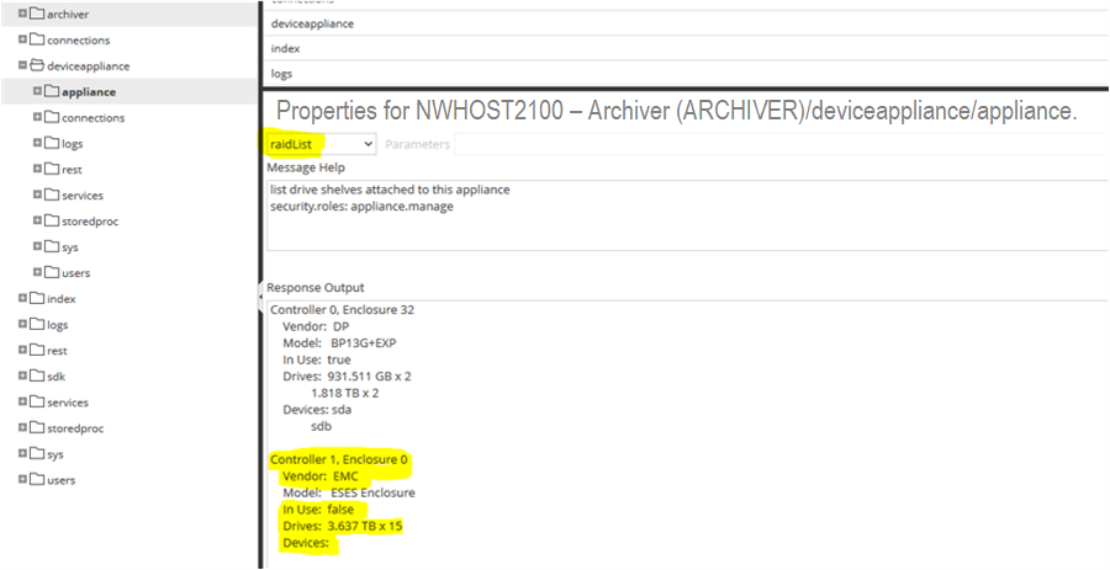
1. Execute the raidList command.
1. Record the Controller Number, Enclosure Number, In Use, Drives, and Devices.
You should see the following information.
In Use: FALSE
Devices:
2. Verify the Drive Count, Size, and Vendor.
The following example illustrates what you should see before you create a RAID array.
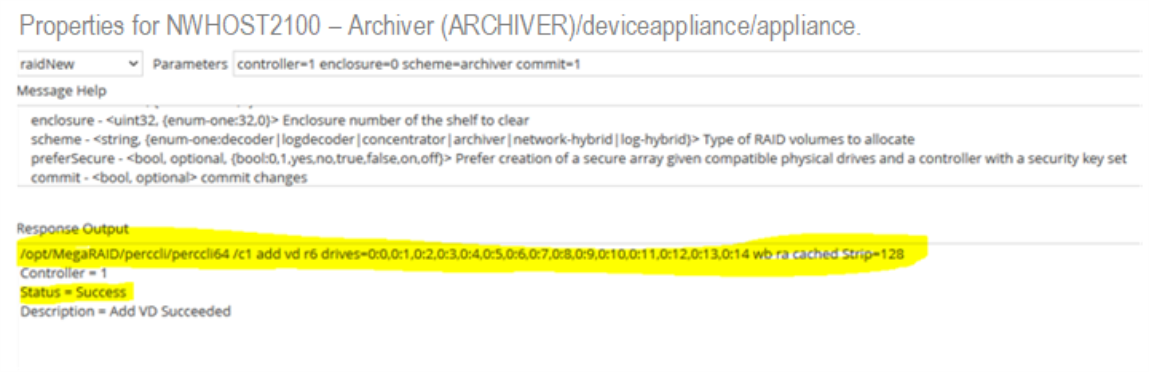
2. Execute the raidNew command with the following parameters using the controller number and the enclosure number you just recorded.
controller=1 enclosure=0 scheme=archiver commit=1
The following example illustrates what you should see after you create a RAID array.
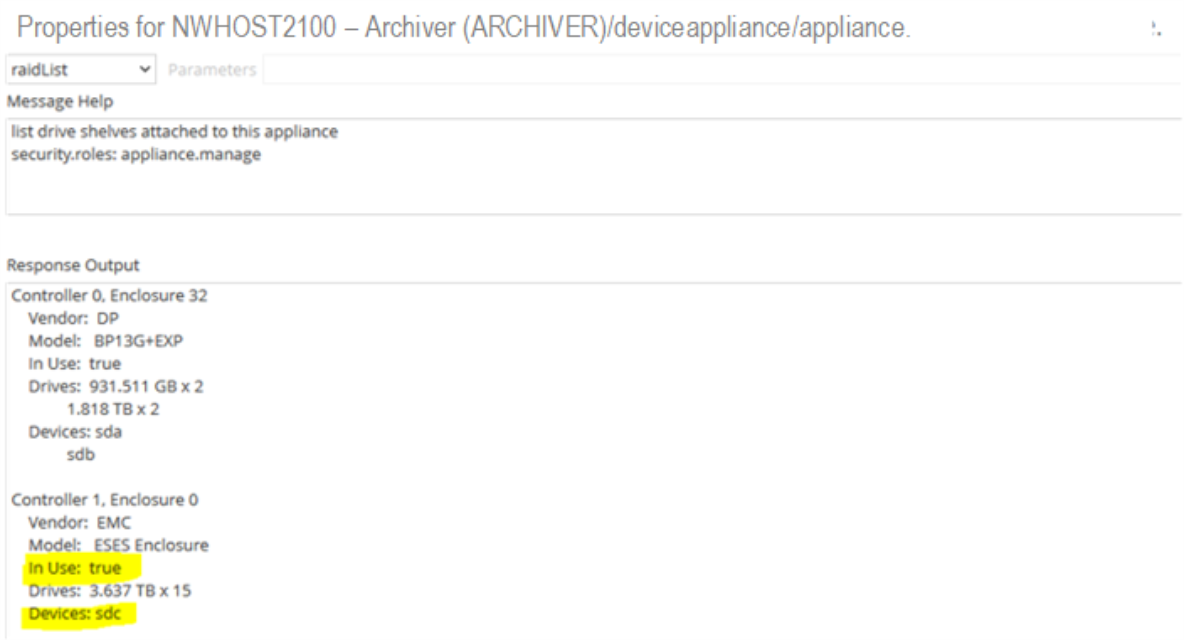
3. Execute the raidList command to verify the new RAID array.
You should now see the following information.
In Use: TRUE
Devices: (for example, sdc)
4. Execute the partNew command with the following parameters to create partitions and mount points in the etc/fstab file.
name= (for example, sdc) service=archiver volume=archiver commit=1
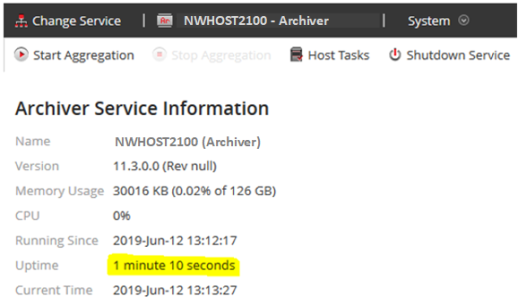
5. Execute the srvAlloc command with the following parameters to allocate the space to the archiver service. This adds storage to the archiver service configuration and restarts the service every time it is executed.
service=archiver volume=archiver0 commit=1

6. Confirm the “Hot Storage” in “Data Retention”.
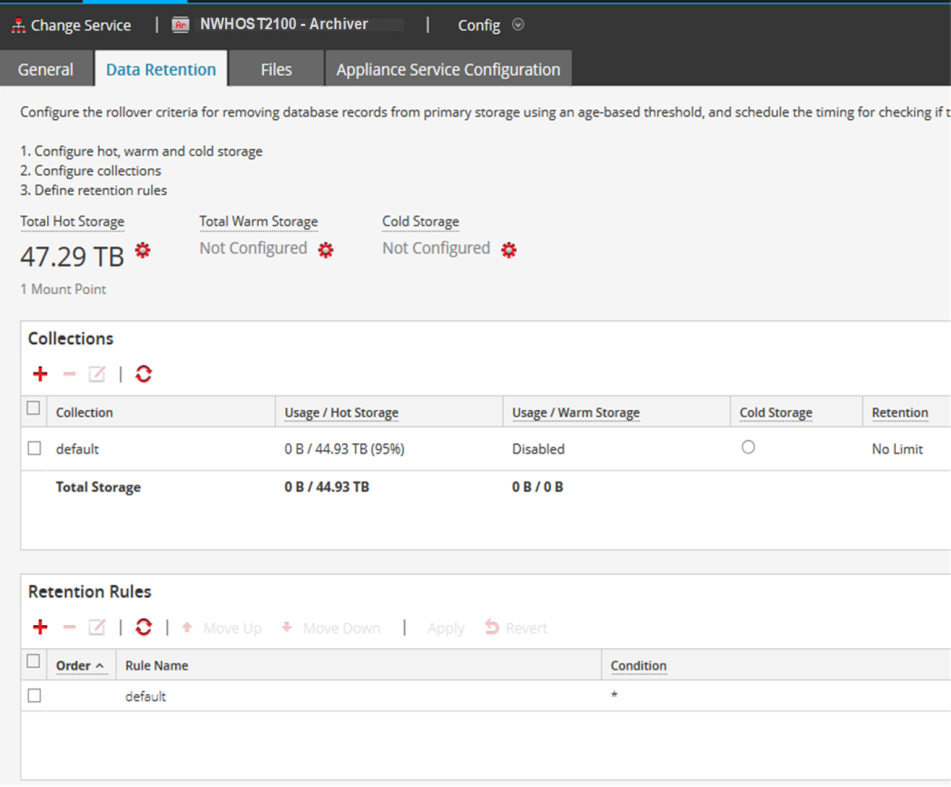
7. Reconfigure the following Archiver service to detect and take advantage of all of the free space as described in [Task 5 - (Optional) Reconfigure Storage Configuration for 10G Capture](https://community.netwitness.com/ConStorageRESTTool.htm#Task5).
## Configure Storage for Network (Packet) DecoderConfigure Storage for Network (Packet) Decoder
The following scenario configures storage on two, non-encrypted, 15-Drive DACs for a Network Decoder for 10G Capture physical host.
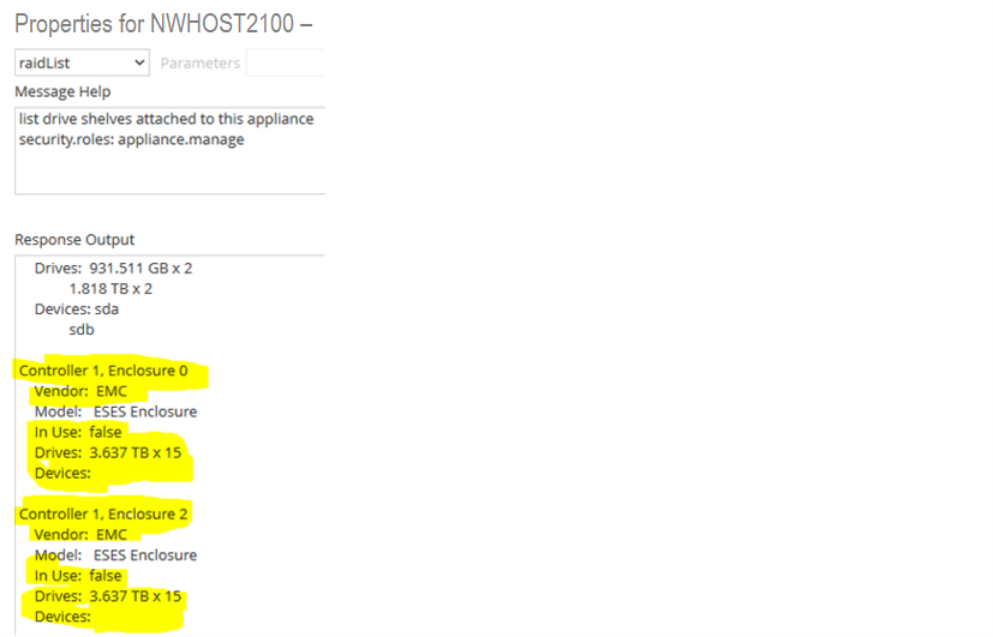
1. Execute the raidList command.
1. Record the Controller Number, Enclosure Number, In Use, Drives, and Devices.
You should see the following information.
In Use: FALSE
Devices:
2. Verify the Drive Count, Size, and Vendor.
The following example illustrates what you should see before you create a RAID array.
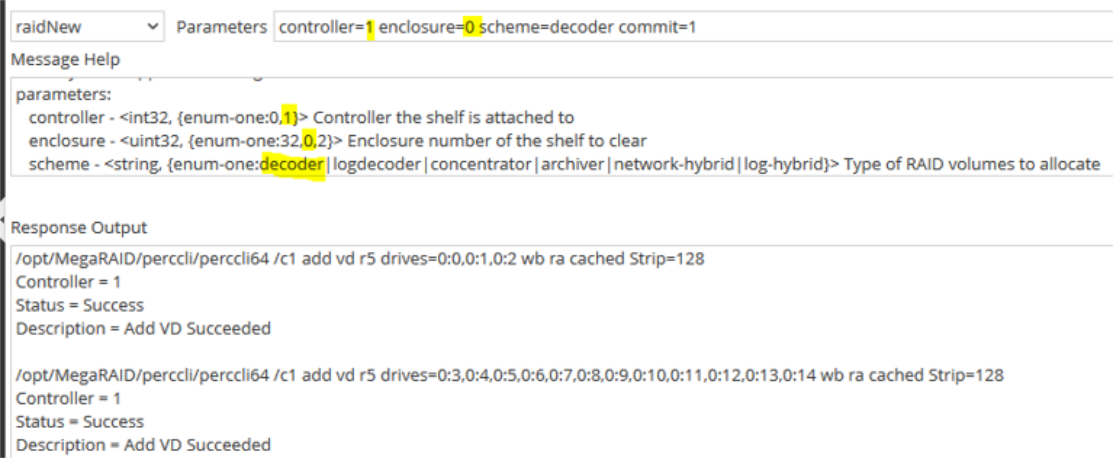
2. Execute the raidNew command with the following parameters using the controller number and the enclosure number you just recorded.
- Parameters for the first enclosure:
controller=1 enclosure=0 scheme=decoder commit=1
- Parameters for the second enclosure:
controller=1 enclosure=2 scheme=decoder commit=1
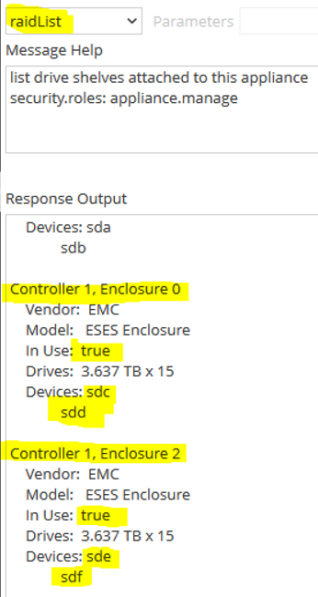
3. Use the raidList command to display block devices for enclosures so you can verify In Use: TRUE.
4. SSH to the Network Decoder and use the lsblk command to confirm sizes for **decodersmall**.
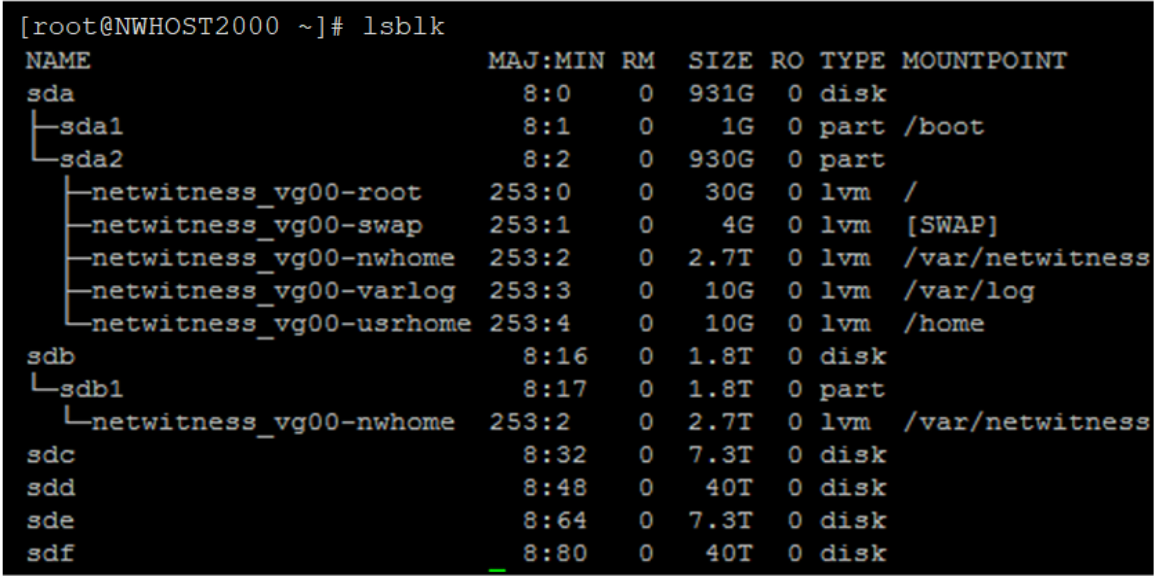
**Note:** For RAID configuration, when you use the decoder for 10G Capture you use **decoder** for both enclosures for performance reasons. When you do not use the **decoder** for 10G Capture, you use the decoder and archiver for the enclosures to maximize storage for becuase the second enclosure is a single RAID under the **archiver** configuration.
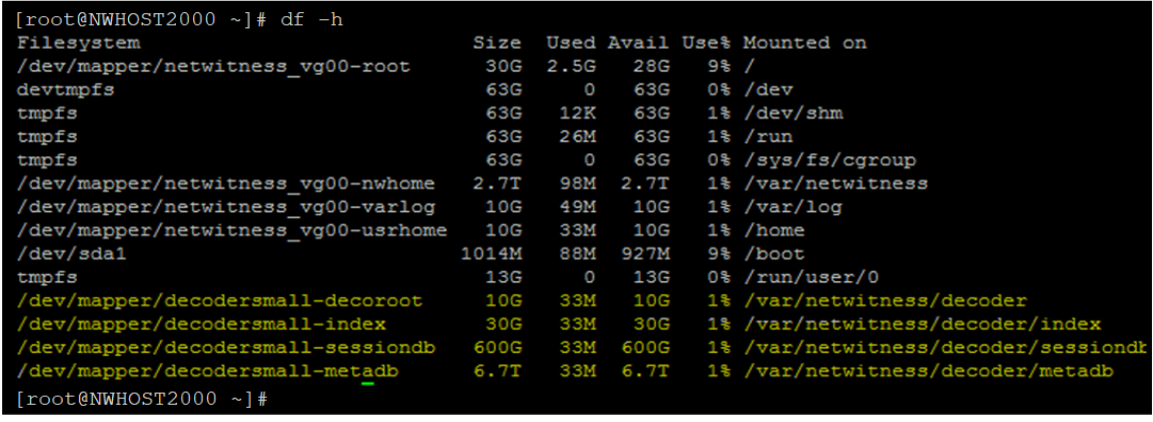
1. Execute the partNew command to create the **decodersmall** partition first (decoder dir, index, metadb, sessiondb) (First Enclosure, SDC, SDD) with the following parameters.
name=sdc service=decoder volume=decodersmall commit=1
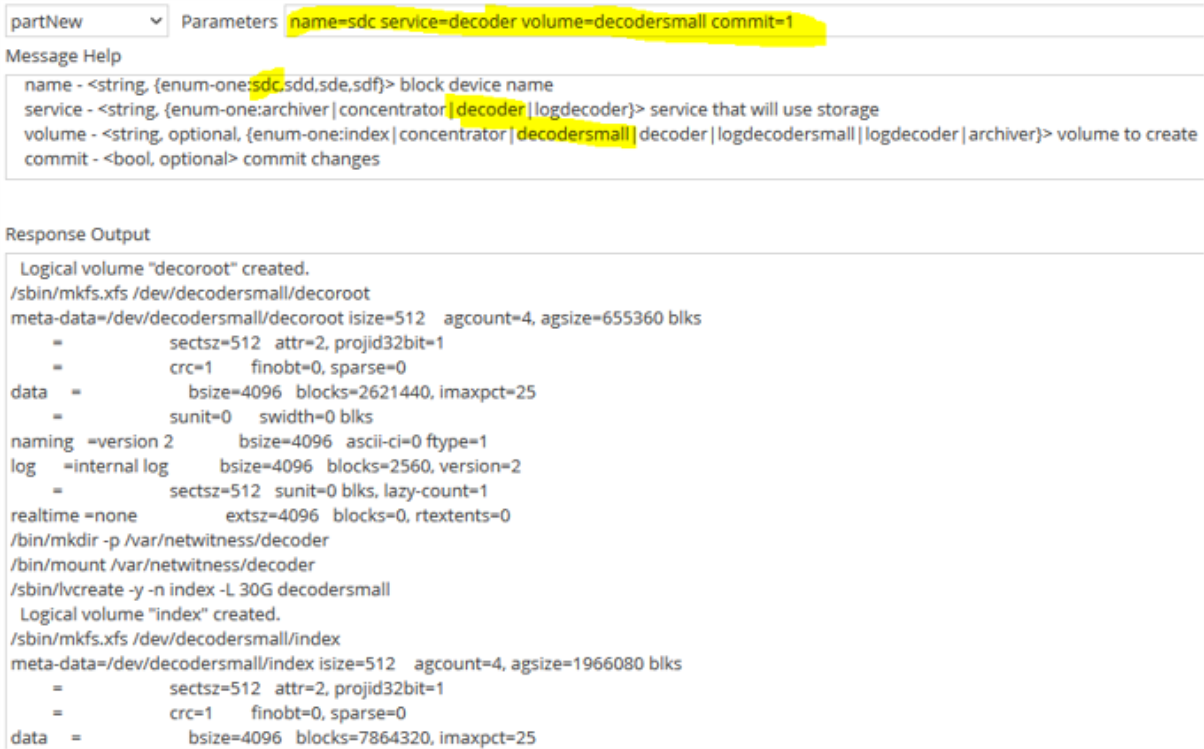
2. Execute the partNew command to create the decoder volume (packetdb) (First Enclosure, SDC, SDD) with the following parameters.
name==sdd service=decoder volume=decoder commit=1
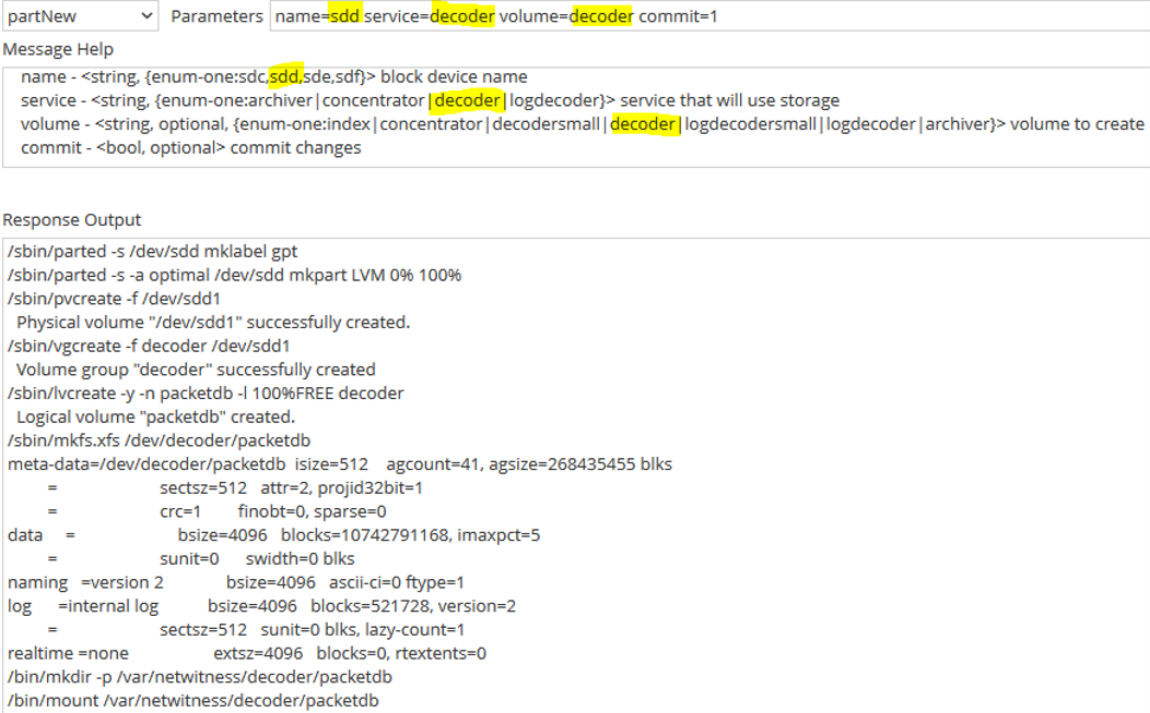
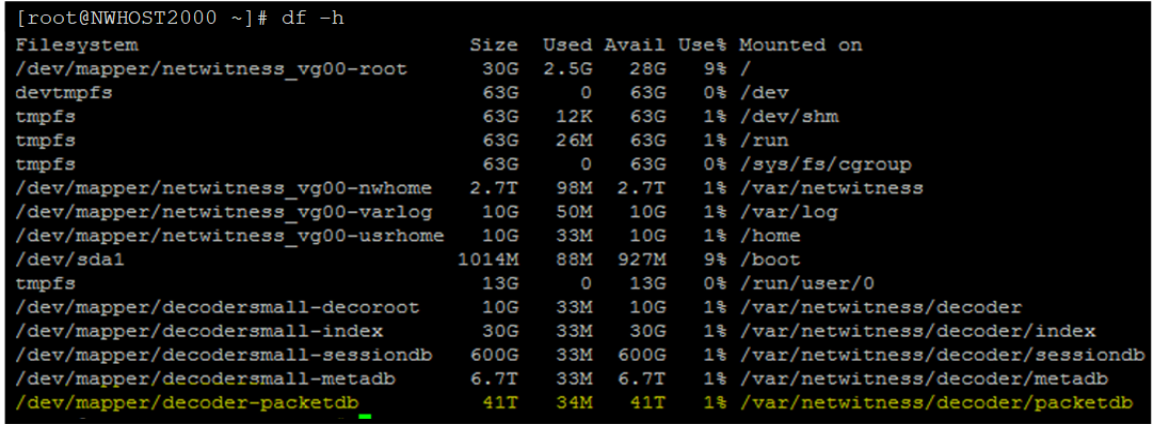
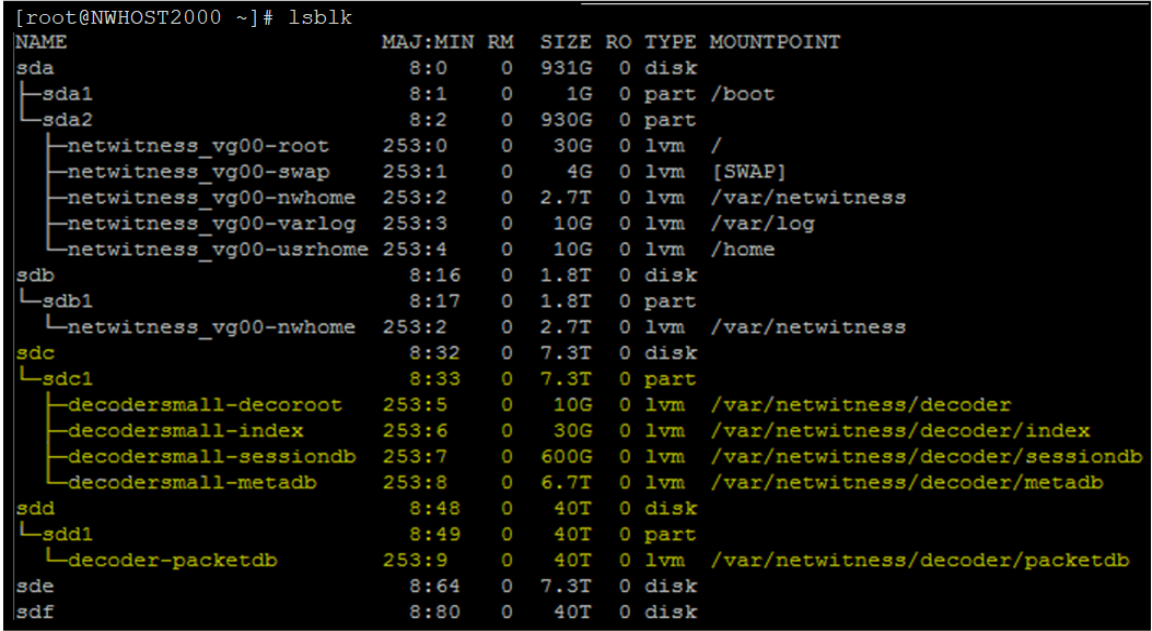
In the following example, the following partions are created for SDC, SDD (Enclosure 0).
At this point, you add the second DAC enclosure.
1. Execute the partNew command to create the decodersmall partition first (Second Enclosure, SDE, SDF) with the following parameters.
name=sde service=decoder volume=decodersmall commit=1
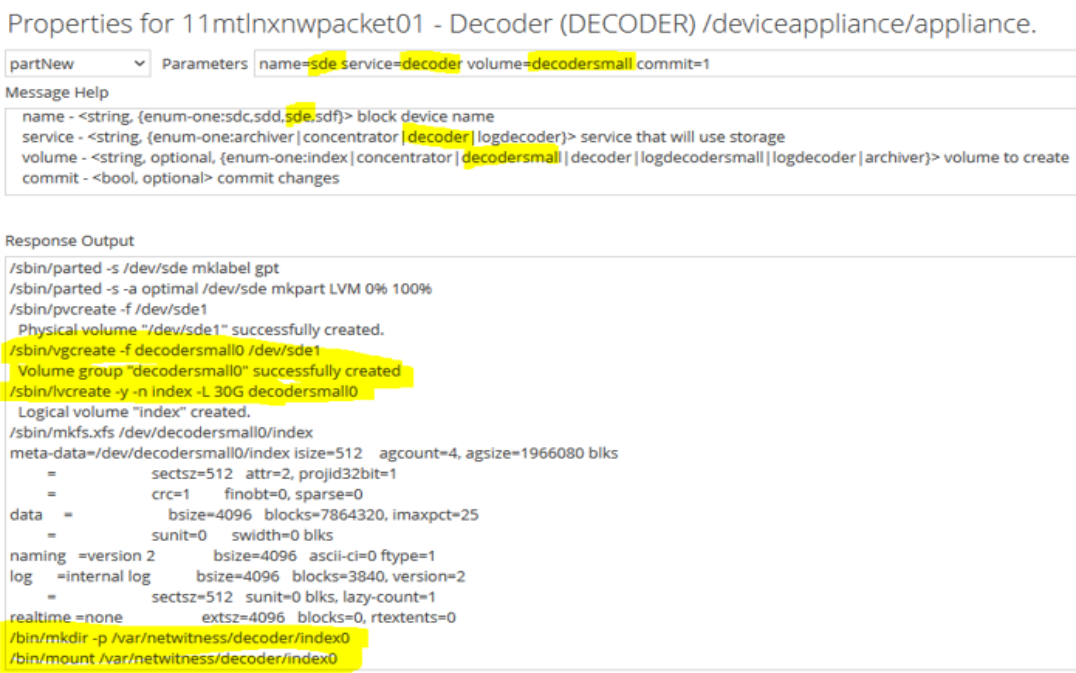
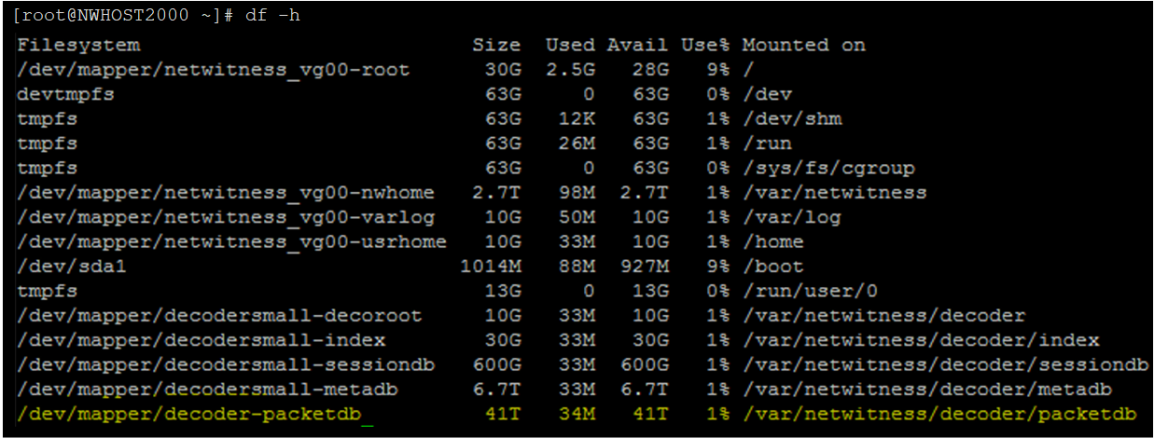
2. Execute the partNew command to create the packetdb decoder volume (Second Enclosure SDE, SDF) with the following parameters.
name=sdf service=decoder volume=decoder commit=1
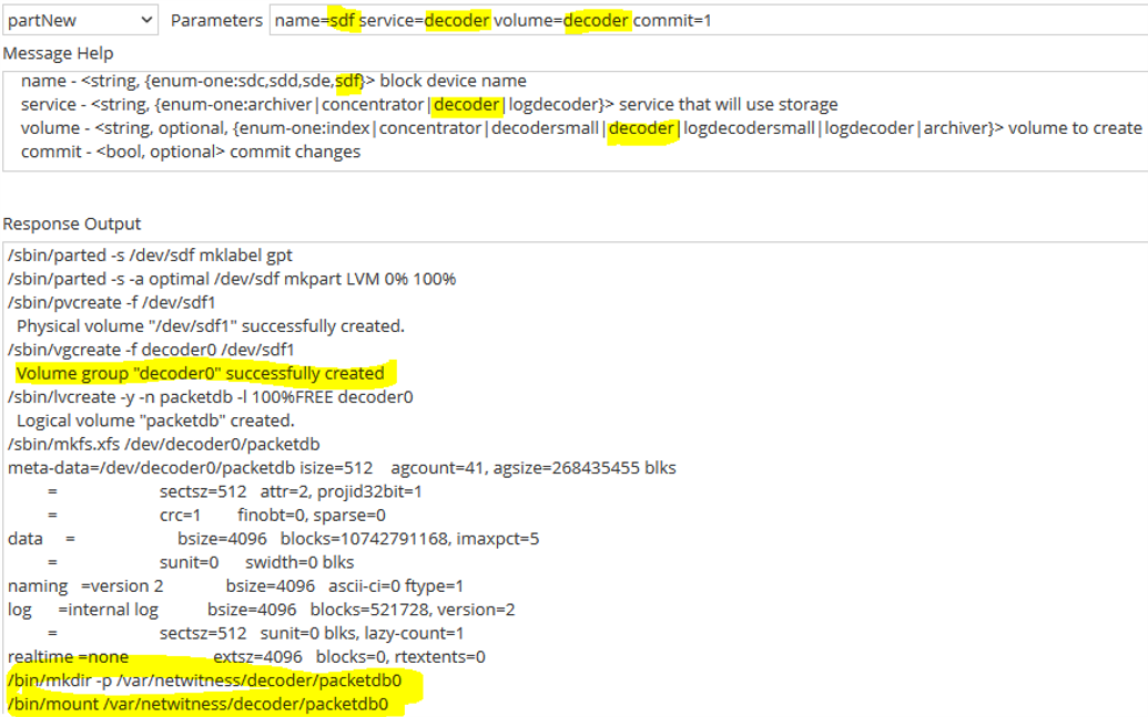
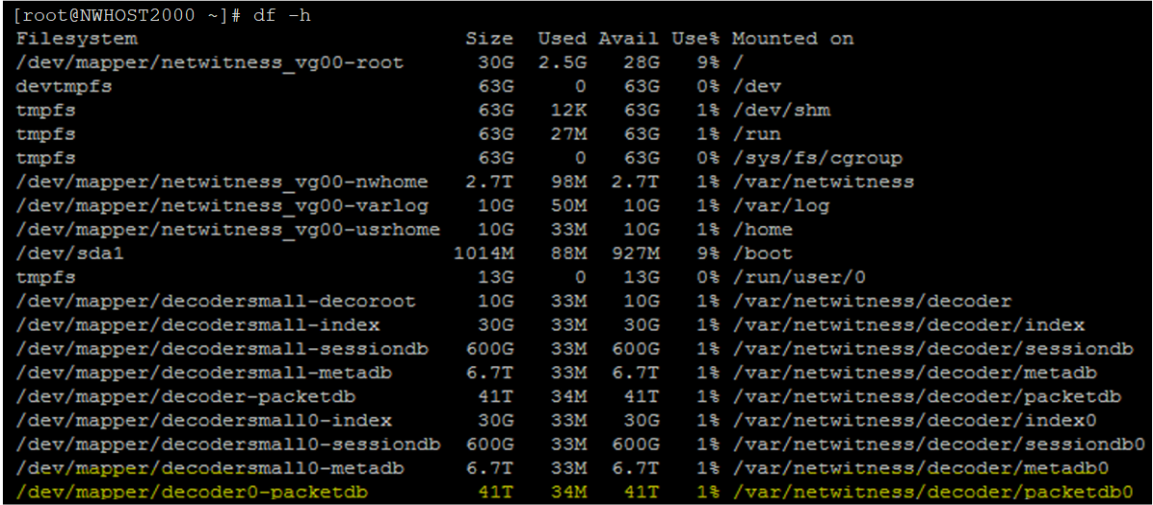
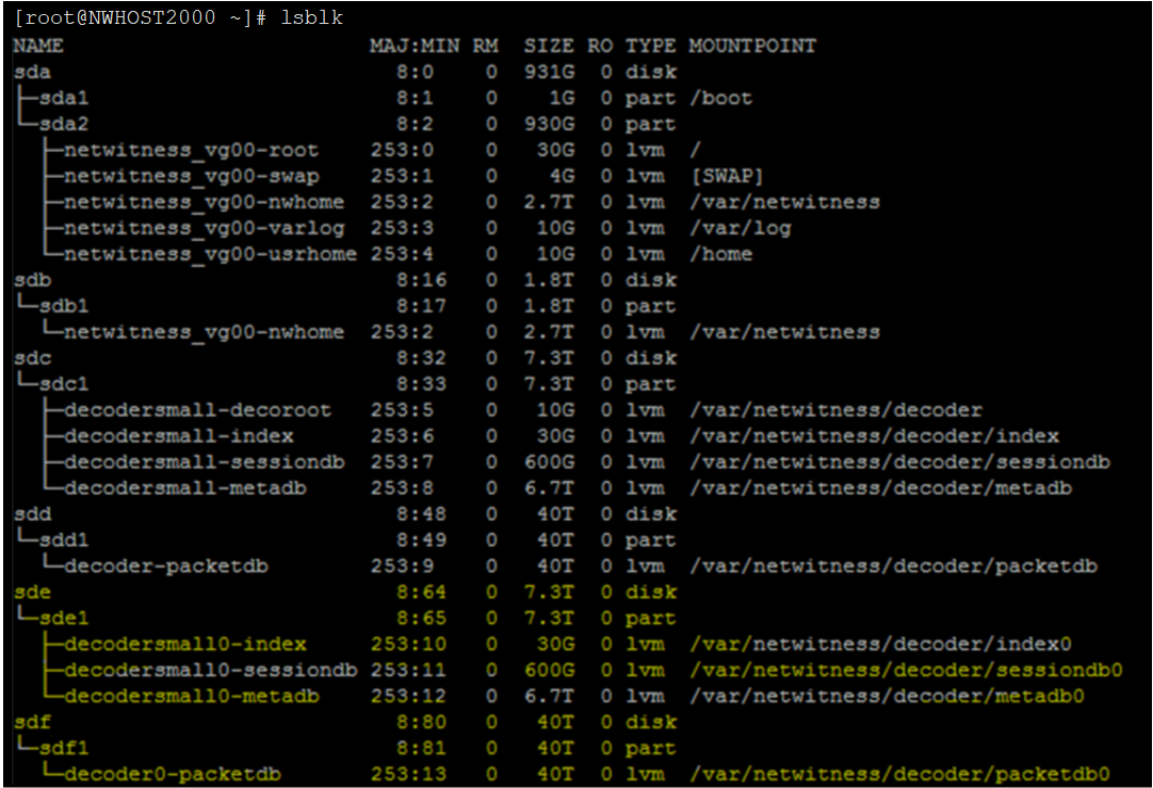
3. Execute the srvAlloc command with the following parameters to add the storage information into the Service Configuration settings.
- service=decoder volume=decodersmall commit=1
- service=decoder volume=decodersmall0 commit=1
- service=decoder volume=decoder commit=1
- service=decoder volume=decoder0 commit=1
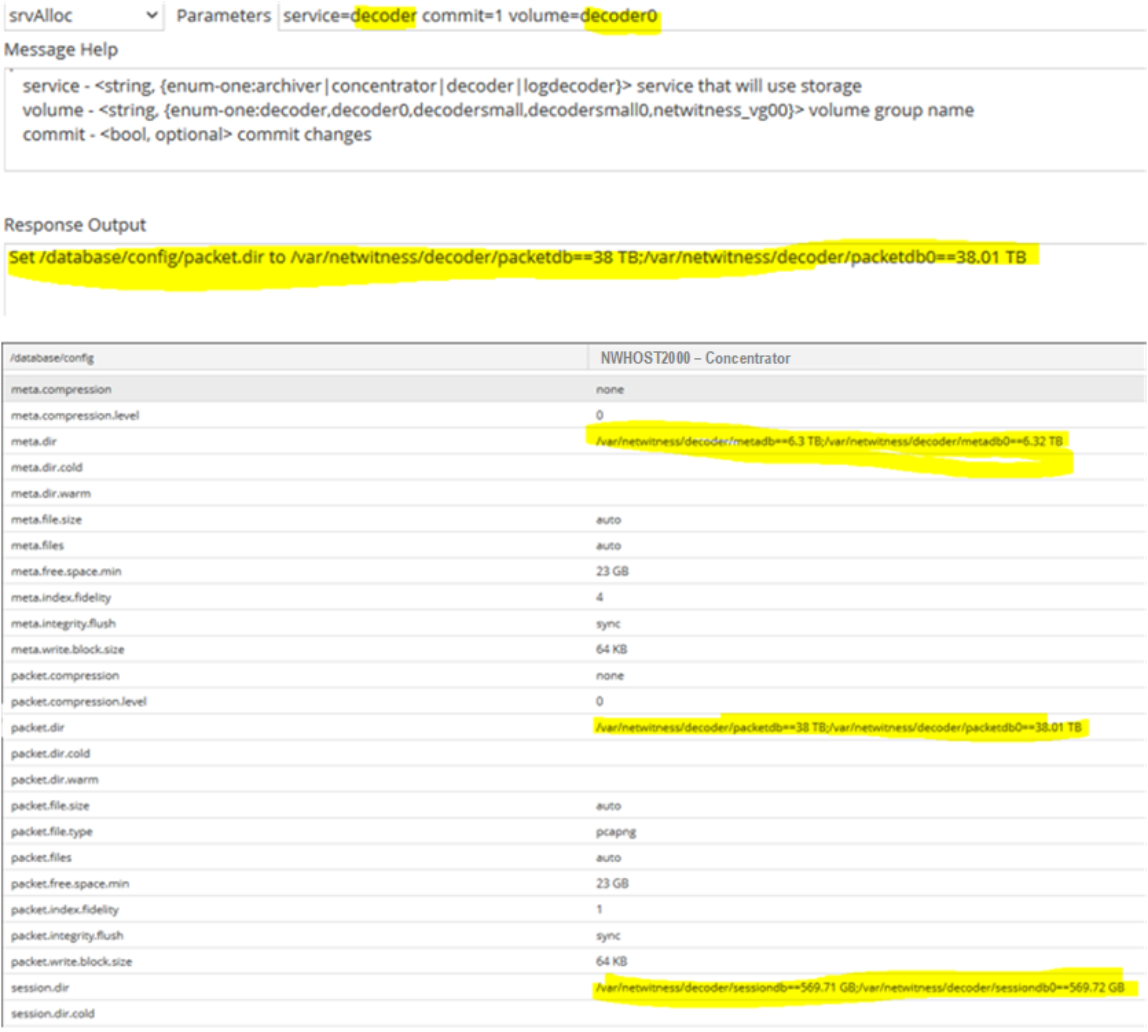
4. Reconfigure the following Network Decoder service and its database to detect and take advantage of all of the free space as described in [Task 5 - (Optional) Reconfigure Storage Configuration for 10G Capture](https://community.netwitness.com/ConStorageRESTTool.htm#Task5).
## Configure Storage for Network ConcentratorConfigure Storage for Network Concentrator
The following scenario configures storage on one, non-encrypted, 15-Drive DAC for a Network Concentrator physical host.
1. Execute the raidList command.
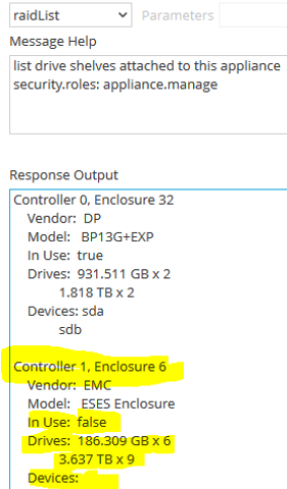
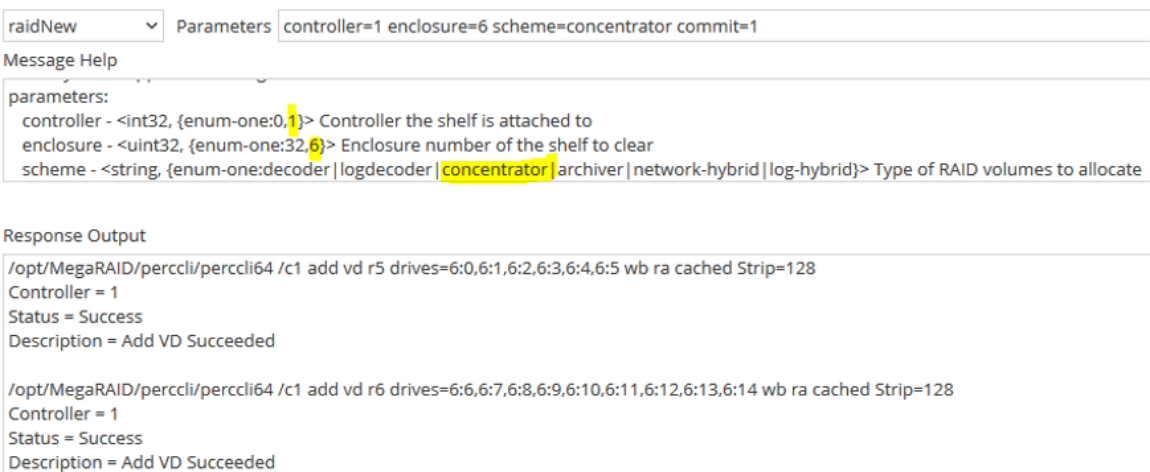
2. Execute the raidNew command with the following parameters.
controller=1 enclosure=6 scheme=concentrator
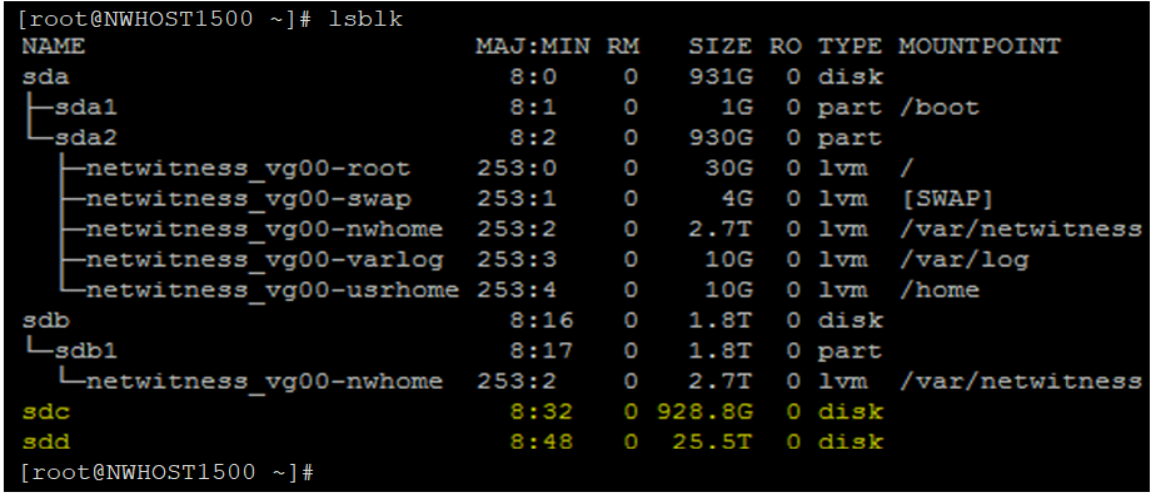
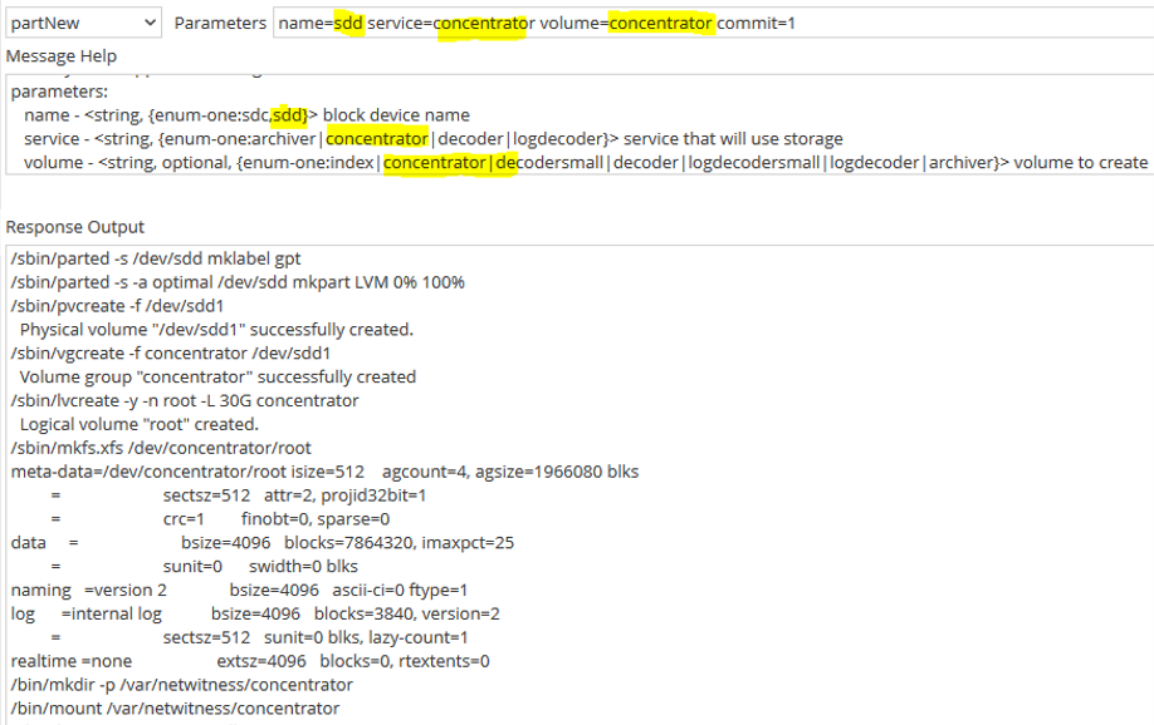
1. Execute the partNew command to create the **concentrator** partition first with the following parameters. You must create the **concentrator** volume before **index** volume or it will fail.
name=sdd service=concentrator volume=concentrator commit=1
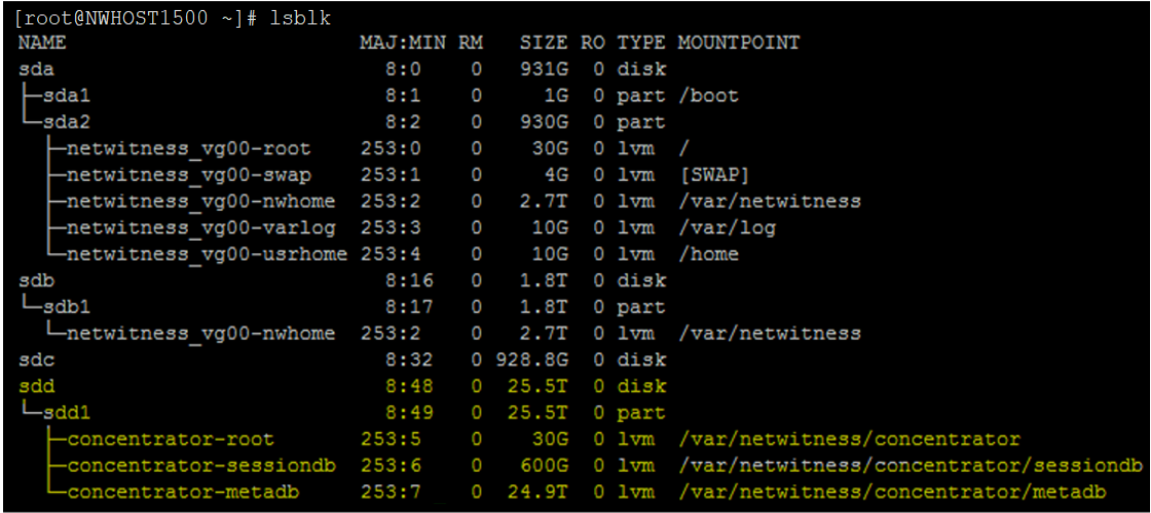
2. Execute the partNew command with the following parameters with the following parameters to create an index on SSDs.
name=sdc service=concentrator volume=index commit=1
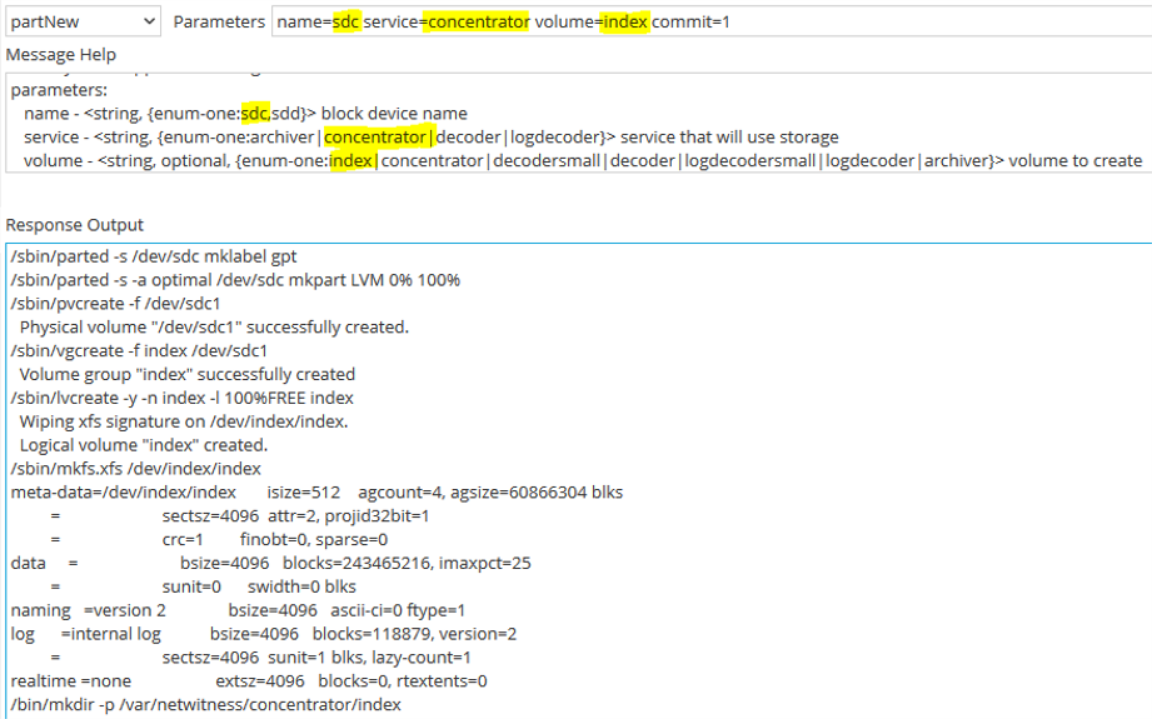
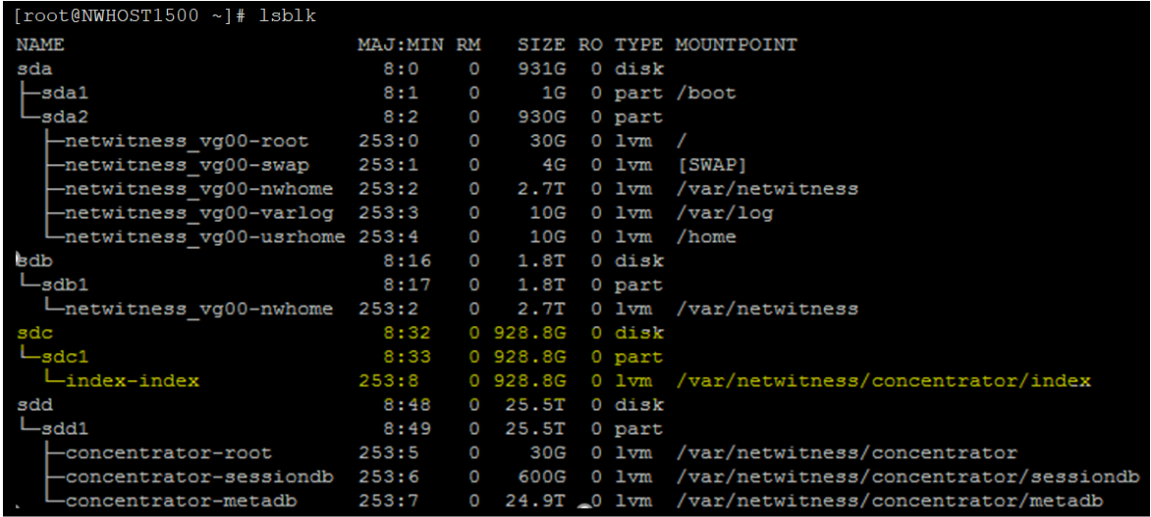
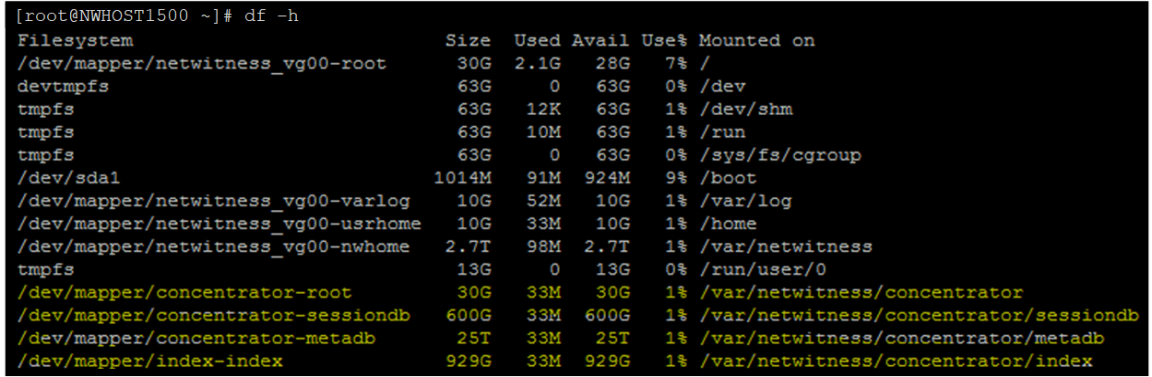
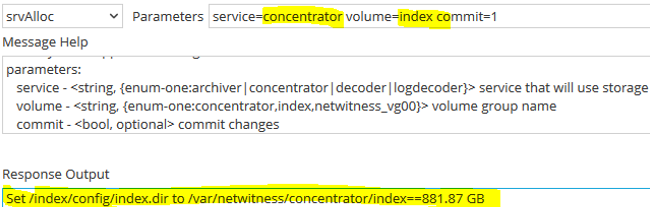
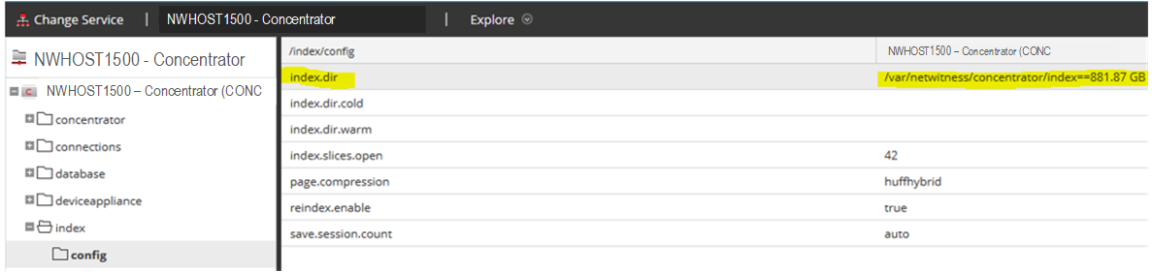
3. Execute the srvAlloc command with the following parameters.
service=concentrator volume=index commit=1
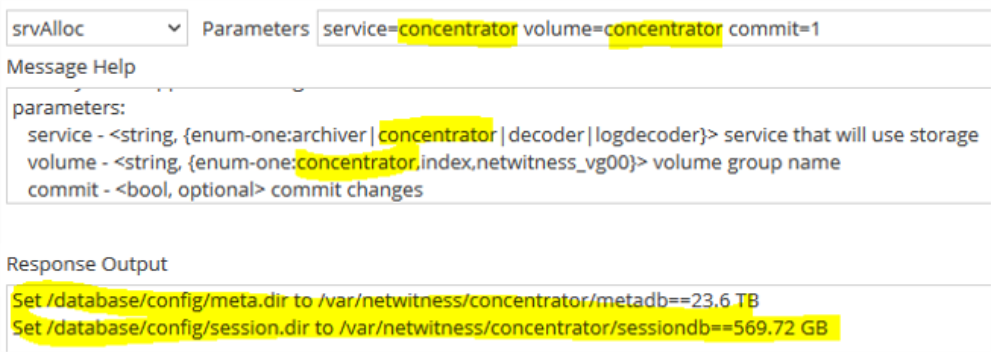
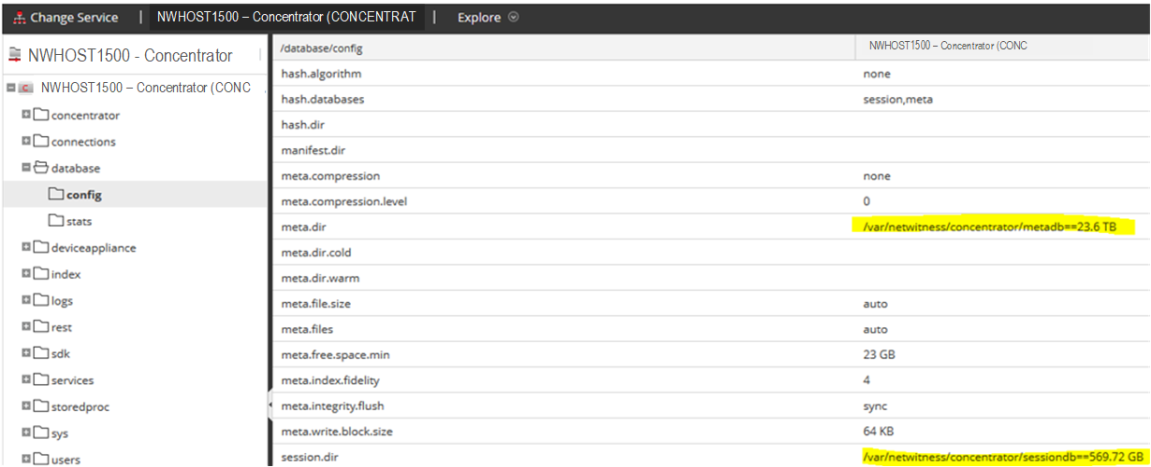
4. Execute the srvAlloc command with the following parameters.
service=concentrator volume=concentrator commit=1
5. Reconfigure the following Network Concentrator service and its database to detect and take advantage of all of the free space as described in [Task 5 - (Optional) Reconfigure Storage Configuration for 10G Capture](https://community.netwitness.com/ConStorageRESTTool.htm#Task5).
## Configure Storage for Log Decoder HybridConfigure Storage for Log Decoder Hybrid
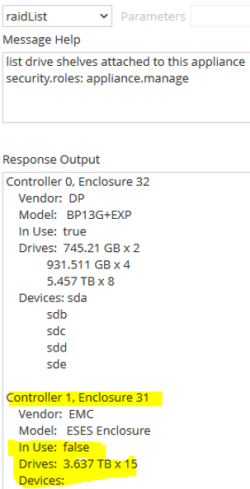
The following scenario configures storage on one, non-encrypted, 15-Drive DAC for a Log Decoder Hybrid physical host.
1. Execute the raidList command.
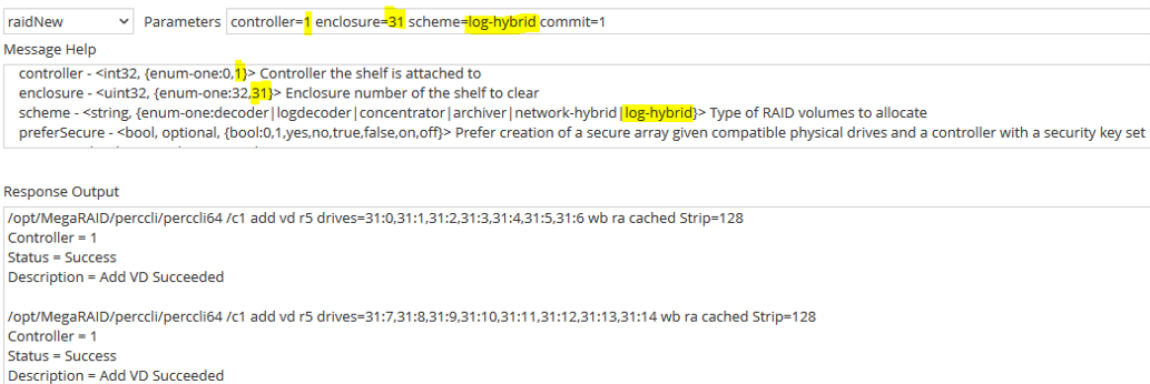
2. Execute the raidNew command with the following parameters.
controller=1 enclosure=31 scheme=log-hybrid commit=1
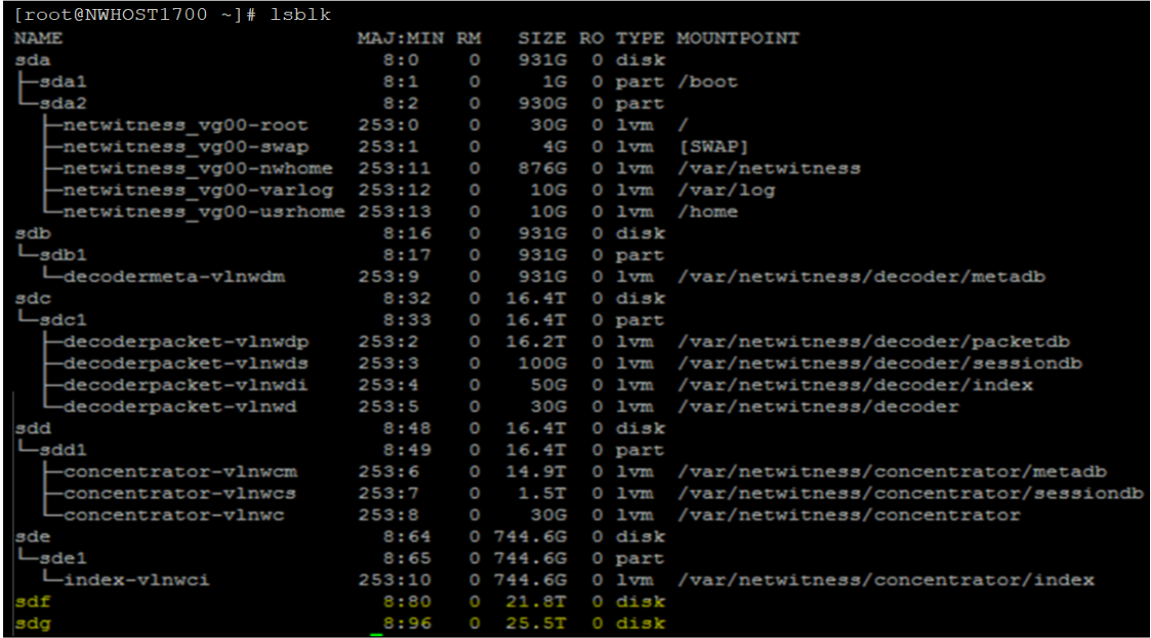
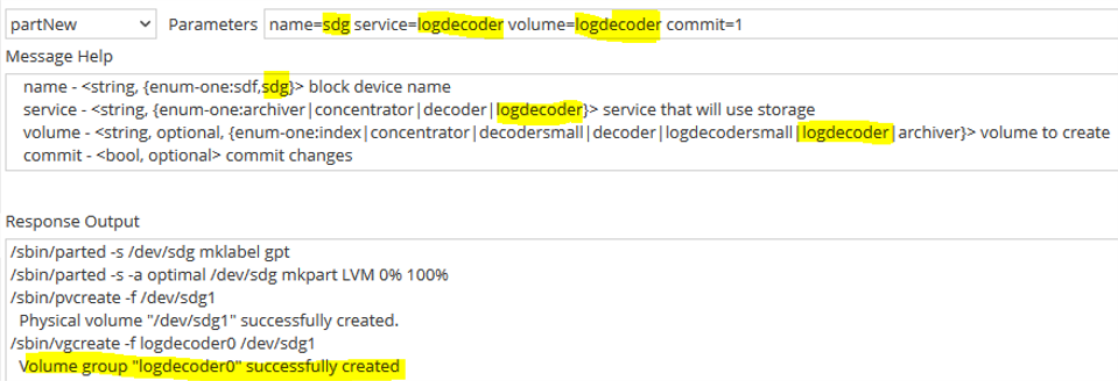
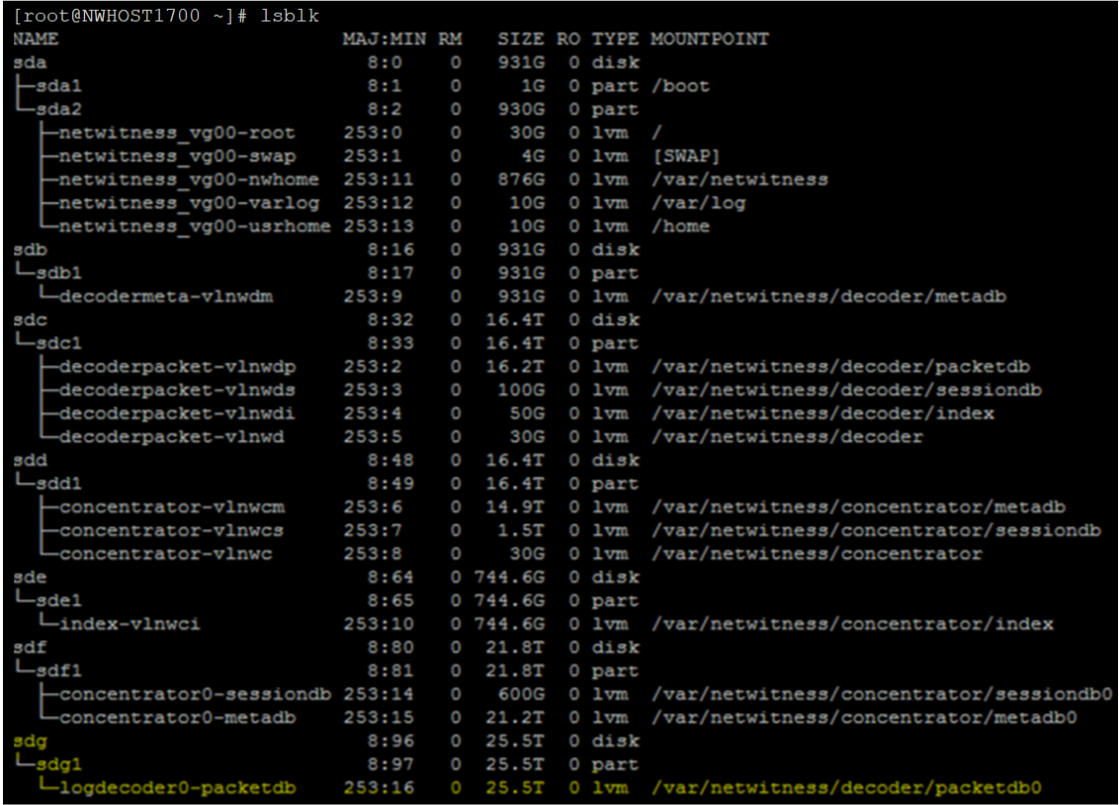
3. Execute the partNew command with the following parameters with the following parameters.
- name=sdf service=concentrator volume=concentrator commit=1
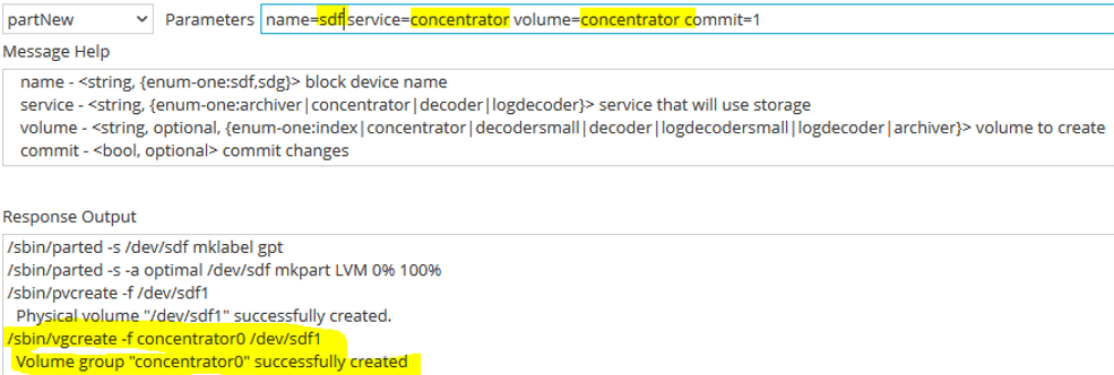
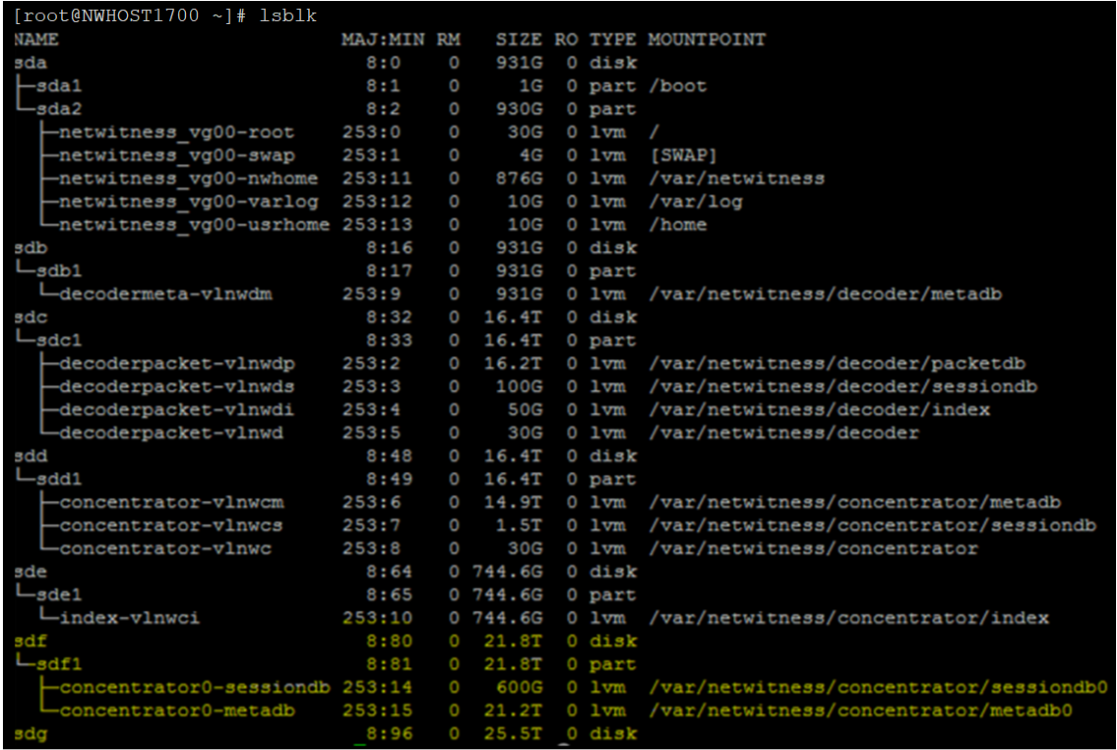
- name=sdg service=logdecoder volume=logdecoder commit=1
4. Execute the srvAlloc command with the following parameters.
- service=concentrator volume=concentrator0 commit=1
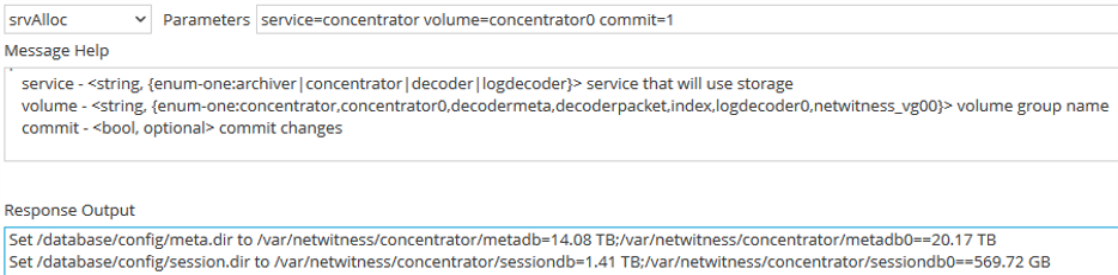
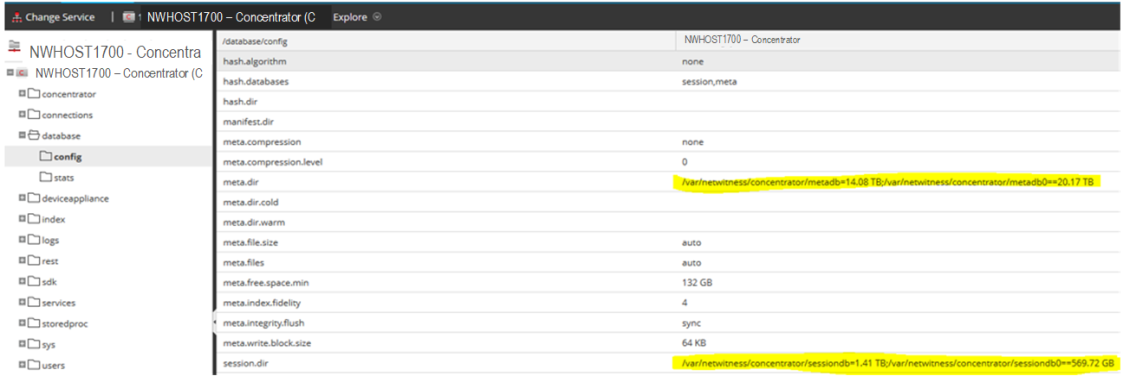
- service=logdecoder volume=logdecoder0 commit=1

5. Reconfigure the following Log Decoder service and its database to detect and take advantage of all of the free space as described in [Task 5 - (Optional) Reconfigure Storage Configuration for 10G Capture](https://community.netwitness.com/ConStorageRESTTool.htm#Task5).
[](https://mydev.netwitness.com/?hsLang=en)
Copyright © 2026, NetWitness LLC. All rights reserved.
[NetWitness Platform](https://www.netwitness.com/)
[Acceptable Use Policy](https://www.netwitness.com/wp-content/uploads/Acceptable-Use-Policy-092022.pdf) [Privacy Statement](https://www.netwitness.com/wp-content/uploads/NetWitness-Privacy-Statement-07292024.pdf)

[](https://www.linkedin.com/company/netwitness-platform/) [](https://www.youtube.com/@netwitness)
© 2026 NetWitness LLC. All rights reserved.