---
title: Appendix B. Encrypt a Series 6E or Series 7 Core or Hybrid Host (encryptSedVd.py)
description: "Appendix B. Encrypt a Series 6E or Series 7 Core or Hybrid Host (encryptSedVd.py)\nNetWitness Series 6E Core and Hybrid hosts have Self-Encrypting Dri"
---
[Skip to content](https://mydev.netwitness.com/knowledge-base/appendixb-encryptaseries6eorseries7coreorhybridhost-encryptsedvd-py#main-content)

- [Home](https://mydev.netwitness.com/home)
- Integrations
Show submenu for Integrations
- [Netwitness Platform Integrations](https://mydev.netwitness.com/netwitnessplatformintegrations)
- [Third Party Integrations](https://mydev.netwitness.com/thirdpartyintegrations)
- [Knowledge Center](https://mydev.netwitness.com/knowledge-base)
- Community
Show submenu for Community
- [Blogs](https://mydev.netwitness.com/netwitness-security-llc-blog)
- Discussions
- Customers
Show submenu for Customers
- [Manage Products and Licenses](https://mydev.netwitness.com/nwportal)
- Downloads
- Partners
Show submenu for Partners
- [Partner Program](https://mydev.netwitness.com/partner)
- [Partner Resources](https://mydev.netwitness.com/partnerresources)
- [Submit a New Deal Registration](https://mydev.netwitness.com/dealregistration)
- [Become a Partner](https://mydev.netwitness.com/becomeapartner)
- [Update Your Partner Locator Profile](https://www.netwitness.com/partner-locator/?utm_source=pardotnewsletter&utm_medium=email&utm_campaign=partner_march)
- [NetWitness LinkedIn Partner Hub](https://linkedin.com/showcase/netwitnesspartners/)
- Education
Show submenu for Education
- [Instructor Led Training Schedule](https://mydev.netwitness.com/instructorledtrainingschedule)
- [NetWitness Training Catalog](https://mydev.netwitness.com/netwitnesstrainingcatalog)
- [Security Awareness Training](https://mydev.netwitness.com/securityawarenesstraining)
- [New Product Readiness](https://mydev.netwitness.com/newproductreadiness)
- [On-Demand Virtual Labs](https://mydev.netwitness.com/ondemandvirtuallabs)
- [Additional Training Information](https://mydev.netwitness.com/additionaltraininginformation)
- [Frequently Asked Questions](https://mydev.netwitness.com/educationfaq)
- [Contact NetWitness Education Team](https://mydev.netwitness.com/contact-netwitness-education-team)
- Support
Show submenu for Support
- [Contact Support](https://mydev.netwitness.com/contact-support)
- [Create a New Case](https://mydev.netwitness.com/create-support-case)
- [View My Cases](https://mydev.netwitness.com/viewmycase)
- [Product Version Life Cycle](https://mydev.netwitness.com/product-version-life-cycle)
- [Warranty & Replacement Parts](https://mydev.netwitness.com/warranty-and-replacement-parts)
- [Community Support Forum](https://mydev.netwitness.com/community-support-forum)
- [Technical Support Guide](https://mydev.netwitness.com/technical-support-guide)
Open main navigation
Close main navigation
- [Home](https://mydev.netwitness.com/home)
- Integrations
Show submenu for Integrations
- [Netwitness Platform Integrations](https://mydev.netwitness.com/netwitnessplatformintegrations)
- [Third Party Integrations](https://mydev.netwitness.com/thirdpartyintegrations)
- [Knowledge Center](https://mydev.netwitness.com/knowledge-base)
- Community
Show submenu for Community
- [Blogs](https://mydev.netwitness.com/netwitness-security-llc-blog)
- Discussions
- Customers
Show submenu for Customers
- [Manage Products and Licenses](https://mydev.netwitness.com/nwportal)
- Downloads
- Partners
Show submenu for Partners
- [Partner Program](https://mydev.netwitness.com/partner)
- [Partner Resources](https://mydev.netwitness.com/partnerresources)
- [Submit a New Deal Registration](https://mydev.netwitness.com/dealregistration)
- [Become a Partner](https://mydev.netwitness.com/becomeapartner)
- [Update Your Partner Locator Profile](https://www.netwitness.com/partner-locator/?utm_source=pardotnewsletter&utm_medium=email&utm_campaign=partner_march)
- [NetWitness LinkedIn Partner Hub](https://linkedin.com/showcase/netwitnesspartners/)
- Education
Show submenu for Education
- [Instructor Led Training Schedule](https://mydev.netwitness.com/instructorledtrainingschedule)
- [NetWitness Training Catalog](https://mydev.netwitness.com/netwitnesstrainingcatalog)
- [Security Awareness Training](https://mydev.netwitness.com/securityawarenesstraining)
- [New Product Readiness](https://mydev.netwitness.com/newproductreadiness)
- [On-Demand Virtual Labs](https://mydev.netwitness.com/ondemandvirtuallabs)
- [Additional Training Information](https://mydev.netwitness.com/additionaltraininginformation)
- [Frequently Asked Questions](https://mydev.netwitness.com/educationfaq)
- [Contact NetWitness Education Team](https://mydev.netwitness.com/contact-netwitness-education-team)
- Support
Show submenu for Support
- [Contact Support](https://mydev.netwitness.com/contact-support)
- [Create a New Case](https://mydev.netwitness.com/create-support-case)
- [View My Cases](https://mydev.netwitness.com/viewmycase)
- [Product Version Life Cycle](https://mydev.netwitness.com/product-version-life-cycle)
- [Warranty & Replacement Parts](https://mydev.netwitness.com/warranty-and-replacement-parts)
- [Community Support Forum](https://mydev.netwitness.com/community-support-forum)
- [Technical Support Guide](https://mydev.netwitness.com/technical-support-guide)
How can we help you?
- There are no suggestions because the search field is empty.
1. [NetWitness Knowledge Base](https://mydev.netwitness.com/knowledge-base?hsLang=en)
2. [Documentation](https://mydev.netwitness.com/knowledge-base/documentation?hsLang=en)
April 21, 2026
# Appendix B. Encrypt a Series 6E or Series 7 Core or Hybrid Host (encryptSedVd.py)
## Appendix B. Encrypt a Series 6E or Series 7 Core or Hybrid Host (encryptSedVd.py)
NetWitness Series 6E Core and Hybrid hosts have Self-Encrypting Drives (SED). The encryptSedVd.py script:
- Validates that the Series 6E host has the correct setup for encryption.
- Encrypts unencrypted drives.
**Note:** For external storage devices such as PowerVault, refer to "[Configure Storage Using the REST API](https://community.netwitness.com/ConStorageRESTTool.htm#Using)" under "Using the REST API to Configure Storage" for instructions on how to encrypt their SED drives.
The following scenarios are examples of why you would use the encryptSedVd.py script.
- You want to know if a physical host has encryption. In this case, if the script determines that the device does not have encryption, it gives you the opportunity to encrypt it.
- You set up a device without encryption and you want to encrypt it.
You will find this script in the rsa-sa-tools directory for releases 12.4.1.0 and later. The following directory is for 12.4.1.0.
rsa-sa-tools-12.4.1.0-xxxx.noarch.rpm
The following procedure illustrates how to use the script.
1. Log in as root.
2. Change the directory to the rsa-sa-tools RPM base directory:
`cd /opt/rsa/saTools/supportScript/`
3. Execute the following command:
`OWB_ALLOW_NON_FIPS=1 ./encryptSedVd.py`
The script tells you if the disks are encrypted or not encrypted.
- If the drives are encrypted, the script displays the following message.
No unencrypted RAID virtual drives with SED physical drives found.
- If the drives are not encrypted, the script identifies the unencrypted drives as shown in the following example.

4. If the drives are not encrypted and you want to encrypt them:
1. Select the drives you want to encrypt with the space bar and press **Enter**.
The following prompt is displayed.
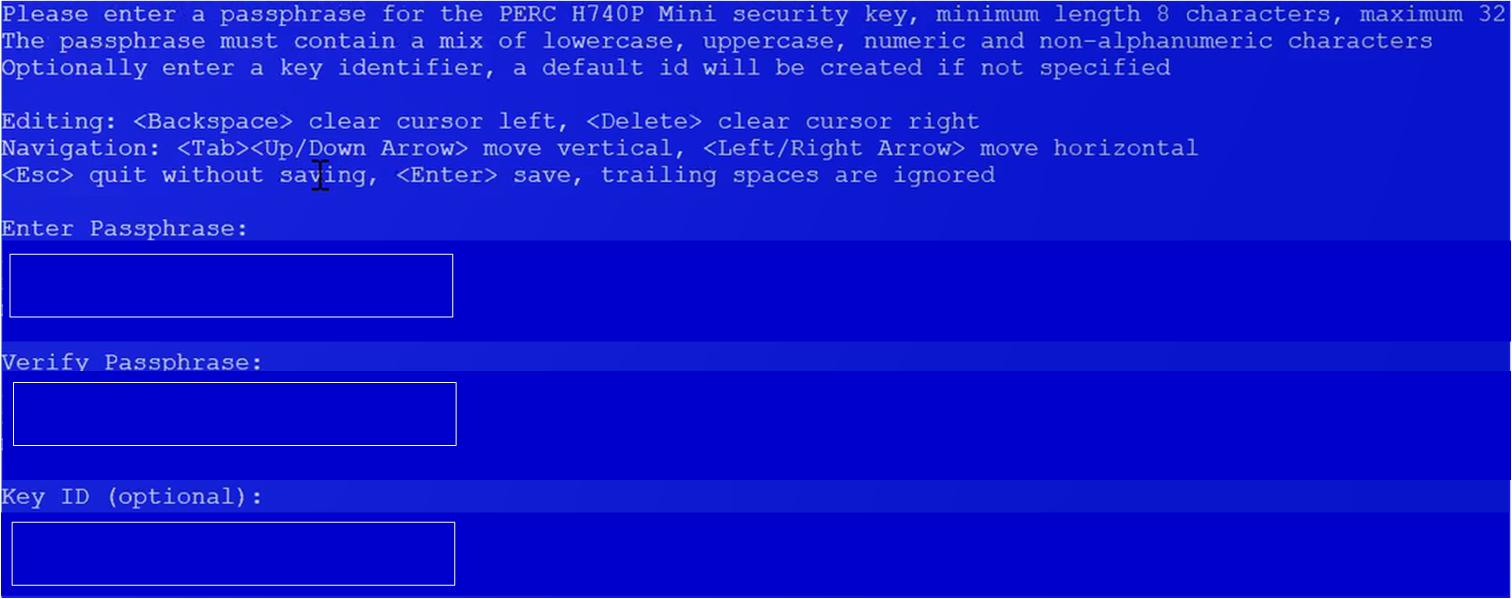
1. In the **Enter Passphrase** text box, type the , for example nFreDaW$792, and press **Tab**.
1. In the **Verify Passphrase** text box, re-enter passphrase again for validation.
1. In the **Key ID (optional)** text box, enter an optional ID string for the security key less than 256 characters or press Enter for none.
The following prompt is displayed.

1. Select and press **Enter** to confirm that you added the Passphrase.
2. Submit the following command string to verify that the SED drives are encrypted.
`/opt/MegaRAID/perccli/perccli64 /c0 show more`
The following information is displayed. You can see that all four SED drives are encrypted (that is, Y is displayed for each drive in the SED column).
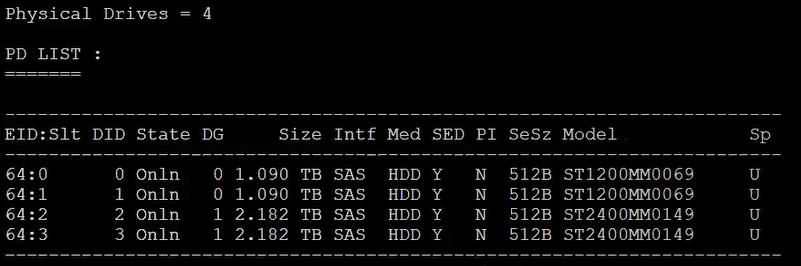
**Note:** The SED Enabled and Secured label values are set to Yes, if the drives are SED enabled and secured.
To check the drives on controller 0 and enclosure 247 use the below command:
`/opt/MegaRAID/perccli/perccli64 /c1 /e247/sall show all | egrep -i '(Policies/Settings|SED Capable|Secured|SED Enabled)'`
You will find detailed information on perccli commands in the RSA PowerEdge RAID Controller CLI Reference Guide ([http://l4u-00.jinr.ru/pub/misc/h-w/LSI/dell-sas-hba-12gbps\_reference-guide\_en-us.pdf](http://l4u-00.jinr.ru/pub/misc/h-w/LSI/dell-sas-hba-12gbps_reference-guide_en-us.pdf)).
## Enable SED on configured Drive Groups
Virtual Drives configured are SED Capable but are NOT SED Enabled.
To enable virtual drives or drive groups using PERC H840 Adaptors (External storage):
1. SSH to the appliance and run the below script to encrypt the virtual drive (on external storage).
**Note:** The encryptSedVd.py script turn on the SED feature only on Virtual Drives or Drive Groups on the PERC H840 Adaptors (external storage) and NOT on PERC H740 mini. Refer to [Enable Virtual Drives / Drive Groups - PERC H740 (Mini) Adaptors (Internal storage)](https://mydev.netwitness.com/knowledge-base/appendixb-encryptaseries6eorseries7coreorhybridhost-encryptsedvd-py#Enable) to enable SED on PERC H740 Mini .
OWB\_ALLOW\_NON\_FIPS=true /opt/rsa/saTools/supportScript/encryptSedVd.py
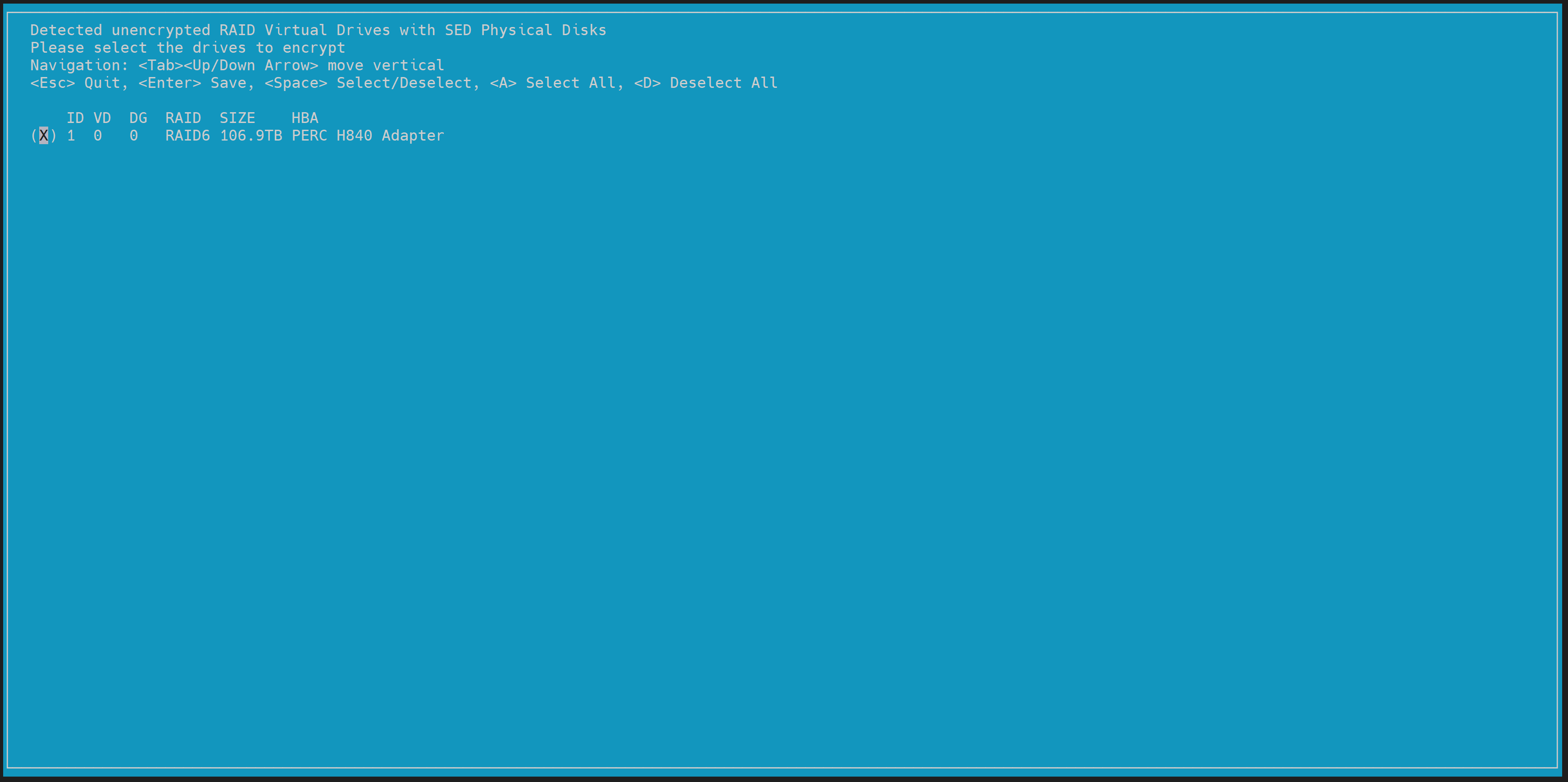
1. Select the Virtual Drive and press **Enter**.
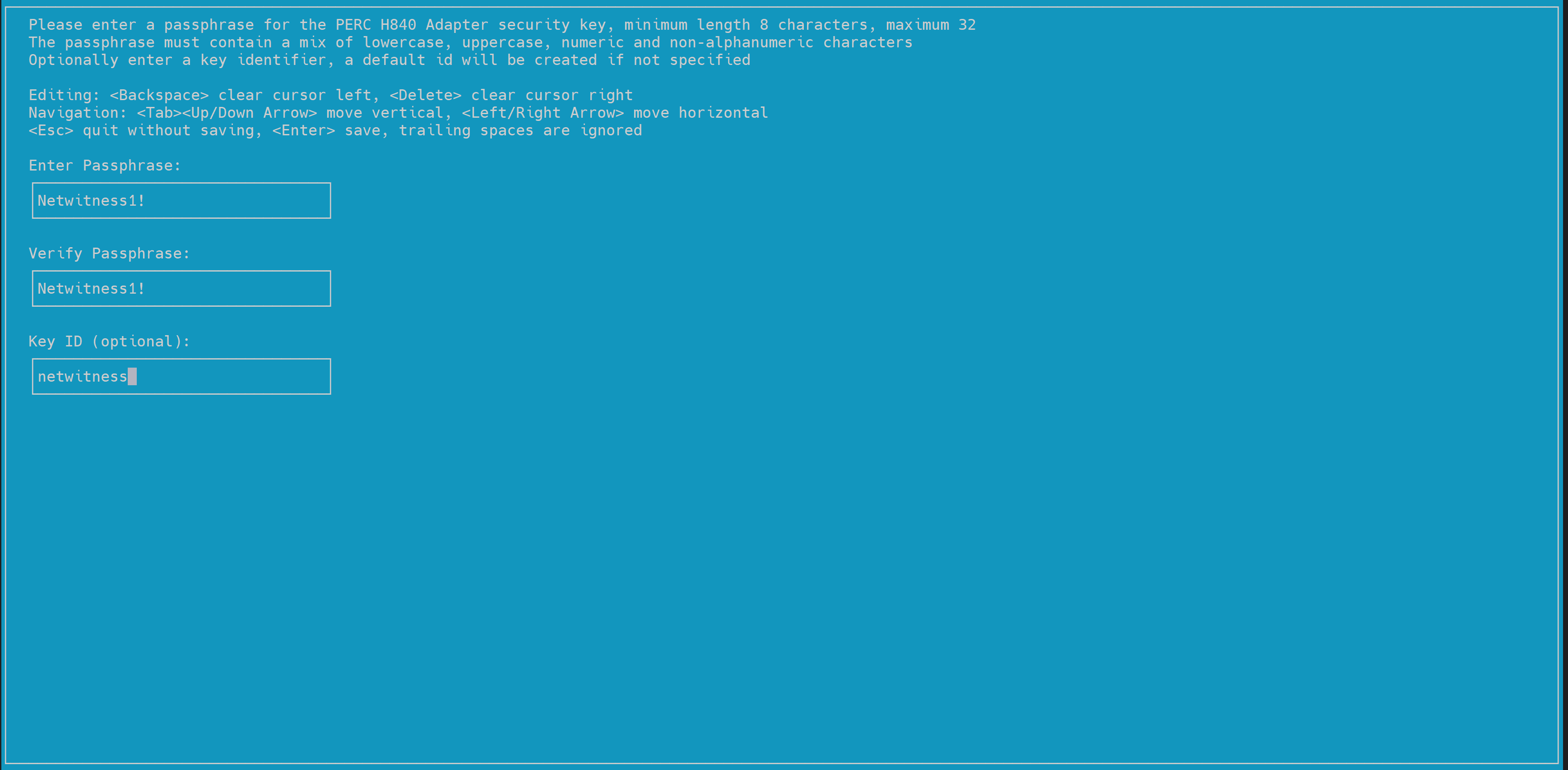
Passphrase screen is displayed.
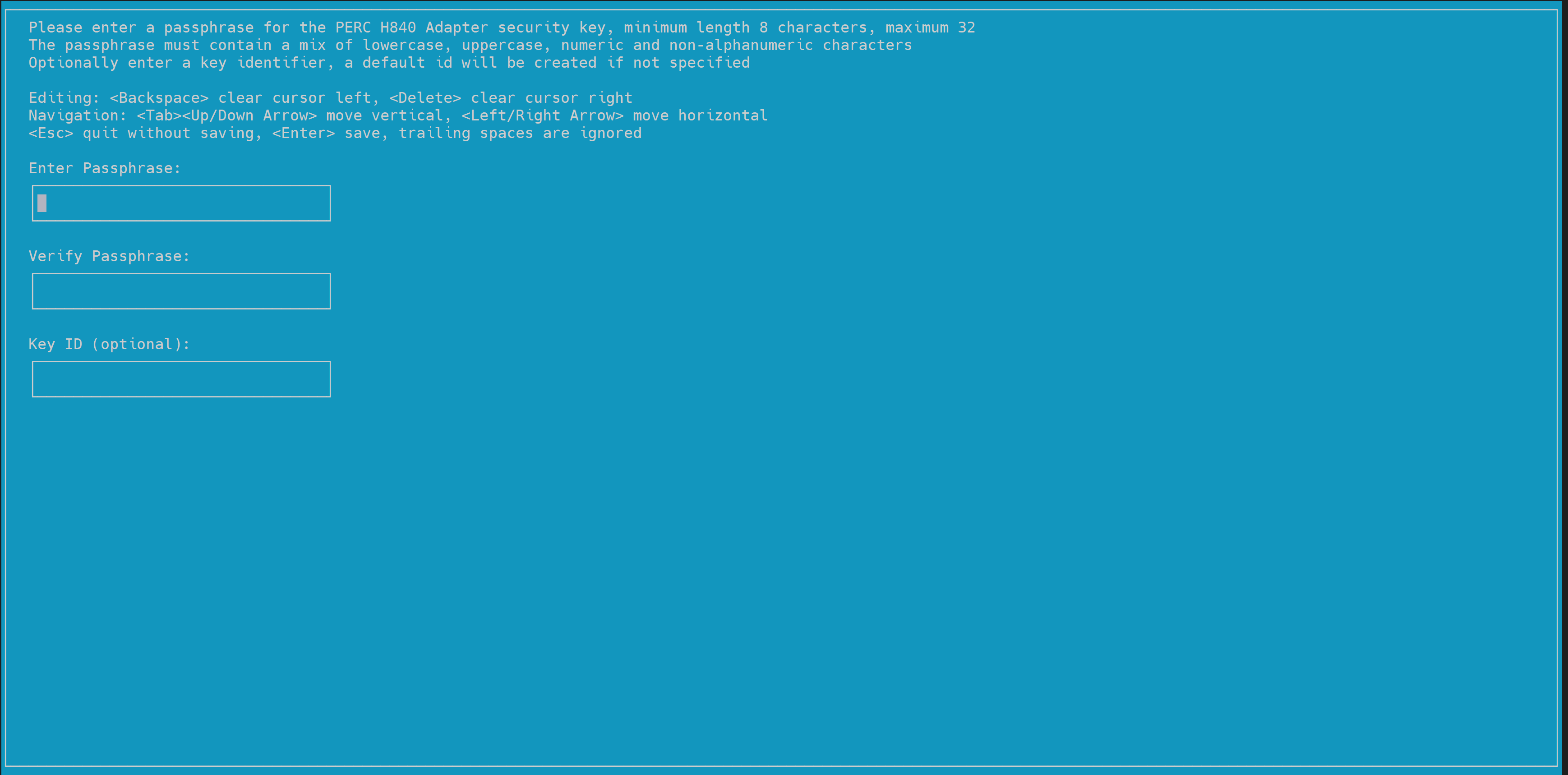
2. Enter the Passphrase and press **Enter**.
For Example,
Passphrase : **NetWitness1!**
keyID: **netwitness**
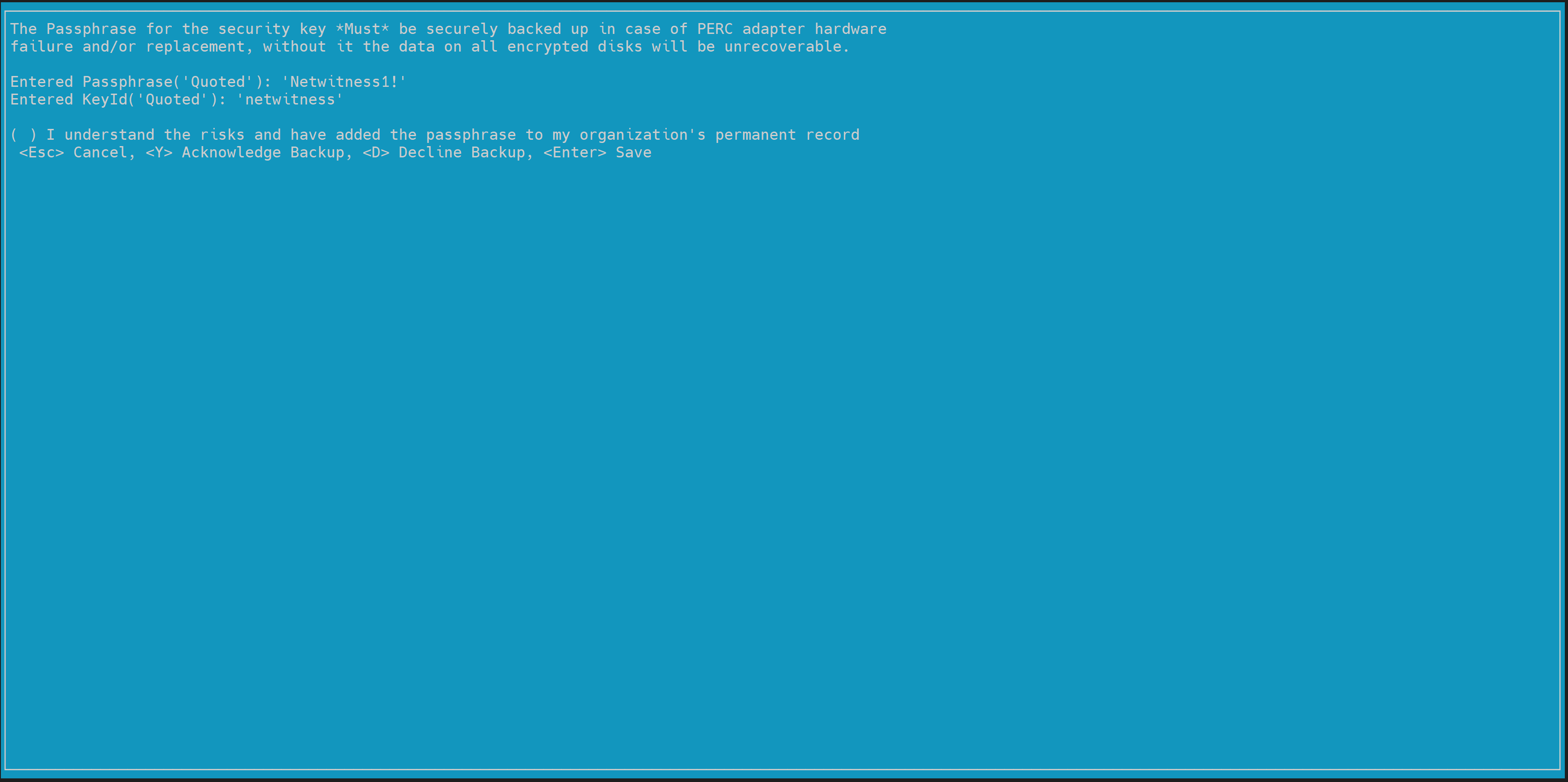
3. Acknowledge the message and Press **Enter** to Save.
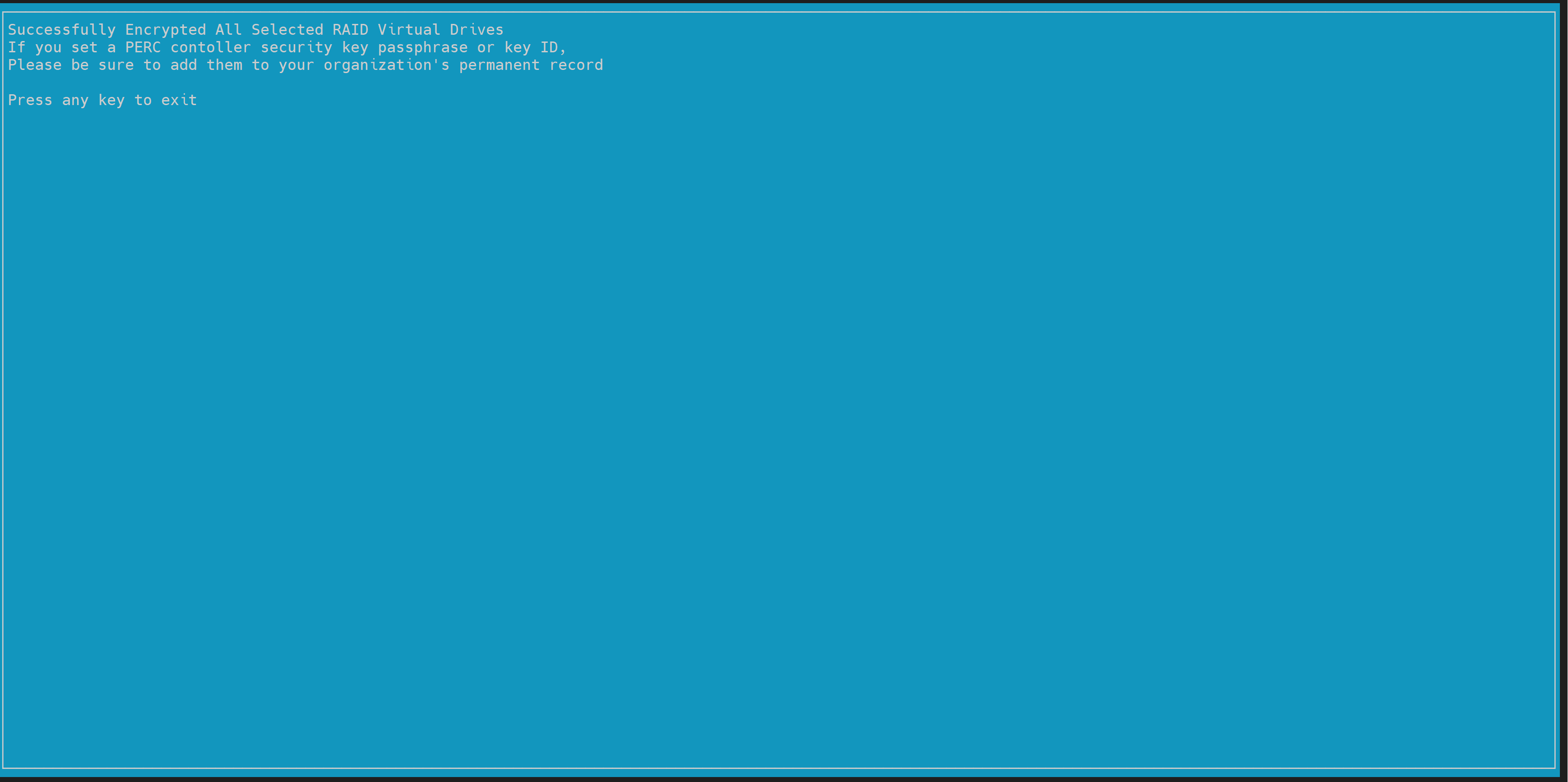
4. Press any Key to Exit.
5. To confirm that the drives are SED Enabled and secured, run the following command and verify the SED Enabled and Secured returns Yes.
`/opt/MegaRAID/perccli/perccli64 /c1 /e247/sall show all | egrep -i '(Policies/Settings|SED Capable|Secured|SED Enabled)'`
`Drive /c1/e247/s0 Policies/Settings :`
`SED Capable = Yes`
`SED Enabled = Yes`
`Secured = Yes`
`Drive /c1/e247/s1 Policies/Settings :`
`SED Capable = Yes`
`SED Enabled = Yes`
`Secured = Yes`
`Drive /c1/e247/s2 Policies/Settings :`
`SED Capable = Yes`
`SED Enabled = Yes`
`Secured = Yes`
`Drive /c1/e247/s3 Policies/Settings :`
`SED Capable = Yes`
`SED Enabled = Yes`
`Secured = Yes`
`Drive /c1/e247/s4 Policies/Settings :`
`SED Capable = Yes`
`SED Enabled = Yes`
`Secured = Yes`
`Drive /c1/e247/s5 Policies/Settings :`
`SED Capable = Yes`
`SED Enabled = Yes`
`Secured = Yes`
`Drive /c1/e247/s6 Policies/Settings :`
`SED Capable = Yes`
`SED Enabled = Yes`
`Secured = Yes`
`Drive /c1/e247/s7 Policies/Settings :`
`SED Capable = Yes`
`SED Enabled = Yes`
`Secured = Yes`
`Drive /c1/e247/s8 Policies/Settings :`
`SED Capable = Yes`
`SED Enabled = Yes`
`Secured = Yes`
`Drive /c1/e247/s9 Policies/Settings :`
`SED Capable = Yes`
`SED Enabled = Yes`
`Secured = Yes`
`Drive /c1/e247/s10 Policies/Settings :`
`SED Capable = Yes`
`SED Enabled = Yes`
`Secured = Yes`
`Drive /c1/e247/s11 Policies/Settings :`
`SED Capable = Yes`
`SED Enabled = Yes`
`Secured = Yes`
### Enable Virtual Drives / Drive Groups - PERC H740 (Mini) Adaptors (Internal storage)
You can enable the SED capability on the Virtual Drive or Drive Groups created out of on-board SED capable drives (in slots 4 through 9 – total of 6 drives) using the percli64 utility. You cannot use /opt/rsa/saTools/supportScript/encryptSedVd.py to turn on Security on the Virtual drives on the PERC H740 (mini) Adaptor.
1. SSH to the appliance and enable security on the PERC H740 (mini) Adaptor. The controller number for this adaptor is **0**. The PERC H840 Adaptor is shown as **1**.
To list all the controllers on the appliance run the following command:
`/opt/MegaRAID/perccli/perccli64 show | egrep -A3 'Model'`
The first column (**Ctl**) lists out the controller index on the appliance. In this case, the controller **0** corresponds to **PERC H740 Mini** and controller **1** corresponds to **PERC H840 Adaptor**. The columns **DGs** and **VDs** dislpays the virtual drives and drive groups on the controller.

1. To enable the security on the **PERC H740 (mini) Adaptor**, for example, Controller **0**, run the following command:
`/opt/MegaRAID/perccli/perccli64 /c0 set securitykey=’ ’!' keyid=’ ’`
Example:
`/opt/MegaRAID/perccli/perccli64 /c0 set securitykey='NetWitness1!' keyid='netwitness'`
'NetWitness1’ is the securityKey and ‘netwintess’ is ID.
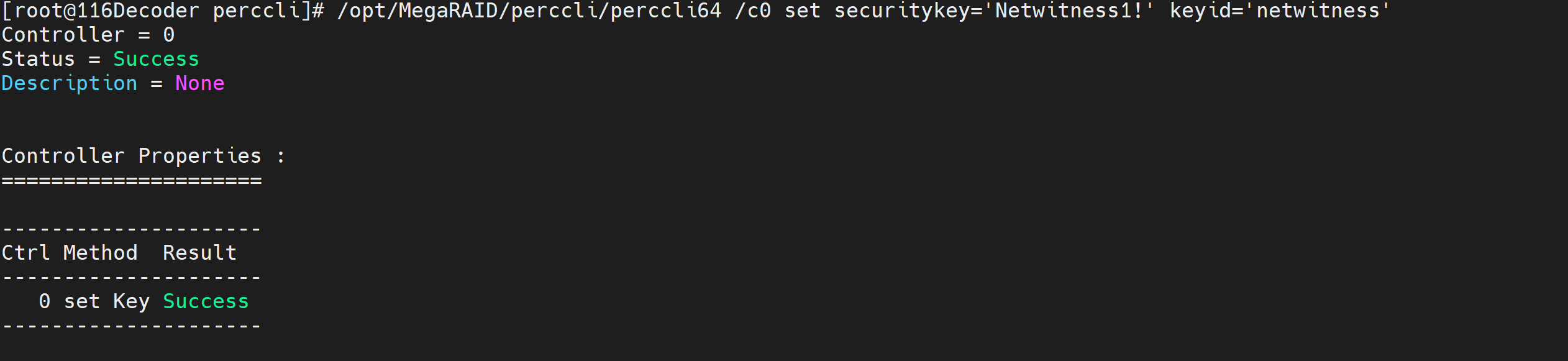
Make a note of both the Key and keyID securely.
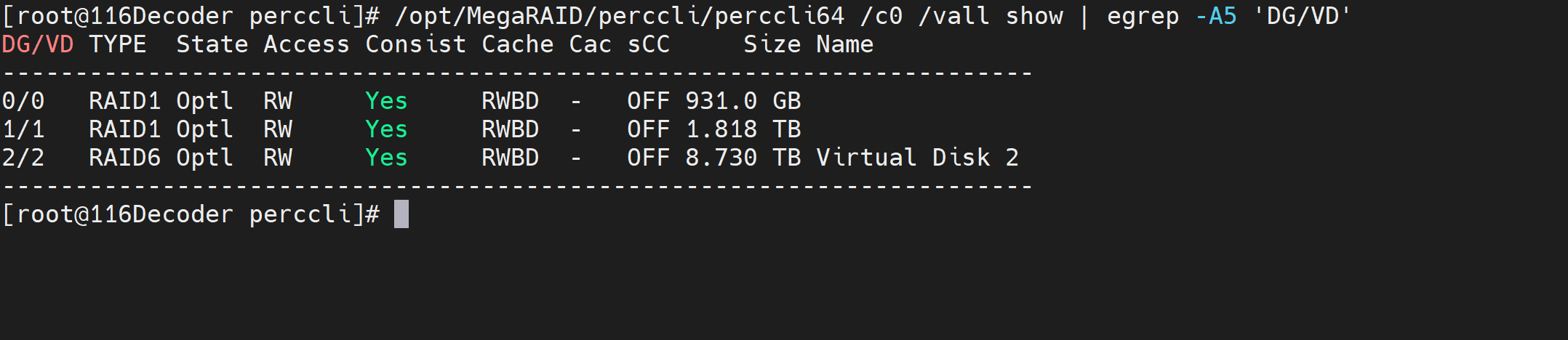
2. Identify the correct Drive group (DG) or Virtual Drive (VD) corresponding to the SED Capable drives that you want to enable security.
/opt/MegaRAID/perccli/perccli64 /c0 /vall show | egrep -A5 'DG/VD'
Check the first two and last column to identify the correct Drive Group / Virtual Drive correspond to the 6 SED enabled drives that are SED Capable. On Series 6 appliances, there is only one DG or VD with **RAID6** type. Name column can be used to identify the VD or DG. In this case, the DG or VD is **2**. Using a combination of **Type**, **Name** and **Size** columns (these are defined when you created VDs above).
3. To turn on Security on the disk group (created out of the 6 SED Capable drives) for **decodersmall** volume group, run the below command:
`/opt/MegaRAID/perccli/perccli64 /c0 /d2 set security=on`

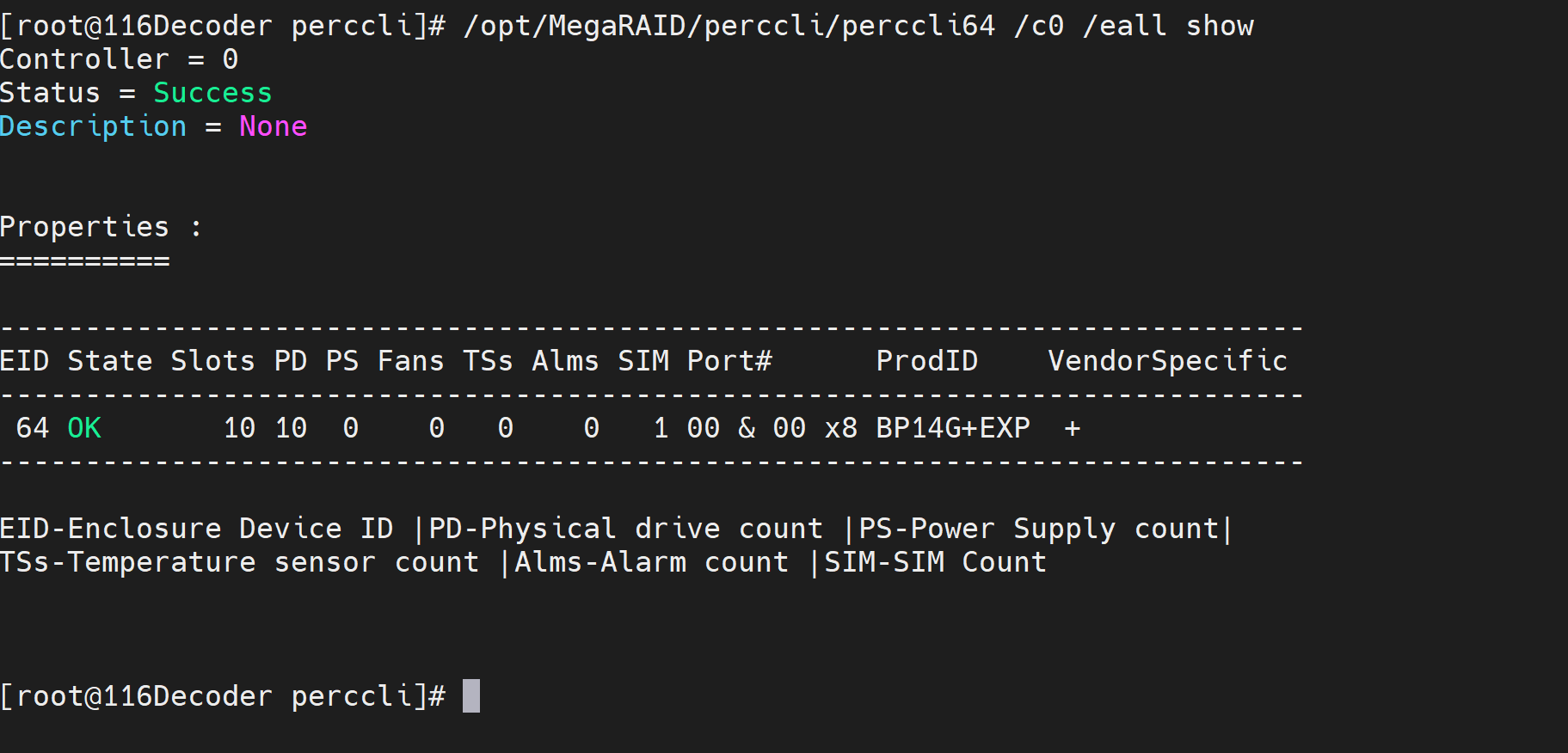
4. Get the Enclosure ID (**EID**) using on the controller **0**. In this case, it is **64**
`/opt/MegaRAID/perccli/perccli64 /c0 /eall show`
5. To confirm that the drives or drive groups are **SED Enabled** and **Secured**, run the below command and verify the **SED Capable**, **Secured**, **SED Enabled** flags are set as **Yes** for drives in slots 4 (s4) through 9 (s9).
`/opt/MegaRAID/perccli/perccli64 /c0 /e64/sall show all | egrep -i '(Policies/Settings |SED Capable|Secured|SED Enabled)'`
`Drive /c0/e64/s0 Policies/Settings :`
`SED Capable = No`
`SED Enabled = No`
`Secured = No`
`Drive /c0/e64/s1 Policies/Settings :`
`SED Capable = No`
`SED Enabled = No`
`Secured = No`
`Drive /c0/e64/s2 Policies/Settings :`
`SED Capable = No`
`SED Enabled = No`
`Secured = No`
`Drive /c0/e64/s3 Policies/Settings :`
`SED Capable = No`
`SED Enabled = No`
`Secured = No`
`Drive /c0/e64/s4 Policies/Settings :`
`SED Capable = Yes`
`SED Enabled = Yes`
`Secured = Yes`
`Drive /c0/e64/s5 Policies/Settings :`
`SED Capable = Yes`
`SED Enabled = Yes`
`Secured = Yes`
`Drive /c0/e64/s6 Policies/Settings :`
`SED Capable = Yes`
`SED Enabled = Yes`
`Secured = Yes`
`Drive /c0/e64/s7 Policies/Settings :`
`SED Capable = Yes`
`SED Enabled = Yes`
`Secured = Yes`
`Drive /c0/e64/s8 Policies/Settings :`
`SED Capable = Yes`
`SED Enabled = Yes`
`Secured = Yes`
`Drive /c0/e64/s9 Policies/Settings :`
`SED Capable = Yes`
`SED Enabled = Yes`
`Secured = Yes`
## Enable SED on configured Virtual Drives/ Drive Groups on Power Vault (PERC 840)
### Enable Virtual Drives / Drive Groups - PERC H840 Adaptors
**Note:** The virtual disk created in *Configure Block Devices for PowerVaults* section in [Prepare Physical Storage](https://50269063.hs-sites.com/knowledge-base/ConfigureDrivePack-s?hsLang=en) is SED capable but NOT SED Enabled.
1. To enable, SSH into the appliance and run the below script to encrypt the VD (on external storage).
`OWB_ALLOW_NON_FIPS=true /opt/rsa/saTools/supportScript/encryptSedVd.py`
**Note:** The encryptSedVd.py script turn on the SED feature only on Virtual Drives or Drive Groups on the PERC H840 Adaptors (external storage) and NOT on PERC H740 mini. Refer to **Enable Virtual Drives / Drive Groups - PERC H740 (Mini) Adaptors (Internal storage)** to enable SED on PERC H740 Mini
OWB\_ALLOW\_NON\_FIPS=true /opt/rsa/saTools/supportScript/encryptSedVd.py
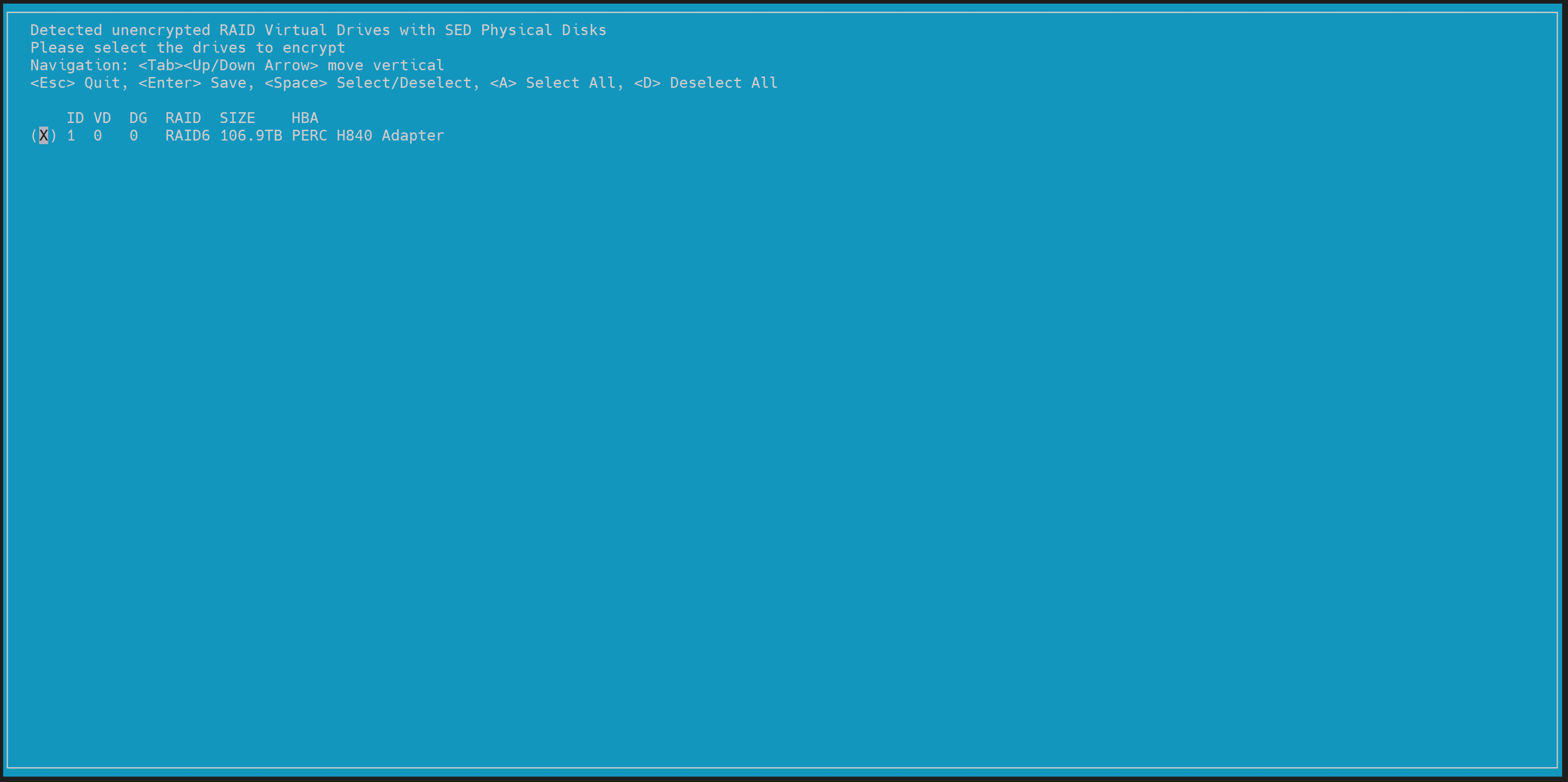
2. Select both the **Virtula Disks** and press **Enter**.
The Passphrase screen is displayed.
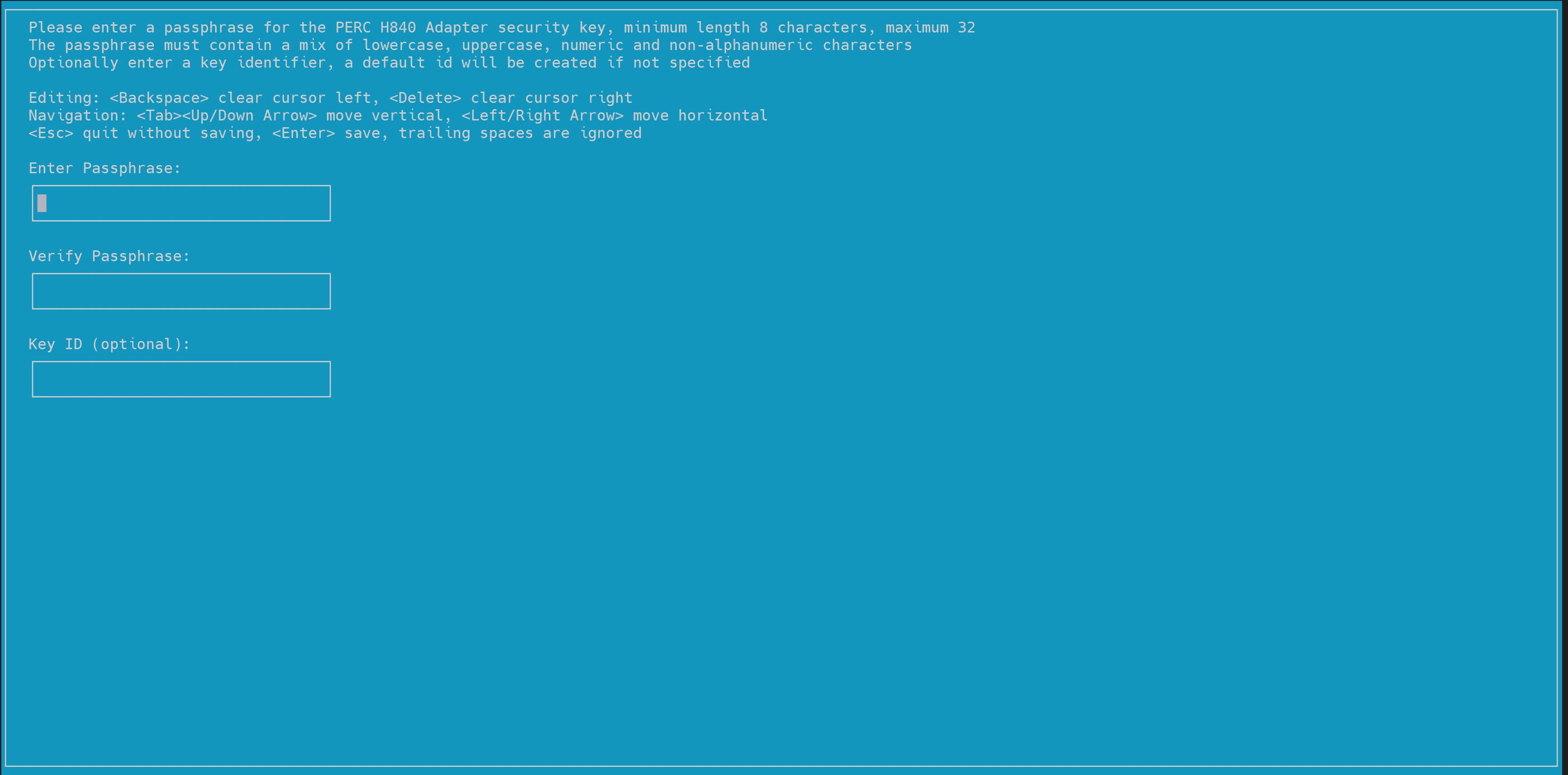
3. Enter the Passphrase and press **Enter**.
For example,
Passphrase : **NetWitness1!**
keyID: **netwitness**
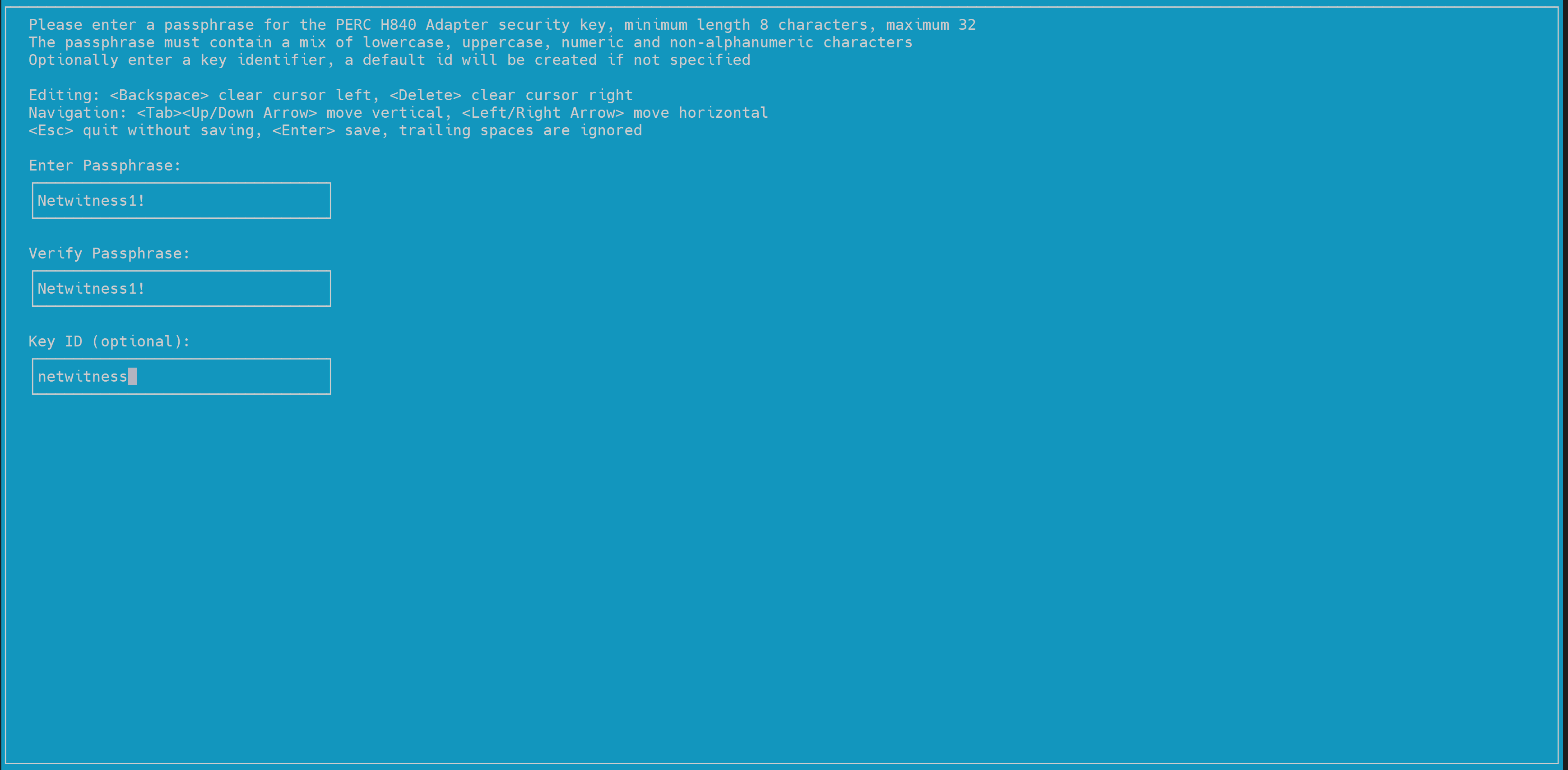
4. Acknowledge the message and Press **Enter** to Save.
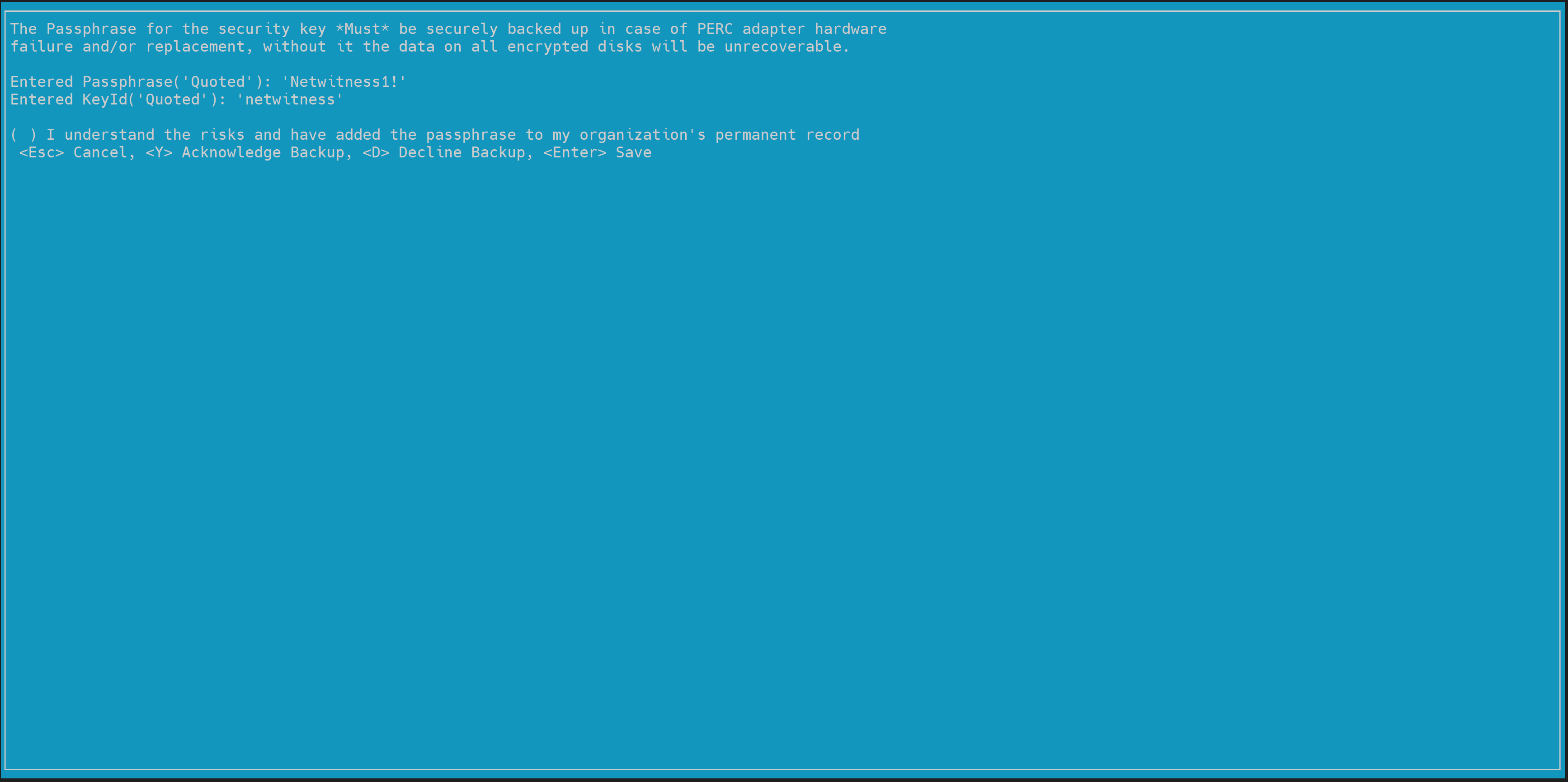
5. Press any Key to Exit.

6. To confirm that the drives are SED Enabled and secured, run the below command and verify the SED Enabled and Secured returns Yes.
``/opt/MegaRAID/perccli/perccli64 /c1 /e247/sall show all | egrep -i '(Policies/Settings|SED Capable|Secured|SED Enabled)'
Drive /c1/e247/s0 Policies/Settings :
SED Capable = Yes
SED Enabled = Yes
Secured = Yes
Drive /c1/e247/s1 Policies/Settings :
SED Capable = Yes
SED Enabled = Yes
Secured = Yes
Drive /c1/e247/s2 Policies/Settings :
SED Capable = Yes
SED Enabled = Yes
Secured = Yes
Drive /c1/e247/s3 Policies/Settings :
SED Capable = Yes
SED Enabled = Yes
Secured = Yes
Drive /c1/e247/s4 Policies/Settings :
SED Capable = Yes
SED Enabled = Yes
Secured = Yes
Drive /c1/e247/s5 Policies/Settings :
SED Capable = Yes
SED Enabled = Yes
Secured = Yes
Drive /c1/e247/s6 Policies/Settings :
SED Capable = Yes
SED Enabled = Yes
Secured = Yes
Drive /c1/e247/s7 Policies/Settings :
SED Capable = Yes
SED Enabled = Yes
Secured = Yes
Drive /c1/e247/s8 Policies/Settings :
SED Capable = Yes
SED Enabled = Yes
Secured = Yes
Drive /c1/e247/s9 Policies/Settings :
SED Capable = Yes
SED Enabled = Yes
Secured = Yes
Drive /c1/e247/s10 Policies/Settings :
SED Capable = Yes
SED Enabled = Yes
Secured = Yes
Drive /c1/e247/s11 Policies/Settings :
SED Capable = Yes
SED Enabled = Yes
Secured = Yes
### Enable Security on SED Capable Drive groups on Host with a mix of SED and NON SED Drives
The encryptSedVd.py may fail to identify the SED Capable Virtual Drives when there is mix of both SED and NON-SED drives on the appliance. The below steps are applicable when both SED and NON-SED capable virtual drives exist on the host.
1. SSH to the appliance and enable security on the PERC H740 (mini) Adaptor. The controller number for this adaptor is **0**. The PERC H840 Adaptor is shown as **1**.
To list all the controllers on the appliance:
`/opt/MegaRAID/perccli/perccli64 show | egrep -A3 'Model'`
The first column **(Ctl)** lists out the controller index on the appliance. In this case, the controller ‘**0**’ corresponds to ‘**PERC H740 Mini**’ and controller ‘**1**’ corresponds to ‘**PERC H840 Adaptor**’ . The columns ‘**DGs**’ and ‘**VDs**’ displays the drive groups and virtual drives on the controller.

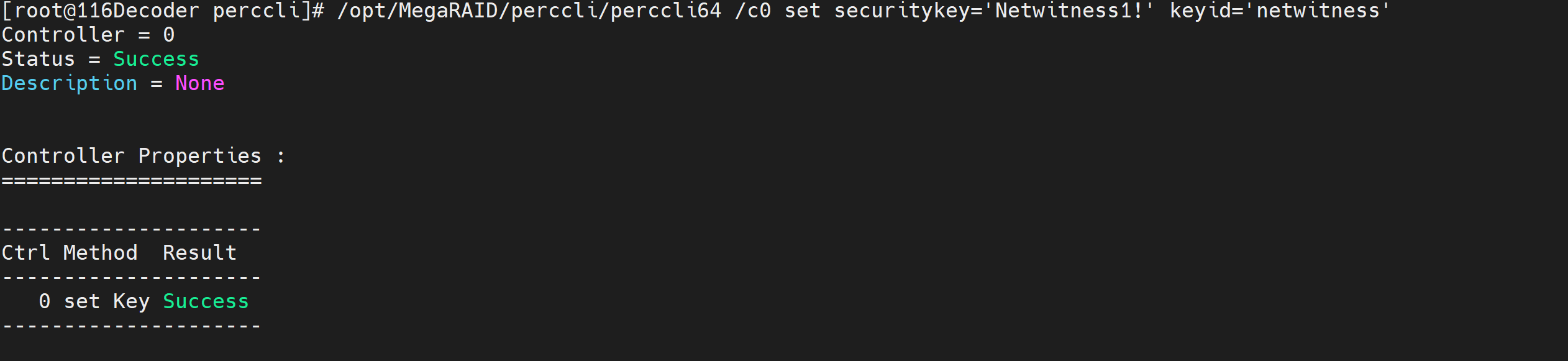
2. To enable the security on the ‘PERC H740 (mini) Adaptor’ i.e Controller ‘**0**’, execute the following command:
`/opt/MegaRAID/perccli/perccli64 /c0 set securitykey=’ ’!' keyid=’< SOME_STRING_VALUE >’`
Example:
`/opt/MegaRAID/perccli/perccli64 /c0 set securitykey='NetWitness1!' keyid=1`
'NetWitness1’ is the securityKey and ‘1’ is ID. Preserve both the Key and keyID securely.
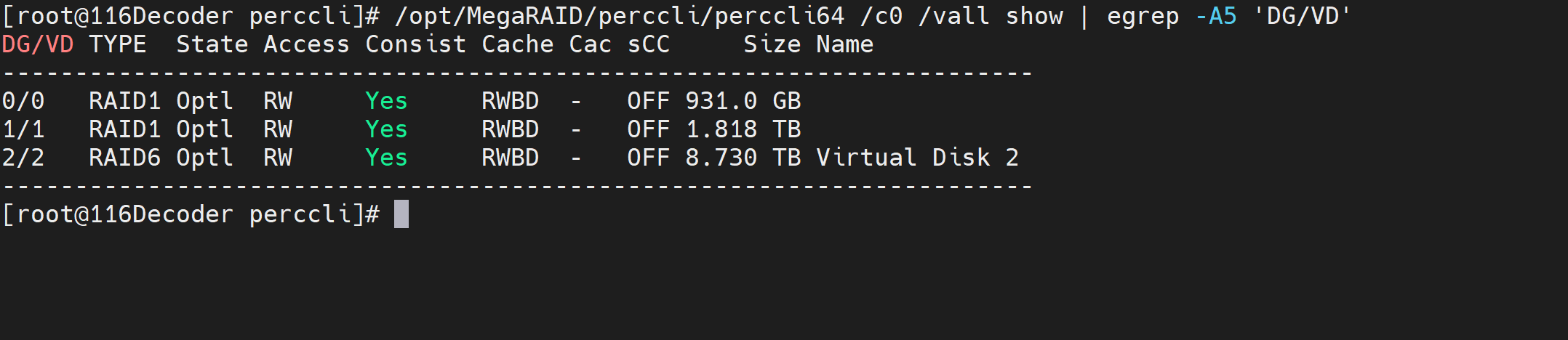
3. Identify the correct Drive group (DG) / Virtual Drive (VD) corresponding to the SED Capable drives that we are trying to enable security.
`/opt/MegaRAID/perccli/perccli64 /c0 /vall show | egrep -A5 'DG/VD'`
Refer to first two and last column to identify the correct Drive Group (DG) / Virtual Drive (VD) correspond to the 6 SED enabled drives. On Series 6 appliances, there is only one DG/VD with **RAID6**. ‘**Name**’ column can be used to identify the VD/DG. In this case, the DG/VD is ‘**2**’. Using a combination of ‘**Type**’, ‘**Name**’ and ‘**Size**’ columns (these were defined by the user when the VDs are created above).
4. To turn on Security on the disk group (created out of the 6 SED Capable drives), execute the below command:
`/opt/MegaRAID/perccli/perccli64 /c0 /d2 set security=on`

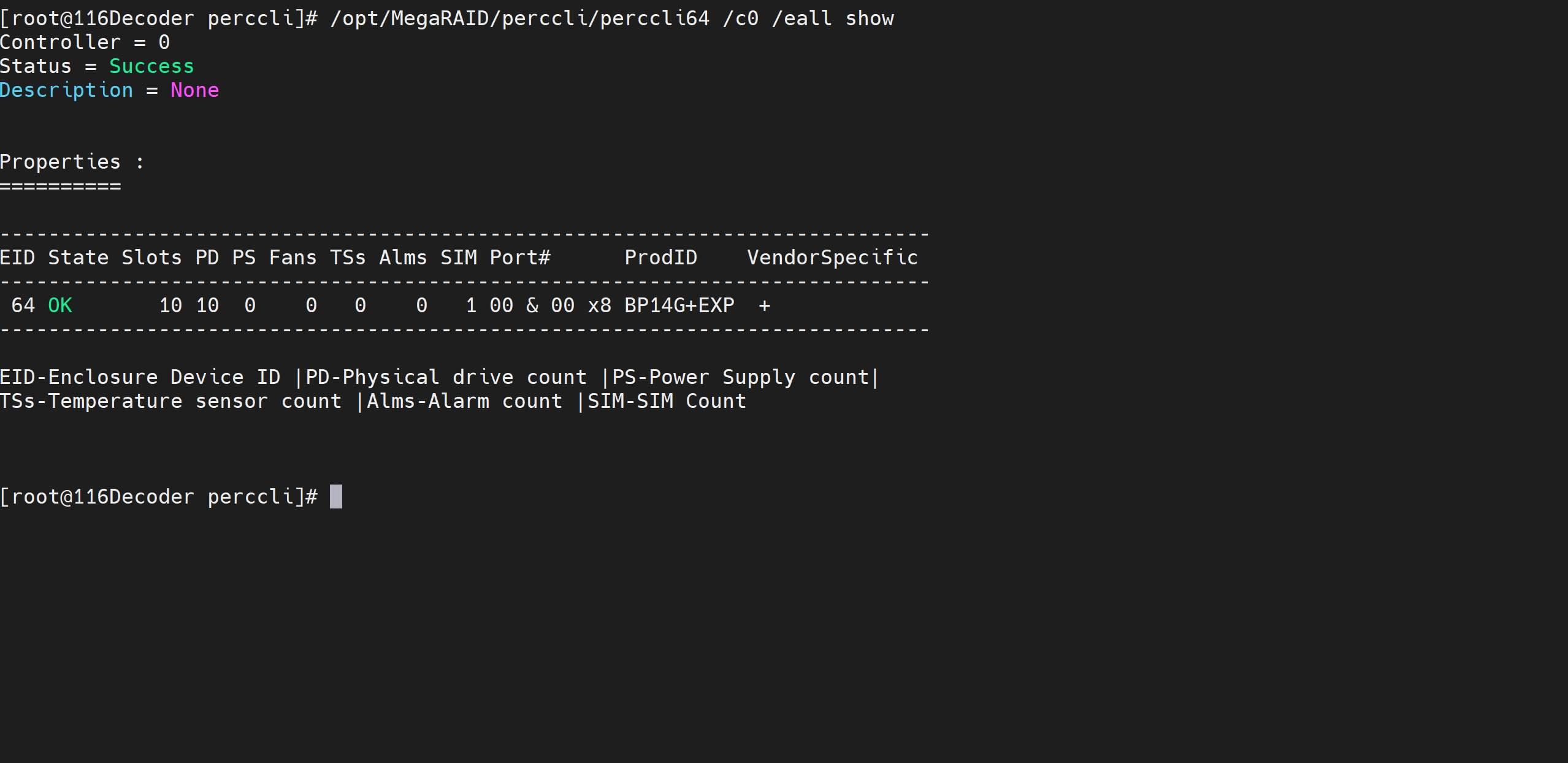
5. Get the Enclosure ID (**EID**) using on the controller ‘**0**’. In this case, it is ‘64’
`/opt/MegaRAID/perccli/perccli64 /c0 /eall show`
6. To confirm that the drives / Drive Groups (DG) are **SED Enabled** and **Secured**, run the below command and verify the **SED Capable**, **Secured**, **SED Enabled** flags are set as ‘**Yes**’ for drives in slots 4 (**s4**) through 9 (**s9**).
`/opt/MegaRAID/perccli/perccli64 /c0 /e64/sall show all | egrep -i '(Policies/Settings |SED Capable|Secured|SED Enabled)'`
`Drive /c0/e64/s0 Policies/Settings :`
`SED Capable = No`
`SED Enabled = No`
`Secured = No`
`Drive /c0/e64/s1 Policies/Settings :`
`SED Capable = No`
`SED Enabled = No`
`Secured = No`
`Drive /c0/e64/s2 Policies/Settings :`
`SED Capable = No`
`SED Enabled = No`
`Secured = No`
`Drive /c0/e64/s3 Policies/Settings :`
`SED Capable = No`
`SED Enabled = No`
`Secured = No`
`Drive /c0/e64/s4 Policies/Settings :`
`SED Capable = Yes`
`SED Enabled = Yes`
`Secured = Yes`
`Drive /c0/e64/s5 Policies/Settings :`
`SED Capable = Yes`
`SED Enabled = Yes`
`Secured = Yes`
`Drive /c0/e64/s6 Policies/Settings :`
`SED Capable = Yes`
`SED Enabled = Yes`
`Secured = Yes`
`Drive /c0/e64/s7 Policies/Settings :`
`SED Capable = Yes`
`SED Enabled = Yes`
`Secured = Yes`
`Drive /c0/e64/s8 Policies/Settings :`
`SED Capable = Yes`
`SED Enabled = Yes`
`Secured = Yes`
`Drive /c0/e64/s9 Policies/Settings :`
`SED Capable = Yes`
`SED Enabled = Yes`
`Secured = Yes`
[](https://mydev.netwitness.com/?hsLang=en)
Copyright © 2026, NetWitness LLC. All rights reserved.
[NetWitness Platform](https://www.netwitness.com/)
[Acceptable Use Policy](https://www.netwitness.com/wp-content/uploads/Acceptable-Use-Policy-092022.pdf) [Privacy Statement](https://www.netwitness.com/wp-content/uploads/NetWitness-Privacy-Statement-07292024.pdf)

[](https://www.linkedin.com/company/netwitness-platform/) [](https://www.youtube.com/@netwitness)
© 2026 NetWitness LLC. All rights reserved.