---
title: All RSA Products - HTTP 403 Forbidden error when downloading from Download Central
description: "Issue\nWhen trying to download software from the RSA Download Central (https://download.rsasecurity.com) website an HTTP 403 Forbidden error is display"
---
[Skip to content](https://mydev.netwitness.com/knowledge-base/all-rsa-products-http-403-forbidden-error-when-downloading-from-download-central#main-content)

- [Home](https://mydev.netwitness.com/home)
- Integrations
Show submenu for Integrations
- [Netwitness Platform Integrations](https://mydev.netwitness.com/netwitnessplatformintegrations)
- [Third Party Integrations](https://mydev.netwitness.com/thirdpartyintegrations)
- [Knowledge Center](https://mydev.netwitness.com/knowledge-base)
- Community
Show submenu for Community
- [Blogs](https://mydev.netwitness.com/netwitness-security-llc-blog)
- Discussions
- Customers
Show submenu for Customers
- [Manage Products and Licenses](https://mydev.netwitness.com/nwportal)
- Downloads
- Partners
Show submenu for Partners
- [Partner Program](https://mydev.netwitness.com/partner)
- [Partner Resources](https://mydev.netwitness.com/partnerresources)
- [Submit a New Deal Registration](https://mydev.netwitness.com/dealregistration)
- [Become a Partner](https://mydev.netwitness.com/becomeapartner)
- [Update Your Partner Locator Profile](https://www.netwitness.com/partner-locator/?utm_source=pardotnewsletter&utm_medium=email&utm_campaign=partner_march)
- [NetWitness LinkedIn Partner Hub](https://linkedin.com/showcase/netwitnesspartners/)
- Education
Show submenu for Education
- [Instructor Led Training Schedule](https://mydev.netwitness.com/instructorledtrainingschedule)
- [NetWitness Training Catalog](https://mydev.netwitness.com/netwitnesstrainingcatalog)
- [Security Awareness Training](https://mydev.netwitness.com/securityawarenesstraining)
- [New Product Readiness](https://mydev.netwitness.com/newproductreadiness)
- [On-Demand Virtual Labs](https://mydev.netwitness.com/ondemandvirtuallabs)
- [Additional Training Information](https://mydev.netwitness.com/additionaltraininginformation)
- [Frequently Asked Questions](https://mydev.netwitness.com/educationfaq)
- [Contact NetWitness Education Team](https://mydev.netwitness.com/contact-netwitness-education-team)
- Support
Show submenu for Support
- [Contact Support](https://mydev.netwitness.com/contact-support)
- [Create a New Case](https://mydev.netwitness.com/create-support-case)
- [View My Cases](https://mydev.netwitness.com/viewmycase)
- [Product Version Life Cycle](https://mydev.netwitness.com/product-version-life-cycle)
- [Warranty & Replacement Parts](https://mydev.netwitness.com/warranty-and-replacement-parts)
- [Community Support Forum](https://mydev.netwitness.com/community-support-forum)
- [Technical Support Guide](https://mydev.netwitness.com/technical-support-guide)
Open main navigation
Close main navigation
- [Home](https://mydev.netwitness.com/home)
- Integrations
Show submenu for Integrations
- [Netwitness Platform Integrations](https://mydev.netwitness.com/netwitnessplatformintegrations)
- [Third Party Integrations](https://mydev.netwitness.com/thirdpartyintegrations)
- [Knowledge Center](https://mydev.netwitness.com/knowledge-base)
- Community
Show submenu for Community
- [Blogs](https://mydev.netwitness.com/netwitness-security-llc-blog)
- Discussions
- Customers
Show submenu for Customers
- [Manage Products and Licenses](https://mydev.netwitness.com/nwportal)
- Downloads
- Partners
Show submenu for Partners
- [Partner Program](https://mydev.netwitness.com/partner)
- [Partner Resources](https://mydev.netwitness.com/partnerresources)
- [Submit a New Deal Registration](https://mydev.netwitness.com/dealregistration)
- [Become a Partner](https://mydev.netwitness.com/becomeapartner)
- [Update Your Partner Locator Profile](https://www.netwitness.com/partner-locator/?utm_source=pardotnewsletter&utm_medium=email&utm_campaign=partner_march)
- [NetWitness LinkedIn Partner Hub](https://linkedin.com/showcase/netwitnesspartners/)
- Education
Show submenu for Education
- [Instructor Led Training Schedule](https://mydev.netwitness.com/instructorledtrainingschedule)
- [NetWitness Training Catalog](https://mydev.netwitness.com/netwitnesstrainingcatalog)
- [Security Awareness Training](https://mydev.netwitness.com/securityawarenesstraining)
- [New Product Readiness](https://mydev.netwitness.com/newproductreadiness)
- [On-Demand Virtual Labs](https://mydev.netwitness.com/ondemandvirtuallabs)
- [Additional Training Information](https://mydev.netwitness.com/additionaltraininginformation)
- [Frequently Asked Questions](https://mydev.netwitness.com/educationfaq)
- [Contact NetWitness Education Team](https://mydev.netwitness.com/contact-netwitness-education-team)
- Support
Show submenu for Support
- [Contact Support](https://mydev.netwitness.com/contact-support)
- [Create a New Case](https://mydev.netwitness.com/create-support-case)
- [View My Cases](https://mydev.netwitness.com/viewmycase)
- [Product Version Life Cycle](https://mydev.netwitness.com/product-version-life-cycle)
- [Warranty & Replacement Parts](https://mydev.netwitness.com/warranty-and-replacement-parts)
- [Community Support Forum](https://mydev.netwitness.com/community-support-forum)
- [Technical Support Guide](https://mydev.netwitness.com/technical-support-guide)
How can we help you?
- There are no suggestions because the search field is empty.
1. [NetWitness Knowledge Base](https://mydev.netwitness.com/knowledge-base?hsLang=en)
2. [Break Fix](https://mydev.netwitness.com/knowledge-base/break-fix?hsLang=en)
April 30, 2026
# All RSA Products - HTTP 403 Forbidden error when downloading from Download Central
#### Issue
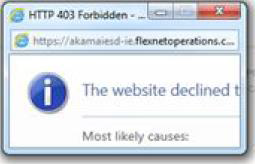
When trying to download software from the RSA Download Central (https://download.rsasecurity.com) website an HTTP 403 Forbidden error is displayed in the pop-up window for the Akamai Download Manager as below:
#### Cause
RSA uses the Akamai Download Manager for software downloads from Download Central which needs to be installed in the web browser. The installation is often blocked by a customer’s network restrictions, proxy settings and/or Java Security level.
#### Resolution
The resolution for this issue depends on the web browser you are using however all browsers will require the customer to ensure their pop-up blocker is not set to block all pop-ups and that their network settings such as a proxy server will not block the installation of the Akamai Download Manager add-on.
If the issue is not related to a pop-up blocker or network restrictions then follow the below browser specific steps:
**Chrome and Firefox**
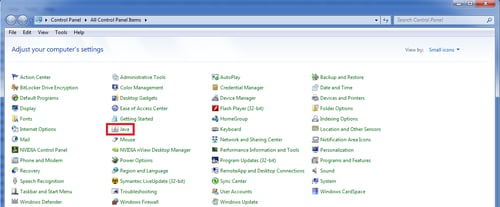
A. Go to Control Panel on your PC and open Java:
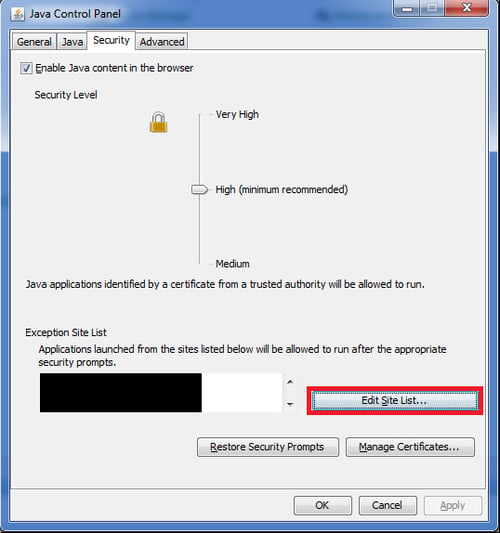
B. In the Java Control Panel click ‘Edit Site List’:
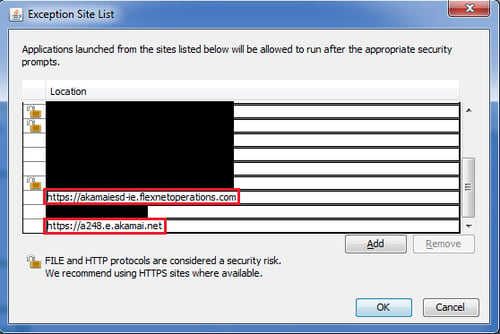
C. Add the following URL’s:
- https://akamaiesd-ie.flexnetoperations.com
- https://a248.e.akamai.net
D. Once complete you should be able to install and use the Akamai Download Manager.
**Internet Explorer**
With Internet Explorer you may need to perform a number of steps to resolve the issue. After each of the following steps attempt the download again to confirm successful installation and use of the Akamai Download Manager:
**Step 1:**
A. Go to Tools/Settings  \> Internet Options \> Security \> Trusted Sites \> Sites
B. Add the following URL’s:
- https://rsasecurity.subscribenet.com
- https://\*.flexnetoperations.com
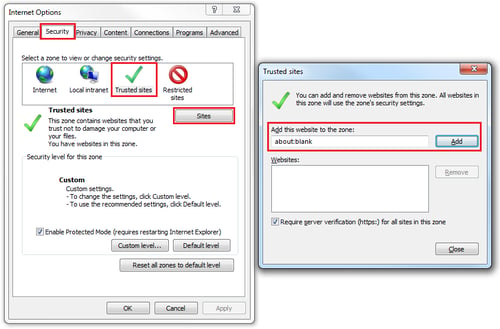
C. Click Close
D. Click OK
**Step 2:**
A. Go to Tools/Settings  \> Internet Options \> Connections tab \> LAN settings
B. Uncheck Use a proxy server for your LAN
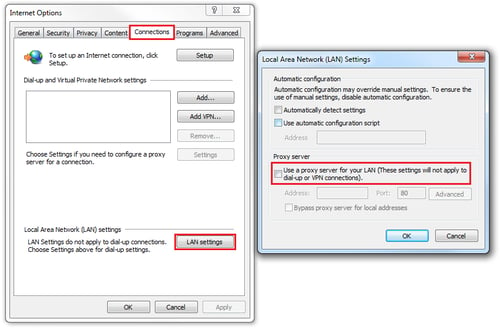
C. Click OK and then OK again
**Step 3:**
A. Go to Tools/Settings  \> Compatibility View Settings
B. Add the following URL’s:
- https://rsasecurity.subscribenet.com
- https://\*.flexnetoperations.com
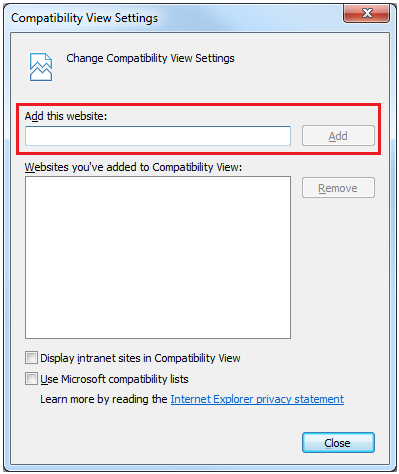
C. Click Close
**Step 4:**
If the Akamai Download Manager installed but still does not work, check that the add-on is enabled as below:
A. Go to Tools/Settings  \> Manage Add-ons
B. Select All add-ons from the ‘Show:’ drop down menu
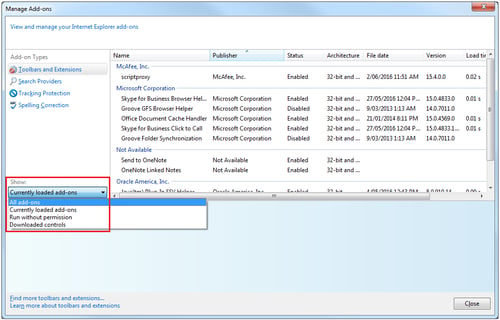
C. Locate Akamai Technologies Inc. \> DLM Control to ensure it is installed
D. If Disabled click the Enable button
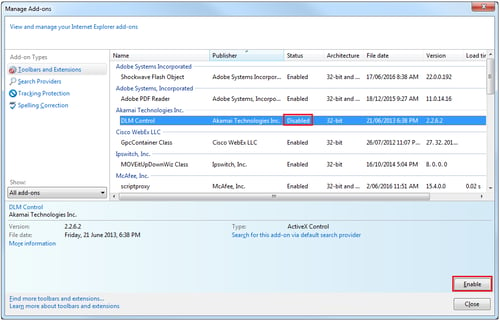
E. Click Close
#### Product Details
**RSA Product Set:** All RSA Products
#### Approval Reviewer Queue
ADP Approval Group
[](https://mydev.netwitness.com/?hsLang=en)
Copyright © 2026, NetWitness LLC. All rights reserved.
[NetWitness Platform](https://www.netwitness.com/)
[Acceptable Use Policy](https://www.netwitness.com/wp-content/uploads/Acceptable-Use-Policy-092022.pdf) [Privacy Statement](https://www.netwitness.com/wp-content/uploads/NetWitness-Privacy-Statement-07292024.pdf)

[](https://www.linkedin.com/company/netwitness-platform/) [](https://www.youtube.com/@netwitness)
© 2026 NetWitness LLC. All rights reserved.