---
title: Upgrade Tasks
description: "Upgrade TaskUpgrade Task\nUpgrade the systems in your environment in the following order:\nNW Server hosts Analyst UI hosts ESA Primary hosts ESA Secon"
---
[Skip to content](https://mydev.netwitness.com/knowledge-base/692710#main-content)

- [Home](https://mydev.netwitness.com/home)
- Integrations
Show submenu for Integrations
- [Netwitness Platform Integrations](https://mydev.netwitness.com/netwitnessplatformintegrations)
- [Third Party Integrations](https://mydev.netwitness.com/thirdpartyintegrations)
- [Knowledge Center](https://mydev.netwitness.com/knowledge-base)
- Community
Show submenu for Community
- [Blogs](https://mydev.netwitness.com/netwitness-security-llc-blog)
- Discussions
- Customers
Show submenu for Customers
- [Manage Products and Licenses](https://mydev.netwitness.com/nwportal)
- Downloads
- Partners
Show submenu for Partners
- [Partner Program](https://mydev.netwitness.com/partner)
- [Partner Resources](https://mydev.netwitness.com/partnerresources)
- [Submit a New Deal Registration](https://mydev.netwitness.com/dealregistration)
- [Become a Partner](https://mydev.netwitness.com/becomeapartner)
- [Update Your Partner Locator Profile](https://www.netwitness.com/partner-locator/?utm_source=pardotnewsletter&utm_medium=email&utm_campaign=partner_march)
- [NetWitness LinkedIn Partner Hub](https://linkedin.com/showcase/netwitnesspartners/)
- Education
Show submenu for Education
- [Instructor Led Training Schedule](https://mydev.netwitness.com/instructorledtrainingschedule)
- [NetWitness Training Catalog](https://mydev.netwitness.com/netwitnesstrainingcatalog)
- [Security Awareness Training](https://mydev.netwitness.com/securityawarenesstraining)
- [New Product Readiness](https://mydev.netwitness.com/newproductreadiness)
- [On-Demand Virtual Labs](https://mydev.netwitness.com/ondemandvirtuallabs)
- [Additional Training Information](https://mydev.netwitness.com/additionaltraininginformation)
- [Frequently Asked Questions](https://mydev.netwitness.com/educationfaq)
- [Contact NetWitness Education Team](https://mydev.netwitness.com/contact-netwitness-education-team)
- Support
Show submenu for Support
- [Contact Support](https://mydev.netwitness.com/contact-support)
- [Create a New Case](https://mydev.netwitness.com/create-support-case)
- [View My Cases](https://mydev.netwitness.com/viewmycase)
- [Product Version Life Cycle](https://mydev.netwitness.com/product-version-life-cycle)
- [Warranty & Replacement Parts](https://mydev.netwitness.com/warranty-and-replacement-parts)
- [Community Support Forum](https://mydev.netwitness.com/community-support-forum)
- [Technical Support Guide](https://mydev.netwitness.com/technical-support-guide)
Open main navigation
Close main navigation
- [Home](https://mydev.netwitness.com/home)
- Integrations
Show submenu for Integrations
- [Netwitness Platform Integrations](https://mydev.netwitness.com/netwitnessplatformintegrations)
- [Third Party Integrations](https://mydev.netwitness.com/thirdpartyintegrations)
- [Knowledge Center](https://mydev.netwitness.com/knowledge-base)
- Community
Show submenu for Community
- [Blogs](https://mydev.netwitness.com/netwitness-security-llc-blog)
- Discussions
- Customers
Show submenu for Customers
- [Manage Products and Licenses](https://mydev.netwitness.com/nwportal)
- Downloads
- Partners
Show submenu for Partners
- [Partner Program](https://mydev.netwitness.com/partner)
- [Partner Resources](https://mydev.netwitness.com/partnerresources)
- [Submit a New Deal Registration](https://mydev.netwitness.com/dealregistration)
- [Become a Partner](https://mydev.netwitness.com/becomeapartner)
- [Update Your Partner Locator Profile](https://www.netwitness.com/partner-locator/?utm_source=pardotnewsletter&utm_medium=email&utm_campaign=partner_march)
- [NetWitness LinkedIn Partner Hub](https://linkedin.com/showcase/netwitnesspartners/)
- Education
Show submenu for Education
- [Instructor Led Training Schedule](https://mydev.netwitness.com/instructorledtrainingschedule)
- [NetWitness Training Catalog](https://mydev.netwitness.com/netwitnesstrainingcatalog)
- [Security Awareness Training](https://mydev.netwitness.com/securityawarenesstraining)
- [New Product Readiness](https://mydev.netwitness.com/newproductreadiness)
- [On-Demand Virtual Labs](https://mydev.netwitness.com/ondemandvirtuallabs)
- [Additional Training Information](https://mydev.netwitness.com/additionaltraininginformation)
- [Frequently Asked Questions](https://mydev.netwitness.com/educationfaq)
- [Contact NetWitness Education Team](https://mydev.netwitness.com/contact-netwitness-education-team)
- Support
Show submenu for Support
- [Contact Support](https://mydev.netwitness.com/contact-support)
- [Create a New Case](https://mydev.netwitness.com/create-support-case)
- [View My Cases](https://mydev.netwitness.com/viewmycase)
- [Product Version Life Cycle](https://mydev.netwitness.com/product-version-life-cycle)
- [Warranty & Replacement Parts](https://mydev.netwitness.com/warranty-and-replacement-parts)
- [Community Support Forum](https://mydev.netwitness.com/community-support-forum)
- [Technical Support Guide](https://mydev.netwitness.com/technical-support-guide)
How can we help you?
- There are no suggestions because the search field is empty.
1. [NetWitness Knowledge Base](https://mydev.netwitness.com/knowledge-base?hsLang=en)
2. [Documentation](https://mydev.netwitness.com/knowledge-base/documentation?hsLang=en)
April 28, 2026
# Upgrade Tasks
## Upgrade TaskUpgrade Task
Upgrade the systems in your environment in the following order:
1. NW Server hosts
2. Analyst UI hosts
3. ESA Primary hosts
4. ESA Secondary hosts
5. The rest of your component hosts
**Note:** NW Server, Analyst UI, and ESA Primary and Secondary hosts must all be upgraded on the same day. The rest of your component hosts can be upgraded on the same day or later.
For information about all the host types in NetWitness, see the *Host and Services Getting Started Guide for RSA NetWitness Platform 11.x*. Go to the [NetWitness All Versions Documents](https://community.netwitness.com/t5/netwitness-platform-online/netwitness-platform-all-documents/ta-p/676246) page and find NetWitness Platform guides to troubleshoot issues.
## Important Notes - Read This FirstImportant Notes - Read This First
### Synchronize Time on Component Hosts with NW Server HostSynchronize Time on Component Hosts with NW Server Host
Before upgrading your hosts, make sure that the time on each host is synchronized with the time on the NetWitness Server.
To synchronize the time, do one of the following:
- Configure the NTP Server. For more information, see "Configure NTP Servers" in the *System Configuration Guide*.
- Perform the following steps on each host:
1. SSH to a component host.
2. Run the following commands.
systemctl stop ntpd
ntpdate nw-node-zero
systemctl start ndpd
### Mixed Mode Unsupported for ESA HostsMixed Mode Unsupported for ESA Hosts
Mixed mode is not supported for ESA hosts in NetWitness Platform. The NetWitness server, ESA primary host, and ESA secondary host must all be on the same NetWitness Platform version.
### Respond Server Service Not Enabled Until NW Server and Primary ESA Host Upgraded to same versionRespond Server Service Not Enabled Until NW Server and Primary ESA Host Upgraded to same version
After upgrading the primary NW Server (including the Respond Server service), the Respond Server service is not automatically re-enabled until after the Primary ESA host is also upgraded to same version. The Respond post-upgrade tasks only apply after the Respond Server service is upgraded and is in the enabled state.
### Deploy\_Admin Password Guidelines Deploy\_Admin Password Guidelines
In NetWitness Platform version 11.6 or Later, deployment account password (only on node-zero) must contain at least one number, one upper and lower case letter, and one special characters (!@#%^,+ . ) along with the existing policy. The same password policy applies while updating deploy\_admin password using nw-manage script.
If deploy\_admin password is changed on Primary NW Server, it must be changed in the Warm Standby Server if it exists.
## Upgrade OptionsUpgrade Options
You can choose one of the following upgrade methods based on your Internet connectivity. They are listed in the order recommended by RSA.
- [Option 1: User Interface Method with Connectivity to the Internet](https://mydev.netwitness.com/knowledge-base/692710#Option)
- [Option 2: User Interface with No Connectivity to the Internet](https://mydev.netwitness.com/knowledge-base/692710#Option2)
- [Option 3: Command Line Interface (CLI) with No Connectivity to the Internet](https://mydev.netwitness.com/knowledge-base/692710#Option3)
The following rules apply when you are upgrading hosts for all of these upgrade methods:
- You must upgrade the NW Server host first.
- You can only apply a version that is compatible with the existing host version.
- The NW Server, ESA primary, ESA secondary, and Analyst UI hosts must all be on the same NetWitness Platform version.
## Option 1: User Interface Method with Connectivity to the InternetOption 1: User Interface Method with Connectivity to the Internet
You can use this method if the NW Server host is connected to Live Services and if you are able to obtain the package.
Prerequisites
Make sure that:
1. The **Automatically download information about new upgrades every day** option is selected and is applied in ** (Admin) \> System \> Updates**.
2. Updates are available. Go to ** (Admin) \> Hosts \> Update \> Check for Updates** to check for updates. The Host view displays the **Update Available** status.
3. 11.7.1.0 is available in the **Update Version** column.
Procedure
1. Go to ** (Admin) \> Hosts**.
2. Select the NW Server (nw-server) host.
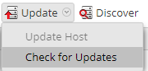
3. Check for the latest updates.
4. Update Available is displayed in the **Status** column if you have a version update in your Local Update Repository for the selected host.
5. Select **11.7.1.0** from the **Update Version** column. If you:
- Want to view a dialog with the major features in the upgrade and information on the updates, click the information icon () to the right of the upgrade version number.
- Cannot find the version you want, select **Update \> Check for Updates** to check the repository for any available updates. If an update is available, the message "New updates are available" is displayed and the **Status** column updates automatically to show Update Available. By default, only supported updates for the selected host are displayed.
6. Click **Update** \> **Update Host** from the toolbar.
7. Click **Begin Update**.
8. Click **Reboot Host**.
9. Repeat steps 6 to 8 for other hosts.
**Note:** You can select multiple hosts to upgrade at the same time only after updating and rebooting the NW Server host. All ESA, Endpoint, and Malware Analysis hosts should be upgraded to the same version as that of the NW Server host.
## Option 2: User Interface with No Connectivity to the InternetOption 2: User Interface with No Connectivity to the Internet
### Task 1. Populate Staging Folder (/var/lib/netwitness/common/update-stage/) with Version Upgrade FilesTask 1. Populate Staging Folder (/var/lib/netwitness/common/update-stage/) with Version Upgrade Files
1. Make sure that you have downloaded the following file from NetWitness Community ([https://community.netwitness.com/](https://community.netwitness.com/)) \> **Products \> NetWitness Platform** \> **Downloads** to a local directory:
- If you are upgrading from 11.5.3.2, 11.5.3.3, 11.6.0.0, 11.6.1.0, 11.6.1.1, 11.6.1.2 or 11.6.1.3, download netwitness-11.7.0.0.zip and netwitness-11.7.1.0.zip
- If you are upgrading from 11.7.0.0, 11.7.0.1 or 11.7.0.2, download netwitness-11.7.1.0.zip
2. SSH to the NW Server host.
3. Copy netwitness-11.7.1.0.zip (and netwitness-11.7.0.0.zip if upgrading from 11.5.3.2, 11.5.3.3, 11.6.0.0, 11.6.1.0, 11.6.1.1, 11.6.1.2 or 11.6.1.3) from the local directory to the /var/lib/netwitness/common/update-stage/ staging folder.
For example:
sudo cp /tmp/netwitness-11.7.1.0.zip /var/lib/netwitness/common/update-stage/
If you are logged as a root user you can ignore sudo in the command, for example,
cp /tmp/netwitness-11.7.1.0.zip /var/lib/netwitness/common/update-stage/
**Note:** NetWitness Platform unzips the file automatically.
### Task 2. Apply Upgrades from the Staging Area to Each HostTask 2. Apply Upgrades from the Staging Area to Each Host
**Caution:** You must upgrade the NW Server host before upgrading any non-NW Server host.
1. Log in to NetWitness.
2. Go to ** (Admin) \> Hosts**.
3. Check for updates and wait for the upgrade packages to be copied, validated, and ready to be initialized.
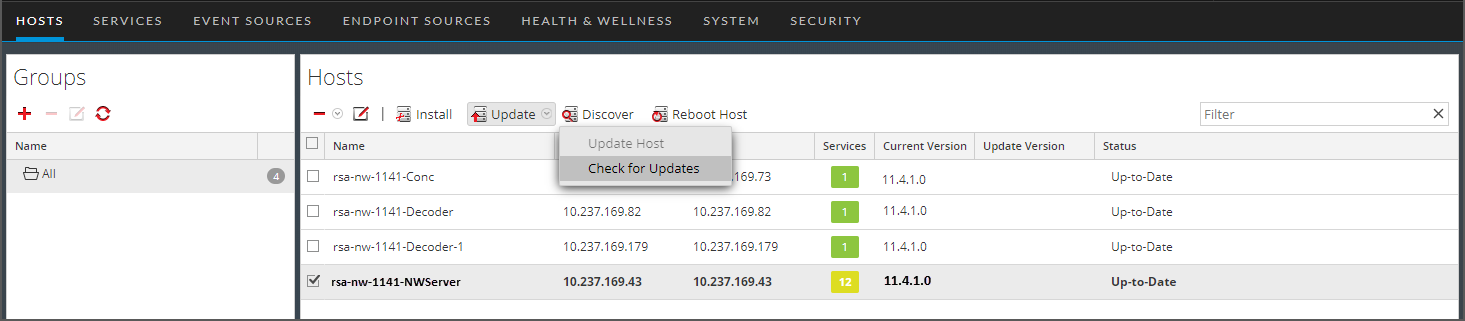
"Ready to initialize packages" is displayed if:
- NetWitness Platform can access the upgrade package.
- The package is complete and has no errors.
Refer to [Troubleshooting Version Installations and Updates](https://community.rsa.com/docs/DOC-84801) for instructions on how to troubleshoot errors (for example, "Error deploying version " and "Missing the following update package(s)," are displayed in the **Initiate Update Package for RSA NetWitness Platform** dialog.)
4. Click **Initialize Update**.
It takes some time to initialize the packages because the files are large and need to be unzipped. The time varies depending on how the host is configured.
After the initialization is successful, the **Status** column displays Update Available and you complete the rest of the steps in this procedure to finish the upgrade of the host.
5. Click **Update** \> **Update Hosts** from the toolbar.

1. Click **Begin Update** from the Update Available dialog.
After the host is upgraded, it prompts you to reboot the host.
2. Click **Reboot Host** from the toolbar.
## Option 3: Command Line Interface (CLI) with No Connectivity to the Internet Option 3: Command Line Interface (CLI) with No Connectivity to the Internet
Follow the instructions in [Appendix A. Offline Method (No Connectivity to Live Services) - Command Line Interface](https://community.netwitness.com/Appendix_OfflineUpgrade.htm).
[](https://mydev.netwitness.com/?hsLang=en)
Copyright © 2026, NetWitness LLC. All rights reserved.
[NetWitness Platform](https://www.netwitness.com/)
[Acceptable Use Policy](https://www.netwitness.com/wp-content/uploads/Acceptable-Use-Policy-092022.pdf) [Privacy Statement](https://www.netwitness.com/wp-content/uploads/NetWitness-Privacy-Statement-07292024.pdf)

[](https://www.linkedin.com/company/netwitness-platform/) [](https://www.youtube.com/@netwitness)
© 2026 NetWitness LLC. All rights reserved.