---
title: Post Upgrade Tasks
description: "Post Upgrade Tasks\nAfter you upgrade to 12.1.0.0, NetWitness has several new features in the user interface. Complete the tasks that apply to the hos"
---
[Skip to content](https://mydev.netwitness.com/knowledge-base/692691#main-content)

- [Home](https://mydev.netwitness.com/home)
- Integrations
Show submenu for Integrations
- [Netwitness Platform Integrations](https://mydev.netwitness.com/netwitnessplatformintegrations)
- [Third Party Integrations](https://mydev.netwitness.com/thirdpartyintegrations)
- [Knowledge Center](https://mydev.netwitness.com/knowledge-base)
- Community
Show submenu for Community
- [Blogs](https://mydev.netwitness.com/netwitness-security-llc-blog)
- Discussions
- Customers
Show submenu for Customers
- [Manage Products and Licenses](https://mydev.netwitness.com/nwportal)
- Downloads
- Partners
Show submenu for Partners
- [Partner Program](https://mydev.netwitness.com/partner)
- [Partner Resources](https://mydev.netwitness.com/partnerresources)
- [Submit a New Deal Registration](https://mydev.netwitness.com/dealregistration)
- [Become a Partner](https://mydev.netwitness.com/becomeapartner)
- [Update Your Partner Locator Profile](https://www.netwitness.com/partner-locator/?utm_source=pardotnewsletter&utm_medium=email&utm_campaign=partner_march)
- [NetWitness LinkedIn Partner Hub](https://linkedin.com/showcase/netwitnesspartners/)
- Education
Show submenu for Education
- [Instructor Led Training Schedule](https://mydev.netwitness.com/instructorledtrainingschedule)
- [NetWitness Training Catalog](https://mydev.netwitness.com/netwitnesstrainingcatalog)
- [Security Awareness Training](https://mydev.netwitness.com/securityawarenesstraining)
- [New Product Readiness](https://mydev.netwitness.com/newproductreadiness)
- [On-Demand Virtual Labs](https://mydev.netwitness.com/ondemandvirtuallabs)
- [Additional Training Information](https://mydev.netwitness.com/additionaltraininginformation)
- [Frequently Asked Questions](https://mydev.netwitness.com/educationfaq)
- [Contact NetWitness Education Team](https://mydev.netwitness.com/contact-netwitness-education-team)
- Support
Show submenu for Support
- [Contact Support](https://mydev.netwitness.com/contact-support)
- [Create a New Case](https://mydev.netwitness.com/create-support-case)
- [View My Cases](https://mydev.netwitness.com/viewmycase)
- [Product Version Life Cycle](https://mydev.netwitness.com/product-version-life-cycle)
- [Warranty & Replacement Parts](https://mydev.netwitness.com/warranty-and-replacement-parts)
- [Community Support Forum](https://mydev.netwitness.com/community-support-forum)
- [Technical Support Guide](https://mydev.netwitness.com/technical-support-guide)
Open main navigation
Close main navigation
- [Home](https://mydev.netwitness.com/home)
- Integrations
Show submenu for Integrations
- [Netwitness Platform Integrations](https://mydev.netwitness.com/netwitnessplatformintegrations)
- [Third Party Integrations](https://mydev.netwitness.com/thirdpartyintegrations)
- [Knowledge Center](https://mydev.netwitness.com/knowledge-base)
- Community
Show submenu for Community
- [Blogs](https://mydev.netwitness.com/netwitness-security-llc-blog)
- Discussions
- Customers
Show submenu for Customers
- [Manage Products and Licenses](https://mydev.netwitness.com/nwportal)
- Downloads
- Partners
Show submenu for Partners
- [Partner Program](https://mydev.netwitness.com/partner)
- [Partner Resources](https://mydev.netwitness.com/partnerresources)
- [Submit a New Deal Registration](https://mydev.netwitness.com/dealregistration)
- [Become a Partner](https://mydev.netwitness.com/becomeapartner)
- [Update Your Partner Locator Profile](https://www.netwitness.com/partner-locator/?utm_source=pardotnewsletter&utm_medium=email&utm_campaign=partner_march)
- [NetWitness LinkedIn Partner Hub](https://linkedin.com/showcase/netwitnesspartners/)
- Education
Show submenu for Education
- [Instructor Led Training Schedule](https://mydev.netwitness.com/instructorledtrainingschedule)
- [NetWitness Training Catalog](https://mydev.netwitness.com/netwitnesstrainingcatalog)
- [Security Awareness Training](https://mydev.netwitness.com/securityawarenesstraining)
- [New Product Readiness](https://mydev.netwitness.com/newproductreadiness)
- [On-Demand Virtual Labs](https://mydev.netwitness.com/ondemandvirtuallabs)
- [Additional Training Information](https://mydev.netwitness.com/additionaltraininginformation)
- [Frequently Asked Questions](https://mydev.netwitness.com/educationfaq)
- [Contact NetWitness Education Team](https://mydev.netwitness.com/contact-netwitness-education-team)
- Support
Show submenu for Support
- [Contact Support](https://mydev.netwitness.com/contact-support)
- [Create a New Case](https://mydev.netwitness.com/create-support-case)
- [View My Cases](https://mydev.netwitness.com/viewmycase)
- [Product Version Life Cycle](https://mydev.netwitness.com/product-version-life-cycle)
- [Warranty & Replacement Parts](https://mydev.netwitness.com/warranty-and-replacement-parts)
- [Community Support Forum](https://mydev.netwitness.com/community-support-forum)
- [Technical Support Guide](https://mydev.netwitness.com/technical-support-guide)
How can we help you?
- There are no suggestions because the search field is empty.
1. [NetWitness Knowledge Base](https://mydev.netwitness.com/knowledge-base?hsLang=en)
2. [Documentation](https://mydev.netwitness.com/knowledge-base/documentation?hsLang=en)
April 28, 2026
# Post Upgrade Tasks
## Post Upgrade Tasks
After you upgrade to 12.1.0.0, NetWitness has several new features in the user interface. Complete the tasks that apply to the hosts in your environment.
- [General](https://mydev.netwitness.com/knowledge-base/692691#General)
- [Event Stream Analysis (ESA)](https://mydev.netwitness.com/knowledge-base/692691#Event)
- [Investigate](https://mydev.netwitness.com/knowledge-base/692691#Investig)
- [Respond](https://mydev.netwitness.com/knowledge-base/692691#Respond)
- [Reference Log Decoder](https://mydev.netwitness.com/knowledge-base/692691#Referenc)
- [Legacy Windows Log Collector](https://mydev.netwitness.com/knowledge-base/692691#Windows)
- [User Entity Behavior Analytics](https://mydev.netwitness.com/knowledge-base/692691#User)
## GeneralGeneral
### (Conditional) Configure NAT-Based IP Addresses
If you have a host, such as a VLC, that requires a NAT-based IP address in order to connect to the NW Server host, you must update the host configuration with the following steps.
1. Log in to the host that requires the use of NAT IP addresses, using the console or SSH.
2. Run the following command:
nw-manage --enable-nat-usage
3. To set the NAT address for the NW Server:
1. Log into the NW Server using the console or SSH.
2. Run the following command:
nw-manage -update-host --host-id --ipv4-public
**Note:** You can find the UUID and view the current NAT IP address of the host by running nw-manage --list-hosts.
### (Conditional - For Warm-Standby Hosts Only) Register the Secondary IP Address of Warm-Standby Hosts
The Warm-Standby server must be upgraded to 12.1.0.0 before completing the following steps.
1. Log in to the NW Server using the console or SSH.
2. Run the following command:
nw-manage --add-nws-secondary-ip --ipv4
**Note:** If the Warm-Standby server requires a NAT-based IP address (IPv4-public) for any host to access it during failover, the NAT IP address must also be registered by running the following command: nw-manage --add-nws-secondary-ip --ipv4
1. Verify the correct Warm Standby host IP address value by running the following command:
nw-manage --get-nws-secondary-ip
### Review Contents of /etc/hosts.user for Obsolete Host Entries
After upgrading the NW Server host or a component host, review the contents of the /etc/hosts.user file for any obsolete host entries. The /etc/hosts.user file contains system and user-generated entries that are not managed by NetWitness Platform. However, entries from /etc/hosts.user are merged with NetWitness Platform-generated host mappings to create and update /etc/hosts. To avoid conflicts with NetWitness Platform-generated mappings, and to avoid generating connectivity errors resulting from an IP address change, NetWitness recommends that you remove any entries in /etc/hosts.user that include a non-loopback IP address of a NetWitness Platform host.
After updating /etc/hosts.user, you must refresh the system by running the following command:
nw-manage --refresh-host --host-key
### Jetty Configuration
For Jetty Configuration and related information, see **Manage Custom Host Entries** topic in the *System Maintenance Guide*.
### Make Sure Services Have Restarted and Are Capturing and Aggregating Data
Make sure that services have restarted and are capturing data (this depends on whether or not you have auto-start enabled).
If required, restart data capture and aggregation for the following services:
- Decoder
- Log Decoder
- Broker
- Concentrator
- Archiver
Start Network Capture
1. In the NetWitness Platform menu, go to  (Admin) \> **Services**.
The Services view is displayed.
2. Select each **Decoder** service.
3. Under  (actions), select **View** \> **System**.
4. In the toolbar, click 
Start Log Capture
- 1. In the NetWitness Platform menu, go to  (Admin) \> **Services**.
The Services view is displayed.
2. Select each **Log Decoder** service.
3. Under  (actions), select **View** \> **System**.
4. In the toolbar, click 
Start Aggregation
1. In the NetWitness Platform menu, go to  (Admin) \> **Services**.
The Services view is displayed.
2. For each **Concentrator**, **Broker**, and **Archiver** service:
1. Select the service.
2. Under  (actions), select **View** \> **Config**.
3. In the toolbar, click 
3. Event Stream Analysis (ESA)
**Note:** Mixed mode is not supported for ESA hosts in NetWitness Platform version 11.6 and later. The NetWitness server, ESA primary host, and ESA secondary host must all be on the same NetWitness Platform version.
There are no required post-upgrade tasks for ESA. For ESA troubleshooting, see [ESA Troubleshooting Information](https://community.netwitness.com/Trblshtg_121.htm#ESAtroubleshooting).
If you want to add support for Endpoint, UEBA, and Live content rules, you must update the multi-valued and single-valued parameter meta keys on the ESA Correlation service to include all the required meta keys. It is not necessary to make these adjustments during the upgrade; you can make the adjustments later at a convenient time. For detailed information and instructions, see "Update Your ESA Rules for the Required Multi-Value and Single-Value Meta Keys" in the *ESA Configuration Guide*
## Event Stream Analysis (ESA)Event Stream Analysis (ESA)
After upgrading to the 12.1 version, all the ESA deployments will be migrated to  (**CONFIGURE**) \> **Policies** page. Each deployment will be converted into a policy and group and will be available to manage only after the upgrade of the Correlation servers to the 12.1 version. Verify if all the ESA deployments are in a healthy state. For more information, see "View a Deployment" topic in the *Live Services Management Guide*.
**Note:** Analysts must have appropriate permissions to view the ESA rules under  (**CONFIGURE**) \> **ESA Rules** and  (**CONFIGURE**) \> **Policies** pages. For more information, see the **Source-server** section in the "Role Permissions" topic in the *System Security and User Management Guide*.
The pre-upgrade and post-upgrade states of deployments are represented in the following table.
(Optional) Using the **Merge Policy** button, you can merge a policy having ESA content with a policy with no ESA content. For more information, see "Merge Policy with ESA Content" topic in the *Live Services Management Guide*.
## InvestigateInvestigate
### (Conditional - For Custom Roles Only) Adjust investigate-server Permissions for Custom User Roles
After upgrading to Version 12.1.0.0, the built-in user roles for analysts (and others) using Investigate have the investigate-server.event.filter permission enabled, but the upgrade process does not enable the permission for custom user roles. Users who are assigned a custom user role that does not have this permission enabled cannot see the Filter Events panel, a new panel in 12.1.0.0 where they can drill into metadata.
**Note:** The built-in user roles for analysts using Investigate have three additional permissions added in Version 11.4 enabled, but the upgrade process does not enable the permissions for custom user roles. Users who are assigned a custom user role that does not have these permissions cannot see the Navigate view and Legacy Events view in the Investigate menu. The three permissions that need to be enabled for custom user roles are:
investigate-server.columngroup.read, investigate-server.metagroup.read, and investigate-server.profile.read
To enable the permissions for a user role:
1. Go to  (Admin) \> **Security** and click the **Roles** tab.
2. Select the custom user role that needs to be edited and click  (edit icon).
3. In the Edit Role dialog, ensure that these four permissions are enabled:
investigate-server.event.filter
investigate-server.columngroup.read
investigate-server.metagroup.read
investigate-server.profile.read
4. Click **Save** to save your changes. When analysts with the custom user role log in to the NetWitness Platform, the changes are in effect.
## RespondRespond
The Primary ESA server must be upgraded to 12.1.0.0 before you can complete these tasks.
**Note:** After upgrading the primary NW Server (including the Respond Server service), the Respond Server service is not automatically re-enabled until after the Primary ESA host is also upgraded to 12.1.0.0 The Respond post-upgrade tasks only apply after the Respond Server service is upgraded and is in the enabled state.
### (Conditional) Restore Any Respond Service Custom Keys in the Aggregation Rule Schema
**Note:** If you did not manually customize the incident aggregation rule schema, you can skip this task.
If you added custom keys in the var/lib/netwitness/respond-server/data/aggregation\_ rule\_schema.json file for use in the groupBy clause for 12.1.0.0, modify the /var/lib/netwitness/respond-server/data/aggregation\_rule\_schema.json file and add the custom keys from the automatic backup file.
The backup file is located in /var/lib/netwitness/respond-server/data and it is in the following format:
aggregation\_rule\_schema.json.bak-
## Reference Log DecoderReference Log Decoder
For full functionality, make sure your reference Log Decoder is at 11.6 or later. If you never set up a reference Log Decoder, there is no need to take action. For details, see the *Log Parser Customization Guide*.
## Legacy Windows Log Collector Legacy Windows Log Collector
### Update the Legacy Windows Log Collector UUID
After upgrading to 12.1.0.0, for each Legacy Windows Log Collector configured in your environment, run the following command on the NW Server:
wlc-cli-client --update-to-uuid --host
#### Refresh Legacy Windows Log Collector Certificates with Updated SA Certificates
**Post Upgrade Steps:**
1. Execute the following command in SA:
1. wlc-cli-client --host-display-name **hostDisplayName** --service-display-name **serviceDisplayName** --host **WLChostIPAddress** --port 50101 --use-ssl false
Enter following information:
1. **Legacy Windows Log Collector REST Username and Legacy Windows Log Collector REST Password**: Enter the admin credentials for the Legacy Windows Log Collector.
2. **Security Server Username and Security Server Password**: Enter admin credentials for NetWitness.
2. Restart the system.
## User Entity Behavior AnalyticsUser Entity Behavior Analytics
**IMPORTANT:** Before the upgrade, if you encountered and resolved the task failure issues, then after the upgrade, you must replace the authentication.json file before you run the post-upgrade tasks. The task failure issues in Airflow and their solutions are described in the 'Troubleshooting' topic of the *UEBA Configuration Guide*.
**IMPORTANT:** Every UEBA deployment when upgraded requires additional steps to complete the upgrade process. When you upgrade from 11.6.x to 11.6.x.x, you must follow UEBA instructions in the Upgrade Guide for 11.6.x.x, before you upgrade to 11.7.x.
**Note:** When you upgrade to 12.1.0.0 from 11.6.x.x, you don't need to rerun the UEBA system for the last 28 days, if you don't update the current processing schemas. When you upgrade to 12.1.0.0 from a version prior to 11.7.x, the UEBA system runs a rerun automatically.
1. Update the UEBA configuration using the following command from the UEBA machine.
source /etc/sysconfig/airflow
source $AIRFLOW\_VENV/bin/activate
OWB\_ALLOW\_NON\_FIPS=on python /var/netwitness/presidio/airflow/venv/lib/python2.7/site-packages/presidio\_workflows-1.0-py2.7.egg/presidio/resources/rerun\_ueba\_server\_config.py
1. (Optional) Update the UEBA processing schema, if needed.
NetWitness recommends that the UEBA start date is set to 28 days earlier than the current date. For UEBA systems that intend to process TLS data, you must make sure that the start date is set to no later than 14 days earlier than the current date.
For more information, see the "reset-presidio script" section in the *UEBA Configuration Guide*.
2. Run the airflow upgrade DAG.
- Go to Airflow main page https:// /admin
- Enter the admin username and password.
- Click the **Play** in presidio\_upgrade\_dag\_from\_ to\_12.1.0.0.
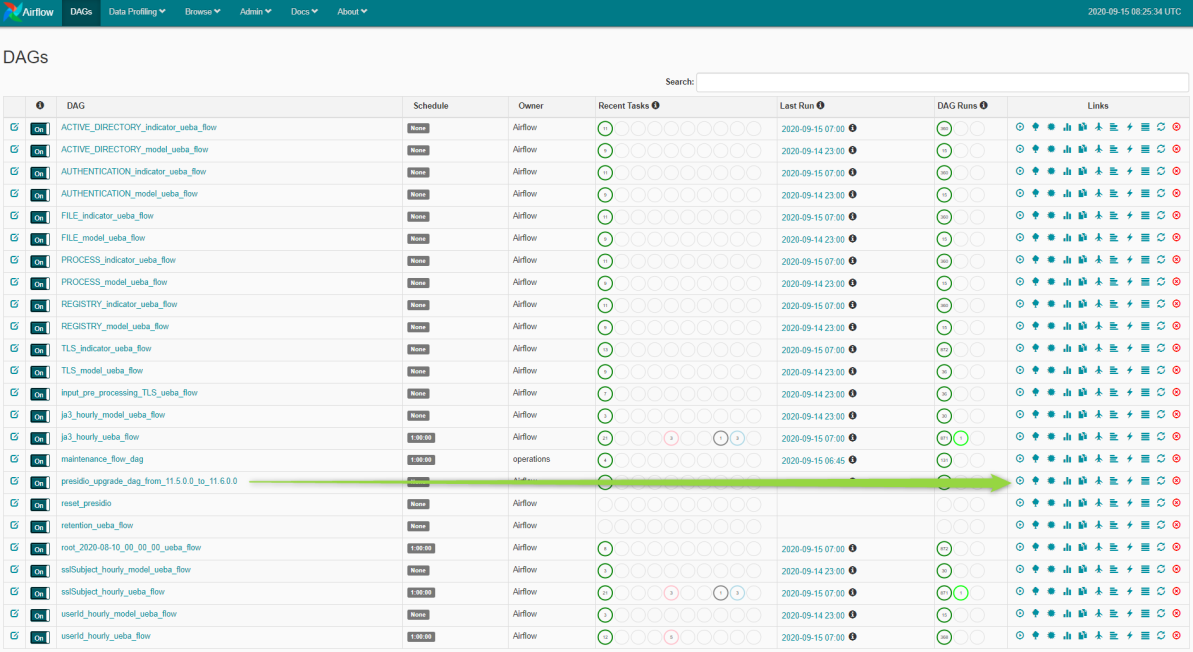
**Note:** A light green circle will appear next to the upgrade DAG row during the upgrade. If the upgrade process is completed successfully the light green circle changes to green. If the upgrade process fails, the light green circle changes to red.
3. Set the appropriate "Boot Jar Pools" slots:
- **Physical Appliance**: Update the spring\_boot\_jar\_pool slot value be 18.
- **Virtual Appliance**: Update the spring\_boot\_jar\_pool slot value to 22.
To update the “Spring Boot Jar Pools” slots, Go to the Airflow main page, tap the “Admin” tab at the top bar and tap “Pools”.
1. To access the Airflow UI, go to https:// /admin and enter the credentials.
User: admin
Password: The environment deploy admin password.
1. Click on the pencil mark of the Pools to update the slot values.
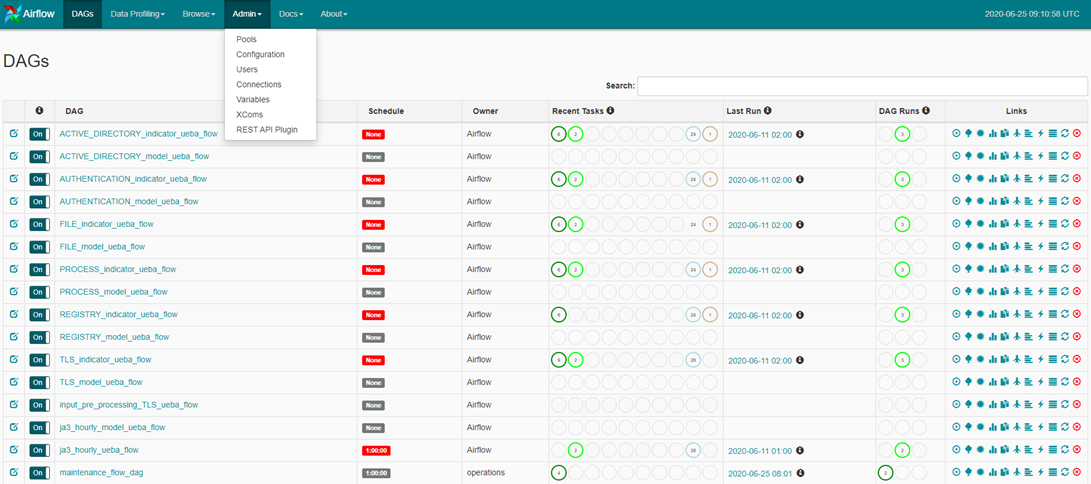
4. Edit the spring\_boot\_jar\_pool and update the slots amount to 22.

5. Import the Elasticsearch presidio data after upgrading the UEBA host to 12.1.0.0. Make sure the following prerequisites are met before you import the Elasticsearch presidio data:
- Elasticsearch version must be upgraded to 7.15.2 from 5.5.0.
- UEBA host must be upgraded to 12.1.0.0
- UEBA rpm version must be 12.1.0.0.
- Elasticsearch data in 12.0.0.0 or older versions must be exported and stored in the Elasticsearch data backup folder located in the /root/ directory.
To import the Elasticsearch data:
1. Go to cd ueba\_es\_migration\_tool. Run the following command.
sh elk-migration-script.sh
The Elasticsearch migration tool guide is displayed.
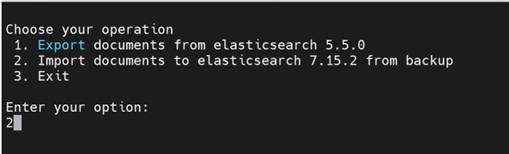
2. Select **Import documents to elasticsearch 7.15.2 from backup**.
3. In the next step, select **Fresh Import** to import the backup data.
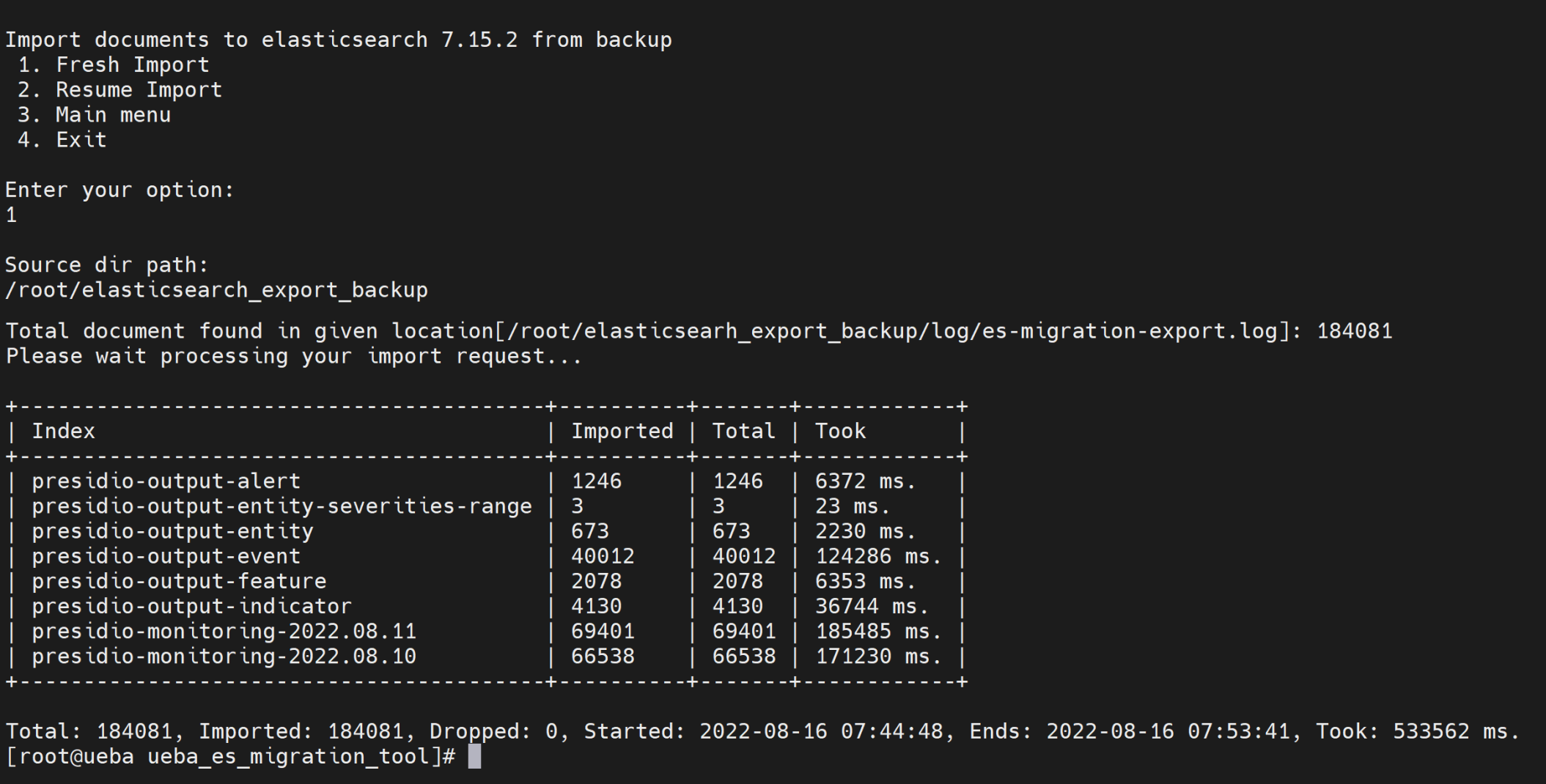
4. Restart the Presidio UI service once the Import operation is completed. Run the following command.
systemctl restart presidio-ui
5. Go to the NetWitness Platform XDR **Users** tab and verify if all the Elasticsearch data is imported.
**Note:**
\- Go to /log/log/es-migration-import.log if you want to view the log for any exceptions.
\- If the Import operation fails due to some technical issue, select **Resume Import** once the issue is resolved, to resume the Import operation.
[](https://mydev.netwitness.com/?hsLang=en)
Copyright © 2026, NetWitness LLC. All rights reserved.
[NetWitness Platform](https://www.netwitness.com/)
[Acceptable Use Policy](https://www.netwitness.com/wp-content/uploads/Acceptable-Use-Policy-092022.pdf) [Privacy Statement](https://www.netwitness.com/wp-content/uploads/NetWitness-Privacy-Statement-07292024.pdf)

[](https://www.linkedin.com/company/netwitness-platform/) [](https://www.youtube.com/@netwitness)
© 2026 NetWitness LLC. All rights reserved.