---
title: Manage Policies
description: "Manage Policies\nPolicies are either user-defined or supplied by NetWitness. A policy defines:\nServices and hosts to which the policy applies.Rules th"
---
[Skip to content](https://mydev.netwitness.com/knowledge-base/669758#main-content)

- [Home](https://mydev.netwitness.com/home)
- Integrations
Show submenu for Integrations
- [Netwitness Platform Integrations](https://mydev.netwitness.com/netwitnessplatformintegrations)
- [Third Party Integrations](https://mydev.netwitness.com/thirdpartyintegrations)
- [Knowledge Center](https://mydev.netwitness.com/knowledge-base)
- Community
Show submenu for Community
- [Blogs](https://mydev.netwitness.com/netwitness-security-llc-blog)
- Discussions
- Customers
Show submenu for Customers
- [Manage Products and Licenses](https://mydev.netwitness.com/nwportal)
- Downloads
- Partners
Show submenu for Partners
- [Partner Program](https://mydev.netwitness.com/partner)
- [Partner Resources](https://mydev.netwitness.com/partnerresources)
- [Submit a New Deal Registration](https://mydev.netwitness.com/dealregistration)
- [Become a Partner](https://mydev.netwitness.com/becomeapartner)
- [Update Your Partner Locator Profile](https://www.netwitness.com/partner-locator/?utm_source=pardotnewsletter&utm_medium=email&utm_campaign=partner_march)
- [NetWitness LinkedIn Partner Hub](https://linkedin.com/showcase/netwitnesspartners/)
- Education
Show submenu for Education
- [Instructor Led Training Schedule](https://mydev.netwitness.com/instructorledtrainingschedule)
- [NetWitness Training Catalog](https://mydev.netwitness.com/netwitnesstrainingcatalog)
- [Security Awareness Training](https://mydev.netwitness.com/securityawarenesstraining)
- [New Product Readiness](https://mydev.netwitness.com/newproductreadiness)
- [On-Demand Virtual Labs](https://mydev.netwitness.com/ondemandvirtuallabs)
- [Additional Training Information](https://mydev.netwitness.com/additionaltraininginformation)
- [Frequently Asked Questions](https://mydev.netwitness.com/educationfaq)
- [Contact NetWitness Education Team](https://mydev.netwitness.com/contact-netwitness-education-team)
- Support
Show submenu for Support
- [Contact Support](https://mydev.netwitness.com/contact-support)
- [Create a New Case](https://mydev.netwitness.com/create-support-case)
- [View My Cases](https://mydev.netwitness.com/viewmycase)
- [Product Version Life Cycle](https://mydev.netwitness.com/product-version-life-cycle)
- [Warranty & Replacement Parts](https://mydev.netwitness.com/warranty-and-replacement-parts)
- [Community Support Forum](https://mydev.netwitness.com/community-support-forum)
- [Technical Support Guide](https://mydev.netwitness.com/technical-support-guide)
Open main navigation
Close main navigation
- [Home](https://mydev.netwitness.com/home)
- Integrations
Show submenu for Integrations
- [Netwitness Platform Integrations](https://mydev.netwitness.com/netwitnessplatformintegrations)
- [Third Party Integrations](https://mydev.netwitness.com/thirdpartyintegrations)
- [Knowledge Center](https://mydev.netwitness.com/knowledge-base)
- Community
Show submenu for Community
- [Blogs](https://mydev.netwitness.com/netwitness-security-llc-blog)
- Discussions
- Customers
Show submenu for Customers
- [Manage Products and Licenses](https://mydev.netwitness.com/nwportal)
- Downloads
- Partners
Show submenu for Partners
- [Partner Program](https://mydev.netwitness.com/partner)
- [Partner Resources](https://mydev.netwitness.com/partnerresources)
- [Submit a New Deal Registration](https://mydev.netwitness.com/dealregistration)
- [Become a Partner](https://mydev.netwitness.com/becomeapartner)
- [Update Your Partner Locator Profile](https://www.netwitness.com/partner-locator/?utm_source=pardotnewsletter&utm_medium=email&utm_campaign=partner_march)
- [NetWitness LinkedIn Partner Hub](https://linkedin.com/showcase/netwitnesspartners/)
- Education
Show submenu for Education
- [Instructor Led Training Schedule](https://mydev.netwitness.com/instructorledtrainingschedule)
- [NetWitness Training Catalog](https://mydev.netwitness.com/netwitnesstrainingcatalog)
- [Security Awareness Training](https://mydev.netwitness.com/securityawarenesstraining)
- [New Product Readiness](https://mydev.netwitness.com/newproductreadiness)
- [On-Demand Virtual Labs](https://mydev.netwitness.com/ondemandvirtuallabs)
- [Additional Training Information](https://mydev.netwitness.com/additionaltraininginformation)
- [Frequently Asked Questions](https://mydev.netwitness.com/educationfaq)
- [Contact NetWitness Education Team](https://mydev.netwitness.com/contact-netwitness-education-team)
- Support
Show submenu for Support
- [Contact Support](https://mydev.netwitness.com/contact-support)
- [Create a New Case](https://mydev.netwitness.com/create-support-case)
- [View My Cases](https://mydev.netwitness.com/viewmycase)
- [Product Version Life Cycle](https://mydev.netwitness.com/product-version-life-cycle)
- [Warranty & Replacement Parts](https://mydev.netwitness.com/warranty-and-replacement-parts)
- [Community Support Forum](https://mydev.netwitness.com/community-support-forum)
- [Technical Support Guide](https://mydev.netwitness.com/technical-support-guide)
How can we help you?
- There are no suggestions because the search field is empty.
1. [NetWitness Knowledge Base](https://mydev.netwitness.com/knowledge-base?hsLang=en)
2. [Documentation](https://mydev.netwitness.com/knowledge-base/documentation?hsLang=en)
April 28, 2026
# Manage Policies
## Manage Policies
Policies are either user-defined or supplied by NetWitness. A policy defines:
- Services and hosts to which the policy applies.
- Rules that specify statistical thresholds that govern alarms.
- When to suppress the policy.
- Who to notify when an alarm triggers and when to notify them.
For related reference topics, see [NetWitness Platform Out-of-the-Box Policies](https://community.netwitness.com/t5/netwitness-platform-online/netwitness-platform-out-of-the-box-policies/ta-p/669835)
**Note:** You can now configure a policy to notify Public Key Infrastructure (PKI) certificate expiration status.
## Add a Policy
1. Go to ** (Admin) \> Health & Wellness.**
2. Click the **Policies** tab.
The Policies view is displayed.
3. Click  in the **Policies** panel.
A list of your hosts and services displays for which you can create health policies.
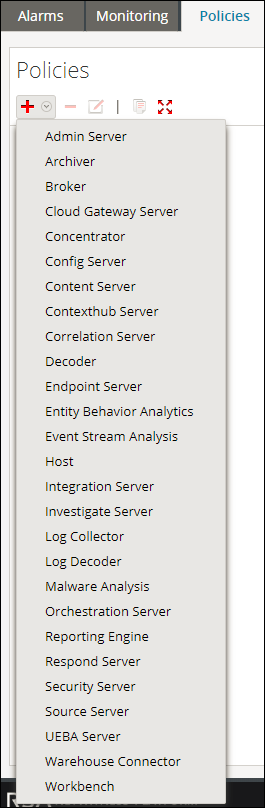
4. Select a host or service (for example, **Concentrator**).
For a PKI policy, you must select a host (for example, Host).
The host or service is displayed in the Policies panel with a blank Policy Detail panel.
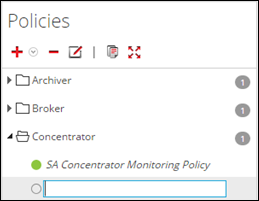
5. Enter a name for the Policy (for example, **Concentrator Policy Status**) in the **Policies** panel.
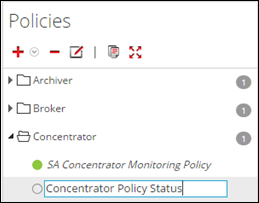
The name (for example, **Concentrator Policy Status**) is now displayed as the policy name in Policy Detail panel.
6. Create a Policy in the Policy Detail panel:
1. Select the **Enable** checkbox.
2. Add relevant services (in this example, any relevant Concentrator services) that you want to monitor for health statistics.
For a PKI policy, you must select the LOCALHOST to monitor for health statistics.
3. Add rule conditions to configure the policy.
4. Suppress enforcement of the policy for the time periods you want.
5. Add any email notifications you want for the policy.
6. Click **Save** in the Policy Detail panel.
The Policy is added.
## Add Policy Example
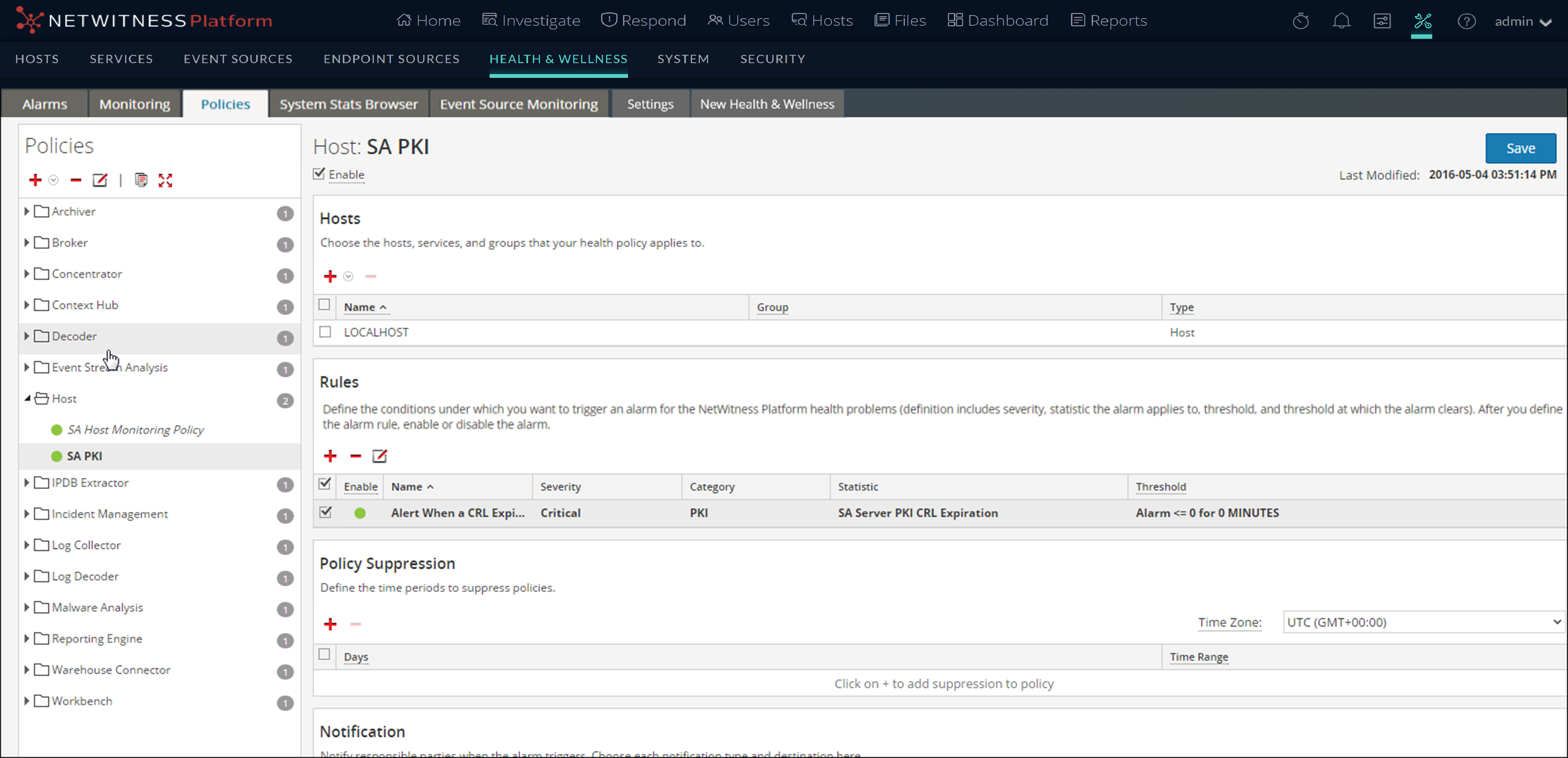
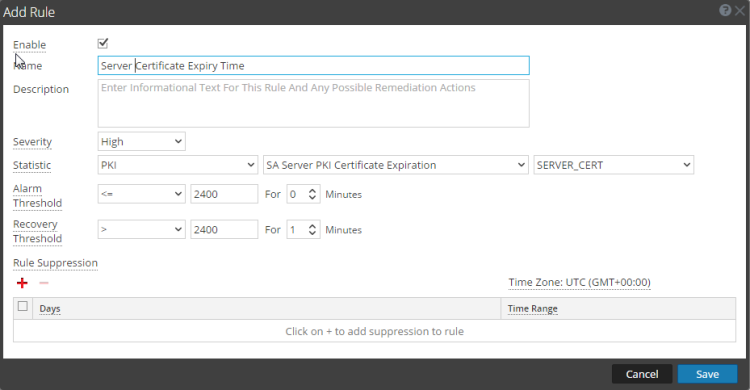
Below is a high-level example of configuring a PKI policy:
1. Add a new PKI policy.
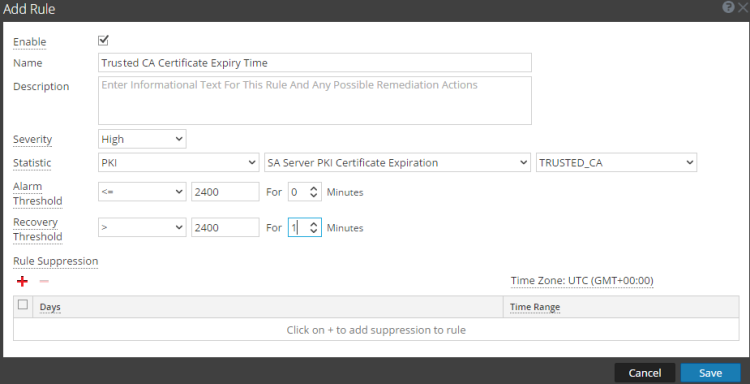
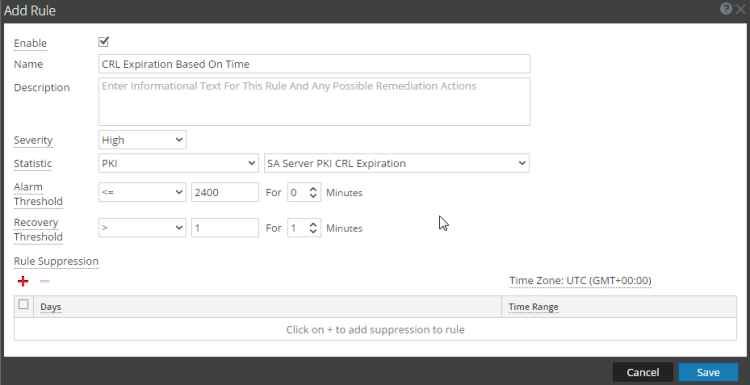
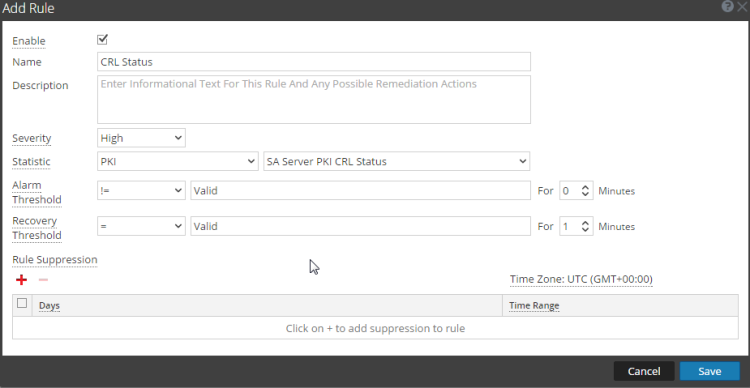
2. Add a Rule with Statistics:
- For CA Expiration
- For CRL Expiration
- For CRL Status
- For Server Certificate Expiration
## Edit a Policy
1. Go to ** (Admin) \> Health & Wellness.**
2. Click the **Policies** tab.
The Policies view is displayed.
3. Select a policy (for example, **Concentrator Policy Status**) under a host or service.
The Policy Detail is displayed.
4. Click .
The policy name (for example, **Admin Server Monitoring Policy**) and policy detail panel become editable.

5. Make the required changes and click **Save** in the Policy Detail panel. You can:
- Edit the policy name.
- Enable or disable the policy.
- Add or delete hosts and services in the policy.
- Add, delete or modify rules in the policy.
- Add, edit, or delete suppressions in the policy.
- Add, edit, or delete notifications in the policy.
**Note: Save** applies the policy rules based on the selection of enable or disable. It also resets the rule condition timers for changed rules, and the entire policy.
## Duplicate a Policy
1. Go to ** (Admin) \> Health & Wellness**.
2. Click the **Policies** tab.
3. Select a policy (for example, **Concentrator Monitoring Policy**) under a host or service.
4. Click .NetWitness copies the policy and lists it with **(1)** appended to the original policy name.
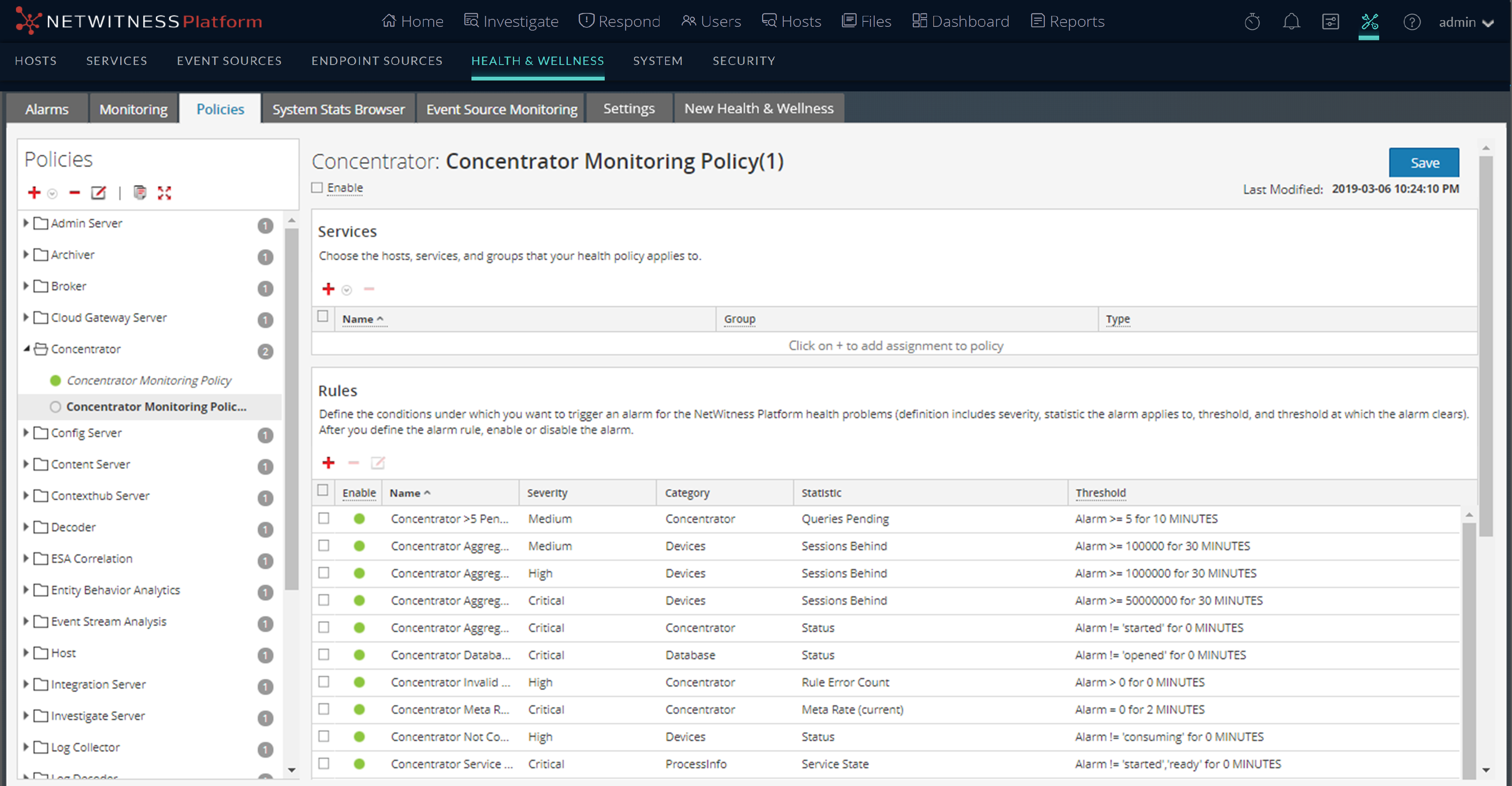
5. Click  and rename the Policy \[for example, rename **Concentrator Monitoring Policy(1)**\] to **New Concentrator Policy**.
**Note:** A duplicated policy is disabled by default and the host and service assignments are not duplicated. Assign any relevant hosts and services to the duplicated policy before you use it to monitor health and wellness of the NetWitness infrastructure.
## Assign Services or Groups
To assign hosts or services to a policy:
1. Go to ** (Admin) \> Health & Wellness.**
2. Click the **Policies** tab.
The Policies view is displayed.
3. Select a policy (for example, **First Policy**) under a host or service.
The Policy Detail view is displayed.
4. Click  in the Services and Groups list toolbar.
5. Choose one of the following actions:
- For hosts, select **Groups** or **Hosts** from the selection menu.
- For services, select **Groups** or **Services** from the selection menu.
6. Depending on whether you are assigning services or groups, perform one of the following actions:
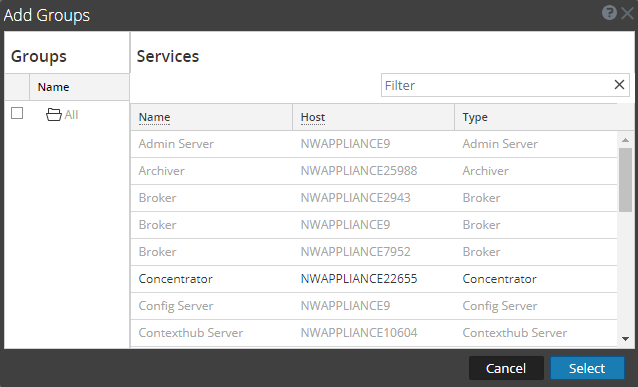
- **Groups**, the **Groups** dialog is displayed from which you can select predefined groups of hosts or services.
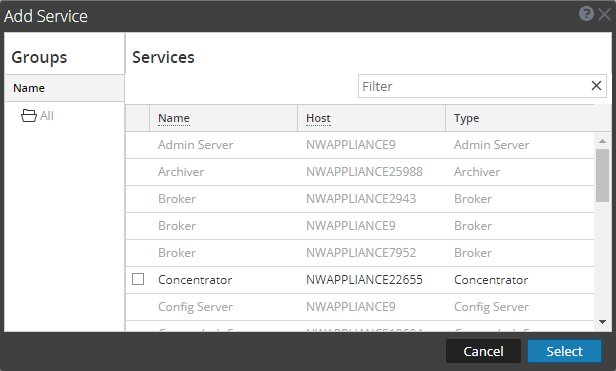
- **Services**, the **Services** dialog is displayed from which you can select individual services.
7. Select the checkbox next to the groups or services you want to assign to the policy, click **Select** in the dialog, and click **Save** in the Policy Detail panel.
**Note:** Services are filtered for selection based on the type of policies. For example, you can only select Concentrator services for a Concentrator type of policy.
## Remove Services or Groups
To remove a host or service from a policy:
1. Go to ** (Admin) \> Health & Wellness**.
2. Click the **Policies** tab.
The Policies view is displayed.
3. Select a policy under a service.
The Policy Detail view is displayed.
4. Select a host or service.
5. Click .
The host or service is removed from the policy.
## Add or Edit a Rule
To add a rule to a policy:
1. Go to ** (Admin) \> Health & Wellness.**
2. Click the **Policies** tab.
The Policies view is displayed.
3. Select a policy (for example, **Checkpoint**) under a host or service.
The Policy Detail view is displayed.
4. Depending on whether you are adding or editing rule, do the following:
- To add a rule, click  in the Rules list toolbar.
- To edit a rule, select a rule from the Rules list and click .
5. Complete the dialog to define or update the rule.
6. Add a description as shown in the following example.
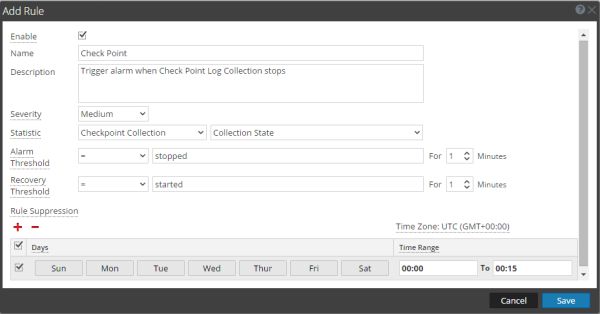
7. Click **OK**.
The rule is added (or updated) to the policy.
## Hide or Show Rule Conditions Columns
To hide or show rule conditions columns in the Rules panel:
1. Go to ** (Admin) \> Health & Wellness.**
2. Click **Policies** tab.
The Policies view is displayed.
3. Select a policy under a service.
The Policy Detail view is displayed.
4. Go to the **Rules** panel.
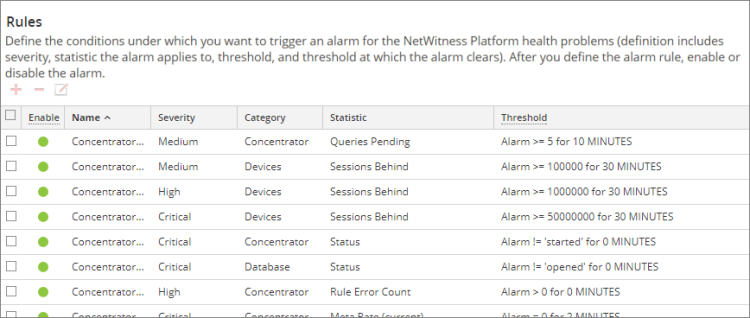
5. Click **v** to the right of **Category** , set **Columns**, and clear the **Static** and **Threshold** rule conditions.
You can set or clear any Rules column to show or hide it.
The **Rules** panel displays without the rule conditions.
## Delete a Rule
To remove a host or service from a policy:
1. Go to ** (Admin) \> Health & Wellness.**
2. Click the **Policies** tab.
The Policies view is displayed.
3. Select a policy under a service.
The Policy Detail view is displayed.
4. Select a rule from the **Rules** list (for example, **Checkpoint**).
5. Click .
The rule is removed from the policy.
## Suppress a Rule
1. Click the **Policies** tab.
The Policies view is displayed.
2. Select a policy under a service.
The Policy Detail view is displayed. You can specify rule suppressions time ranges when you initially add it or you can edit the rule and specify suppression time ranges.
3. Add or edit a rule.
4. In the **Rules Suppression** panel of the **Add** or **Edit Rule** dialog, specify the days and time ranges during which you want the rule suppressed.
## Suppress a Policy
1. Add or edit a policy.
The Policies view is displayed.
2. In the **Policy Suppression** panel:
1. Select a time zone from the **Time Zone** drop-down list.
This time zone applies to the entire policy (both policy suppression and rule suppression).
2. Click  in the toolbar.
3. Specify the days and time ranges during which you want the policy suppressed.
## Add an Email Notification
To add an email notification to a policy:
1. Add or edit a policy.
The Policies view is displayed.
2. In the **Notification** panel:
- Click  in the toolbar.
A blank EMAIL notification row is displayed.
- Select the email:
- Notification types in the Recipient column (see "Configure Notification Outputs" in the [**NetWitness System Configuration Guide**](https://community.netwitness.com/t5/netwitness-platform-online/system-configuration-guide-for-12-5/ta-p/716982) for the source of the values in this drop-down list).
- Notification server in the Notification Server column (see 'Configure Notification Servers" in the [**NetWitness System Configuration Guide**](https://community.netwitness.com/t5/netwitness-platform-online/system-configuration-guide-for-12-5/ta-p/716982) for the source of the values in this drop-down list).
- Template server in the Template column (see "Configure Notification Templates" in the *[NetWitness System Configuration Guide](https://community.netwitness.com/t5/netwitness-platform-online/system-configuration-guide-for-12-5/ta-p/716982)* for the source of the values in this drop-down list).
**Note:** Refer to [Include the Default Email Subject Line](https://community.netwitness.com/t5/netwitness-platform-online/include-the-default-email-subject-line/ta-p/669757) if you want to include the default Email subject line from the Health & Wellness template in your Health & Wellness Email notifications for specified recipients.
## Delete an Email Notification
To add an email notification to a policy:
1. Add or edit a policy.
The Policies view is displayed.
2. In the **Notification** panel:
1. Select an email notification.
2. Click .
The notification is removed.
[](https://mydev.netwitness.com/?hsLang=en)
Copyright © 2026, NetWitness LLC. All rights reserved.
[NetWitness Platform](https://www.netwitness.com/)
[Acceptable Use Policy](https://www.netwitness.com/wp-content/uploads/Acceptable-Use-Policy-092022.pdf) [Privacy Statement](https://www.netwitness.com/wp-content/uploads/NetWitness-Privacy-Statement-07292024.pdf)

[](https://www.linkedin.com/company/netwitness-platform/) [](https://www.youtube.com/@netwitness)
© 2026 NetWitness LLC. All rights reserved.