---
title: Manage Policies
description: "Managing PoliciesManaging Policies\nNote: The information in this topic applies to NetWitness version 11.3 and later. Policies are not applicable on s"
---
[Skip to content](https://mydev.netwitness.com/knowledge-base/669545#main-content)

- [Home](https://mydev.netwitness.com/home)
- Integrations
Show submenu for Integrations
- [Netwitness Platform Integrations](https://mydev.netwitness.com/netwitnessplatformintegrations)
- [Third Party Integrations](https://mydev.netwitness.com/thirdpartyintegrations)
- [Knowledge Center](https://mydev.netwitness.com/knowledge-base)
- Community
Show submenu for Community
- [Blogs](https://mydev.netwitness.com/netwitness-security-llc-blog)
- Discussions
- Customers
Show submenu for Customers
- [Manage Products and Licenses](https://mydev.netwitness.com/nwportal)
- Downloads
- Partners
Show submenu for Partners
- [Partner Program](https://mydev.netwitness.com/partner)
- [Partner Resources](https://mydev.netwitness.com/partnerresources)
- [Submit a New Deal Registration](https://mydev.netwitness.com/dealregistration)
- [Become a Partner](https://mydev.netwitness.com/becomeapartner)
- [Update Your Partner Locator Profile](https://www.netwitness.com/partner-locator/?utm_source=pardotnewsletter&utm_medium=email&utm_campaign=partner_march)
- [NetWitness LinkedIn Partner Hub](https://linkedin.com/showcase/netwitnesspartners/)
- Education
Show submenu for Education
- [Instructor Led Training Schedule](https://mydev.netwitness.com/instructorledtrainingschedule)
- [NetWitness Training Catalog](https://mydev.netwitness.com/netwitnesstrainingcatalog)
- [Security Awareness Training](https://mydev.netwitness.com/securityawarenesstraining)
- [New Product Readiness](https://mydev.netwitness.com/newproductreadiness)
- [On-Demand Virtual Labs](https://mydev.netwitness.com/ondemandvirtuallabs)
- [Additional Training Information](https://mydev.netwitness.com/additionaltraininginformation)
- [Frequently Asked Questions](https://mydev.netwitness.com/educationfaq)
- [Contact NetWitness Education Team](https://mydev.netwitness.com/contact-netwitness-education-team)
- Support
Show submenu for Support
- [Contact Support](https://mydev.netwitness.com/contact-support)
- [Create a New Case](https://mydev.netwitness.com/create-support-case)
- [View My Cases](https://mydev.netwitness.com/viewmycase)
- [Product Version Life Cycle](https://mydev.netwitness.com/product-version-life-cycle)
- [Warranty & Replacement Parts](https://mydev.netwitness.com/warranty-and-replacement-parts)
- [Community Support Forum](https://mydev.netwitness.com/community-support-forum)
- [Technical Support Guide](https://mydev.netwitness.com/technical-support-guide)
Open main navigation
Close main navigation
- [Home](https://mydev.netwitness.com/home)
- Integrations
Show submenu for Integrations
- [Netwitness Platform Integrations](https://mydev.netwitness.com/netwitnessplatformintegrations)
- [Third Party Integrations](https://mydev.netwitness.com/thirdpartyintegrations)
- [Knowledge Center](https://mydev.netwitness.com/knowledge-base)
- Community
Show submenu for Community
- [Blogs](https://mydev.netwitness.com/netwitness-security-llc-blog)
- Discussions
- Customers
Show submenu for Customers
- [Manage Products and Licenses](https://mydev.netwitness.com/nwportal)
- Downloads
- Partners
Show submenu for Partners
- [Partner Program](https://mydev.netwitness.com/partner)
- [Partner Resources](https://mydev.netwitness.com/partnerresources)
- [Submit a New Deal Registration](https://mydev.netwitness.com/dealregistration)
- [Become a Partner](https://mydev.netwitness.com/becomeapartner)
- [Update Your Partner Locator Profile](https://www.netwitness.com/partner-locator/?utm_source=pardotnewsletter&utm_medium=email&utm_campaign=partner_march)
- [NetWitness LinkedIn Partner Hub](https://linkedin.com/showcase/netwitnesspartners/)
- Education
Show submenu for Education
- [Instructor Led Training Schedule](https://mydev.netwitness.com/instructorledtrainingschedule)
- [NetWitness Training Catalog](https://mydev.netwitness.com/netwitnesstrainingcatalog)
- [Security Awareness Training](https://mydev.netwitness.com/securityawarenesstraining)
- [New Product Readiness](https://mydev.netwitness.com/newproductreadiness)
- [On-Demand Virtual Labs](https://mydev.netwitness.com/ondemandvirtuallabs)
- [Additional Training Information](https://mydev.netwitness.com/additionaltraininginformation)
- [Frequently Asked Questions](https://mydev.netwitness.com/educationfaq)
- [Contact NetWitness Education Team](https://mydev.netwitness.com/contact-netwitness-education-team)
- Support
Show submenu for Support
- [Contact Support](https://mydev.netwitness.com/contact-support)
- [Create a New Case](https://mydev.netwitness.com/create-support-case)
- [View My Cases](https://mydev.netwitness.com/viewmycase)
- [Product Version Life Cycle](https://mydev.netwitness.com/product-version-life-cycle)
- [Warranty & Replacement Parts](https://mydev.netwitness.com/warranty-and-replacement-parts)
- [Community Support Forum](https://mydev.netwitness.com/community-support-forum)
- [Technical Support Guide](https://mydev.netwitness.com/technical-support-guide)
How can we help you?
- There are no suggestions because the search field is empty.
1. [NetWitness Knowledge Base](https://mydev.netwitness.com/knowledge-base?hsLang=en)
2. [Documentation](https://mydev.netwitness.com/knowledge-base/documentation?hsLang=en)
April 28, 2026
# Manage Policies
## Managing PoliciesManaging Policies
**Note:** The information in this topic applies to NetWitness version 11.3 and later. Policies are not applicable on standalone agents.
You can view, edit, filter, and delete policies, as detailed in the following sections:
- [View Policy Details](https://mydev.netwitness.com/knowledge-base/669545#View)
- [Filter Policies](https://mydev.netwitness.com/knowledge-base/669545#Filter)
- [Edit a Policy](https://mydev.netwitness.com/knowledge-base/669545#Edit)
- [Delete a Policy](https://mydev.netwitness.com/knowledge-base/669545#Delete)
- [Conflict Resolution](https://mydev.netwitness.com/knowledge-base/669545#Conflict)
## View Policy DetailsView Policy Details
To view properties of the selected policy:
1. Go to ** (Admin) \> Endpoint Sources**.
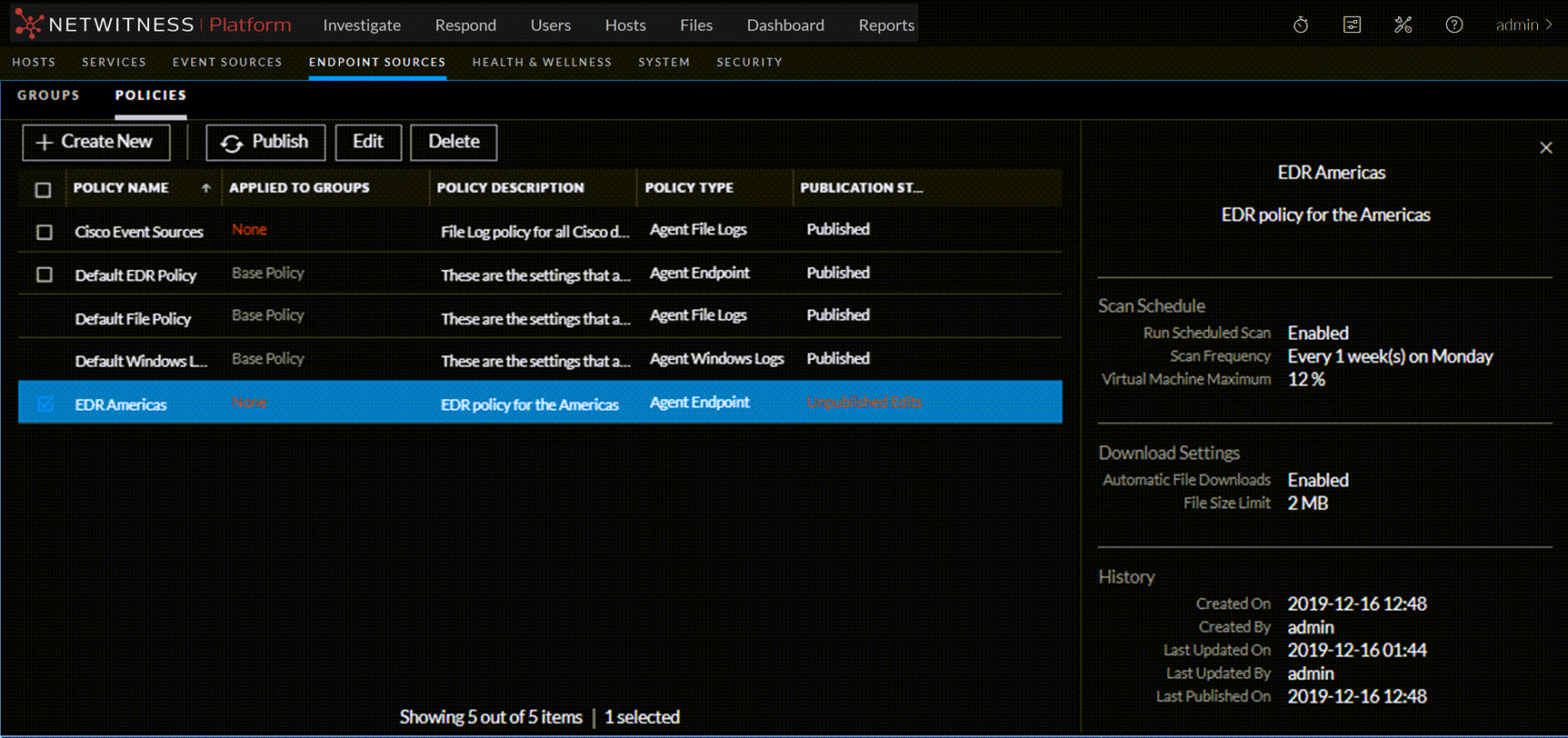
2. In the left panel, select the **Policies** tab. The details, such as policy name, applied to groups, policy description, source type, and publication status are displayed. For more details on these columns, see [Endpoint Sources - Policies](https://community.netwitness.com/t5/netwitness-platform-online/endpoint-sources-policies/ta-p/669560).
3. Click the row to view details about selected policy in right pane.
## Filter PoliciesFilter Policies
The Filters Panel allows you to filter the list of displayed policies, based on the source type. You can filter on any combination of the following:
- Agent Endpoint
- Agent File Logs
- Agent Windows Logs
Additionally, you can filter based on publication status:
- Published: Policies that are published to use.
- Unpublished: Policies that are saved but not published.
- Unpublished Edits: Policies that are previously published and edited later and saved, but not published.
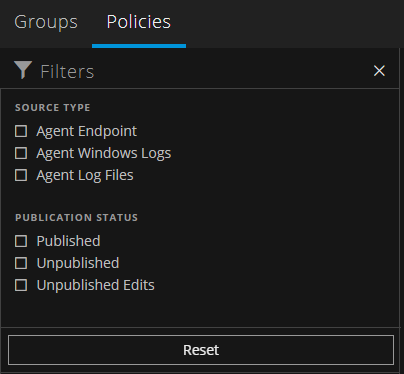
The Filters panel can be hidden or displayed:
- To hide, click the  icon at the top-right of the panel.
- To display if hidden, click the  icon in the toolbar.
Click **Reset Filters** to remove the currently applied filtering criteria.
## Edit a PolicyEdit a Policy
You can edit the settings of the default Agent Endpoint and custom policies. The default Agent Windows Log policy cannot be edited.
**Note:** For the default EDR policy, you cannot edit the source type, policy name, and policy description. However, you can edit the details in the Define Policy panel.
To edit a policy:
1. Go to ** (Admin) \> Endpoint Sources**, and select the **Policies** tab.
2. Select a policy and click **Edit**.
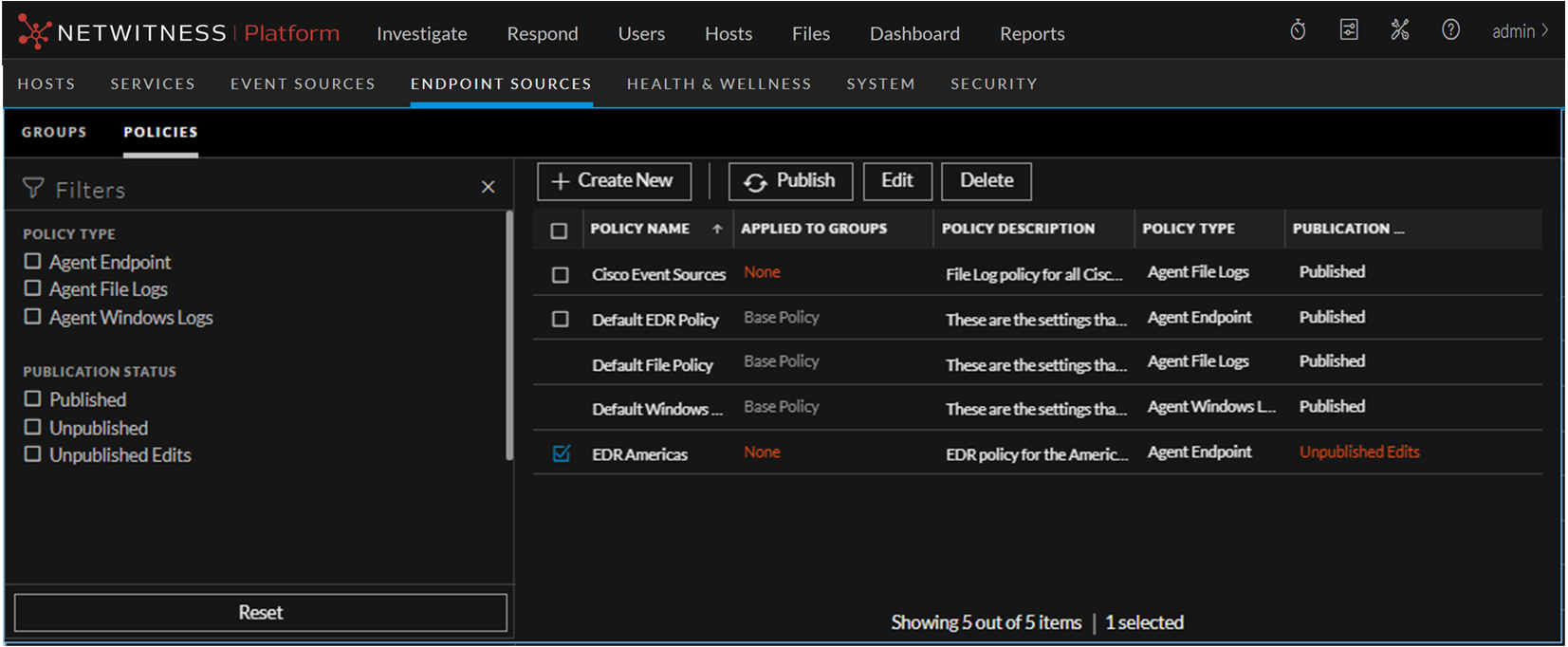
3. Edit the policy details as required.
4. Do one of the following:
- Click **Save and Close** to save the changes and return to the Policies view. The policy will be listed under the **Unpublished Edits** category.
- Click **Publish Policy** to publish the changes.
## Delete a PolicyDelete a Policy
To delete a policy:
1. Go to ** (Admin) \> Endpoint Sources**.
2. Click the **Policy** tab. The available policies are displayed.
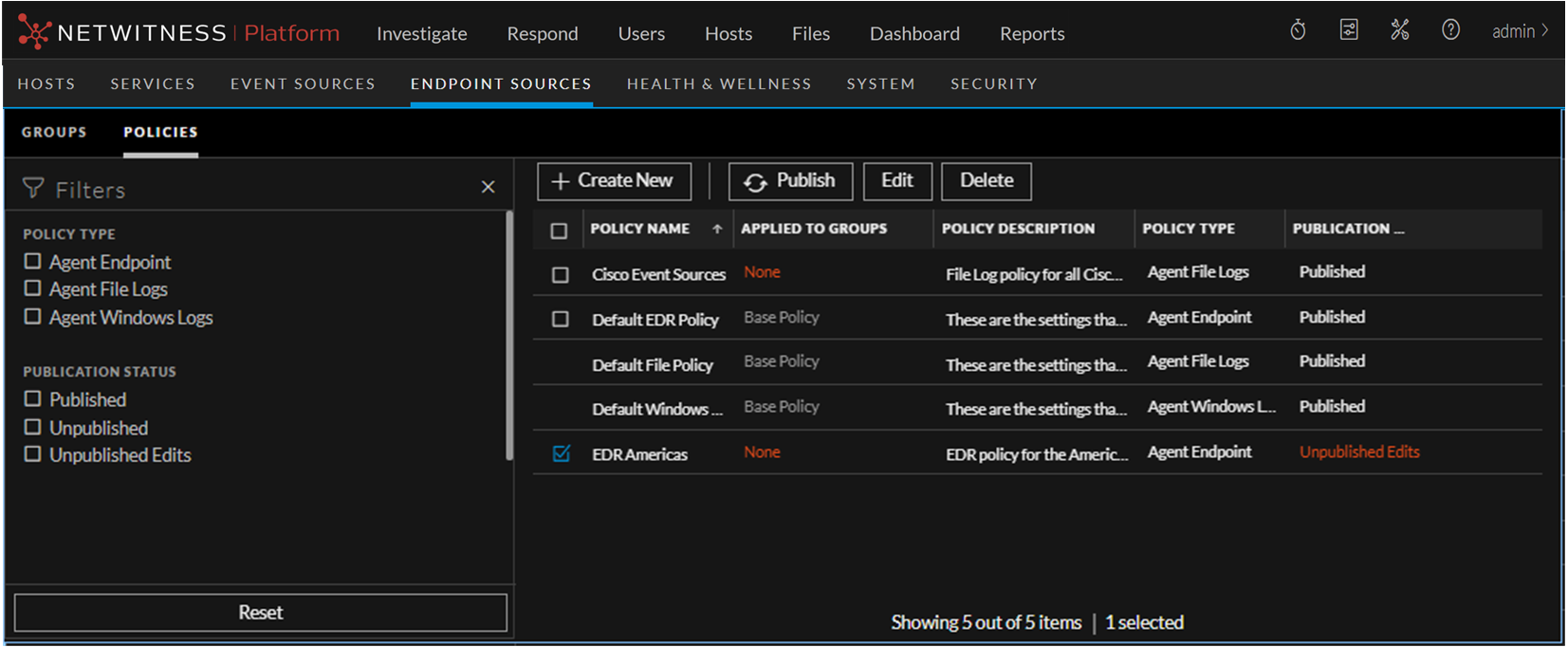
3. Select one or more policies and click **Delete**.
The confirmation message is displayed.
4. In the Delete Policies dialog, click **Delete Policy(ies)** to permanently delete the selected policies.
## Conflict ResolutionConflict Resolution
An endpoint can be in more than one group, and can thus have more than one Agent Endpoint, Agent File Logs, or Windows Logs policy applied to it. In this case, there may be conflicting settings that could be applied to the endpoint.
For example, an endpoint that is in two Groups could have two, different File Log policies applied to it. In this case, some of the settings could have conflicting values. The value that is actually applied to the endpoint is determined by the highest-ranked policy that contains a value for that setting.
For example, assume there is an endpoint that has 2 Agent File Log policies applied to it:
- LF Policy One: Log File Type is webgateway, and **File Encoding** is set to UTF-8
- LF Policy Two: Log File Type is webgateway, and **File Encoding** is set to Local Encoding
How NetWitness assumes the webgateway logs are encoded is dependent upon which policy is ranked higher:
- If Policy One is ranked higher than Policy Two, NetWitness treats the logs as having UTF‑8 encoding.
- If Policy Two is ranked higher than Policy One, NetWitness treats the logs as having Local Encoding.
For an example using EDR policies, see [Simulation Examples](https://community.netwitness.com/EP_policyOrdering.htm#Simulati), which shows how you can preview the settings that would be applied before actually changing any policy rankings.
[](https://mydev.netwitness.com/?hsLang=en)
Copyright © 2026, NetWitness LLC. All rights reserved.
[NetWitness Platform](https://www.netwitness.com/)
[Acceptable Use Policy](https://www.netwitness.com/wp-content/uploads/Acceptable-Use-Policy-092022.pdf) [Privacy Statement](https://www.netwitness.com/wp-content/uploads/NetWitness-Privacy-Statement-07292024.pdf)

[](https://www.linkedin.com/company/netwitness-platform/) [](https://www.youtube.com/@netwitness)
© 2026 NetWitness LLC. All rights reserved.